הקדמה
Thank you for choosing the ttec AirBeat Free True Wireless Earphones. This manual provides essential information for setting up, operating, and maintaining your earphones to ensure optimal performance and longevity. Please read this manual thoroughly before using the product.
פּעקל אינהאַלט
זיכער מאַכן אַז אַלע זאכן זענען פאַראַן אין דיין פּעקל:
- ttec AirBeat Free True Wireless Earphones (Left and Right)
- טשאַרדזשינג קאַסע
- וסב טשאַרדזשינג קאַבלע
- אויער קושאַנז
- באַניצער מאַנואַל (דעם דאָקומענט)
פּראָדוקט איבערview
Familiarize yourself with the components of your ttec AirBeat Free earphones and charging case.

Figure 1: The compact ttec AirBeat Free charging case, shown held in a hand, highlighting its portable design.
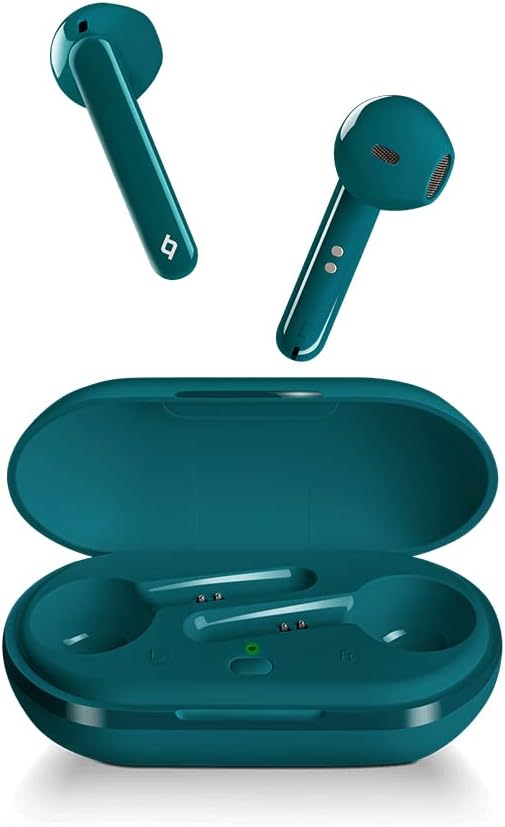
Figure 2: The ttec AirBeat Free earbuds displayed alongside their open charging case, showing the earbuds' design and the charging slots.

Figure 3: A single ttec AirBeat Free earbud positioned next to its open charging case, illustrating the earbud's form factor and the case's interior.
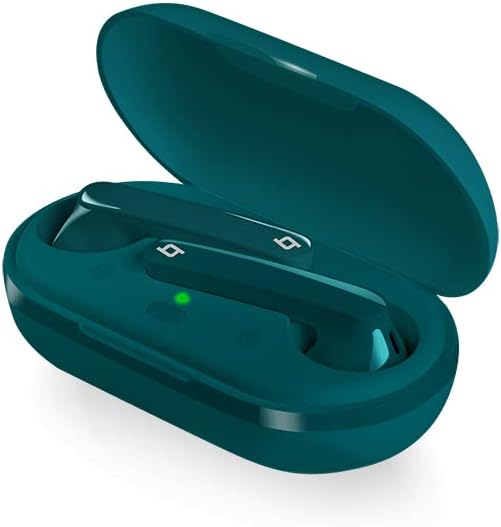
פיגור 4: א ווינקלדיקע view of the ttec AirBeat Free earbuds securely placed within their open charging case, showing the charging indicators.
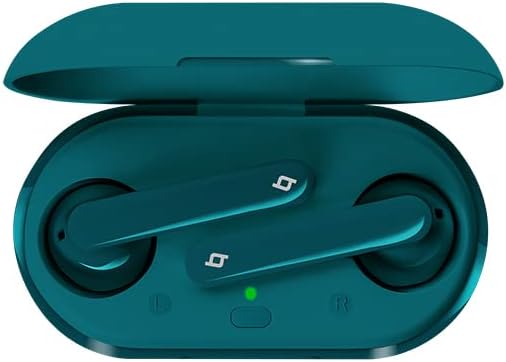
פיגור 5: א אויבן-אראפ view of the ttec AirBeat Free earbuds nestled in their open charging case, clearly showing the left and right earbud positions and the charging status light.
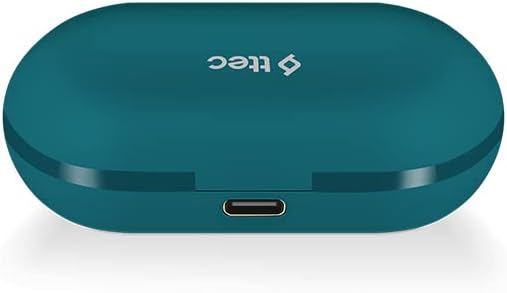
Figure 6: The closed ttec AirBeat Free charging case, viewed from the back, highlighting the USB-C charging port.
סעטאַפּ
1. אויפלאָדן די אויערפאָונז און קעסטל
פארן ערשטן באַנוץ, לאָדן די אויערפאָונז און די טשאַרדזשינג קעסטל גאָר אויף.
- שטעלן ביידע ירפאָונז אין די טשאַרדזשינג פאַל.
- Connect the USB charging cable to the charging port on the back of the case (refer to Figure 6) and plug the other end into a USB power source.
- The indicator light on the charging case will show charging status. A full charge provides up to 30 hours of extra battery life with the case, and up to 4 hours for the earphones on a single charge.
- די Charge & Go feature allows 1 hour of use with only 15 minutes of charging.
2. בלועטאָאָטה פּערינג
Pair your ttec AirBeat Free earphones with your Bluetooth-enabled device.
- זיכער מאַכן אַז די אויערפאָונז זענען אויפגעלאָדן און אין דער טשאַרדזשינג קעסטל.
- Open the charging case lid. The earphones will automatically enter pairing mode.
- אויף אייער דעווייס (סמאַרטפאָן, טאַבלעט, אאז"וו), גייט צו בלועטוט סעטטינגס און אַקטיווירט בלועטוט.
- זוכן פֿאַר available devices. Select "ttec AirBeat Free"פון דער רשימה.
- Once connected, you will hear a confirmation tone, and the indicator light on the earphones may change.
- די MonoSmart technology allows either earbud to be used independently. To use a single earbud, simply remove one from the case while the other remains inside or is turned off.
אַפּערייטינג ינסטראַקשאַנז
The ttec AirBeat Free earphones feature touch sensors for easy control of music and calls.
מוזיק קאָנטראָל
- שפּיל / פּויזע: Single tap on either earbud's touch sensor.
- ווייַטער שפּור: Double tap on the right earbud's touch sensor.
- פֿריִערדיקע שפּור: Double tap on the left earbud's touch sensor.
- באַנד אַרויף: Triple tap on the right earbud's touch sensor.
- באַנד אַראָפּ: Triple tap on the left earbud's touch sensor.
רופן קאָנטראָל
- ענטפֿערן / סוף רופן: Single tap on either earbud's touch sensor.
- אָפּוואַרפן רופן: Press and hold either earbud's touch sensor for 2 seconds.
- אַקטאַווייט קול אַססיסטאַנט: Press and hold either earbud's touch sensor for 3 seconds (e.g., Siri, Google Assistant).
מאַכט אויף / אַוועק
- מאַכט אויף: Open the charging case lid, or press and hold the touch sensor for 3 seconds if out of case.
- מאַכט אַוועק: Place earphones back into the charging case and close the lid, or press and hold the touch sensor for 5 seconds.
וישאַלט און זאָרג
Proper care will extend the life of your earphones.
- רייניקונג: ניצט אַ ווייכע, טרוקענע, לינט-פֿרייע שטאָף צו רייניקן די אויערפֿאָנען און די טשאַרדזשינג קעסטל. ניצט נישט קיין שאַרפֿע כעמיקאַלן אָדער אַברייסיוו מאַטעריאַלן.
- וואַסער קעגנשטעל: The earphones have an IPX4 water and dust proof rating, meaning they are resistant to splashing water from any direction. Do not submerge them in water or expose them to heavy rain. Dry them thoroughly if they get wet.
- סטאָרידזש: ווען נישט אין באַנוץ, לייגט די אויערפאָונז אין זייער טשאַרדזשינג קעסטל צו באַשיצן זיי און האַלטן זיי טשאַרדזשד. לייגט זיי אין אַ קיל, טרוקן אָרט אַוועק פון עקסטרעמע טעמפּעראַטורן.
- באַטאַרייע לעבן: To preserve battery life, charge the earphones and case regularly, even if not used for extended periods.
טראָובלעשאָאָטינג
If you encounter issues with your ttec AirBeat Free earphones, try the following solutions:
| פּראָבלעם | מעגלעך לייזונג |
|---|---|
| Earphones not pairing/connecting. |
|
| נאָר איין אויערקנעפּל אַרבעט. |
|
| נידעריגע וואָלומען אָדער שלעכטע געזונט קוואַליטעט. |
|
| די טשאַרדזשינג קעיס טשאַרדזשט זיך נישט. |
|
ספּעסאַפאַקיישאַנז
Key technical specifications for the ttec AirBeat Free True Wireless Earphones:
- מאָדעל נאָמען: AirBeat Free
- מאָדעל נומער: 2KM133T
- בלועטאָאָטה ווערסיע: 5.0
- Water and Dust Proof Rate: IPX4
- עאַרבוד וואָג: 3.6 גראַמז (יעדער)
- טשאַרדזשינג קאַסטן וואָג: 37 גראַמז
- Earphone Battery Life (single charge): אַרויף צו 4 שעה
- גאַנץ באַטערי לעבן (מיט טשאַרדזשינג פאַל): אַרויף צו 30 שעה
- שנעל אָפּצאָל: 15 minutes charge for 1 hour playback (Charge & Go)
- ראַש קאָנטראָל: אַקטיוו ראַש קאַנסאַליישאַן
- קאַנעקטיוויטי טעכנאָלאָגיע: ווירעלעסס (בלועטאָאָטה)
- Headphones Ear Placement: אין אויער
- אַרייַנגערעכנט קאַמפּאָונאַנץ: אויער קושאַנז
- קאָליר: טערקווויז
וואָראַנטי און שטיצן
For warranty information and customer support, please refer to the official ttec webזייטל אדער קאָנטאַקט אייער לאקאלן הענדלער.
פאַבריקאַנט: טטעק
ערשטער דאַטע בנימצא: 9 פעברואר 2021
If you experience issues not covered in the troubleshooting section, please contact ttec customer service for further assistance.