הקדמה
א דאנק פארן קויפןasing the Bytech True Wireless Bluetooth Boost Link True Speaker. This manual provides essential information for setting up, operating, and maintaining your new speakers. Please read this manual thoroughly before use to ensure proper operation and to maximize your listening experience. These speakers feature True Wireless Stereo (TWS) functionality, Bluetooth connectivity, FM Radio, and Bass Boost for rich audio.
זיכערקייַט אינפֿאָרמאַציע
- שטעלט נישט אויס די רעדנערס צו עקסטרעמע טעמפּעראַטורן, הומידיטי, אדער דירעקטע זונשייַן.
- פֿאַרמײַדט צו לאָזן פאַלן אָדער אויסשטעלן די רעדנערס צו שטאַרקע קלאַפּן.
- Do not disassemble, repair, or modify the speakers yourself. Refer all servicing to qualified personnel.
- Keep the speakers away from water and other liquids.
- ניצט נאָר דעם ספּעציפֿישן טשאַרדזשינג קאַבל און מאַכט אַדאַפּטער.
- Clean the speakers with a soft, dry cloth. Do not use abrasive cleaners or solvents.
- Listen at moderate volume levels to avoid hearing damage.
פּעקל אינהאַלט

Image: The Bytech Boost Link True Wireless Speakers shown in their retail packaging, highlighting the two speakers and the Bluetooth connectivity feature.
ביטע קאָנטראָלירט אַז אַלע זאכן זענען פאַראַן און אין גוטן צושטאַנד:
- 2 x Bytech Boost Link True Wireless Speakers
- 1 x טשאַרדזשינג קאַבל (USB)
- 1 x באַניצער מאַנואַל (דאָס דאָקומענט)
פּראָדוקט איבערview

בילד: א נאָענטע פֿראָנט view of the two Bytech Boost Link True Wireless Speakers, showing the speaker grilles and control buttons at the bottom.
מאַכט זיך באַקאַנט מיט די רעדנער'ס קאָמפּאָנענטן און קאָנטראָלס:
- רעדנער גריל: Protects the speaker driver.
- קאָנטראָל קנעפּלעך:
- מאַכט קנעפּל: Power On/Off, Play/Pause.
- מאָדע קנעפּל: Switch between Bluetooth, FM Radio, etc.
- פרייַערדיק שפּור / באַנד אַראָפּ קנעפּל: קורץ דריקן פֿאַר פֿריִערדיקן ליד, לאַנג דריקן פֿאַר באַנד אַראָפּ.
- ווייַטער שפּור / באַנד אַרויף קנעפּל: קורץ דריקן פארן נעקסטן ליד, לאנג דריקן צו פארגרעסערן די וואליאם.
- טשאַרדזשינג פּאָרט: פֿאַר פֿאַרבינדן דעם USB טשאַרדזשינג קאַבל.
- LED ינדיקאַטאָר: Shows power status, charging status, and pairing status.
סעטאַפּ
טשאַרדזשינג די ספּיקערז
Before first use, fully charge both speakers. Connect the supplied USB charging cable to the charging port on each speaker and plug the other end into a USB power adapter (not included) or a computer's USB port. The LED indicator will show charging status and turn off or change color when fully charged.
מאַכט אויף / אַוועק
- צו מאַכט אויף: Press and hold the Power button on each speaker until the LED indicator lights up and you hear a power-on prompt.
- צו מאַכט אַוועק: Press and hold the Power button on each speaker until the LED indicator turns off and you hear a power-off prompt.
אַפּערייטינג ינסטראַקשאַנז
Bluetooth Pairing (Single Speaker Mode)
- זיכער מאַכן אַז דער רעדנער איז אנגעצונדן און אין בלועטוט פּערינג מאָדע (די LED אינדיקאַטאָר וועט בליצן).
- אויף אייער דעווייס (סמאַרטפאָן, טאַבלעט, לאַפּטאָפּ), אַקטיווירט בלועטוט און זוכט פֿאַר פֿאַראַן דעווייסעס.
- Select "BYTECH BOOST LINK" (or similar name) from the list.
- Once paired, the LED indicator will stop flashing and remain solid, and you will hear a confirmation sound.
True Wireless Stereo (TWS) Pairing (Two Speakers)
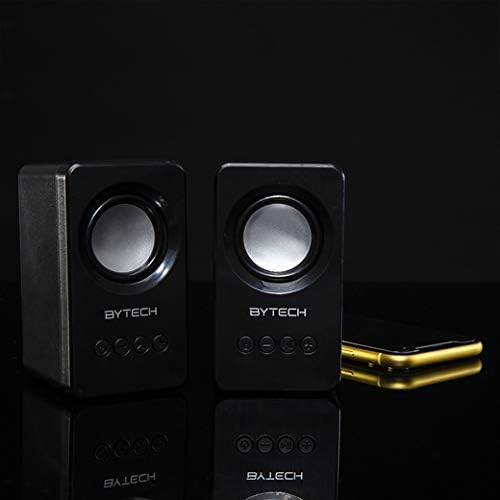
Image: The two Bytech Boost Link True Wireless Speakers positioned next to a smartphone, symbolizing their ability to connect wirelessly to each other and a device for stereo sound.
For a true stereo sound experience, you can pair both speakers together:
- Power on both Bytech Boost Link speakers. Do not connect them to your Bluetooth device yet.
- The speakers will automatically attempt to pair with each other. You will hear a confirmation sound when they are successfully linked for TWS. One speaker will become the master (left channel) and the other the slave (right channel).
- Once TWS paired, the master speaker will enter Bluetooth pairing mode (LED flashing).
- On your device, enable Bluetooth and search for "BYTECH BOOST LINK". Connect to this single entry.
- ביידע רעדנערס וועלן איצט שפּילן אַודיאָ אין סטערעאָ.
- באַמערקונג: If the speakers do not automatically pair, try double-pressing the Mode button on one of the speakers to initiate TWS pairing.
עפעם ראַדיאָ אָפּעראַציע
- Power on the speaker(s).
- דרוק די מאָדע button repeatedly until you hear the FM radio prompt.
- צו אויטאמאטיש סקענען און ראטעווען סטאנציעס, דריק און האלט די שפּיל / פּויזע button. The speaker will scan and store available FM stations.
- ניצן די פֿריִערדיקע שפּירט און ווייַטער שפּור קנעפּלעך צו נאַוויגירן צווישן געראַטעוועטע סטאַנציעס.
אַודיאָ פּלייבאַק און באַנד קאָנטראָל
- שפּיל / פּויזע: קורץ דריקן די מאַכט קנעפּל.
- ווייַטער שפּור: Short press the Next Track/Volume Up button.
- פֿריִערדיקע שפּור: Short press the Previous Track/Volume Down button.
- באַנד אַרויף: Long press the Next Track/Volume Up button.
- באַנד אַראָפּ: Long press the Previous Track/Volume Down button.
וישאַלט
- רייניקונג: Use a soft, dry, lint-free cloth to clean the surface of the speakers. Do not use liquid cleaners, aerosols, or solvents.
- סטאָרידזש: ווען נישט אין באַנוץ פֿאַר לענגערע פּעריאָדן, האַלט די רעדנערס אין אַ קיל, טרוקן אָרט אַוועק פון דירעקט זונשייַן און עקסטרעמע טעמפּעראַטורן.
- באַטערי זאָרגן: To prolong battery life, avoid fully discharging the battery frequently. Charge the speakers regularly, even if not in use.
טראָובלעשאָאָטינג
| פּראָבלעם | מעגלעך סיבה | לייזונג |
|---|---|---|
| דער רעדנער גייט נישט אן. | נידעריק באַטאַרייע. | לאָדט דעם רעדנער גאָר אויף. |
| קען נישט פארבינדן דורך בלוטוט. | רעדנער נישט אין פּערינג מאָדע; מיטל בלועטוט אויסגעלאָשן; צו ווייט פון מיטל. | Ensure speaker LED is flashing; Turn on Bluetooth on your device; Move speaker closer to device (within 10 meters). |
| קיין געזונט. | Volume too low; Speaker not connected; Incorrect mode. | Increase volume on speaker and device; Re-pair Bluetooth; Ensure correct mode (Bluetooth/FM). |
| TWS פּאָרינג פיילז. | Speakers already connected to a device; Speakers too far apart. | Disconnect speakers from any device; Power off and on both speakers, then try TWS pairing again; Ensure speakers are close to each other. |
| שלעכטע FM ראַדיאָ אָפּנאַם. | שוואַך סיגנאַל; שטערונג. | Relocate the speaker to an area with better reception; Extend the charging cable (can act as an antenna). |
ספּעסאַפאַקיישאַנז
- מאָדעל: BY-AU-BS-152-BK
- סאָרט: בייטעק
- קאַנעקטיוויטי טעכנאָלאָגיע: ווירעלעסס (בלועטאָאָטה)
- אַודיאָ רעזולטאַט מאָדע: אַרומרינגלען
- רעדנער טיפּ: אַרומרינגלען סאָונד
- ספּעציעלע פֿעיִקייטן: Wireless Bluetooth, Bass Boost, FM Radio, True Wireless Stereo (TWS)
- רעקאַמענדיד ניצט: פֿאַר מוזיק פּלייַערס
- קאַמפּאַטאַבאַל דעוויסעס: לאַפּטאַפּ, טאַבלעט, סמאַרטפאָנע
- קאָנטראָללער טיפּ: קנעפּלעך אויף די דעווייס
- פּעקל דימענשאַנז: 20.7 X 16 X 9 סענטימעטער
- וואָג: 560 ג
וואָראַנטי און שטיצן
Bytech products are designed and manufactured to the highest quality standards. For information regarding warranty coverage, technical support, or service inquiries, please refer to the warranty card included with your purchase or visit the official Bytech webזייטל. ביטע באַהאַלטן אייער קויפן באַווייַז פֿאַר וואָראַנטי קליימז.
For further assistance, please contact Bytech customer support.


