הקדמה
The Lockly Secure Pro Wi-Fi Smart Door Lock offers advanced keyless entry solutions for homes, offices, and rental properties. This manual provides detailed instructions for the setup, operation, and maintenance of your Lockly Secure Pro, ensuring optimal security and convenience. Key features include the patented PIN Genie digital keypad, 3D biometric fingerprint sensor, smartphone app control, voice control compatibility, and an auto-lock function.
סעטאַפּ
Unboxing Your Lockly Secure Pro
Upon opening the package, verify that all components are present. The box typically contains the Lockly Secure Pro smart lock assembly (exterior and interior units), a Wi-Fi bridge, installation hardware, and a strike plate. Familiarize yourself with each part before beginning installation.
ווידעא: אויספּאַקן און איבערקוקן די ערשטעview of the Lockly Secure Pro Smart Door Lock. This video provides a general look at the product and its components.
ייַנמאָנטירונג
The Lockly Secure Pro is designed for DIY installation using common household tools. Ensure your door is compatible; it should be 1⅜" to 2" thick. This lock is not compatible with storm doors or doors with round latch holes. Follow the detailed instructions provided in the included installation guide for precise measurements and assembly steps. Proper installation is crucial for the lock's functionality and security.
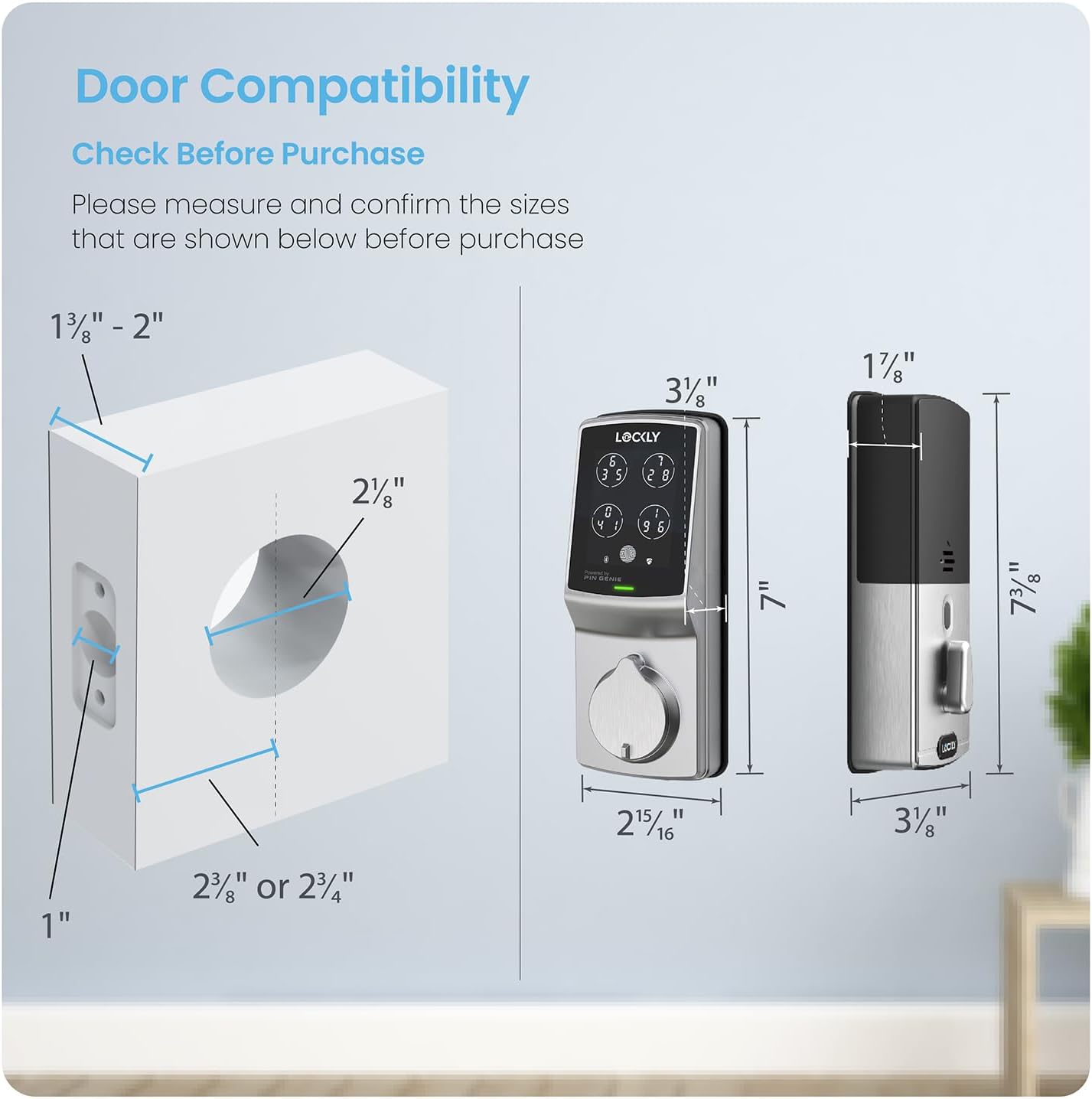
Image: Door compatibility diagram illustrating required door thickness and bore hole dimensions for Lockly Secure Pro installation.
Video: Step-by-step guide for installing the Lockly Secure Pro Smart Door Lock. This video demonstrates the physical installation process on a door.
Operating Your Lockly Secure Pro
עטלעכע וועגן צו ופשליסן
Your Lockly Secure Pro offers several convenient and secure methods for entry:
- Patented PIN Genie Digital Keypad
- 3D Biometric Fingerprint Reader
- Smartphone App (Lockly App)
- Voice Control (Alexa or Hey Google)
- Physical Key (for backup)
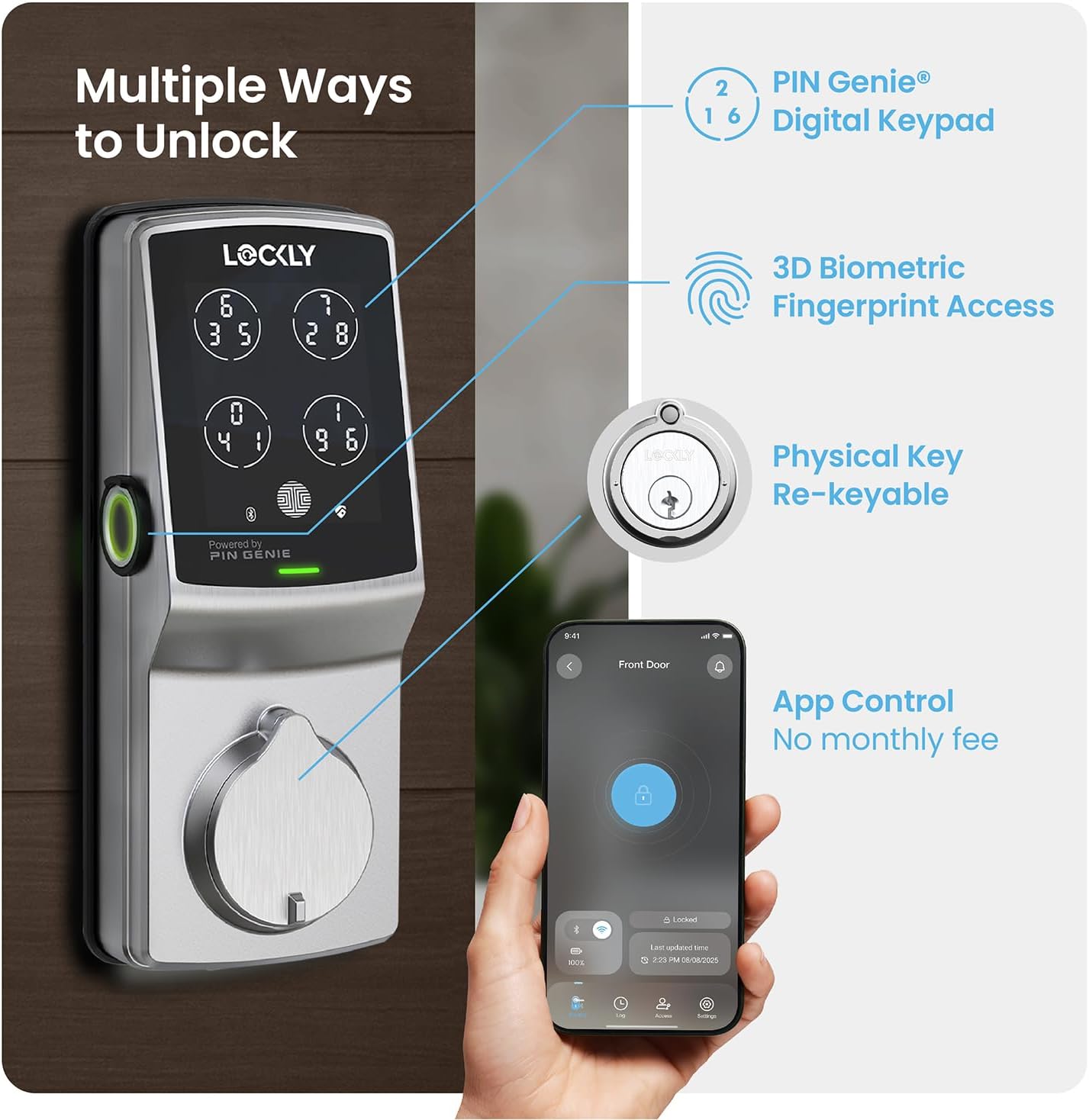
Image: Visual representation of the various unlocking methods available for the Lockly Secure Pro, including the digital keypad, fingerprint sensor, physical keyhole, and smartphone app interface.
PIN Genie דיגיטאַל קיפּאַד
The patented PIN Genie keypad enhances security by shuffling the numbers displayed on the screen after each use. Each of the four virtual buttons contains three different numbers. This dynamic arrangement makes it impossible for onlookers to guess your PIN by observing finger placement, even if they are watching you enter your code.

Image: Illustration of the Lockly PIN Genie keypad, showing how the numbers dynamically shuffle across four buttons to prevent code guessing.
3D Biometric Fingerprint Sensor
For quick and secure access, the 3D biometric fingerprint sensor recognizes your fingerprint in less than 0.3 seconds, unlocking the door in under 0.5 seconds. The second-generation sensor can store up to 99 unique fingerprints and utilizes AI learning to improve speed and accuracy over time.

Image: A hand using the 3D biometric fingerprint sensor on the Lockly Secure Pro, highlighting its quick recognition and capacity for multiple fingerprints.
מאָביל אַפּ קאָנטראָל
The Lockly App allows you to remotely lock and unlock your door from anywhere. It also provides real-time monitoring of the lock's open/closed status and sends alerts directly to your smartphone. The app offers access history and does not require a monthly fee for cloud storage or remote control.

Image: A smartphone displaying the Lockly app, illustrating features like remote lock/unlock, notifications, and access history.
Programmable Auto-Lock
Never worry about forgetting to lock your door again. The Lockly Secure Pro features a customizable auto-lock function, allowing you to set a delay from 5 to 300 seconds after the door closes.

Image: A couple leaving their home, demonstrating the convenience of the programmable auto-lock feature of the Lockly Secure Pro.
Voice Control & Backup Access
Integrate your Lockly Secure Pro with smart home systems for voice control. Unlock, lock, or check the lock status using voice commands with Alexa or Hey Google. For emergencies or convenience, the lock also includes a physical key slot for backup access and a 9V battery backup access point.

Image: Two panels showing the Lockly Secure Pro's voice control compatibility with Alexa and Hey Google, and the physical key backup option.
eKeys & Offline Access Codes
Grant revocable access to family, friends, or visitors using eKeys via the Lockly app. You can also generate offline access codes that can be used without Wi-Fi or internet, providing flexible access management.
וישאַלט
To ensure the longevity and optimal performance of your Lockly Secure Pro, regular maintenance is recommended:
- רייניקונג: Wipe the keypad and fingerprint sensor with a soft, dry cloth. Avoid abrasive cleaners or solvents that could damage the finish or electronics.
- באַטערי פאַרבייַט: The lock operates on standard AA batteries. Replace all batteries simultaneously when the low battery indicator appears. Use high-quality alkaline batteries for best performance.
- Firmware דערהייַנטיקונגען: Periodically check the Lockly app for available firmware updates to ensure your lock has the latest features and security enhancements.
טראָובלעשאָאָטינג
If you encounter issues with your Lockly Secure Pro, refer to the following common solutions:
- קיפּאַד ריספּאַנדינג נישט: Check battery levels. If the batteries are dead, use the 9V battery backup or physical key. Ensure the screen is clean and dry.
- פינגער-אפדרוק נישט דערקענט: Ensure your finger is clean and dry. Try re-registering your fingerprint through the app.
- קאַנעקטיוויטי ישוז: Verify your Wi-Fi network is active and the Lockly Wi-Fi bridge is properly connected and within range of the lock and your router. Restarting the bridge and the lock may resolve temporary issues.
- אויטאמאטישער שלאָס פראבלעם: Check the auto-lock settings in the Lockly app to ensure it's enabled and configured correctly.
- פיזישער שליסל ארבעט נישט: Ensure the key is fully inserted and turned correctly. If the lock cylinder is damaged, it may require rekeying or replacement.
For more complex issues, consult the Lockly app's help section or contact customer support.
ספּעסאַפאַקיישאַנז
| שטריך | דעטאַל |
|---|---|
| סאָרט | לאַקלי |
| ספּעציעלע פֿעיִקייטן | App Control, Auto-Lock, Left Fingerprint, Voice Control, Waterproof |
| לאַק טיפּ | סמאַרט לאַק |
| נומער דימענשאַנז (L X W X H) | 7.3 X 3.15 X 4.5 אינטשעס |
| מאַטעריאַל | צינק |
וואָראַנטי און שטיצן
The Lockly Secure Pro comes with a limited 5-year mechanical and finish warranty, and a 2-year electronics warranty. Additionally, lifetime technical support is provided to assist you with any questions or issues you may encounter. For warranty claims or technical assistance, please refer to the contact information provided in your product packaging or visit the official Lockly support webפּלאַץ.
The lock also features rekeying capability, allowing you to replace the key cylinder without changing the entire lock using a standard rekey kit.


