1. וויכטיק סאַפעטי אינפֿאָרמאַציע
Before operating the Zipro Nix Rower, please read and understand all instructions in this manual. Keep this manual for future reference.
- באַראַטנ זיך אַ דאָקטער איידער איר אָנהייבן קיין געניטונג פּראָגראַם.
- זיכער מאַכן אַז אַלע טיילן זענען ריכטיק צוזאַמענגעשטעלט און צוגעצויגן איידער יעדן באַנוץ.
- Place the rower on a flat, stable surface. Ensure adequate clear space around the equipment (at least 0.6 meters).
- האַלטן קינדער און פּעץ אַוועק פון די ויסריכט בעשאַס אָפּעראַציע.
- נישט איבערשטייגן די מאקסימום באַניצער וואָג קאַפּאַציטעט פון 120 ק"ג (264 פונט).
- טראָגט פּאַסיקע ספּאָרט קליידער און שיך.
- If you experience pain, dizziness, or shortness of breath, stop exercising immediately and consult a physician.
- Regularly inspect the rower for wear and tear, especially cables, straps, and moving parts. Do not use if damaged.
2. פּעקל אינהאַלט
Carefully unpack the carton and verify all parts are present and undamaged. If any parts are missing or damaged, contact customer support immediately.
- Main Rower Frame (pre-assembled components)
- Seat and Rail Assembly
- פאָאָטרעסץ
- האַנדלעבאַר
- קאָמפּיוטער קאַנסאָול
- האַרדווער קיט (באָלץ, וואַשערס, ניסלעך, מכשירים)
- באַניצער מאַנואַל
3. אַסעמבלי און סעטאַפּ
Follow these steps to assemble your Zipro Nix Rower. It is recommended to have two people for assembly.
- אָפּלייגן קאַמפּאָונאַנץ: Lay out all parts on a clean, flat surface. Refer to the parts diagram in the included manual for identification.
- צוטשעפּען סטאַביליזאַטאָרן: באַפעסטיקט די פראָנט און הינטערשטע סטאַביליזאַטאָרן צום הויפּט ראַם מיט די צוגעשטעלטע באָלץ און וואַשערס. מאַכט זיכער אַז זיי זענען פעסט באַפעסטיקט פֿאַר פעסטקייט.
- Install Seat Rail: Attach the seat rail to the main unit. Ensure the seat carriage slides smoothly along the rail.
- Mount Footrests: Secure the footrests to the main frame. Ensure the adjustable straps are correctly positioned.
- פאַרבינדן האַנטלבאַר: Attach the handlebar to the pulling mechanism. Verify the strap or chain is securely connected.
- Install Computer Console: Mount the computer console onto its designated bracket. Connect any necessary sensor cables from the main unit to the console. Insert batteries if required.
- לעצט טשעק: Double-check all bolts and connections to ensure they are secure. Test the seat movement and handlebar pull for smooth operation.

פיגורע 3.1: The Zipro Nix Rower with its approximate dimensions: Length 183 cm, Width 46 cm, Height 48 cm. These dimensions are important for planning the placement of the rower in your home.
4. אַפּערייטינג ינסטרוקטיאָנס
4.1. אַדזשאַסטירן קעגנשטעל
The Zipro Nix Rower features an 8-level magnetic resistance system. To adjust the resistance, locate the rotary knob on the main unit, typically near the footrests. Turn the knob clockwise to increase resistance (levels 1-8) and counter-clockwise to decrease it. Start with a lower resistance level and gradually increase as your fitness improves.

פיגורע 4.1: נאָענט-אַרויף view of the adjustable footrests and the 8-level resistance control knob on the Zipro Nix Rower.
4.2. Using the Computer Console
The easy-to-use LCD computer console displays various workout data to help you monitor your progress.
פיגורע 4.2: The LCD computer display of the Zipro Nix Rower, showing icons for Time, Calories, Speed, and Pulse, along with numerical readouts.
- מאַכט אויף / אַוועק: The console typically powers on automatically when you begin rowing or press any button. It will power off after a period of inactivity.
- פאַנגקשאַנז: The display cycles through or allows selection of the following metrics:
- צייט: די געדויער פון אייער טרענירונג.
- COUNT (Strokes): Total number of strokes performed.
- קאַלאָריעס: Estimated calories burned during the workout.
- SPEED: קראַנט ראָוינג גיכקייַט.
- דויפעק: Heart rate (if a compatible heart rate monitor is used and connected).
- באַשטעטיק: Press and hold the button (usually marked 'MODE' or 'RESET') to clear all current workout data.
4.3. Proper Rowing Technique
To maximize effectiveness and prevent injury, maintain proper form:
- כאַפּן: Start with knees bent, arms extended forward, and back straight.
- פאָר: Push off with your legs, then lean back slightly, and finally pull the handlebar towards your abdomen.
- ענדיקן: Legs are extended, body leans back slightly, and handlebar is at your abdomen.
- אָפּזוך: Extend arms forward, then lean forward, and finally bend knees to return to the catch position.

פיגורע 4.3: The ergonomically designed seat of the Zipro Nix Rower, providing comfort during extended workouts.
5. וישאַלט און סטאָרידזש
5.1. רייניקונג
Wipe down the rower after each use with a damp cloth to remove sweat and dust. Do not use abrasive cleaners or solvents, as they may damage the finish or electronic components.
5.2. לובריקיישאַן
The magnetic resistance system is largely maintenance-free. However, periodically check the seat rail for any debris and wipe it clean. If the seat movement becomes less smooth, a small amount of silicone-based lubricant can be applied to the rail, but avoid oil-based lubricants.
5.3. סטאָרידזש
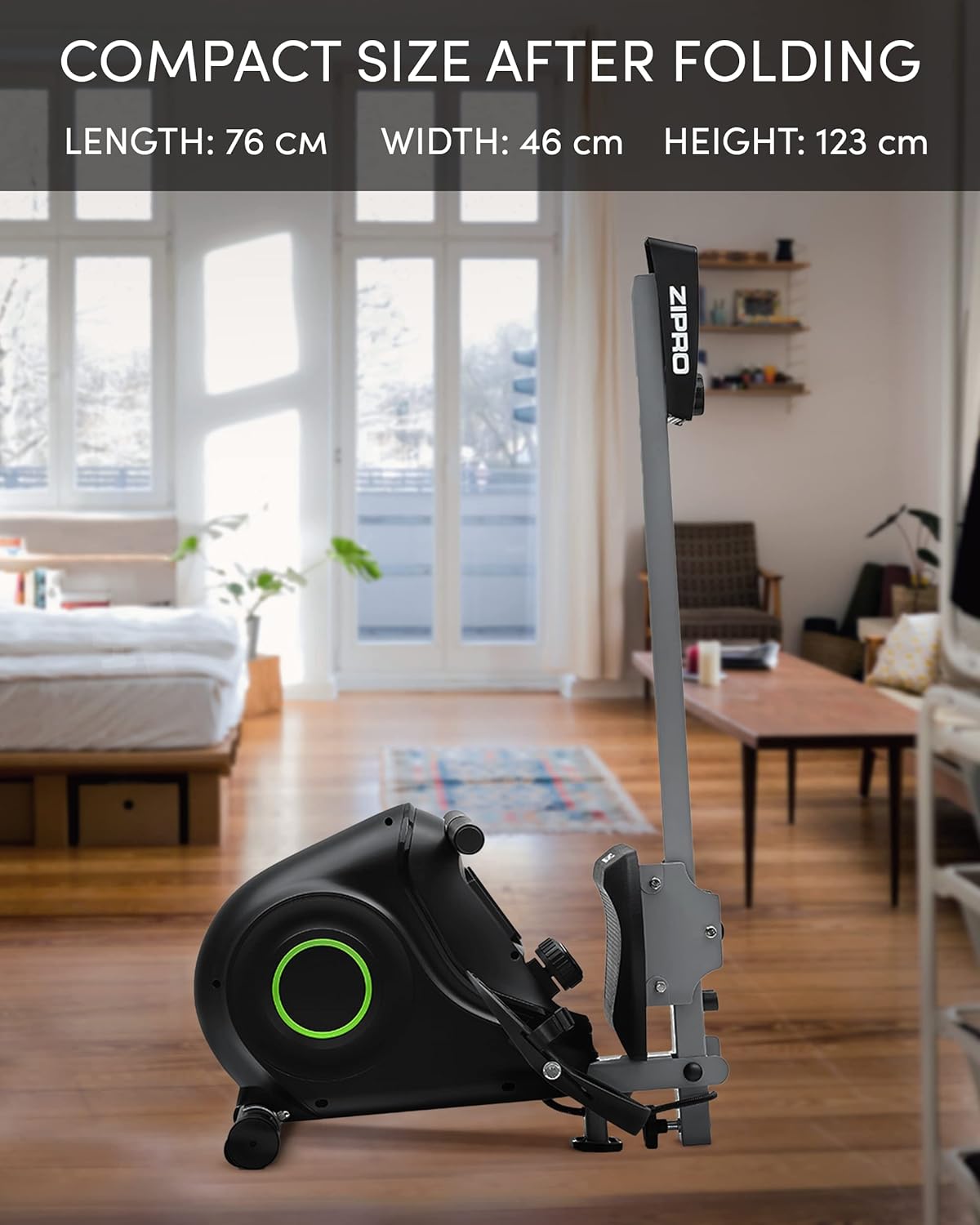
The Zipro Nix Rower is designed to be foldable for compact storage, saving space when not in use.
- פאָלדינג: Follow the instructions in your assembly manual for folding the rower into its vertical position. This typically involves releasing a locking pin or knob and folding the rail upwards.
- טראנספארט: Utilize the integrated transport wheels located on the rear stabilizer to easily move the rower. Tilt the rower onto its wheels and push it to your desired storage location.

פיגורע 5.1: The Zipro Nix Rower in its compact, folded position, ideal for space-saving storage.

פיגורע 5.2: נאָענט-אַרויף view of the transport wheels on the Zipro Nix Rower, facilitating easy relocation of the unit.
6. טראָובלעשאָאָטינג
If you encounter issues with your Zipro Nix Rower, refer to the following common problems and solutions:
| פּראָבלעם | מעגלעך סיבה | לייזונג |
|---|---|---|
| No display on computer console | Batteries are dead or incorrectly installed. Loose sensor cable connection. | Replace batteries. Check battery orientation. Ensure sensor cable is securely plugged into the console. |
| Resistance feels inconsistent or too low/high | Resistance knob not set correctly. Internal magnetic mechanism issue. | Adjust the resistance knob to a different level. If problem persists, contact customer support. |
| Seat does not slide smoothly | Debris on the rail. Rail or wheels need lubrication. | Clean the seat rail and wheels. Apply a small amount of silicone-based lubricant to the rail. |
| ומגעוויינטלעך נויזיז בעשאַס אָפּעראַציע | Loose bolts or components. Internal friction. | Check and tighten all visible bolts. If noise persists, discontinue use and contact customer support. |
7. ספּעסאַפאַקיישאַנז
Detailed technical specifications for the Zipro Nix Rower:
| שטריך | באַשרייַבונג |
|---|---|
| מאָדעל נומער | 6299217 |
| סאָרט | ZIPRO |
| קעגנשטעל מעקאַניזאַם | מאַגנעטיק |
| קעגנשטעל לעוועלס | 8 |
| ווייַז טיפּ | לקד |
| געוויזן מעטריקס | Time, Strokes (Count), Calories, Speed, Pulse |
| ראַם מאַטעריאַל | טשאַד שטאָל |
| מאַקסימום באַניצער וואָג | 120 קילאָגראַמס (264 לבס) |
| פּראָדוקט דימענשאַנז (L x W x H) | 183 X 46 X 48 סענטימעטער (72 X 18.1 X 18.9 אינטשעס) |
| פאָולדיד דימענשאַנז (L x W x H) | אומגעפער 76 x 46 x 123 ס״מ (30 x 18.1 x 48.4 אינטשעס) |
| פּונקט וואָג | 27 קילאָגראַמס (59.5 לבס) |
| מאַכט מקור (קאָנסאָל) | באַטאַרייע פּאַוערד |
| ספּעציעלע פֿעיִקייטן | Adjustable foot strap, Foldable design, Transport wheels |
8. וואָראַנטי און שטיצן
פֿאַר וואָראַנטי אינפֿאָרמאַציע, ביטע זען די וואָראַנטי קאַרטל וואָס איז אַרייַנגערעכנט מיט דיין פּראָדוקט אָדער באַזוכן די באַאַמטער ZIPRO website. If you require technical assistance, replacement parts, or have any questions not covered in this manual, please contact ZIPRO customer support through their official channels.
ביטע האַלט אייער מאָדעל נומער (6299217) און באַווייַז פון קויפן גרייט ווען איר קאָנטאַקטירט שטיצע.


