הקדמה
Welcome and thank you for choosing the cellularline TABLE STAND. This universal holder is designed to provide a stable and adjustable viewing experience for your smartphones and tablets. Its compact and foldable design ensures portability and convenience, making it an ideal accessory for various settings.
פּראָדוקט פֿעיִקייטן
- Compact and foldable for easy portability.
- Two adjustable heights for vertical and horizontal viewing.
- Metal finishes combined with anti-slip and anti-scratch rubber backing.
The TABLE STAND is engineered for versatility, allowing you to position your device optimally for various activities, from video calls to media consumption.
פּעקל אינהאַלט
- 1 x cellularline TABLE STAND Universal Holder
ביטע זיכער מאַכן אַז אַלע קאָמפּאָנענטן זענען פאַראַן ביים אויספּאַקן.
סעטאַפּ אינסטרוקציעס
- ופשליסן די שטיין: Gently unfold the stand from its compact, folded position. The base and the device support arm will extend.

Image: The cellularline TABLE STAND shown in its folded, compact state, ready for transport or storage.

Image: The cellularline TABLE STAND fully unfolded, supporting a smartphone in a vertical orientation.
- סטרויערן הייך און ווינקל: The stand features an adjustable arm. Carefully extend or retract the arm to achieve your desired viewing height. The device support can also be tilted to adjust the viewינג ווינקל.

בילד: א זייט view of the stand illustrating the adjustable arm, which allows for various height settings.
- שטעלן דיין מיטל: Position your smartphone or tablet onto the support cradle. The anti-slip rubber backing will help secure your device.

Image: A smartphone is shown resting securely on the stand's cradle, highlighting the anti-slip surface that prevents movement.
The stand is designed for both vertical and horizontal device orientation.
אַפּערייטינג ינסטראַקשאַנז
The cellularline TABLE STAND is straightforward to operate:
- ווערטיקאַל Viewינג: Place your smartphone or tablet vertically on the stand for portrait mode viewing, ideal for reading or video calls.
Image: A smartphone is positioned vertically on the stand, demonstrating its use for portrait viewing.
- האָריזאָנטאַל Viewינג: Rotate your device to a horizontal position for landscape mode viewing, suitable for watching videos or gaming.
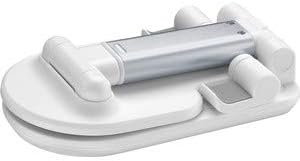
Image: A tablet is displayed horizontally on the stand, showcasing its functionality for landscape viewing.
- אַדזשאַסטינג פֿאַר סטאַביליטעט: Ensure the stand is placed on a flat, stable surface. The anti-slip base provides additional grip.
The stand's design allows for easy access to charging ports and buttons on most devices.
זאָרגן און וישאַלט
- רייניקונג: ווישט אָפּ דעם שטאַנד מיט אַ ווייכן, טרוקענעם שטאָף. פֿאַר שווערע פֿלעקן, ניצט אַ ביסלamp שטאָף קען גענוצט ווערן, און דערנאָך זאָל עס גלייך טרוקנט ווערן.
- ויסמיידן האַרב קעמיקאַלז: Do not use abrasive cleaners, solvents, or strong detergents, as these may damage the finish or rubber components.
- סטאָרידזש: When not in use, fold the stand into its compact form for easy storage and to protect it from dust.
Proper care will ensure the longevity and optimal performance of your TABLE STAND.
טראָובלעשאָאָטינג
- פּראָבלעם: דער שטאַנד פילט זיך נישט סטאַביל.
- לייזונג: Ensure the stand is fully unfolded and placed on a flat, level surface. Check that your device is centered on the support cradle.
- Issue: Device slips on the support.
- לייזונג: Verify that the anti-slip rubber backing is clean and free from debris. Ensure your device is properly seated.
- Issue: Difficulty adjusting the height/angle.
- לייזונג: Apply gentle, firm pressure when adjusting. The joints are designed to hold position securely. Do not force adjustments.
If you encounter issues not listed here, please contact cellularline customer support.
פּראָדוקט ספּעסאַפאַקיישאַנז
| שטריך | דעטאַל |
|---|---|
| סאָרט | סעללולאַרלינע |
| מאָדעל | TABLESTANDW |
| פּראָדוקט דימענשאַנז | 9 X 17.5 X 3 סענטימעטער (פאָולדיד) |
| וואָג | 100 ג |
| מאַטעריאַל | Satin Steel, Rubber |
| קאָליר | ווייַס |
| קאַמפּאַטאַבאַל דעוויסעס | סמאַרטפאָנעס, טאַבלאַץ |
| ייַנמאָנטירונג טיפּ | טאַבלעטאָפּ |
| נאָך פֿעיִקייטן | Adjustable height, Foldable, Anti-slip, Anti-scratch |
| באַטעריז פארלאנגט | ניין |
וואָראַנטי אינפֿאָרמאַציע און קונה שטיצע
The cellularline TABLE STAND comes with a standard manufacturer's warranty. Please refer to the warranty card included in your product packaging for specific terms and conditions.
For technical support, product inquiries, or warranty claims, please visit the official cellularline webפּלאַץ אָדער קאָנטאַקט זייער קונה סערוויס אָפּטיילונג.
Note: Keep your proof of purchase for warranty purposes.


