1. הקדמה
The M5Stack Core2 ESP32 IoT Development Kit for AWS IoT Kit is a versatile and robust development platform designed for rapid prototyping and deployment of Internet of Things (IoT) applications, particularly those integrating with Amazon Web Services (AWS). This kit features a powerful ESP32-D0WDQ6-V3 microcontroller, a capacitive touch screen, and a comprehensive suite of sensors, making it an ideal tool for learning and developing advanced IoT solutions.

Image 1.1: The M5Stack Core2 ESP32 IoT Development Kit for AWS IoT Kit.
2. וואָס איז אין דער קעסטל
Upon unboxing your M5Stack Core2 ESP32 IoT Development Kit, you should find the following components:
- 1 x M5Stack Core2
- 1 x M5GO Bottom2 for AWS
- 1 x Type-C USB Cable (50cm)
- 1 x HEX KEY

Image 2.1: All components included in the M5Stack Core2 ESP32 IoT Development Kit packaging.
3. פּראָדוקט פֿעיִקייטן
The M5Stack Core2 for AWS IoT Kit is equipped with several key features designed to enhance your IoT development experience:
- AWS IoT Ready: Designed as a reference hardware kit for the AWS IoT Kit, facilitating easy learning and development of IoT applications using AWS services.
- Robust ESP32 Processor: Features an ESP32-D0WDQ6-V3 microcontroller with dual cores running at 240MHz, ensuring efficient processing power and connectivity via 2.4GHz Wi-Fi.
- ימפּרוווד זיכערהייט פֿעיִקייטן: Equipped with a Microchip ATECC608 Trust&GO secure element, providing pre-provisioned security for seamless AWS connectivity and cryptographic operations.
- ינטעראַקטיווע ריר סקרין: A 2.0-inch capacitive touch screen offers an intuitive user interface, complemented by programmable touch buttons for custom interaction.
- Comprehensive Sensor Suite: Includes a 6-axis IMU, PDM microphone, and RGB LEDs for diverse applications, from motion detection to audio recording and visual feedback.
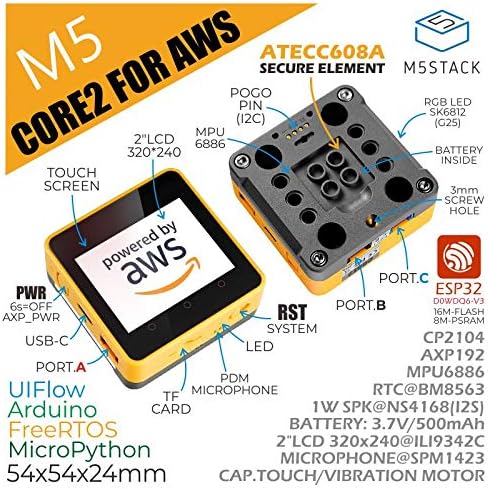
בילד 3.1: דעטאַלירט view of the M5Stack Core2 highlighting its various components and features.
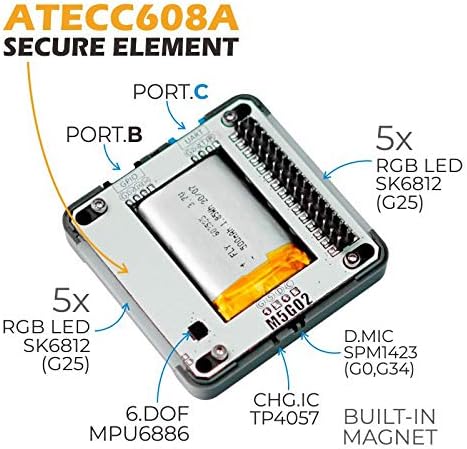
Image 3.2: An internal perspective of the M5Stack Core2, showcasing the ATECC608A secure element and other integrated components.
4. סעטאַפּ
Setting up your M5Stack Core2 involves connecting it to a power source and preparing your development environment. Follow these steps for initial setup:
- פאַרבינדן מאַכט: Use the provided USB Type-C cable to connect the M5Stack Core2 to a computer or a 5V USB power adapter. The device will power on automatically.
- דרייווער ינסטאַלירונג: For Windows users, you may need to install the appropriate USB-to-serial drivers (e.g., CP2104 or CH9102F) if the device is not recognized automatically. Drivers are typically available on the M5Stack official webפּלאַץ.
- Choose Development Environment: The M5Stack Core2 supports multiple programming environments, including UIFlow (a block-based visual programming platform), Arduino IDE, FreeRTOS, and MicroPython. Select the environment that best suits your project needs.
- Access Tutorials and Documentation: Comprehensive tutorials and documentation are available on the M5Stack official website. It is recommended to visit www.m5stack.com, navigate to the "DOCUMENT" section, and search for the Core2 for AWS to find detailed guides and exampדער קאָד.

Image 4.1: Visual guide on how to locate tutorials and documentation on the M5Stack webפּלאַץ.
5. אַפּערייטינג ינסטרוקטיאָנס
The M5Stack Core2 is designed for interactive operation and development. Here are general guidelines for its use:
- מאַכט אויף / אַוועק: The device powers on when connected to a power source. To power off, press and hold the power button for approximately 6 seconds.
- ריר סקרין צובינד: Utilize the 2.0-inch capacitive touch screen for direct interaction with applications. The screen supports multi-touch gestures depending on the programmed application.
- פּראָגראַממאַבלע קנעפּלעך: The three virtual touch buttons below the screen can be programmed to perform various functions within your applications, offering customizable user input.
- Sensor Utilization: Integrate data from the 6-axis IMU (for motion and orientation), PDM microphone (for audio input), and RGB LEDs (for visual feedback) into your IoT projects.
- קאַנעקטיוויטי: Leverage the built-in 2.4GHz Wi-Fi for network communication, connecting to AWS IoT Core, or other cloud services.

Image 5.1: The M5Stack Core2 supports multiple development platforms, including UIFlow, Arduino, FreeRTOS, and MicroPython.
6. וישאַלט
To ensure the longevity and optimal performance of your M5Stack Core2, follow these maintenance guidelines:
- רייניקונג: Use a soft, dry cloth to clean the device. Avoid using liquid cleaners or solvents, which can damage the screen or internal components.
- סטאָרידזש: האַלט דאָס אַפּאַראַט אין אַ קיל, טרוקן אָרט אַוועק פון דירעקט זונשייַן, עקסטרעמע טעמפּעראַטורן און הויכער הומידיטי.
- האַנדלינג: Handle the device with care to prevent drops or impacts, which can damage the internal circuitry or screen.
- באַטערי זאָרגן: The device contains a Lithium Ion battery. Avoid fully discharging the battery frequently and store it with a partial charge if not used for extended periods. Do not expose the battery to high temperatures.
- Firmware דערהייַנטיקונגען: טשעק רעגולער די M5Stack אפיציעלע website for firmware updates to ensure your device has the latest features and bug fixes.
7. טראָובלעשאָאָטינג
If you encounter issues with your M5Stack Core2, consider the following troubleshooting steps:
- מיטל נישט פּאַוערינג אויף: Ensure the USB-C cable is securely connected to both the device and a reliable power source. Try a different USB-C cable or power adapter.
- Connection Issues with PC: Verify that the correct USB-to-serial drivers are installed on your computer. Try a different USB port or computer. Ensure your development environment (e.g., Arduino IDE, UIFlow) is configured to recognize the correct COM port.
- Program Upload Failure: Check that the correct board and port are selected in your development environment. Ensure the device is in programming mode if required by your specific setup. Refer to the official M5Stack documentation for detailed programming guides.
- עקראַן רעאַגירט נישט: Perform a soft reset by briefly pressing the reset button (RST) if available, or power cycle the device. Ensure the device firmware is up to date.
- Wi-Fi קאַנעקטיוויטי פּראָבלעמס: Verify your Wi-Fi credentials in your code. Ensure the device is within range of your Wi-Fi network. Check for any firewall or router settings that might be blocking the connection.
- אומגעריכטע אויפפירונג: This is a development kit, and behavior is highly dependent on the loaded firmware. Review your code for logical errors. If using example code, ensure it is compatible with the Core2 for AWS model.
For more specific issues, consult the extensive documentation and community forums available on the M5Stack official webפּלאַץ.
8. ספּעסאַפאַקיישאַנז
Key technical specifications for the M5Stack Core2 ESP32 IoT Development Kit:
| שטריך | פּאַראַמעטער |
|---|---|
| פּראַסעסער | ESP32-D0WDQ6-V3, 240MHz dual core |
| באַראַן | 8 MB PSRAM |
| פלאַש זכּרון | 16 מב |
| ווייַז | 2.0-inch Capacitive Touch Screen (320x240) |
| ווירעלעסס טיפּ | 2.4 GHz Wi-Fi, Bluetooth |
| זיכער עלעמענט | Microchip ATECC608 Trust&GO |
| סענסאָרס | 6-axis IMU (MPU6886), PDM Microphone (SPM1423) |
| לעדס | RGB LEDs (SK6812) |
| אַרייַנשרייַב וואָלtage | 5V @ 500mA (via Type-C USB) |
| באַטערי | 1 ליטהיום יאָן באַטאַרייע (אַרייַנגערעכנט) |
| אַפּערייטינג סיסטעם שטיצן | FreeRTOS |
| פּונקט וואָג | 2.45 אונס (בעערעך 69.45 גראַמז) |
| דימענשאַנז (LxWxH) | 2.13 X 2.13 X 0.93 אינטשעס (54 X 54 X 24 מם) |
Image 8.1: A summary of the M5Stack Core2's technical specifications.

Image 8.2: Physical dimensions of the M5Stack Core2 device.

Image 8.3: The M5Stack Core2's weight as measured on a digital scale.
9. אַפּפּליקאַטיאָנס
The M5Stack Core2 ESP32 IoT Development Kit is suitable for a wide range of applications, from educational projects to industrial IoT solutions:
- STEM חינוך: An excellent tool for teaching programming, electronics, and IoT concepts to students.
- DIY פּראַדזשעקס: Ideal for hobbyists and makers to create custom smart devices, home automation systems, and interactive installations.
- IoT קאָנטראָללער: Can serve as a compact and powerful controller for various IoT deployments, managing sensors, actuators, and data communication.
- Rapid Prototyping: Accelerates the development cycle for new IoT products and services due to its integrated features and modular design.

Image 9.1: Illustrative examples of the M5Stack Core2's diverse applications.

Image 9.2: The Core2 for AWS is specifically designed for AWS IoT learning projects, enabling practical DIY applications.
10. וואָראַנטי און שטיצן
For warranty information, technical support, and additional resources, please refer to the official M5Stack website. M5Stack provides extensive documentation, forums, and community support for its products.
באַאַמטער Webפּלאַץ: www.m5stack.com

Image 10.1: The official website for M5Stack, where further support and resources can be found.


