1. הקדמה
This manual provides detailed instructions for the safe and efficient use of your Hoco HC3 Bounce Sports Wireless Speaker. Please read this manual thoroughly before operating the device and retain it for future reference. The Hoco HC3 is a versatile portable speaker supporting Bluetooth, FM radio, TF card, USB, AUX, and TWS modes.

Figure 1: Hoco HC3 Bounce Sports Wireless Speaker. This image displays the speaker in a vertical orientation, showcasing its black mesh grille, the 'hoco' logo at the bottom right, and a braided carrying strap attached to the top left side. The control buttons are visible on the side panel.
2. פּעקל אינהאַלט
זיכער מאַכן אַז אַלע זאכן זענען פאַראַן ביים אויספּאַקן:
- Hoco HC3 Bounce Sports Wireless Speaker
- וסב טשאַרדזשינג קאַבלע
- באַניצער מאַנואַל (דעם דאָקומענט)
- AUX Audio Cable (if included with your model)
3. פּראָדוקט איבערview
3.1 רעדנער קאָמפּאָנענטן

Figure 2: Rear panel of the Hoco HC3 speaker. This image highlights the various input ports and control buttons located on the back of the speaker. Visible elements include the power switch, USB port, TF card slot, AUX input, and LED indicator.
מאַכט זיך באַקאַנט מיט די רעדנער'ס קאָנטראָלן און פּאָרץ:
- מאַכט קנעפּל: Long press to power on/off. Short press to switch modes.
- שפּיל / פּויזע קנעפּל: שפּילן אָדער פּויזירן אַודיאָ. ענטפֿערן/ענדיגן רופן.
- באַנד אַרויף / ווייַטער ליד קנעפּל: קורץ דריקן פארן נעקסטן ליד, לאנג דריקן צו פארגרעסערן די וואליאם.
- באַנד אַראָפּ / פריערדיקע ליד קנעפּל: קורץ דריקן פֿאַר פֿריִערדיקן ליד, לאַנג דריקן פֿאַר באַנד אַראָפּ.
- מאָדע קנעפּל (M): Short press to cycle through Bluetooth, FM, TF card, USB, and AUX modes.
- וסב פּאָרט: פֿאַר USB דרייוו ווידערשפּיל.
- טף קאַרד שפּעלטל: פֿאַר TF (MicroSD) קאַרטל ווידערשפּיל.
- AUX אַרייַנשרייַב: 3.5 מ״מ דזשעק פֿאַר דראָטיקער אַודיאָ פֿאַרבינדונג.
- טשאַרדזשינג פּאָרט: מיקראָ USB פּאָרט פֿאַר טשאַרדזשינג דעם רעדנער.
- LED ינדיקאַטאָר: Displays charging status and operating mode.
3.2 שליסל פֿעיִקייטן
- בלועטאָאָטה וו5.0: גיט סטאַבילע און עפעקטיווע וויירלעסע קאַנעקטיוויטי.
- קייפל פּלייַבאַקק מאָדעס: Supports Bluetooth, FM radio, TF card, USB drive, and AUX input.
- אמת ווירעלעסס סטערעאָ (TWS): Allows two HC3 speakers to connect wirelessly for a stereo sound experience.
- לאנג באַטאַרייע לעבן: 2400mAh battery capacity offers up to 5 hours of music playback.
- צווייענדיק ספּיקערז: Equipped with two 45mm speaker units, each with 5W power output.
- סאָליד און פּאָרטאַטיוו: Dimensions of 202*60*60mm and weight of 561g for easy transport.
4. סעטאַפּ
4.1 אויפלאָדן דעם רעדנער
- פֿאַרבינדט דעם צוגעשטעלטן USB טשאַרדזשינג קאַבל צום רעדנער'ס טשאַרדזשינג פּאָרט.
- Connect the other end of the USB cable to a 5V USB power adapter (not included) or a computer's USB port.
- The LED indicator will illuminate to show charging status. It typically takes about 3 hours for a full charge.
- Once fully charged, the LED indicator will change or turn off (refer to specific LED behavior in the troubleshooting section if unsure).
Note: For optimal battery life, fully charge the speaker before first use.
4.2 פּאַוערינג אויף / אַוועק
- צו מאַכט אויף: Long press the Power button until you hear an audible prompt and the LED indicator lights up.
- צו מאַכט אַוועק: Long press the Power button again until you hear an audible prompt and the LED indicator turns off.
5. אַפּערייטינג ינסטרוקטיאָנס
5.1 בלועטאָאָטה פּערינג
- Ensure the speaker is powered on and in Bluetooth mode (the LED indicator will typically flash blue, indicating it's ready for pairing). If not, short press the Mode (M) button to switch to Bluetooth mode.
- אַקטיווירן בלועטוט אויף אייער מאָביל מיטל (סמאַרטפאָון, טאַבלעט, קאָמפּיוטער).
- זוכן פֿאַר available Bluetooth devices. You should see "HC3" or "Hoco HC3" in the list.
- Select "HC3" to connect. Once paired, the speaker will emit an audible confirmation, and the LED indicator will stop flashing and remain solid blue.
- איר קענט איצט שפּילן אַודיאָ פֿון אייער דעווייס דורך דעם רעדנער.
Note: The speaker will automatically attempt to reconnect to the last paired device when powered on, if that device's Bluetooth is active and within range.
5.2 עפעם ראַדיאָ מאָדע
- מאַכט די רעדנער.
- Short press the Mode (M) button repeatedly until you enter FM radio mode.
- To auto-scan and save available FM stations, short press the Play/Pause button. The speaker will scan and store stations.
- Use the Volume Up / Next Track and Volume Down / Previous Track buttons to navigate between saved stations.
5.3 TF Card / USB Playback
- מאַכט די רעדנער.
- Insert a TF (MicroSD) card into the TF card slot or a USB flash drive into the USB port.
- The speaker should automatically switch to TF card or USB mode and begin playing audio files. If not, short press the Mode (M) button to select the correct mode.
- Use the Play/Pause, Volume Up / Next Track, and Volume Down / Previous Track buttons to control playback.
Note: Ensure your TF card or USB drive contains compatible audio files (e.g., MP3 format).
5.4 AUX מאָדע
- מאַכט די רעדנער.
- Connect one end of a 3.5mm audio cable (if included) to the speaker's AUX input port.
- Connect the other end of the audio cable to the audio output jack of your external device (e.g., MP3 player, computer).
- The speaker should automatically switch to AUX mode. If not, short press the Mode (M) button to select AUX mode.
- Control playback from your external device. Volume can be adjusted on both the speaker and the external device.
5.5 TWS (אמת'ע ווירעלעס סטערעאָ) פונקציע
The TWS function allows you to pair two Hoco HC3 speakers together for a true stereo sound experience.
- Ensure both HC3 speakers are powered off.
- Power on both speakers simultaneously. They should both enter Bluetooth pairing mode.
- On איינער of the speakers (this will become the primary speaker), long press the Mode (M) button or a dedicated TWS button (if present, otherwise try the Play/Pause button for 3-5 seconds) until you hear a pairing tone. The speakers will attempt to connect to each other.
- Once successfully paired, you will hear a confirmation tone, and one speaker's LED will indicate it's the primary (e.g., flashing slowly), while the other's LED will be solid.
- Now, connect your mobile device to the ערשטיק speaker via Bluetooth as described in section 5.1.
- אַודיאָ וועט איצט שפּילן אין סטעריאָו דורך ביידע רעדנערס.
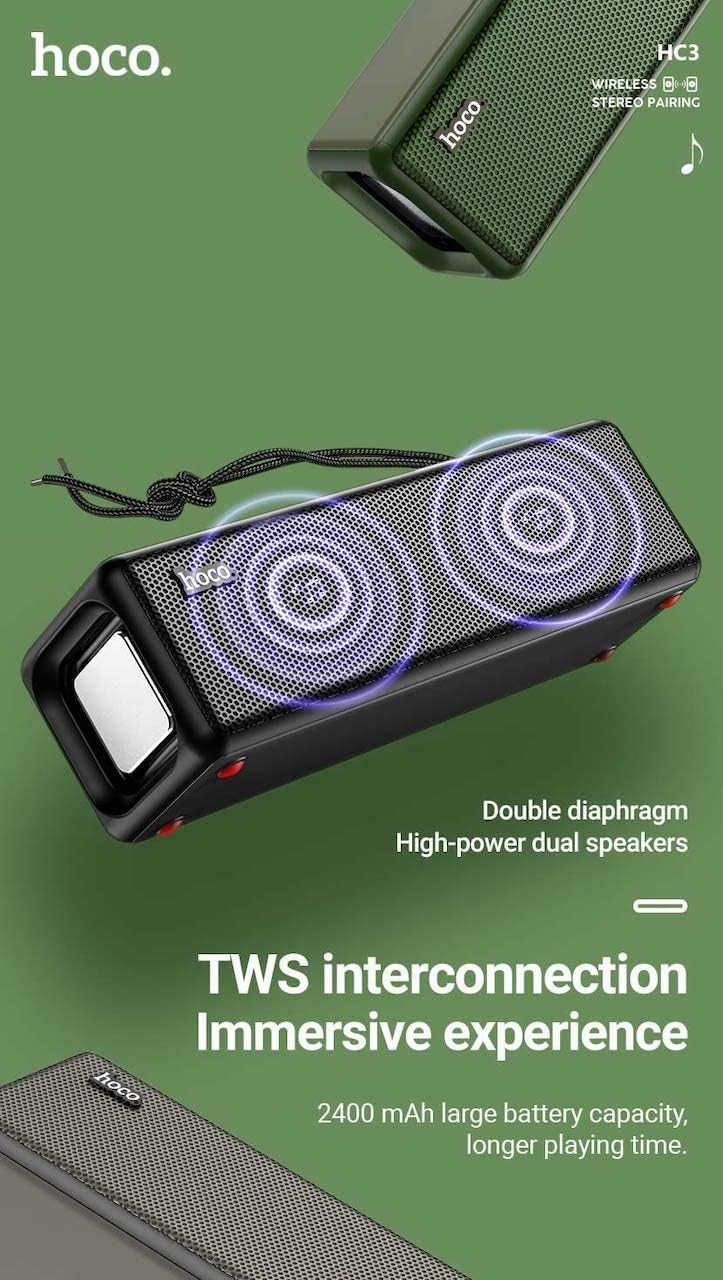
Figure 3: TWS Interconnection. This image illustrates the concept of two Hoco HC3 speakers wirelessly connected to provide a stereo audio experience, highlighting the dual speaker setup and the 2400 mAh battery capacity.
5.6 רופן האַנדלינג
ווען פארבונדן דורך בלועטוט צו א סמאַרטפאָון:
- ענטפער רופן: קורץ דריקן די שפּיל / פּויזע קנעפּל.
- סוף רופן: דריקט קורץ דעם שפּיל/פּויזע קנעפּל בעת אַ רוף.
- אָפּוואַרפן רופן: לאנג דריק דעם שפּיל/פּויזע קנעפּל ווען אַן אינקאַמינג רוף קלינגט.
- ריאַל די לעצטע נומער: טאָפּל דריקן די שפּיל / פּויזע קנעפּל.
6. וישאַלט
- רייניקונג: Use a soft, dry cloth to clean the speaker's surface. Do not use abrasive cleaners, alcohol, or other chemical solvents.
- סטאָרידזש: האַלט דעם רעדנער אין אַ קיל, טרוקן אָרט אַוועק פון דירעקט זונשייַן און עקסטרעמע טעמפּעראַטורן.
- באַטערי זאָרגן: To prolong battery life, charge the speaker regularly, even if not in use for extended periods (e.g., once every 3 months). Avoid fully discharging the battery frequently.
- וואַסער קעגנשטעל: While designed for sports, avoid submerging the speaker in water. Refer to product specifications for any IP rating.
- ויסמיידן פּראַל: Protect the speaker from drops and strong impacts.
7. טראָובלעשאָאָטינג
If you encounter issues with your Hoco HC3 speaker, refer to the following table for common problems and solutions:
| פּראָבלעם | מעגלעך סיבה | לייזונג |
|---|---|---|
| דער רעדנער גייט נישט אן. | נידעריק באַטאַרייע. | לאָדט אויף דעם רעדנער פֿאַר מינדעסטנס 30 מינוט. |
| קען נישט פארבינדן דורך בלוטוט. | בלועטוט נישט איינגעשטעלט אויף דעם אפאראט; רעדנער נישט אין פארבינדונג מאָד; צו ווייט פון דעם אפאראט. | Ensure Bluetooth is on, speaker is in pairing mode (flashing blue LED), and devices are within 10 meters. Forget "HC3" on your device and try pairing again. |
| קיין געזונט. | קול צו נידעריג; אומרעכטע מאָדע אויסגעקליבן; דעווייס שפּילט נישט אַודיאָ. | Increase volume on both speaker and connected device. Verify correct mode (Bluetooth, AUX, TF, USB). Ensure audio is playing on the source device. |
| די FM ראַדיאָ אָפּנאַם איז שוואַך. | שוואַך סיגנאַל; סביבה־אינטערפערענץ. | Move the speaker to a location with better reception. Re-scan for stations. |
| TF card/USB playback not working. | Card/drive not inserted correctly; incompatible file פֿאָרמאַט; פֿאַרדאָרבן files. | Ensure card/drive is fully inserted. Check file formats (MP3 recommended). Try another card/drive. |
| TWS פּאָרינג פיילז. | Speakers not in TWS pairing mode; too far apart. | Ensure both speakers are powered on and in TWS pairing mode. Keep them close during pairing. Refer to section 5.5. |
8. ספּעסאַפאַקיישאַנז
| שטריך | דעטאַל |
|---|---|
| מאָדעל | HC3 |
| דימענשאַנז | 202 X 60 X 60 מם |
| וואָג | 561 ג |
| בלועטאָאָטה ווערסיע | V5.0 (Chip: JLAC6928B) |
| באַטאַרייע קאַפּאַציטעט | 2400 מאַה |
| טשאַרדזשינג צייט | בעערעך 3 שעה |
| רעדן / מוזיק צייט | אַרויף צו 5 שעה |
| רעדנער אַפּאַראַט | 45מם * 2 |
| רעדנער מאַכט רעזולטאַט | 5 וו * 2 |
| קאַנעקטיוויטי מאָדעס | Bluetooth, FM, TF card, USB, AUX, TWS |
| אַודיאָ רעזולטאַט מאָדע | אַרומרינגלען |
| פאַבריקאַנט | Hoco |
| לאַנד פון אָריגין | כינע |
9. וואָראַנטי און שטיצן
Hoco products are manufactured to high quality standards. For information regarding warranty coverage, please refer to the warranty card included with your purchase or contact your local Hoco distributor or retailer. Keep your proof of purchase for any warranty claims.
For technical support or further assistance, please visit the official Hoco website or contact their customer service department. Contact details are typically available on the product packaging or the official webפּלאַץ.


