1. הקדמה
The Waveshare 1.28inch Round LCD Display Module is a compact, high-resolution display designed for various embedded applications. It features a 240x240 pixel resolution with 65K RGB colors, providing a clear and vibrant visual experience. The module utilizes an SPI interface, minimizing the number of required I/O pins for connection to microcontrollers and single-board computers. It is embedded with the GC9A01 driver and is compatible with popular development boards such as Raspberry Pi, Jetson Nano, Arduino, and STM32.
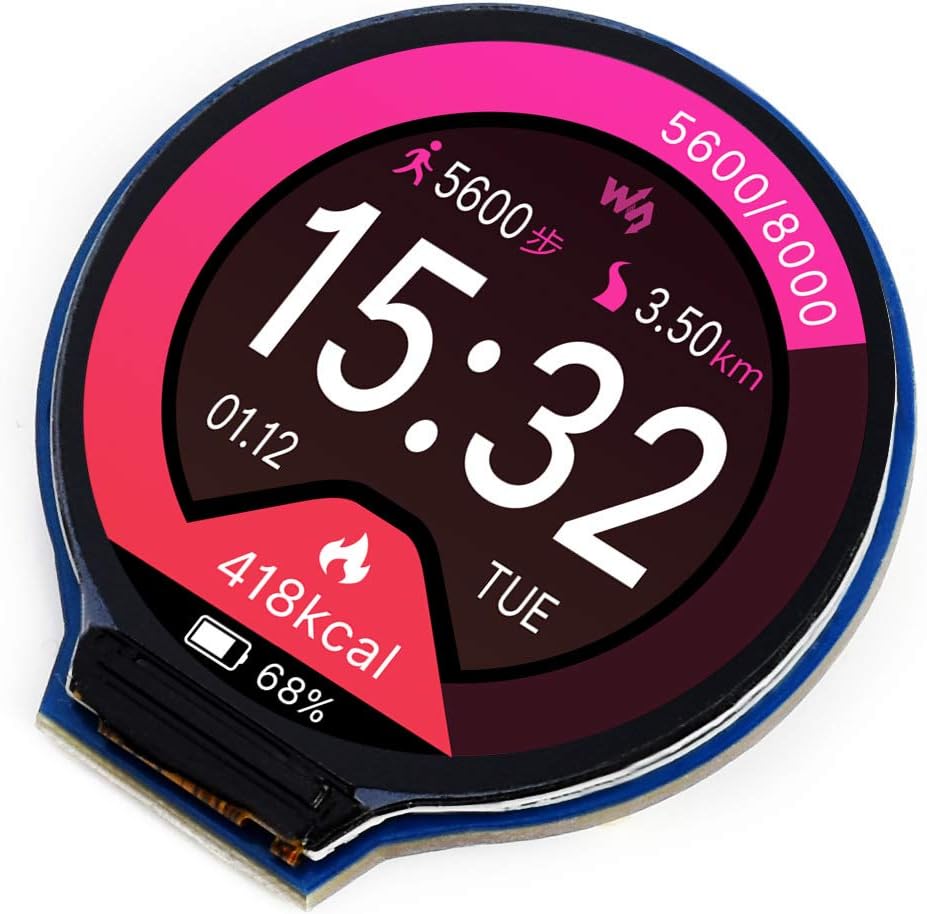
פיגורע 1: פראָנט view of the Waveshare 1.28inch Round LCD Display Module displaying a watch face with time, date, steps, distance, and calorie information.
2. שליסל פֿעיִקייטן
- רעזאלוציע: 240x240 pixels, offering clear and detailed visuals.
- קאָליר טיפקייַט: 65K RGB colors for rich and vibrant display effects.
- צובינד: SPI (Serial Peripheral Interface) for efficient data transfer and reduced pin count.
- דרייווער: Embedded GC9A01 display driver.
- קאַמפּאַטאַבילאַטי: Supports various controller boards including Raspberry Pi, Jetson Nano, Arduino, and STM32.
- אַנטוויקלונג רעסורסן: Comes with example code and documentation for Raspberry Pi, Arduino, and STM32.

פיגורע 2: איבערview of the 1.28inch Round LCD Display Module highlighting its main features and specifications.
3. פּעקל אינהאַלט
ווען איר עפֿענען דעם פּעקל, איר זאָל געפֿינען די פאלגענדע זאכן:
- 1x Waveshare 1.28inch Round LCD Display Module
- 1x PH2.0 8PIN 20cm cable

פיגורע 3: אינהאַלט אַרייַנגערעכנט אין די פּראָדוקט פּאַקעט.
4. Setup and Hardware Connection
This section details the physical connection of the 1.28inch Round LCD Display Module to compatible development boards. The module uses an SPI interface for communication.
4.1 פּינאָוט באַשרייַבונג

פיגורע 4: צוריק view of the display module showing the 8-pin connector and pin labels.
| שפּילקע לאַבעל | באַשרייַבונג |
|---|---|
| VCC | Power supply (3.3V / 5V input) |
| GND | ערד |
| DIN | SPI data input (MOSI) |
| CLK | SPI clock input (SCK) |
| CS | שפּאָן סעלעקציע, נידעריק אַקטיוו |
| DC | דאַטאַ / קאַמאַנד סעלעקציע (הויך פֿאַר דאַטן, נידעריק פֿאַר באַפֿעל) |
| RST | באַשטעטיק, נידעריק אַקטיוו |
| BL | באַקלייט קאָנטראָל |
4.2 Connecting with Raspberry Pi
Follow the diagram below to connect the display module to a Raspberry Pi board. Ensure correct pin mapping for VCC, GND, DIN (MOSI), CLK (SCK), CS, DC, RST, and BL.

פיגורע 5: Hardware connection diagram for Raspberry Pi.
4.3 Connecting with Arduino Board
Refer to the diagram for connecting the display module to an Arduino board. Pay attention to the specific digital and analog pins used for SPI communication and control signals.

פיגורע 6: Hardware connection diagram for Arduino.
For other compatible boards like Jetson Nano or STM32, consult the respective board's documentation and the Waveshare product wiki for specific wiring instructions and exampדער קאָד.
5. אָפּעראַציע און פּראָגראַמירן
The Waveshare 1.28inch Round LCD Display Module requires programming to display content. Waveshare provides comprehensive development resources, including example code and libraries, for various platforms.
5.1 ווייכווארג סעטאַפּ
- Obtain Resources: Visit the official Waveshare product wiki page for the 1.28inch Round LCD Display Module to download the latest development resources, including drivers, libraries, and example code for Raspberry Pi, Arduino, and STM32.
- אינסטאַלירן ביבליאָטעקן: Follow the instructions provided in the downloaded resources to install the necessary libraries for your chosen development environment (e.g., Arduino IDE, Python for Raspberry Pi).
- לאָדן עקסampדי קאָד: Open and compile the provided example code to verify the display's functionality and understand basic operations.
5.2 Basic Display Control
The display is controlled via the SPI protocol. Key functions typically include:
- איניציאליזאציע: Sending a sequence of commands to the GC9A01 driver to configure the display.
- Drawing Pixels/Shapes: Writing pixel data to the display memory.
- טעקסט ווייַז: Using fonts to render text on the screen.
- בילד אַרויסווייַזונג: Loading and displaying bitmap images.
- באַקלייט קאָנטראָל: Adjusting the brightness of the display backlight via the BL pin.
אָפּשיקן צו די צוגעשטעלט עקסample code for detailed implementation of these functions.
6. וישאַלט און קער
To ensure the longevity and optimal performance of your Waveshare 1.28inch Round LCD Display Module, follow these general maintenance guidelines:
- האַנדלינג: Handle the module by its edges to avoid touching the display surface or electronic components.
- רייניקונג: ניצט אַ ווייכן, לינט-פֿרייע שטאָף, אַ ביסל ווייכערampגעוואשן מיט וואַסער אָדער אַ מילדן עקראַן רייניגער, צו זאַכט ווישן די עקראַן ייבערפלאַך. ויסמיידן אַברייסיוו מאַטעריאַלס אָדער שטרענג כעמיקאַלן.
- סטאָרידזש: האַלט דעם מאָדול אין אַ טרוקענער, שטויב-פֿרײַער סביבה, ווײַט פֿון דירעקטער זון און עקסטרעמע טעמפּעראַטורן.
- מאַכט צושטעלן: פאַרזיכערן די מאַכט צושטעלן וואָלtage is within the specified range (3.3V / 5V) to prevent damage.
- סטאַטיק עלעקטרע: Take precautions against electrostatic discharge (ESD) when handling the module, as electronic components are sensitive to static.
7. טראָובלעשאָאָטינג
If you encounter issues with your display module, consider the following troubleshooting steps:
- קיין ווייַז / ליידיק פאַרשטעלן:
- Verify all connections (VCC, GND, DIN, CLK, CS, DC, RST, BL) are secure and correctly wired according to the diagrams.
- Check the power supply to the module and the host board.
- Ensure the backlight (BL) pin is correctly controlled and receiving power.
- Confirm that the initialization code for the GC9A01 driver is correctly executed in your program.
- Incorrect or Garbled Display:
- Double-check your SPI communication settings (mode, clock speed).
- Ensure the data format and command sequences sent to the GC9A01 driver match the specifications.
- Verify that the display buffer is being updated correctly in your code.
- Slow Refresh Rate:
- SPI communication speed can impact refresh rates. Ensure your host board is configured for the fastest stable SPI clock speed.
- Optimize your drawing routines to minimize the amount of data sent over SPI.
- Module Gets Warm:
- Some heat generation is normal, especially with continuous operation. Ensure adequate ventilation.
- באַשטעטיקן אַז די אַרייַנשרייַב וואָלtage איז נישט מער ווי 5V.
- קאַמפּאַטאַבילאַטי ישוז:
- While compatible with many boards, specific libraries or pin mappings might be required. Consult Waveshare's documentation for your exact host board. (Note: Some users reported issues with Teensy 4, while it worked with Arduino Nano/Teensy 3.2/3.5).
8. טעכניש ספּעסאַפאַקיישאַנז
| שטריך | באַשרייַבונג |
|---|---|
| ווייַז גרייס | 1.28 אינטשעס (קייַלעכיק) |
| האַכלאָטע | 240 X 240 בילדצעלן |
| קאָליר דעפּט | 65K RGB colors |
| דרייווער יק | GC9A01 |
| צובינד | 4-דראָט ספּי |
| אַפּערייטינג וואָלtage | 3.3V / 5V |
| דימענשאַנז | 40.4 x 37.5mm (overall), φ32.4mm (display area) |
| פּיקסעל גרייס | 0.135 X 0.135 מם |
| פּונקט וואָג | 0.704 אונסעס |
| פאַבריקאַנט | וואַוועשאַרע |

פיגורע 7: Detailed technical specifications and pin descriptions.
9. שטיצן און רעסאָורסעס
For further assistance, detailed documentation, and the latest development resources, please visit the official Waveshare website or product wiki page for this module. You can typically find:
- Detailed tutorials and guides.
- Example code for various programming languages and platforms.
- Datasheets for the GC9A01 driver IC.
- Community forums or contact information for technical support.
פאַבריקאַנט: וואַוועשאַרע
באַאַמטער Webפּלאַץ: www.waveshare.com
For specific product support, search for "1.28inch Round LCD Display Module" on the Waveshare wiki.


