הקדמה
This manual provides instructions for the operation and maintenance of your WIITHINK Portable CD Boombox, model WTB771. This device features multiple audio playback options including CD, FM radio, Bluetooth, USB, and AUX input, designed for versatile use.

בילד: פראָנט view of the WIITHINK Portable CD Boombox WTB771, black color, showing the display, control buttons, speakers, and handle.
פּעקל אינהאַלט
- 1 x WIITHINK Portable CD Radio Boombox (WTB771)
- 1 x מאַכט קאַבלע
- 1 x AUX ליניע
- 1 x באַניצער מאַנואַל
- 1 x רימאָוט קאָנטראָל
סעטאַפּ
מאַכט צושטעלן
די בוםבאָקס קען ווערן געטריבן דורך AC מאַכט אָדער באַטעריעס.
- AC מאַכט: Connect the provided power cable to the AC port on the back of the unit and plug it into a standard wall outlet (AC voltage: 220V / 50Hz, 110V / 60Hz).
- באַטאַרייע מאַכט: For portable use, insert 4 C-sized batteries (not included) into the battery compartment located on the bottom of the unit. Ensure correct polarity.
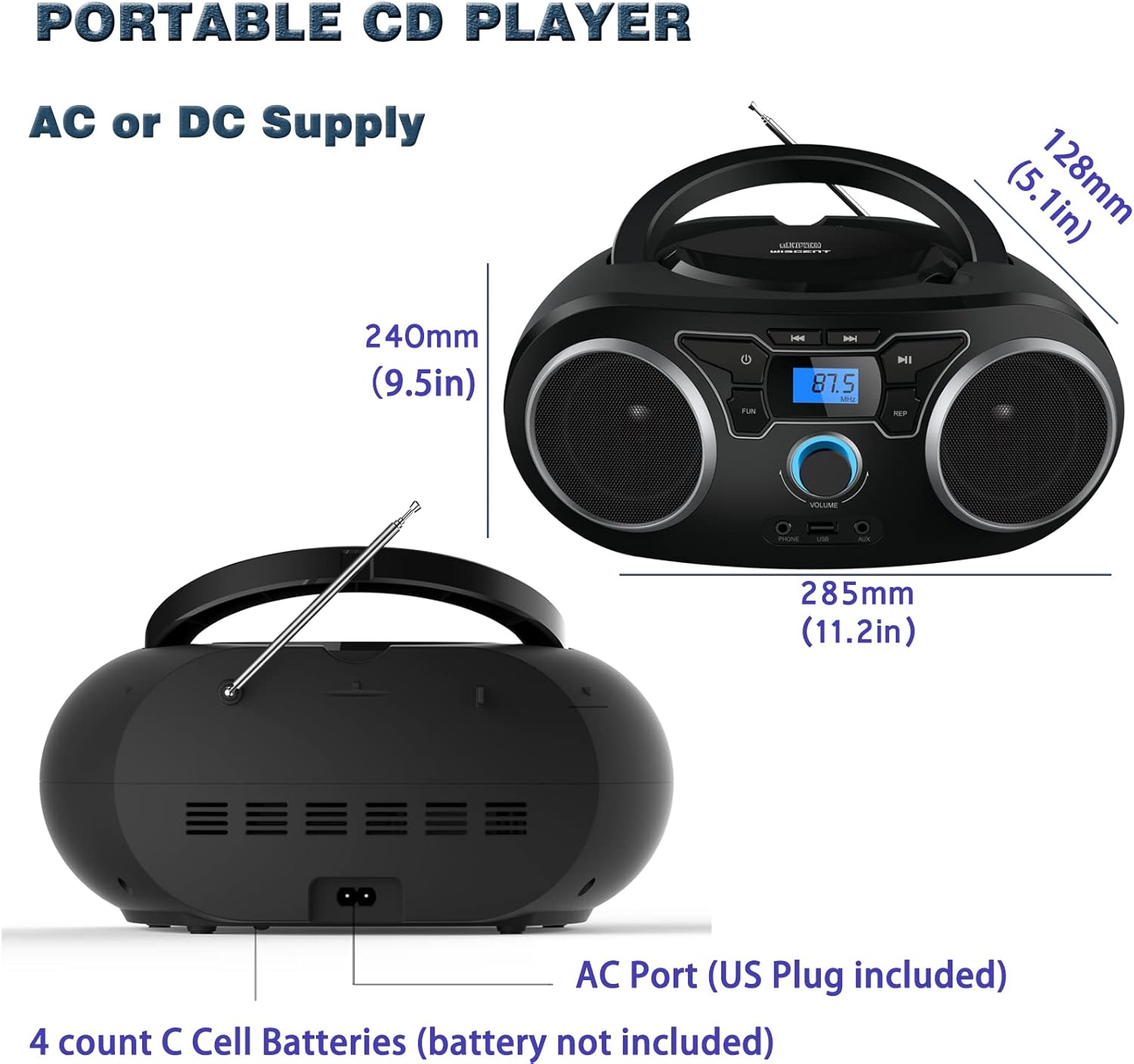
בילד: הינטערשטע view of the boombox, highlighting the AC power port and the battery compartment for 4 C-sized batteries.
אַפּערייטינג ינסטראַקשאַנז
אַלגעמיינע קאָנטראָלס
The unit features a digital LCD screen and various control buttons and knobs. The main volume control is a rotary knob on the front. A remote control is also included for convenient operation.

בילד: פון אויבן אַראָפּ view of the boombox, showing the CD compartment, control buttons, and volume knob.
1. סי פּלייבאַק
- עפֿנט דעם דעקל פֿונעם סי-די אָפּטייל וואָס געפֿינט זיך אויף דער שפּיץ פֿונעם אַפּאַראַט.
- Place a CD (CD, CD-R, CD-RW, MP3-CD) onto the spindle with the label side facing up.
- נאָענט די קאָמפּאַקטדיסק אָפּטייל דעקל.
- דרוק די מאָדע קנעפּל צו אויסקלייַבן קאָמפּאַקטדיסק מאָדע.
- דרוק די שפּיל / פּויזע קנעפּל צו אָנהייבן פּלייבאַק.
- ניצן די האָפּקען / זוכן קנעפּלעך צו נאַוויגירן צווישן לידער.
- די איבערחזרן button allows for repeating a single track or all tracks.
- די פּראָגראַם function allows you to create a custom playback order for tracks.
The boombox supports MP3 and WMA audio formats on compatible discs.
2. עפעם ראַדיאָ אָפּעראַציע
- פֿאַרלענגערט די טעלעסקאָפּישע אַנטענע פֿאַר אַן אָפּטימאַלן אָפּנאַם.
- דרוק די מאָדע קנעפּל צו אויסקלייבן FM ראַדיאָ מאָדע.
- צו אויטאמאטיש סקענען און ראטעווען סטאנציעס, דריק און האלט די יבערקוקן button. The unit will automatically search for and store up to 30 FM stations.
- צו מאַניואַלי ניגן, נוצן די טונינג קנופּ אָדער האָפּקען / זוכן buttons to find desired frequencies.
- ניצן די PRESET קנעפּלעך צו נאַוויגירן דורך געראטעוועט סטיישאַנז.
Video: A user demonstrating the FM radio tuning function on the WIITHINK Portable CD Boombox WTB771, showing the digital display changing frequencies.
3. בלועטאָאָטה קאַנעקטיוויטי
- דרוק די מאָדע button to select Bluetooth mode. The display will indicate "BT" and the unit will enter pairing mode.
- On your Bluetooth-enabled device (e.g., smartphone, tablet), search for available devices and select "WTB771".
- Once paired, you can stream audio wirelessly from your device to the boombox.
ווידעא: א קורצע הקדמהview demonstrating Bluetooth connectivity, showing a smartphone wirelessly connected to the boombox.
4. וסב פּלייַבאַקק
- אַרייַנלייגן אַ וסב בליץ פאָר מיט mp3 fileס אין די וסב פּאָרט אויף די פראָנט פון די אַפּאַראַט.
- דרוק די מאָדע קנעפּל צו אויסקלייַבן וסב מאָדע.
- די אַפּאַראַט וועט אויטאָמאַטיש דעטעקטירן און אָנהייבן שפּילן MP3 fileס פון די USB דרייוו.
- Use the playback controls (PLAY/PAUSE, SKIP/SEARCH) to manage your music.
5. AUX ינפּוט
- Connect an external audio device (e.g., MP3 player, laptop) to the AUX input jack on the front of the unit using the provided 3.5mm AUX cable.
- דרוק די מאָדע קנעפּל צו אויסקלייבן AUX מאָדע.
- Audio from the connected device will now play through the boombox speakers. Control playback from your external device.
Controls and Ports Overview
| שטריך | באַשרייַבונג |
|---|---|
| מאַכט קנעפּל | טורנס די אַפּאַראַט אויף/אַוועק. |
| מאָדע קנעפּל | טוישט צווישן CD, FM, בלועטוט, USB, און AUX מאָדעס. |
| באַנד קנעפּל | Adjusts the audio output level (up to 32 levels). |
| PLAY/PAUSE קנעפּל | Starts or pauses playback in CD, USB, and Bluetooth modes. |
| איבערשפרינגען/זוכן קנעפּלעך | Navigates tracks in CD/USB mode; tunes frequencies in FM mode. |
| איבערחזרן קנעפּל | Repeats current track or all tracks in CD/USB mode. |
| פּראָגראַם קנעפּל | Sets a custom playback order for CD/USB tracks. |
| עפעם אַנטענע | Telescopic antenna for FM radio reception. |
| וסב פּאָרט | פֿאַרבינדט USB פֿלאַש דרייווז פֿאַר MP3 ווידערשפּיל. |
| AUX אַרייַנשרייַב דזשאַק | 3.5 מ״מ אַרײַנגאַנג פֿאַר פֿאַרבינדן עקסטערנע אַודיאָ דעוויסעס. |
| כעדפאָון דזשאַק | 3.5 מ״מ אויסגאַנג פֿאַר פּריוואַט צוהערן. |
| ווייַט קאָנטראָל | Provides wireless control over all functions. |

Image: Close-up of the front panel, showing the USB port, AUX input, and headphone jack.
וישאַלט
- רייניקט דעם אַפּאַראַט מיט אַ ווייכן, טרוקענעם שטאָף. ניצט נישט קיין שרײַבנדיקע רייניגערס אדער סאָלווענטן.
- Keep the CD compartment clean and free of dust.
- פֿאַרמײַדן אויסצושטעלן דעם אַפּאַראַט צו עקסטרעמע טעמפּעראַטורן, פֿײַכטקייט, אָדער דירעקטער זון.
- When not in use for extended periods, remove batteries and unplug the AC power cable.
טראָובלעשאָאָטינג
| פּראָבלעם | לייזונג |
|---|---|
| קיין מאַכט |
|
| קיין געזונט |
|
| CD Skipping/Not Playing |
|
| שלעכטע FM אויפנעמונג |
|
| בלועטאָאָטה פּערינג ישוז |
|
ספּעסאַפאַקיישאַנז
- מאָדעל: WTB771
- פּראָדוקט דימענשאַנז: 7 X 10 X 4.8 אינטשעס (17.8 X 25.4 X 12.2 סענטימעטער)
- נומער וואָג: 2.64 פונט (1.2 קג)
- מאַכט רעזולטאַט: 2 קס 2 וו רמס
- קאַנעקטיוויטי: הילפס-פארבינדונג, בלועטוט, יו-עס-בי
- רעדנער טיפּ: געבויט-אין
- מאַכט צושטעלן: AC (220V/50Hz, 110V/60Hz) or 4 x C batteries (not included)
- שטיצט דיסק טייפּס: CD, CD-R, CD-RW, MP3-CD
- שטיצט אַודיאָ פֿאָרמאַטירונגען: mp3, וומאַ
- FM Radio Presets: ביז 30 סטאַנציעס
וואָראַנטי און שטיצן
WIITHINK offers an 18-month after-sales service for this product. For any inquiries or technical support, please contact WIITHINK customer service through your purchase platform. Lifetime technical support is provided.
For further assistance, you may refer to the "Your Orders" section on Amazon, locate your order, and contact "WIITHINK Direct".

Image: Graphic illustrating WIITHINK's customer support, including 18-month replacement and lifetime technical support.
