1. איבערview
The Logitech C505/C505e HD Wired Business Webcam is designed to enhance your video communication experience. It provides crisp, smooth, and colorful widescreen HD 720p video with a 60° diagonal field of view. די webcam features fixed focus and automatic light correction, adapting to various lighting conditions. Its single, omnidirectional microphone incorporates noise-reduction technology, supporting clear conversations up to 3 meters away, even in noisy environments. The extra-long USB-A cable and universal clip offer flexible placement options on your computer or up to 7 feet away.
2. סעטאַפּ אינסטרוקציעס
Setting up your Logitech C505/C505e webcam is a straightforward plug-and-play process. No additional software installation or charging is required.
- פאַרבינדן די Webקאַם: שטעקט אריין דעם USB-A קאבל פון דעם webקאַם אין אַ פאַראַן USB פּאָרט אויף דיין דעסקטאַפּ אָדער לאַפּטאַפּ קאָמפּיוטער.
- שטעלן די Webקאַם: Use the universal clip to securely mount the webcam on your monitor, laptop screen, or place it on a flat surface. The extra-long cable allows for flexible positioning.
- אויסקלייַבן די Webקאַם: דיין קאָמפּיוטער זאָל אויטאָמאַטיש דעטעקט די webcam. If you have multiple cameras or microphones, you may need to select the "Logitech C505/C505e" in your application's settings (e.g., video conferencing software, recording applications) or your operating system's device settings.

Image: The Logitech C505/C505e webcam easily clips onto a monitor for convenient placement.
3. אַפּערייטינג די Webקאַם
Once connected, the Logitech C505/C505e is ready for use with most video conferencing and recording applications.
- ווידעא קוואַליטעט: די webcam delivers HD 720p video at 30 frames per second, providing clear visuals for your calls and recordings.
- פעלד פון View: א דיאַגאָנאַל פעלד פון 60 ° view ensures you are framed appropriately without capturing excessive background.
- פאַרפעסטיקט פאָקוס: The fixed focus lens maintains sharpness for subjects within its optimal range, simplifying operation.
- אָטאַמאַטיק ליכט קערעקשאַן: די webcam automatically adjusts to the lighting conditions of your environment, helping to ensure you appear well-lit even in varying light. Optimal lighting conditions will yield the best video quality.
- מיקראָפאָן: The integrated omnidirectional microphone with noise-reduction technology is designed to capture your voice clearly from up to 3 meters away, minimizing background distractions.

Image: The Logitech C505/C505e provides HD 720p widescreen video for clear communication.
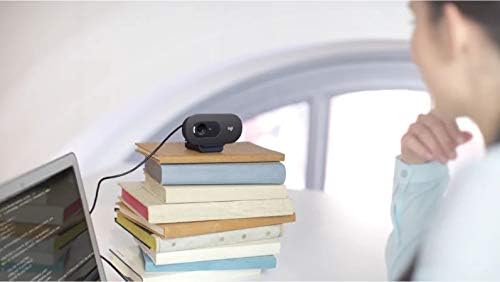
Image: Flexible placement options allow the webcam to be positioned on various surfaces.
4. וישאַלט
To ensure optimal performance and longevity of your Logitech C505/C505e webקאַם, פֿאָלגן די פּשוטע וישאַלט גיידליינז:
- רייניקונג די לענס: ווישט אָפּ דעם webcam lens with a soft, lint-free cloth. Avoid using harsh chemicals or abrasive materials that could scratch the lens.
- סטאָרידזש: ווען ניט אין נוצן, קראָם די webקאַם אין אַ ריינעם, טרוקענעם אָרט אַוועק פון עקסטרעמע טעמפּעראַטורן און דירעקטער זון.
- קאַבלע זאָרגן: Avoid sharply bending or crimping the USB cable to prevent internal damage.
5. טראָובלעשאָאָטינג
If you encounter issues with your Logitech C505/C505e webקאַם, פּרוּווט די פֿאָלגנדיקע פּראָבלעם־לייזונג טריט:
- קיין ווידעא/אודיאָ:
- זיכער מאַכן אַז דער USB קאַבל איז זיכער אַרײַנגעשטעקט אין ביידע webקאַמעראַ און דיין קאָמפּיוטער.
- פּרוּווט פּלאַגינג די webקאַם אין אַ אַנדערש וסב פּאָרט.
- Check your application's settings (e.g., Zoom, Microsoft Teams) to confirm the Logitech C505/C505e is selected as the active camera and microphone.
- Verify your operating system's privacy settings allow applications to access the camera and microphone.
- נעבעך ווידעא קוואַליטעט:
- זיכער מאַכן גענוג ליכט אין דיין סביבה. webcam performs best with good illumination.
- ריין די webcam lens with a soft cloth.
- קוקט איבער פֿאַר יעדע שטערונג פֿאַר דער לינזע.
- נעבעך אַודיאָ קוואַליטעט:
- פאַרזיכערן די webcam's microphone is selected in your application and system audio settings.
- רעדוצירן הינטערגרונט ראַש אין דיין סביבה.
- Ensure you are within the 3-meter optimal range of the microphone.
- Webcam Not Recognized:
- ריסטאַרט דיין קאָמפּיוטער.
- קוק אויף אייער קאמפיוטער'ס דעווייס מענעדזשער (ווינדאָוס) אדער סיסטעם אינפארמאציע (מעקאָס) צו זען אויב די webcam is listed. You may need to update or reinstall drivers, though typically the webcam is plug-and-play.
6. ספּעסאַפאַקיישאַנז
| סאָרט | Logitech |
| מאָדעל נומער | Logitech C505/C505e |
| ווידעא קאַפּטורע רעסאָלוטיאָן | 720 פּ |
| ווידעא האַכלאָטע | 720 פּ |
| קאַנעקטיוויטי טעכנאָלאָגיע | מיט אַ דראָט (USB-A) |
| פאָקוס טיפּ | פאַרפעסטיקט פאָקוס |
| Viewינג אַנגלע | 60 דיגריז |
| מיקראָפאָן | Omnidirectional with Noise-Reduction |
| אָפּערייטינג סיסטעם | Multiple (Windows 8 or later, macOS 10.10 or later, ChromeOS) |
| געבויט-אין מידיאַ | USB Cable, Universal Clip |
| פֿעיִקייטן | Automatic Light Correction, Low Light Performance |
7. וואָראַנטי און שטיצן
פֿאַר דעטאַלירטע וואָראַנטי אינפֿאָרמאַציע און טעכנישע שטיצע, ביטע באַזוכט די אָפֿיציעלע לאָגיטעטש שטיצע webזייטל. איר קענט דאָרט געפֿינען דרייווערס, אָפֿט געשטעלטע פֿראַגעס, און קאָנטאַקט אינפֿאָרמאַציע פֿאַר קונה סערוויס.


