הקדמה
The CYCPLUS M1+Z1 GPS Bike Computer is a comprehensive device designed to enhance your cycling experience by providing accurate data and navigation. This manual will guide you through the setup, operation, and maintenance of your new bike computer and its accompanying handlebar mount.

Image: The CYCPLUS M1 bike computer shown alongside the Z2 handlebar mount.
פּעקל אינהאַלט
- CYCPLUS M1 Cycling Computer
- CYCPLUS Z2 Bicycle Handlebar Mount
- וסב טשאַרדזשינג קאַבלע
- באַניצער מאַנואַל (דעם דאָקומענט)
סעטאַפּ
1. טשאַרדזשינג די מיטל
Before first use, fully charge the CYCPLUS M1 bike computer. Connect the provided USB cable to the charging port on the device and to a standard USB power adapter. A full charge takes approximately 3 hours and provides up to 60 hours of operation.

Image: The CYCPLUS M1 bike computer connected to a charging cable, illustrating its 60-hour battery endurance.
2. Installing the Handlebar Mount (Z2)
The Z2 handlebar mount is designed for easy installation. It is suitable for 31.8mm handlebars. Securely attach the mount to your bicycle's handlebar using the provided screws. Ensure the mount is firm and does not rotate during use.

Image: The CYCPLUS M1 bike computer and Z2 mount shown together, with the computer installed on a bicycle handlebar.
3. Attaching the Bike Computer
Align the back of the M1 bike computer with the mount and twist it clockwise until it clicks into place. Ensure it is securely fastened before riding.
אַפּערייטינג ינסטראַקשאַנז
1. Power On/Off and Initial Setup
Press and hold the power button to turn the device on or off. Upon first use, ensure you set the correct time zone for accurate functionality.
2. GPS Positioning
The M1 features dynamic GPS positioning with high sensitivity and accuracy. It supports GPS, Glonass, Galileo, and BeiDou satellite systems for rapid positioning, typically within 30 seconds. Positioning speed may vary slightly based on environmental and weather conditions.

Image: Illustration of the CYCPLUS M1's fast and accurate GPS positioning capabilities, showing various satellite systems.
3. ווייַז און באַקלייט
The 2.8-inch FSTN backlit display provides clear visibility even in direct sunlight. The LCD screen automatically adjusts its backlight based on sunrise and sunset times in your set time zone, ensuring readability day or night. The device also features auto-awakening after 10 minutes of no displacement or vibration.

Image: The CYCPLUS M1 display demonstrating its auto backlight feature for clear visibility during both day and night cycling.
4. ANT+ Sensor Compatibility
The M1 supports simultaneous recording of various data from ANT+ sensors, including speed, cadence, heart rate, and power. This allows for comprehensive training data monitoring.

Image: Diagram illustrating the CYCPLUS M1's compatibility with ANT+ sensors for heart rate, cadence, and power data.
5. App Synchronization (CYCPLUS FIT / XOSS)
Connect your M1 bike computer to your smartphone via Bluetooth. Download the "CYCPLUS FIT" or "XOSS" app from the Google Play Store or Apple App Store. The app allows you to view sports data, analyze your rides, and perform firmware updates. You can also sync your ride data directly to Strava through the app.
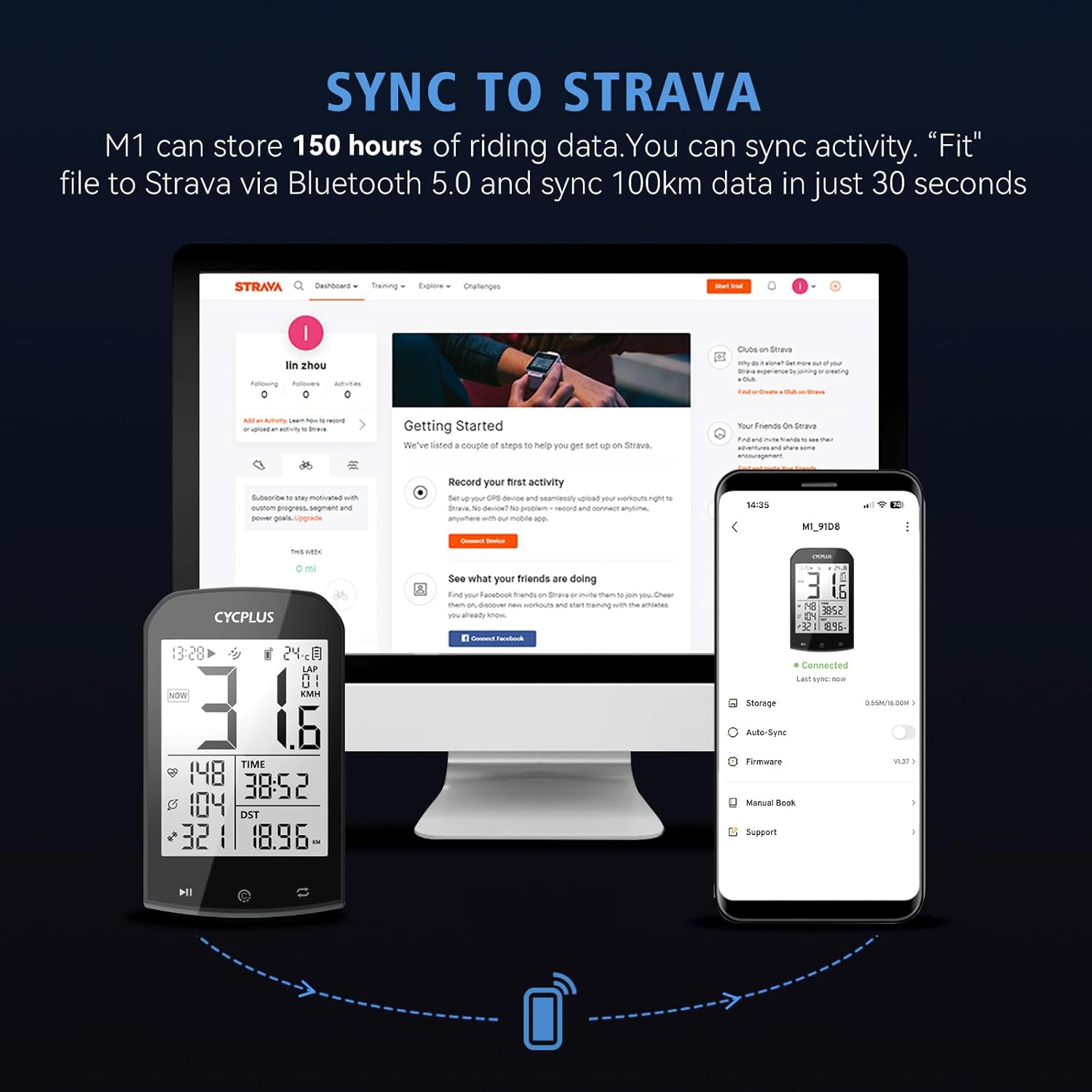
Image: The CYCPLUS FIT app interface on a smartphone, highlighting data analysis, sports data view, and firmware update features.

Image: The CYCPLUS M1 bike computer syncing activity data to Strava via Bluetooth 5.0 and the companion app.
6. Data Display Overview
The M1 displays various cycling metrics. Some common data points include:
- דורכשניטלעך ספּיד
- קראַנט ספּיד
- מאַקס ספּיד
- הייך
- גראַדיענט
- אַרופגאַנג
- זייגער
- טעמפּעראַטור
- יאַזדע דיסטאַנסע
- יאַזדע צייט
- אָדאָמעטער (ODO)
- שויס
- Cadence (requires external sensor)
- Heart Rate (requires external sensor)
- Power (requires external sensor)

בילד: א דעטאַלירטע view of the CYCPLUS M1 display, highlighting the various data metrics it can show, including those requiring additional sensors.
וישאַלט
1. וואַסער קעגנשטעל
The CYCPLUS M1 is IPX6 waterproof, meaning it is protected against high-pressure water jets from any direction. It can function reliably in rainy conditions. However, it is not designed for submersion.

Image: Two CYCPLUS bike computers mounted on handlebars, shown in a rainy environment, demonstrating their waterproof design.
2. רייניקונג
ווישן די מיטל מיט אַ ווייך, דamp שטאָף. פֿאַרמײַדט ניצן שאַרפֿע כעמיקאַלן אָדער אַברייסיוו מאַטעריאַלן וואָס קענען שאַטן דעם עקראַן אָדערasing.
3. באַטערי קער
To prolong battery life, avoid extreme temperatures and store the device with a partial charge if not used for extended periods.
טראָובלעשאָאָטינג
| פּראָבלעם | מעגלעך סיבה | לייזונג |
|---|---|---|
| די מיטל טוט נישט מאַכט אויף. | נידעריק באַטאַרייע. | טשאַרדזש די מיטל גאָר. |
| GPS signal acquisition is slow or inaccurate. | Environmental factors (e.g., dense tree cover, tall buildings), initial setup time zone incorrect. | Move to an open area. Ensure the time zone is correctly set in the device settings. Allow up to 30 seconds for initial lock. |
| Cannot connect to ANT+ sensors. | Sensor not active, out of range, or battery low. | Ensure sensors are active and within range. Check sensor batteries. Refer to sensor's manual for pairing instructions. |
| App synchronization issues (CYCPLUS FIT / XOSS / Strava). | Bluetooth not enabled, app outdated, or temporary software glitch. | Ensure Bluetooth is enabled on your phone and the bike computer. Update the app to the latest version. Restart both devices. |
| Display not clear or backlight not working. | Incorrect time zone setting affecting auto-backlight, or device in hibernation. | Verify time zone settings. Move the device to wake it from hibernation. |
ספּעסאַפאַקיישאַנז
| שטריך | דעטאַל |
|---|---|
| מאָדעל נאָמען | M1+Z1 |
| סאָרט | CYCPLUS |
| פאַרשטעלן גרייס | 2.9 אינטשעס |
| ווייַז טיפּ | FSTN LCD (Anti-glare, Backlit) |
| קאַנעקטיוויטי | GPS, Glonass, Galileo, BeiDou, ANT+, Bluetooth 5.0 |
| וואָטערפּרוף רייטינג | IPX6 |
| באַטערי טיפּ | ליטהיום פּאָלימער |
| באַטאַרייע קאַפּאַציטעט | 1200 מאַה |
| באַטערי לעבן | אַרויף צו 60 שעה |
| דימענסיעס (L X W X H) | 5.3 X 2 X 9 סענטימעטער (2.09 X 0.79 X 3.54 אינטשעס) |
| וואָג | 76.54 ג (2.7 אונסעס) |
| Handlebar Mount Compatibility | 31.8 mm handlebars (Z2 mount) |

Image: The CYCPLUS M1 bike computer highlighting its 2.9-inch screen and thin profile (20 מם).
וואָראַנטי און שטיצן
CYCPLUS products are designed for reliability and performance. For warranty information, technical support, or service inquiries, please refer to the official CYCPLUS webזייטל אדער קאנטאקט זייער קאסטומער סערוויס גלייך. האלט אייער קויף קוויטל אלס באווייז פון קויפן פאר גאראנטיע קליימס.
For app-related support, please refer to the "CYCPLUS FIT" or "XOSS" app's support section.


