הקדמה
א דאנק פארן קויפןasing the IPEGA Wireless Switch Controller. This manual provides detailed instructions on how to set up, operate, and maintain your new gamepad. Please read this manual thoroughly before use to ensure optimal performance and longevity of your device.

Figure 1: IPEGA Wireless Switch Controller in use with a tablet device, showcasing its telescopic design.
פּראָדוקט פֿעיִקייטן
- מולטי-פּלאַטפאָרם קאַמפּאַטאַבילאַטי: Designed for N-Switch, P3, Android devices, and PC (Win 7/8/10). Note: Does not support MediaTek chips.
- ימפּרוווד גיימינג דערפאַרונג: Features six-axis gyroscope function for precise motion control and dual motor vibration for immersive feedback.
- ערגאָנאָמיק פּלאַן: Full ergonomic structure provides a comfortable hand feeling during extended gaming sessions.
- טעלאַסקאָפּיק בראַקאַץ: Integrated lever telescopic bracket with a super long telescopic function, adjustable from 130mm to 280mm (approximately 5.1 to 11 inches), suitable for various devices including N-Switch host and tablets.
- לאנג באַטאַרייע לעבן: Built-in 300mAh high-performance lithium battery offers over 10 hours of continuous use and up to 30 days of standby time on a full charge.
- באַקוועם קאָנטראָלס: Equipped with a screen capture button and multimedia buttons (volume+, -, last, next, Play/Pause) for Android devices.

Figure 2: The controller's telescopic design, suitable for various devices.
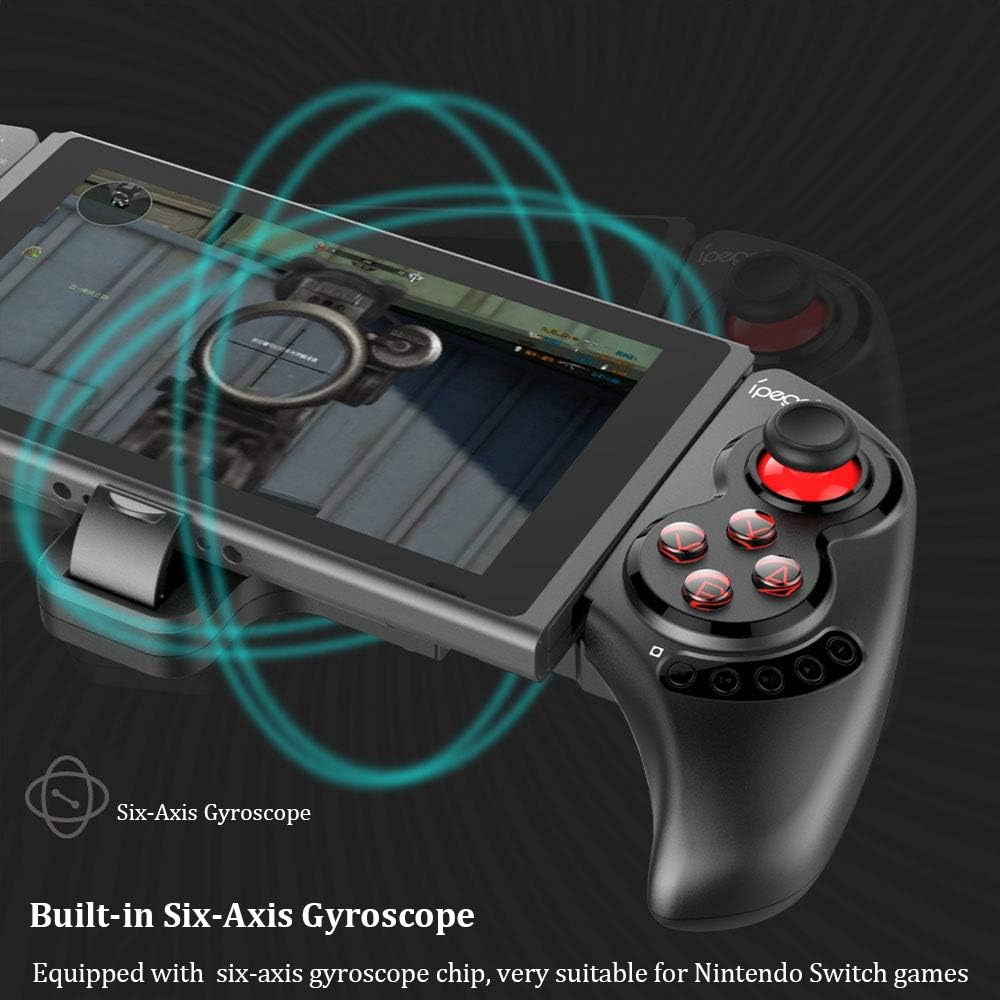
Figure 3: Illustration highlighting the built-in six-axis gyroscope for motion control.

Figure 4: Illustration demonstrating the dual motor vibration feature for haptic feedback.

Figure 5: The telescopic rod's adjustable range (130-280mm) and compatibility with Switch Mobile Device, Android Phone, and PC Tablet.

Figure 6: Detail of the controller's ergonomic structure designed for comfortable hand feeling.
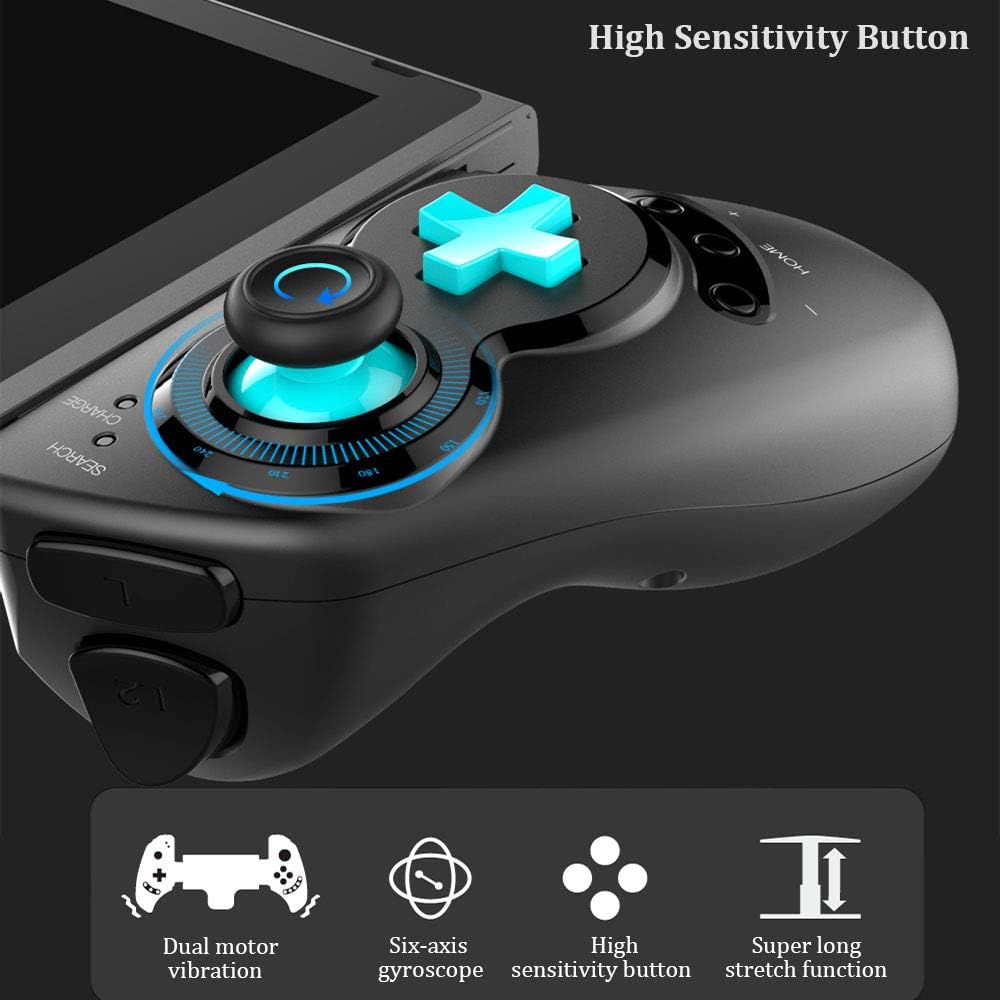
Figure 7: Highlighting the high sensitivity buttons and other key features like dual motor vibration, six-axis gyroscope, and super long stretch function.
סעטאַפּ
Before using your IPEGA Wireless Switch Controller, ensure it is adequately charged. Connect the included USB cable to the controller's charging port and to a USB power source (e.g., computer, USB wall adapter). The charge indicator will show charging status.
אַפּערייטינג מאָדעס
N-Switch Connection Mode
- ערשטער מאָל פּערינג:
- Turn on your Nintendo Switch Console.
- From the HOME Menu, navigate to קאָנטראָללער, דעמאָלט אויסקלייַבן טוישן גריפּ און אָרדער.
- On the IPEGA controller, press and hold down the "ב" + "היים" buttons simultaneously for 2 seconds. The SEARCH indicators on the controller will flash quickly.
- Once successfully paired, the indicators will turn on solid. Press "A" on the controller when prompted to confirm.
- שייַעך-פּאַירינג:
- דריקן און האַלטן אַראָפּ די "היים" button for 2 seconds to turn on the controller.
- The SEARCH indicator will flash slowly, indicating it's in re-pair mode. The controller will automatically attempt to connect to the previously paired console.
- אַמאָל קאָננעקטעד, דריקן "A" when you're ready to play.
- וועקן-אַרויף קאָנטראָללער:
- If the controller is in sleep mode, press the "היים" קנעפּל צו וועקן עס אַרויף.
- It will automatically connect to the console.
- דרוק "A" when you're ready.
אַנדרויד מאָדע
- דריקן און האַלטן אַראָפּ די "Y" + "היים" buttons simultaneously for 2 seconds to turn on the controller. The SEARCH indicators will flash quickly.
- On your Android device, enable Bluetooth and search for available devices. Select "PG-SW029" צו פּאָר.
- Once successfully paired, the SEARCH indicator on the controller will turn on solid, indicating it has entered Android Mode.
- The controller supports standard Android HID games.
P3 Mode (PlayStation 3)
- דריקן און האַלטן אַראָפּ די "A" + "HOME" buttons simultaneously for 2 seconds to turn on the controller. The SEARCH indicators will flash quickly.
- Connect the controller to your P3 console using the provided USB cable. Press the "היים" button to initiate pairing.
- Once paired successfully, the corresponding SEARCH indicator will turn on solid, indicating the gamepad has entered P3 mode.
- You can then unplug the USB cable, and the controller will operate in wireless connection mode.
וישאַלט
- Keep the controller away from extreme temperatures, direct sunlight, and humid environments.
- פֿאַרמײַדט צו לאָזן פאַלן אָדער אויסשטעלן דעם קאָנטראָללער צו שטאַרקע קלאַפּן.
- Clean the controller with a soft, dry cloth. Do not use chemical solvents or abrasive cleaners.
- When not in use for extended periods, store the controller in a cool, dry place.
- Do not attempt to disassemble or modify the controller, as this will void the warranty and may cause damage.
טראָובלעשאָאָטינג
| פּראָבלעם | מעגלעך לייזונג |
|---|---|
| דער קאָנטראָללער צינדט זיך נישט אָן. | זיכער מאַכן אַז דער קאָנטראָללער איז גאָר אויפגעלאָדן. פֿאַרבינדט עס צו אַ מאַכט מקור מיטן USB קאַבל. |
| דער קאָנטראָללער קען זיך נישט צופּאַסן מיטן דעווייס. |
|
| אינפוט לעג אדער דיסקאנעקציע בעת גאַמעפּלייַ. |
|
| קנעפּלעך אדער דזשויסטיקס רעאַגירן נישט. |
|
ספּעסאַפאַקיישאַנז
| שטריך | דעטאַל |
|---|---|
| מאָדעל נומער | PG-SW029 |
| סאָרט | ipega |
| קאַנעקטיוויטי | ווירעלעסס (בלועטאָאָטה) |
| טראַנסמיסיע דיסטאַנסע | ≤ 26ft (8 meters) |
| באַטאַרייע קאַפּאַציטעט | 300 מאַה ליטהיום באַטערי |
| קעסיידערדיק באַניץ צייט | > 10 שעה |
| סטאַנדביי צייט | אַרויף צו 30 טעג |
| Telescopic Range | 130mm - 280mm (approx. 5.1 - 11 inches) |
| פּראָדוקט דימענשאַנז | 23.7 X 12.5 X 5.99 סענטימעטער (9.33 X 4.92 X 2.36 אינטשעס) |
| קאַמפּאַטאַבילאַטי | Nintendo Switch, PlayStation 3, Android Phones/Tablets, PC (Win 7/8/10) |

Figure 8: Detailed dimensions of the controller and its retail packaging.
פּעקל רשימה
די פאלגענדע זאכן זענען אַרייַנגערעכנט אין דיין פּראָדוקט פּעקל:
- Wireless Gamepad x1
- באַניצער מאַנואַל x1 (דאָס דאָקומענט)
- וסב קאַבלע x1
וואָראַנטי און שטיצן
For warranty information and technical support, please refer to the contact details provided by your retailer or visit the official IPEGA webזייטל. האַלט אייער קויף קוויטל ווי אַ באַווייַז פון קויפן פֿאַר וואָראַנטי קליימז.
If you encounter any issues not covered in this manual, please contact customer support for assistance.


