הקדמה
This manual provides detailed instructions for the installation, operation, maintenance, and troubleshooting of the ADVANTECH PS8-500FATX-GB 80+ Gold Flex ATX Power Supply. This power supply unit (PSU) is designed to deliver stable and efficient power to your system, featuring 500W output with 3.3V, 5V, 12V, and -12V outputs, and RoHS compliance.
זיכערקייַט אינפֿאָרמאַציע
Please read all safety instructions carefully before installing or operating the power supply. Failure to follow these instructions may result in electric shock, fire, or damage to the product and connected equipment.
- Ensure the power supply is disconnected from the AC power source before installation or maintenance.
- עפֿנט נישט די מאַכט־צושטעל casinז. הויך באַנדtage components inside pose a risk of electric shock.
- אינסטאלירט די מאַכט צושטעל אין אַ גוט-ווענטילאַטעד אָרט צו פאַרמייַדן איבערהיצונג.
- Use only the cables provided or approved by ADVANTECH for this power supply.
- דער פּראָדוקט איז דיזיינד בלויז פֿאַר דרינענדיק נוצן.
פּעקל אינהאַלט
באַשטעטיקן אַז אַלע זאכן זענען פאַראַן אין פּעקל:
- ADVANTECH PS8-500FATX-GB Power Supply Unit
- אַק מאַכט שנור
- מאַונטינג סקרוז
- באַניצער מאַנואַל (דעם דאָקומענט)
סעטאַפּ און ינסטאַלירונג
Follow these steps to properly install the power supply into your system:
- צוגרייטן אייער סיסטעם: Ensure your computer system is powered off and disconnected from the AC outlet. Open the computer case.
- אַראָפּנעמען אַלטע PSU (אויב אָנווענדלעך): Disconnect all cables from the old power supply. Unscrew and remove the old PSU from the chassis.
- אינסטאַלירן אַ נייע PSU: Carefully place the ADVANTECH PS8-500FATX-GB into the power supply bay of your computer case. Ensure the fan is facing the correct direction for optimal airflow (usually facing down or out of the case). Secure the PSU with the provided mounting screws.
- פֿאַרבינדן הויפּט מאַכט קייבאַלז:
- Connect the 20+4 pin ATX main power connector to the motherboard.
- Connect the 4+4 pin EPS/ATX 12V connector to the motherboard CPU power socket.
- פֿאַרבינדן פּעריפֿערישע קאַבלען: Connect SATA power connectors to hard drives, SSDs, and optical drives. Connect PCIe power connectors to graphics cards if required. Connect Molex connectors to other peripherals as needed.
- קאַבלע פאַרוואַלטונג: לייגט די קאַבלען אָרדנטלעך צו פֿאַרבעסערן די לופֿטפֿלוס און עסטעטיק.
- פֿאַרמאַכן דעם קעסטל און פֿאַרבינדן וועקסלשטראָם: Close your computer case. Connect the AC power cord to the power supply and then to a wall outlet or surge protector.
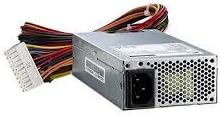
בילד 1: The ADVANTECH PS8-500FATX-GB 500W Flex ATX Power Supply, showing its compact form factor and various power connectors. This image illustrates the physical appearance of the unit and its attached cabling.
אַפּערייטינג ינסטראַקשאַנז
Once installed, operating the power supply is straightforward:
- מאַכט אויף: After connecting all necessary cables and the AC power cord, press the power button on your computer case. The power supply will automatically provide power to your system.
- מאַכט אַוועק: Shut down your computer through the operating system. The power supply will enter a low-power state. For complete power disconnection, switch off the power supply's main switch (if present) or unplug the AC power cord.
- מאָניטאָרינג: Modern motherboards and operating systems often provide tools to monitor power supply voltages. Refer to your motherboard manual for details.
וישאַלט
געהעריגע אויפהאלטונג גאראנטירט די לאנגעוויטי און אפטימאלע פערפארמאנס פון אייער מאכט צושטעל:
- שטויב רייניקונג: Periodically clean the power supply fan and vents to prevent dust buildup, which can impede airflow and cause overheating. Use compressed air for this purpose, ensuring the system is powered off and unplugged.
- קאַבלע דורכקוק: Regularly check all power cables for any signs of wear, fraying, or damage. Replace damaged cables immediately.
- ינווייראַנמענאַל טנאָים: Operate the power supply within its specified temperature and humidity ranges. Avoid extreme conditions.
טראָובלעשאָאָטינג
אויב איר טרעפט פּראָבלעמען מיט אייער מאַכט צושטעלן, זעט די פאלגענדע געוויינטלעכע פּראָבלעמען און לייזונגען:
| פּראָבלעם | מעגלעך סיבה | לייזונג |
|---|---|---|
| סיסטעם טוט נישט מאַכט אויף. |
|
|
| סיסטעם צינדט זיך אן אבער שליסט זיך אפ גלייך. |
|
|
| Unusual noises from PSU. |
|
|
If the problem persists after trying these solutions, contact ADVANTECH customer support for further assistance.
ספּעסאַפאַקיישאַנז
| שטריך | דעטאַל |
|---|---|
| מאָדעל | PS8-500FATX-GB |
| סאָרט | ADVANTECH |
| פאָרם פאַקטאָר | פלעקס עטיק |
| רעזולטאַט וואָסtage | 500 וואטס |
| עפעקטיווקייַט שאַץ | 80+ Gold |
| רעזולטאַט חלקtages | 3.3V, 5V, 12V, -12V |
| קאַנעקטער טיפּ | ATX (20+4 pin, 4+4 pin EPS/ATX 12V, SATA, PCIe, Molex) |
| העסקעם | RoHS |
| פּונקט וואָג | 12.99 פונט |
| פאַבריקאַנט | Advantech Co |
| ASIN | B08SMRH5V8 |
| UPC | 040048829683 |
וואָראַנטי און שטיצן
ADVANTECH products are designed for reliability and performance. For warranty information and technical support, please refer to the official ADVANTECH webפּלאַץ אָדער קאָנטאַקט זייער קונה סערוויס אָפּטיילונג.
- באַאַמטער Webפּלאַץ: www.vantech.com
- קונה שטיצן: זעט די "קאָנטאַקט אונדז" סעקציע אויף דער באַאַמטער webזייטל פֿאַר רעגיאָנאַלע שטיצע דעטאַילס.
ביטע האַלטן דיין דערווייַז פון קויפן פֿאַר וואָראַנטי קליימז.


