הקדמה
This manual provides essential information for the proper installation, operation, and maintenance of your Zebronics Zeb-D370S DVD Player. Please read this manual thoroughly before using the device to ensure safe and efficient operation. Keep this manual for future reference.
וויכטיק סאַפעטי אינפֿאָרמאַציע
- שטעלט נישט אויס דעם אפאראט צו רעגן אדער פייכטקייט כדי צו פארמיידן פייער אדער עלעקטרישע שאק.
- נישט עפענען דעם סיasinז. איבערגעבן אלע סערוויסינג צו קוואַליפֿיצירטע פּערסאָנעל.
- זיכער מאַכן אַז די ווענטילאַציע איז געהעריק אַרום דעם אַפּאַראַט. נישט פאַרשפּאַרן די ווענטילאַציע עפענונגען.
- Use only the power adapter supplied with the unit or specified by the manufacturer.
- פֿאַרמײַדן צו שטעלן דעם אַפּאַראַט אויף נישט־סטאַבילע ייבערפֿלאַכן.
- טרענט אפ דעם עלעקטרישן שנור בעת בליץ-שטורעמס אדער ווען עס ווערט נישט גענוצט פאר לאנגע צייטן.
פּעקל אינהאַלט
באַשטעטיקן אַז אַלע זאכן זענען פאַראַן אין פּעקל:
- Zebronics Zeb-D370S DVD Player Unit
- ווייַט קאָנטראָל
- אב קאַבלע
- מאַכט קאַבלע
- ינסטראַקשאַנז מאַנואַל
פּראָדוקט איבערview
The Zebronics Zeb-D370S is a versatile DVD player featuring a built-in stereo speaker and amplifier, HDMI, USB, and SD card support, and dual karaoke microphone inputs. It supports multiple formats and offers 5.1 channel, coaxial, and optical audio outputs.
Front Panel Controls and Ports
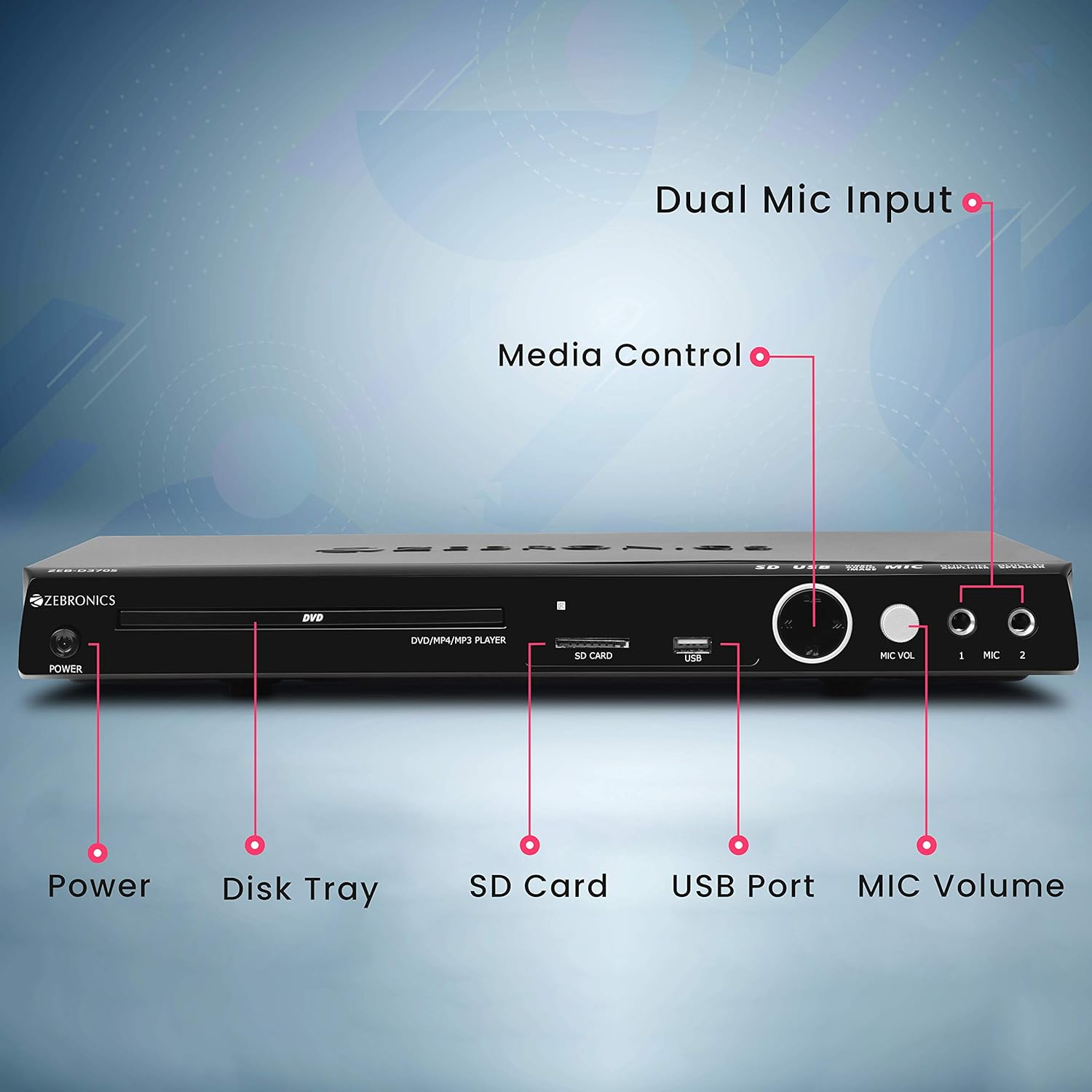
Front panel of the Zebronics Zeb-D370S DVD Player, showing the Power button, Disk Tray, SD Card slot, USB Port, MIC Volume control, and two Microphone inputs (MIC 1, MIC 2).
- מאַכט קנעפּל: טורנס די אַפּאַראַט אויף אָדער אַוועק.
- Disk Tray: For inserting DVDs, CDs, VCDs, and SVCDs.
- SD Card Slot: פֿאַר פּלייינג מידיאַ fileס פון אַ סד קאָרט.
- וסב פּאָרט: פֿאַר פּלייינג מידיאַ fileס פון אַ וסב פאָר.
- MIC באַנד: אַדזשאַסטירט דעם באַנד פֿון די פֿאַרבונדענע מיקראָפֿאָנען.
- מיק 1 און מיק 2: Inputs for connecting microphones for karaoke.
- מעדיע קאָנטראָל קנעפּלעך: Play/Pause, Stop, Skip, etc.
דערציען פּאַנעל קאַנעקשאַנז

Rear panel of the Zebronics Zeb-D370S DVD Player, detailing the Coaxial Output, Optical Output, 5.1 Channel Output, HDMI port, Composite video output, Component video output, S-Video output, and Ext-Audio Output.
- HDMI רעזולטאַט: For high-definition video and audio connection to a TV or display.
- קאָמפּאָסיטע ווידעא רעזולטאַט: Standard definition video output.
- קאָמפּאָנענט ווידעאָ אַרויסגאַנג: Higher quality analog video output (YPbPr).
- S-ווידעא אויסגאַנג: Improved analog video output.
- Digital Audio Output (Optical & Coaxial): For connecting to external audio receivers or sound systems.
- Analog 5.1 Channel Output: For connecting to a 5.1 channel speaker system.
- Ext-Audio Output: Additional audio output connections.
- רעדנער רעזולטאַט: Terminals for connecting external speakers, utilizing the built-in ampליפער.

דערציען view of the Zebronics Zeb-D370S DVD Player highlighting the built-in amplifier, built-in speaker, and speaker output terminals.
סעטאַפּ אינסטרוקציעס
1. מאַכט קאַנעקשאַן
- Ensure the DVD player is placed on a stable, flat surface with adequate ventilation.
- Connect the power cable to the AC input on the rear of the DVD player.
- Plug the other end of the power cable into a standard electrical outlet (110V - 260V AC).
2. Video Connection to TV/Display
קלייַבן איינער פון די פאלגענדע קשר מעטהאָדס:
- HDMI (Recommended for best quality): Connect an HDMI cable from the HDMI output on the DVD player to an HDMI input on your TV.
- קאָמפּאָנענט ווידעא: Connect component video cables (Red, Green, Blue) from the DVD player's component outputs to the corresponding inputs on your TV.
- קאָמפּאָסיטע ווידעא: Connect a composite video cable (Yellow) from the DVD player's composite output to the yellow video input on your TV.
- S- ווידעא: Connect an S-Video cable from the DVD player's S-Video output to the S-Video input on your TV.
3. אַודיאָ קאַנעקשאַן
קלייַבט איינע פון די פאלגענדע אַודיאָ פֿאַרבינדונג מעטאָדן:
- הדמי: If using HDMI for video, audio will also be transmitted via the HDMI cable.
- 5.1 Channel Analog Output: Connect RCA cables from the 5.1 channel outputs (Front Left, Front Right, Center, Subwoofer, Surround Left, Surround Right) on the DVD player to a compatible 5.1 channel ampליפיער אָדער רעדנער סיסטעם.
- דיגיטאַל אַודיאָ (אָפּטיש/קאָאַקסיאַל): Connect an optical or coaxial cable from the respective output on the DVD player to a digital audio input on your amplifier or home theater system for surround sound.
- Built-in Speaker Output: If using the built-in speakers, ensure no external speakers are connected to the 5.1 channel outputs unless desired.
4. Microphone Connection (Optional)
- Plug your microphones into the MIC 1 and/or MIC 2 inputs on the front panel.
- Adjust the MIC Volume knob to control microphone audio levels.
אַפּערייטינג ינסטראַקשאַנז

Zebronics Zeb-D370S DVD Player with a disc inserted, remote control, and a visual representation of content playing on a screen, illustrating its multimedia capabilities.
1. דיסק ווידערשפּיל
- דרוק די מאַכט button to turn on the DVD player.
- דרוק די עפענען / נאָענט button (usually on the remote or front panel) to open the disc tray.
- Place a compatible disc (DVD Video, DVD+RW/-RW/+R/-R, Dual Layer Disc, CD Audio, CD-R/-RW, VCD, SVCD) onto the disc tray with the label side facing up.
- דרוק די עפענען / נאָענט button again to close the tray. The player will automatically begin playback or display a menu.
- Use the remote control for playback functions such as Play, Pause, Stop, Fast Forward, Rewind, and Chapter Skip.
2. USB/SD Media Playback
- Insert a USB drive into the USB port or an SD card into the SD card slot on the front panel.
- The player should automatically detect the media and display a menu to browse files. If not, select the USB or SD source using the remote control's מקור or אַרייַנשרייַב קנעפּל.
- נאַוויגירן דורך דיין files (VOB, MP4, DIVX, AVI, MPEG-1, MPEG-2, 3GP, MP3, WMA, AAC, JPEG, TXT) using the remote control and press שפּיל צו אָנהייבן פּלייבאַק.
3. קאַראַאָקע פונקציע
- Connect one or two microphones to the MIC 1 and MIC 2 inputs.
- Play a karaoke disc or a media file with instrumental tracks.
- Adjust the MIC Volume knob on the front panel to control the microphone audio level.
4. אַוואַנסירטע פאַנגקשאַנז
- CD Ripping: Convert audio CDs to digital formats (refer to on-screen menu for options).
- Picture Slideshow: View JPEG images from disc, USB, or SD card as a slideshow.
- פּראָגרעסיוו סקאַן: Provides a smoother, flicker-free image on compatible displays.
- Zoom IN/OUT: Magnify or reduce the displayed image during playback.
- High Speed Search: Quickly scan through disc or media content.
- פּאַרענטאַל לאַק: Restrict playback of certain content based on ratings.
- Instant Replay: Jump back a few seconds during playback.
- Disc Resume: Resume playback from where it was last stopped on a disc.
וישאַלט
- רייניקונג די אַפּאַראַט: Use a soft, dry cloth to clean the exterior of the DVD player. Do not use liquid cleaners or abrasive materials.
- דיסק באַהאַנדלונג: Handle discs by their edges. Keep them clean and free of scratches. Use a soft, lint-free cloth to wipe discs from the center outwards.
- ווענטילאַטיאָן: ענשור אַז די ווענטאַליישאַן אָופּאַנינגז זענען נישט אפגעשטעלט צו פאַרמייַדן אָוווערכיטינג.
טראָובלעשאָאָטינג
If you encounter issues with your DVD player, refer to the table below for common problems and solutions:
| פּראָבלעם | מעגלעך סיבה | לייזונג |
|---|---|---|
| קיין מאַכט | שטראָם קאַבל נישט פארבונדן; שטראָם אַוטלעט אַרבעט נישט | קאָנטראָלירט די פֿאַרבינדונג פֿון עלעקטרישן קאַבל; פּרוּווט אַן אַנדער אַוטלעט |
| קיין ווידעא רעזולטאַט | Incorrect video cable connection; Incorrect input selected on TV | Ensure video cables are securely connected; Select the correct input source on your TV (e.g., HDMI 1, AV) |
| קיין אַודיאָ רעזולטאַט | Incorrect audio cable connection; TV/amplifier volume too low; Mute activated | Check audio cable connections; Increase volume; Deactivate mute function |
| די דיסק איז נישט פּלייינג | Disc is dirty or scratched; Disc format not supported; Disc inserted incorrectly | Clean the disc; Ensure disc is compatible; Insert disc with label side up |
| USB/SD media not detected | USB drive/SD card not inserted correctly; Incompatible file format; Corrupted media | Reinsert USB/SD; Check supported file formats; Try a different USB/SD device |
ספּעסאַפאַקיישאַנז

Dimensions of the Zebronics Zeb-D370S DVD Player: 360mm (width), 220mm (depth), and 50mm (height).
| שטריך | דעטאַל |
|---|---|
| מאָדעל נאָמען | Zeb D370S |
| סאָרט | זעבראָניקס |
| פּראָדוקט דימענשאַנז | 28 x 39 x 82 mm (1.4 kg) |
| האַכלאָטע | 1920 x 1080 (Supported resolutions: 480i/576i/480p/576p/720p/1080i/1080p) |
| ספּעציעלע פֿעיִקייטן | Surround Sound, Built-in Amplifier, Built-in Stereo Speaker, Karaoke Mic Input |
| אַודיאָ רעזולטאַט מאָדע | Stereo, Surround (2CH / 5.1CH / Virtual Surround Sound) |
| רעדנער סוראַונד סאַונד קאַנאַל קאָנפיגוראַציע | 5.1 |
| שטיצט אַודיאָ פֿאָרמאַטירונגען | Dolby Digital, MP3, WMA, AAC |
| Video Playback System | NTSC / PAL / AUTO |
| קאַנעקטער טיפּ | HDMI, USB, SD Slot, MIC 1 & MIC 2, Composite, Component, S-Video, Digital Audio Output (Optical & Coaxial), Analog 5.1Ch Output, Ext-Audio Output x 2 |
| Media Type (Playback Disc) | DVD Video, DVD+RW/-RW/+R/-R, Dual Layer Disc, CD Audio, CD-R/-RW, VCD, SVCD |
| מעדיע Fileס שטיצט | VOB, MP4, DIVX, AVI, MPEG-1, MPEG-2, 3GP, MP3, WMA, AAC, JPEG, TXT |
| אַפּערייטינג וואָלtage | 110V - 260V וועקסלשטראָם |
| פאַנגקשאַנז | CD Ripping, Picture SlideShow, Progressive scan, Zoom IN/OUT, High speed search, Parental lock, Instant replay, Disc resume |
וואָראַנטי און שטיצן
For warranty information, technical support, or service inquiries, please refer to the warranty card included with your product or visit the official Zebronics webזייטל. פרובירט נישט צו פאררעכטן דעם אפאראט אליין.


