1. הקדמה
The Chieftec MUB-3003C is a versatile USB hub designed for installation into a standard 3.5-inch external drive bay of a desktop computer. It expands your system's connectivity by providing one USB 3.2 Type-C port and two USB 3.0 Type-A ports, offering high-speed data transfer capabilities directly from your PC's front panel.
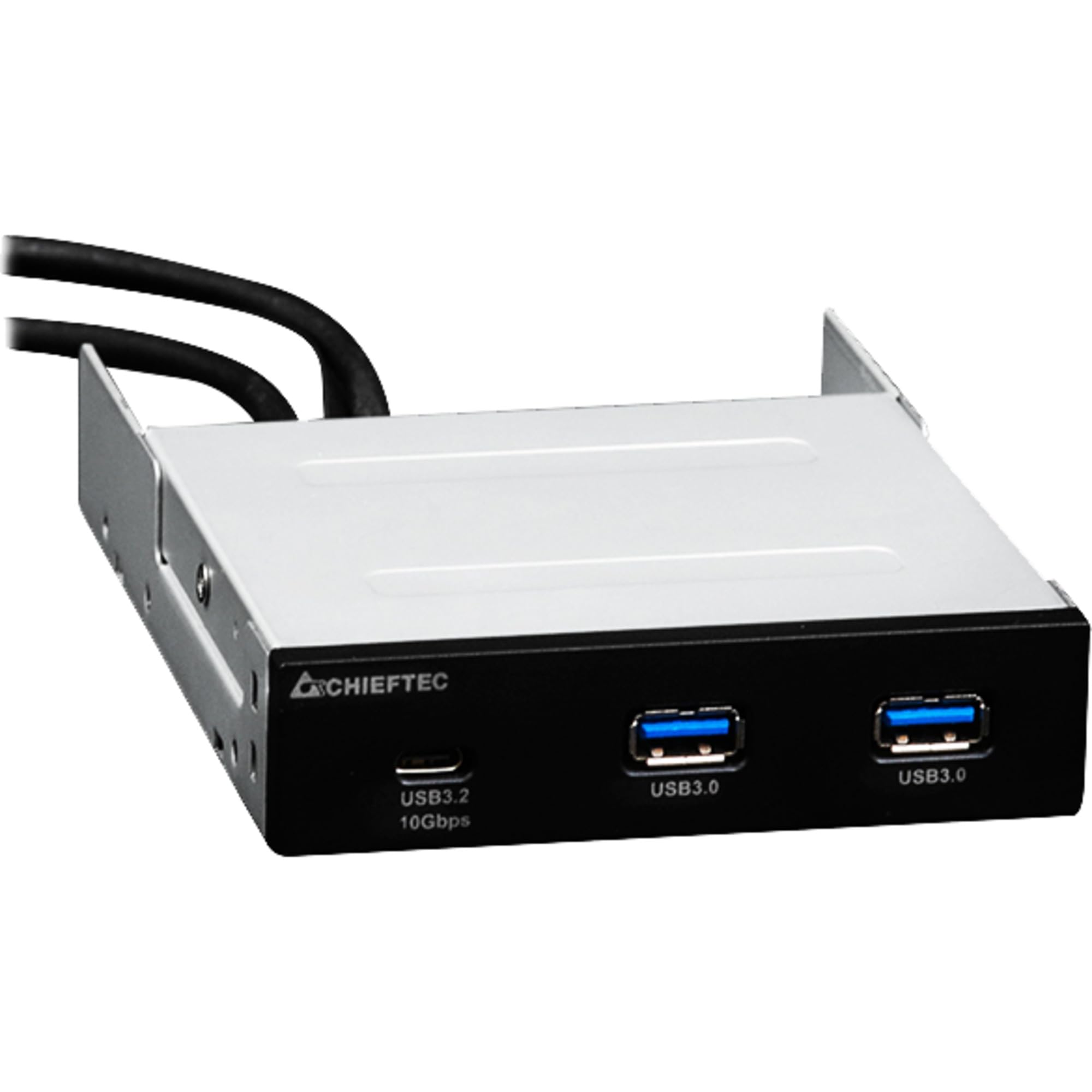
בילד 1.1: פראָנט view of the Chieftec MUB-3003C USB Hub, showing the USB 3.2 Type-C and two USB 3.0 Type-A ports.
2. זיכערקייַט אינפֿאָרמאַציע
Please read and follow these safety instructions carefully to prevent damage to the device or injury to yourself.
- שטעלט נישט אויס דעם אפאראט צו פייכטקייט, עקסטרעמע טעמפעראטורן, אדער דירעקטער זונשייַן.
- פרובירט נישט צו עפענען אדער מאדיפיצירן דעם אפאראט. לאָזט איבער אלע סערוויסעס צו קוואַליפֿיצירטע פּערסאָנעל.
- Ensure proper grounding of your computer system before installation.
- Disconnect power from your computer before installing or removing the USB hub.
- האַלטן די מיטל אַוועק פון קינדער.
3. פּעקל אינהאַלט
באַשטעטיקן אַז אַלע זאכן זענען פאַראַן אין דיין פּעקל:
- Chieftec MUB-3003C USB Hub
- Internal USB 3.0 Header Cable
- Mounting Screws (typically included with PC cases or the hub)

Image 3.1: The Chieftec MUB-3003C USB Hub shown with its retail packaging.
4. סעטאַפּ און ייַנמאָנטירונג
Follow these steps to install the Chieftec MUB-3003C USB Hub into your computer system.
- צוגרייטן אייער סיסטעם: Power off your computer and disconnect the power cable from the wall outlet. Open your computer case to access the internal components.
- Locate a 3.5-inch Bay: Identify an available 3.5-inch external drive bay in your computer case. This is typically found at the front of the case.
- ינסטאַלירן די הוב: Slide the MUB-3003C USB Hub into the chosen 3.5-inch bay from the front of the case until it is flush with the front panel. Secure the hub using the appropriate mounting screws on both sides.
- פֿאַרבינדן אינערלעכע קאַבלען:
- Connect the internal USB 3.0 header cable from the MUB-3003C to an available USB 3.0 (or USB 3.1 Gen1) header on your motherboard. This header is usually blue and labeled 'USB3' or 'F_USB3'.
- באַמערקונג: The MUB-3003C typically draws power directly from the USB 3.0 header. No separate SATA power connection is usually required for this model.
- פֿאַרמאַכן דעם קעסטל און אָנצינדן: Once all connections are secure, close your computer case, reconnect the power cable, and power on your computer. The system should automatically detect the new USB hub.

בילד 4.1: זייט view of the Chieftec MUB-3003C USB Hub, illustrating the mounting bracket and the internal USB 3.0 header cable connection.
5. אַפּערייטינג ינסטרוקטיאָנס
Using the Chieftec MUB-3003C USB Hub is straightforward:
- פאַרבינדן דיווייסאַז: Plug your USB devices (e.g., flash drives, external hard drives, card readers, smartphones) into the available ports on the front of the hub.
- USB 3.2 טיפּ-C פּאָרט: This port supports data transfer speeds up to 10 Gbps (USB 3.1 Gen2). Use it for devices that require the highest speed and utilize a USB-C connector.
- USB 3.0 טיפ-א פּאָרטן: These two ports support data transfer speeds up to 5 Gbps (USB 3.1 Gen1). They are compatible with standard USB-A devices.
- צאַפּן און שפּיל: The hub is plug-and-play compatible, meaning no additional drivers are typically required for most operating systems.

Image 5.1: Close-up of the Chieftec MUB-3003C USB Hub's front panel, highlighting the USB 3.2 Type-C and USB 3.0 Type-A ports.
6. וישאַלט
To ensure the longevity and optimal performance of your USB hub:
- רייניקונג: Use a soft, dry cloth to gently wipe the exterior of the hub. Avoid using liquid cleaners or abrasive materials.
- סוויווע: Keep the hub installed in a well-ventilated area within your PC case to prevent overheating.
- פֿאַרבינדונגען: Periodically check that all internal and external connections are secure.
7. טראָובלעשאָאָטינג
If you encounter issues with your Chieftec MUB-3003C USB Hub, refer to the following common problems and solutions:
- מיטל ניט דערקענט:
- Ensure the internal USB 3.0 header cable is securely connected to both the hub and the motherboard.
- Try connecting the USB device directly to a motherboard port to verify the device itself is functional.
- Check your motherboard's BIOS/UEFI settings to ensure USB ports are enabled.
- לאַנגזאַמע דאַטן טראַנספער גיכקייטן:
- Ensure you are using USB 3.0/3.2 compatible devices and cables. Connecting a USB 2.0 device will result in USB 2.0 speeds.
- Verify that the hub is connected to a USB 3.0 or higher header on your motherboard.
- Avoid connecting multiple high-bandwidth devices simultaneously if you experience performance degradation.
- No Power to USB Devices:
- Confirm the internal USB 3.0 header cable is fully seated on the motherboard.
- Some high-power USB devices may require an externally powered hub. This hub draws power from the motherboard's USB header, which has power limitations.
8. ספּעסאַפאַקיישאַנז
| שטריך | באַשרייַבונג |
|---|---|
| סאָרט | טשיףטעק |
| מאָדעל נומער | MUB-3003C |
| ייַזנוואַרג צובינד | וסב |
| קאַמפּאַטאַבאַל דעוויסעס | Card Readers, Desktops, USB Flash Drives |
| גאַנץ וסב פּאָרץ | 3 |
| פּאָרט קאָנפיגוראַטיאָן | 1x USB 3.2 Type-C (10 Gbps), 2x USB 3.0 Type-A (5 Gbps) |
| Installation Bay | 3.5-inch external drive bay |
| פּונקט וואָג | 10.6 אונסעס |
9. וואָראַנטי און שטיצן
Chieftec products are designed for reliability and performance. For warranty information, technical support, or service inquiries, please refer to the official Chieftec webזייטל אדער קאָנטאַקט אייער לאקאלן הענדלער. האַלט אייער קויפן-באַווייַז פֿאַר וואָראַנטי-קליימז.
אָנליין רעסורסן: For the latest drivers, FAQs, and support documentation, visit the official Chieftec support page.


