הקדמה
This manual provides detailed instructions for the safe and effective operation of the AOPUTTRIVER AP-7200APP Professional True-RMS Clamp Meter. This device is designed for measuring AC/DC current, AC/DC voltage, resistance, capacitance, continuity, and temperature, and features non-contact voltage (NCV) detection and Bluetooth connectivity for mobile app integration.
זיכערקייַט אינפֿאָרמאַציע
Always adhere to safety precautions when using electrical testing equipment. This device complies with IEC 61010-1, CAT III 600V safety standards and features double insulation for enhanced protection.
- נישט איבערשרייטן די מאַקסימום אַרייַנגאַנג ווערטן ספּעציפֿיצירט פֿאַר יעדן מעסטונג קייט.
- זייט זייער פארזיכטיג ווען איר ארבעט מיט לעבעדיגע קרייזן.
- Ensure the test leads are in good condition and properly connected before use.
- Do not operate the meter if it appears damaged or if the casinג איז אָפֿן.
- Refer to local and national safety codes for proper electrical work procedures.
פּעקל אינהאַלט
באַשטעטיקט אַז אַלע זאכן וואָס זענען אויסגערעכנט אונטן זענען אַרייַנגערעכנט אין אייער פּעקל:
- AOPUTTRIVER AP-7200APP Clamp מעטער
- טעמפּעראַטור פּראָבע
- Test Leads (Red/Black)
- Batteries (AAA type, typically 2)
- ינסטראַקשאַנז מאַנואַל

Image: Contents of the AP-7200APP package, including the clamp meter, temperature probe, test leads, batteries, and instruction manual.
פּראָדוקט איבערview
Familiarize yourself with the components of the AP-7200APP Clamp מעטער:

Image: Labeled diagram of the AP-7200APP Clamp Meter, highlighting its main components and controls.
- Clamp קין: Opens 26mm to enclose conductors for current measurement.
- Jaw-opening Handle: געניצט צו עפענען און פארמאכן די קלamp דזשאָז.
- NCV Detection Area: Located at the top, used for non-contact voltagE דיטעקשאַן.
- Lamp ליכט: Illuminates the measurement area. Press the "HOLD" key for over 2 seconds to activate.
- ראָטאַרי סוויטש: סעלעקטירט מעסטונג פונקציעס און ראַנגעס.
- LCD ווייַז: 6000 counts display, showing measurement values and function symbols.
- האַלטן קנעפּל: Freezes the current display reading. Press for >2 seconds to activate backlight.
- SEL Key: Used to change measurement modes within a function (e.g., AC/DC, Diode/Continuity/Capacitance).
- מאַקס/מין קנעפּל: Records maximum and minimum measured values. Press for >2 seconds to exit.
- Hz/פליכט שליסל: Selects frequency or duty cycle measurement.
- REL שליסל: אַקטיוויזירט רעלאַטיווע מעסטונג מאָדע.
- COM אַרייַנשרייַב דזשאַק: Common terminal for test leads and temperature probe.
- VΩHz°C°F Input Jack: אַרייַנשרייַב וואָקזאַל פֿאַר וואָלtagע, קעגנשטעל, אָפטקייט, קאַפּאַסיטאַנס, און טעמפּעראַטור מעסטונגען.
סעטאַפּ
1. באַטאַרייע ייַנמאָנטירונג
The meter requires two AAA batteries. Open the battery compartment cover on the back of the device, insert the batteries according to the polarity indicators, and securely close the cover. A low battery indicator will appear on the LCD when replacement is needed.
2. Bluetooth Connection (AiLink App)
The AP-7200APP can connect to a mobile device via Bluetooth for remote monitoring and data analysis. The effective control distance is approximately 10-15 meters.
- אראפקאפיע די אַפּ: Scan the QR code provided in the manual or search for "AiLink" in the Google Play Store (for Android) or Apple App Store (for iOS). Download and install the application. You can also download it from aicare.net.cn/app/ailink/download/.
- עפֿענען די אַפּ: Launch the AiLink application on your mobile phone.
- פאַרבינדן צו מיטל: Within the app, press the "ADD" or "Connect" button to search for nearby devices. Select the "Clamp Meter" from the list to establish a connection.
- מאָניטאָר דאַטן: Once connected, the app will display real-time measurement data from the clamp meter. You can analyze and save this data.

Image: Visual guide for Bluetooth connection and app usage, showing the AiLink app interface.
אַפּערייטינג ינסטראַקשאַנז
Before any measurement, ensure the rotary switch is set to the OFF position when not in use.
1. AC/DC קראַנט מעסטונג (Clamp)
- שטעלן די דריי - באַשטימען צו די 60א~ or 400א~ position for AC current, or 60א= or 400א= for DC current.
- Press the jaw-opening handle to open the clamp דזשאָז.
- שליסט איין איין קאנדוקטאר מיטן קל.amp jaws. Ensure the conductor is centered within the jaws for accurate readings.
- לייענען די קראַנט ווערט אויף די לקד אַרויסווייַזן.
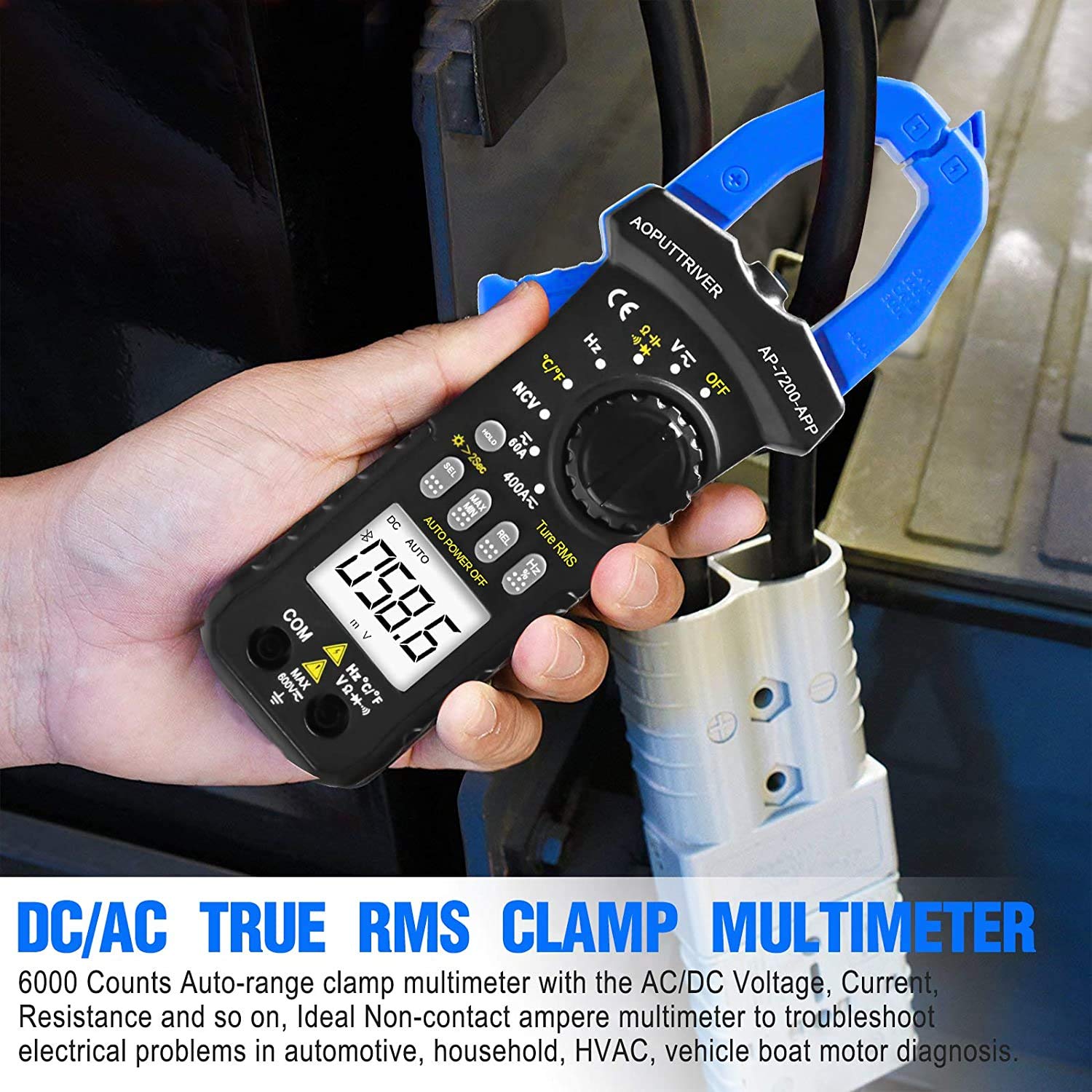
Image: Demonstrating current measurement using the clamp jaws on an electrical cable.
2. אַק / דק חלקtagE מעזשערמאַנט
- Insert the red test lead into the VΩHz°C°F jack and the black test lead into the COM jack.
- שטעלן די דריי - באַשטימען צו די V~ (AC באַנדtage) אָדער V= (DC Voltagה) שטעלע.
- פֿאַרבינדט די טעסט־לידער פּאַראַלעל צום קרייז אָדער קאָמפּאָנענט וואָס ווערט געטעסט.
- לייענען דעם חלקtagE ווערט אויף די לקד אַרויסווייַזן.
3. Resistance, Capacitance, Continuity, Diode Measurement
- Insert the red test lead into the VΩHz°C°F jack and the black test lead into the COM jack.
- שטעלן די דריי - באַשטימען צו די Ω שטעלע.
- דרוק די SEL key to cycle through Resistance (Ω), Continuity (buzzer icon), Diode (diode icon), and Capacitance (F) modes.
- Connect the test leads to the component. For resistance and capacitance, ensure the component is de-energized.
- Read the measurement on the LCD. For continuity, a beep indicates a continuous circuit.
4. ניט-קאָנטאַקט וואָלtagE (NCV) דעטעקשאַן
- שטעלן די דריי - באַשטימען צו די NCV שטעלע.
- Place the NCV detection area (top of the clamp jaws) near the conductor or outlet to be tested.
- אויב AC voltage ≥ 90V RMS is detected, the lamp light will illuminate, and an audible alarm will sound.

Image: Demonstrations of temperature measurement, NCV detection, continuity testing, and current measurement.
5. טעמפּעראַטור מעזשערמאַנט
- Insert the temperature probe into the VΩHz°C°F and COM jacks, observing polarity.
- שטעלן די דריי - באַשטימען צו די ° C / ° F שטעלע.
- שטעלט די שפּיץ פֿון דער טעמפּעראַטור פּראָבע אויף אָדער לעבן דעם אָביעקט וועמענס טעמפּעראַטור זאָל געמאָסטן ווערן.
- Read the temperature value on the LCD display. Press the SEL key to switch between Celsius (°C) and Fahrenheit (°F).

Image: Temperature measurement using the included probe, with display examples in Celsius and Fahrenheit.
6. באַקלייט פונקציע
To activate the backlight for improved visibility in dim environments, press and hold the האַלטן key for more than 2 seconds. Press and hold again for 2 seconds to turn it off.

בילד: די קל.amp meter's backlight feature in action, enhancing readability in low-light conditions.
וישאַלט
1. רייניקונג
ווישט אויס דעם מעטער'ס קasinג מיט אַדamp cloth and mild detergent. Do not use abrasives or solvents. Ensure the meter is completely dry before storage or use.
2. באַטערי פאַרבייַט
When the low battery indicator appears on the display, replace the batteries promptly to ensure accurate measurements. Refer to the "Battery Installation" section for instructions.
3. סטאָרידזש
אויב דער מעטער ווערט נישט גענוצט פאר א לענגערע צייט, נעמט ארויס די באַטעריעס כדי צו פארמיידן ליקאַדזש. האַלט דעם מיטל אין א קיל, טרוקן אָרט, אַוועק פון דירעקט זונשייַן און עקסטרעמע טעמפּעראַטורן.
טראָובלעשאָאָטינג
| פּראָבלעם | מעגלעך סיבה | לייזונג |
|---|---|---|
| דער מעטער גייט נישט אן. | טויטע אדער נישט ריכטיק אינסטאלירטע באַטעריעס. | קאָנטראָלירט די פּאָלאַריטעט פון די באַטעריעס; פאַרבייטן די באַטעריעס. |
| ומפּינקטלעך רידינגז. | Incorrect function selected; poor test lead connection; external interference. | Verify rotary switch setting; ensure secure test lead connection; move away from strong electromagnetic fields. |
| בלועטאָאָטה קשר פיילז. | Meter too far from phone; Bluetooth off on phone; app not installed correctly. | Ensure meter is within 10-15m range; enable Bluetooth on phone; reinstall AiLink app. |
| NCV detection not working. | Not in NCV mode; voltage ונטער שוועל. | Set rotary switch to NCV; ensure voltage is ≥ 90V AC RMS. |
ספּעסאַפאַקיישאַנז
| שטריך | באַשרייַבונג |
|---|---|
| מאָדעל נומער | AP-7200APP |
| ווייַז | 6000 קאַונטס על-סי-די |
| AC VoltagE ראַנגע | קסנומקסוו ~ קסנומקסוו |
| DC VoltagE ראַנגע | 600מוו ~ 600וו |
| אַק קראַנט ראַנגע | 60A ~ 400A |
| דק קראַנט ראַנגע | 60A ~ 400A |
| קעגנשטעל ראַנגע | 600Ω ~ 60MΩ |
| קאַפּאַסיטאַנס ראַנגע | 6nF ~ 60mF (Inferred from 6000 counts and common multimeter ranges) |
| טעמפּעראַטור ראַנגע | -20°C ~ 1000°C |
| NCV Detection Threshold | ≥ 90V AC RMS |
| זיכערקייַט סטאַנדאַרד | IEC 61010-1, CAT III 600V |
| מאַכט מקור | באַטאַרייע פּאַוערד |
| דימענשאַנז | 207 X 75 X 37 מם |
| פּונקט וואָג | 390 גראַמז |
| בלועטאָאָטה קייט | 10-15 ם (בעערעך) |
וואָראַנטי און שטיצן
AOPUTTRIVER provides a 48-חודש פּראָדוקט גאַראַנטיע for the AP-7200APP Clamp Meter. For any product issues or technical assistance, please contact our customer service. We offer 7/24 קונה שטיצע to resolve your concerns promptly.
Contact information can typically be found on the product packaging or the official AOPUTTRIVER webפּלאַץ.