פּראָדוקט איבערview
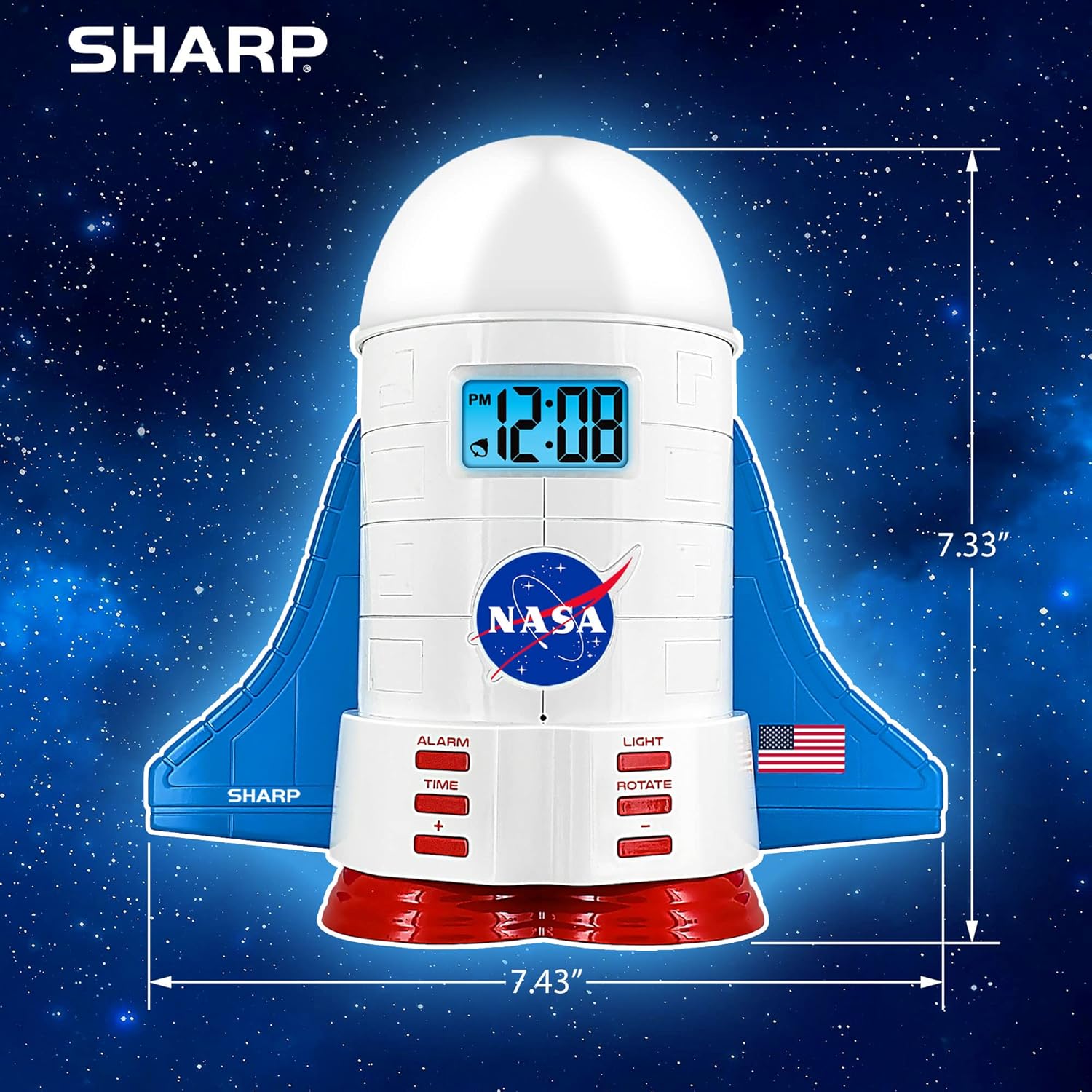
This manual provides instructions for the Sharp NASA Space Shuttle Night Light Alarm Clock. This device combines an alarm clock with a space-themed nightlight and projection feature, designed to enhance a child's bedroom environment.

סעטאַפּ
ונפּאַקקינג
- קערפאַלי באַזייַטיקן אַלע קאַמפּאָונאַנץ פון די פּאַקקאַגינג.
- באַשטעטיקט אַז אַלע זאכן וואָס זענען אויסגערעכנט אין דער "וואָס איז אין דער קעסטל" סעקציע זענען פאַראַן.
מאַכט קאַנעקשאַן
The alarm clock can be powered via the included electric adapter. For continuous operation of all features, including the nightlight and projection, direct power is recommended.
For battery backup, insert appropriate batteries (not included) into the battery compartment located at the base of the unit. This ensures timekeeping and alarm function during power outages.

אַפּערייטינג ינסטראַקשאַנז
באַשטעטיקן די צייט
- דרוק די צייט קנעפּל.
- ניצן די + און - קנעפּלעך צו סטרויערן די שעה און מינוט.
- דרוק צייט ווידער צו באַשטעטיקן.
באַשטעטיקן די שרעק
- דרוק די שרעק קנעפּל.
- ניצן די + און - קנעפּלעך צו שטעלן די געוואונטשענע שרעק צייט.
- דרוק שרעק again to activate the alarm. An alarm icon will appear on the display.
סנאָאָזע פֿונקציע
To temporarily silence the alarm, tap the top of the unit. The alarm will sound again after a short interval.
Nightlight and Projection Features
The unit features light-up wings and a rocket booster base, along with a rotating projection cap.

אַקטאַווייטינג לייץ
דרוק די ליכט button to cycle through the 4 color options for the wings and booster lights.
Projection Caps
The device includes two interchangeable space-themed projection caps and a frosted nightlight cap. Twist counter-clockwise to attach or remove caps.

ראָוטייטינג פּרויעקציע
דרוק די דרייען button to activate or deactivate the rotation of the projected images.
וישאַלט
- Clean the unit with a soft, dry cloth. Avoid abrasive cleaners or solvents.
- Ensure the projection caps are free from dust or smudges for clear image projection.
- Replace batteries in the backup compartment as needed to maintain time settings during power interruptions.
טראָובלעשאָאָטינג
| פּראָבלעם | מעגלעך סיבה | לייזונג |
|---|---|---|
| Clock not displaying time | קיין מאַכט | Ensure the electric adapter is securely plugged in. Check battery backup. |
| דער שרעק קלינגט נישט | Alarm not set or deactivated | Verify alarm time is set and activated (alarm icon visible). |
| Projection unclear or dim | Dust on cap or insufficient darkness | Clean the projection cap. Ensure the room is sufficiently dark for optimal projection. |
| פּרויעקציע נישט ראָוטייטינג | Rotate function off | דרוק די דרייען button to activate the rotation feature. |
ספּעסאַפאַקיישאַנז
- סאָרט: שאַרף
- מאָדעל נומער: Sharp NASA e Shuttle Alarm Clock
- מאַכט מקור: Electric Adapter (Battery backup for timekeeping)
- ליכט מקור טיפּ: געפירט
- Nightlight Colors: 4 אָפּציעס
- Projection Themes: 2 interchangeable space scenes
- ווייַז: לקד מיט בלוי באַקלייט
- דימענסיעס: 7.43 X 1.5 X 7.43 אינטשעס
- וואָג: 1.33 פונט
- מאַטעריאַל: פּלאַסטיק
- ספּעציעלע פֿעיִקייטן: Color Changing, Snooze Function, Rotating Projection
וואָראַנטי און שטיצן
פֿאַר וואָראַנטי אינפֿאָרמאַציע אָדער טעכנישע שטיצע, ביטע זען די פאַבריקאַנט'ס באַאַמטער webפּלאַץ אָדער קאָנטאַקט זייער קונה דינסט.
פאַבריקאַנט: שאַרף
UPC: 049353005447
ASIN: B08PL6K2C5


