1. פּראָדוקט איבערview
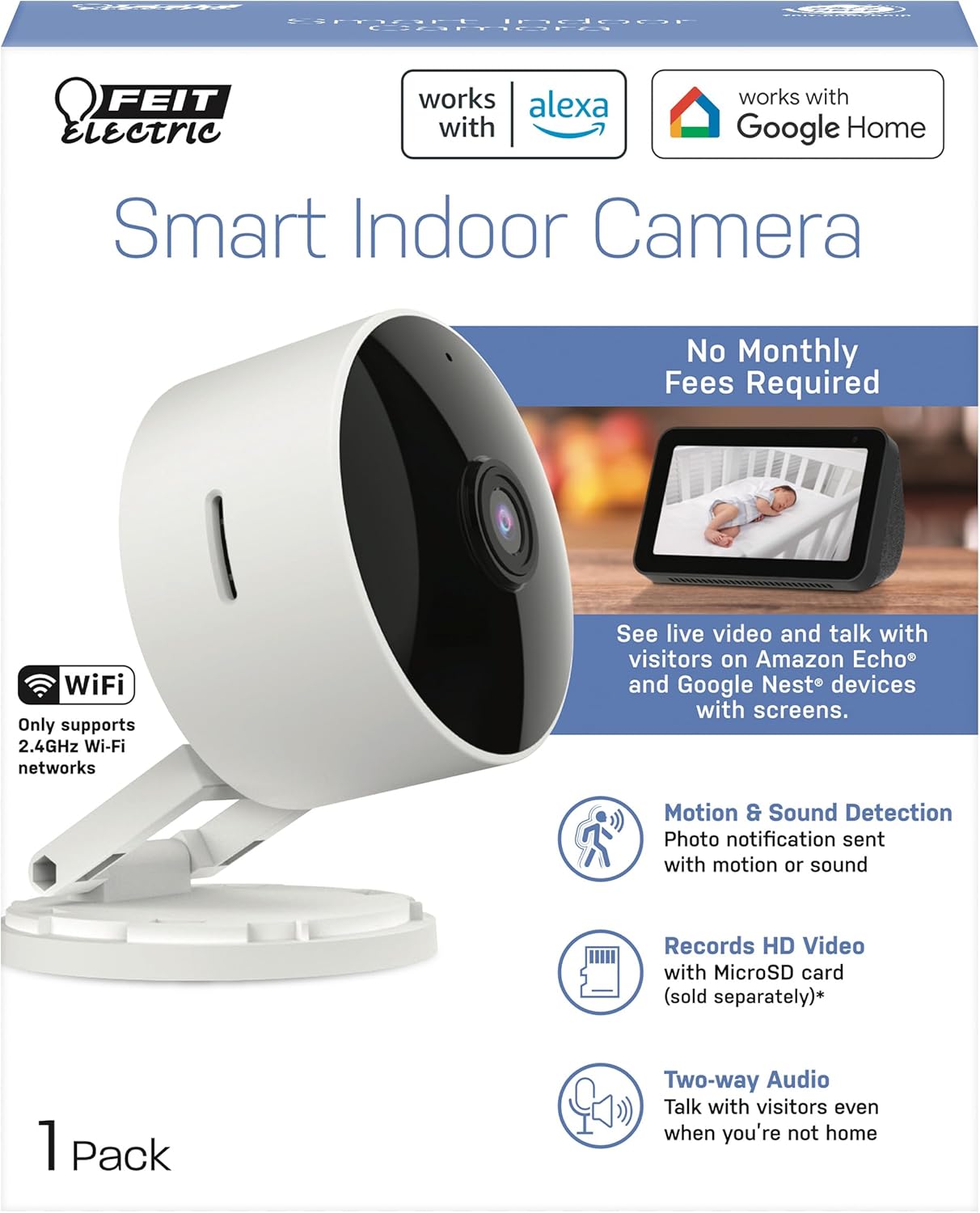
The Feit Electric CAM1/WIFI Indoor Security Camera is designed to help you monitor your property with ease. This motion-activated HD camera connects directly to your 2.4 GHz Wi-Fi network, allowing for remote control and live viewing from anywhere via the Feit Electric mobile app. It features two-way audio, 1080p HD video recording, and night vision capabilities. Recorded events can be stored locally on a Micro-SD card (sold separately), eliminating the need for monthly fees or subscriptions. The camera is compatible with popular smart home assistants like Alexa and Google Assistant for convenient voice control.
2. פּעקל אינהאַלט
- 1 x Feit Electric Smart Security Camera (CAM1/WIFI)
- 1 x מאַכט אַדאַפּטער
- 1 x 1-meter USB Cord
3. פּראָדוקט פֿעיִקייטן
- 1080 פּ הד ווידעא: High-quality video for clear monitoring and recording.
- אַוואַנסירטע באַוועגונג דעטעקשאַן: Detects motion up to 30 feet with visible night vision. Receive push notifications for detected activity.
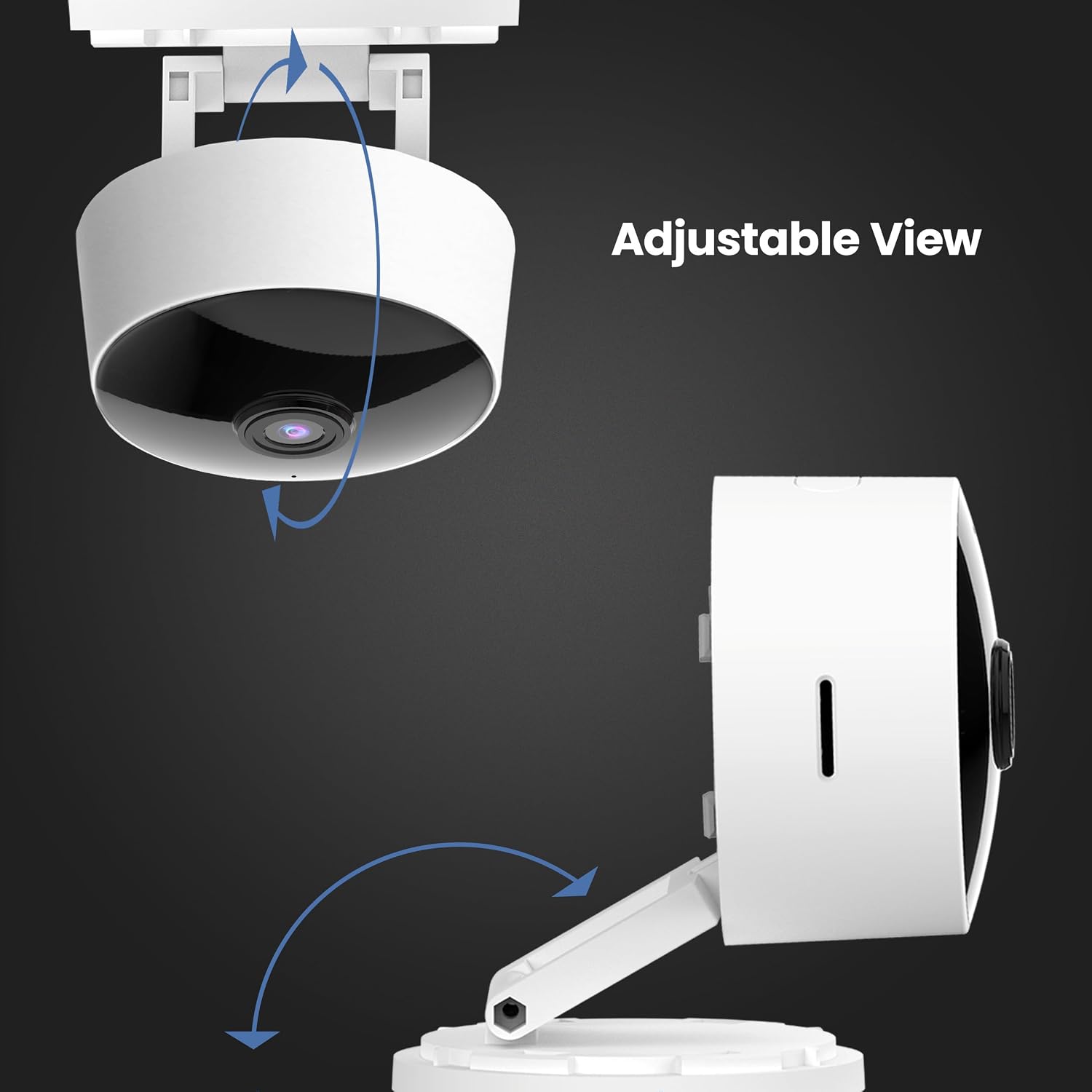
- 360 ° אַדזשאַסטאַבאַל קאָפּ: אַלאַוז פֿאַר פלעקסאַבאַל פּאַזישאַנינג און viewינג אַנגלעס.
- 2.4GHz WiFi קאָנעקטיוויטי: Connects directly to your home Wi-Fi network for remote access.
- 2-וועג אַודיאָ: Built-in microphone and speaker enable real-time conversation.
- לאקאלע סטאָרידזש: Supports Micro-SD cards up to 128GB for up to 10 days of continuous recording (SD card not included). No monthly fees or subscriptions required.
- קול אַססיסטאַנט קאַמפּאַטאַבילאַטי: אַרבעט מיט אַמאַזאָן אַלעקסאַ און גוגל אַסיסטאַנט פֿאַר באַקוועמע שטימע קאָנטראָל.
- פּלוגין פּלאַן: Plugs into standard outlets, no hardwiring required.



אפיציעלע פּראָדוקט ווידעאָ
דער ווידעא גיט אַן איבערבליקview of the Feit Electric Smart Indoor and Outdoor Cameras, highlighting their key features and benefits for home security.
4. ספּעסאַפאַקיישאַנז
| אַטריביוט | ווערט |
|---|---|
| מאָדעל נומער | CAM1/WIFI |
| דרינענדיק / דרויסנדיק באַניץ | דרינענדיק |
| ווידעא קאַפּטורע רעסאָלוטיאָן | 1080 פּ הד |
| נאַכט וויזשאַן ראַנגע | 30 פֿיס |
| קאַנעקטיוויטי פּראָטאָקאָל | ווי-פי (2.4 גהז) |
| צוויי-וועג אַודיאָ | יא |
| סטאָרידזש | Micro-SD Card (up to 128GB, not included) |
| מאַכט מקור | עלעקטריש מיט שנור (שטעק-אין) |
| קאַמפּאַטאַבאַל דעוויסעס | Smartphone (Feit Electric App), Amazon Alexa, Google Assistant |
| נומער דימענשאַנז (L X W X H) | 5.1 X 4.3 X 2.5 אינטשעס |
| פּונקט וואָג | 6.4 אונסעס |
| קאָליר | ווייַס |
5. סעטאַפּ גייד
- מאַכט אויף: Plug the camera into a standard electrical outlet using the provided power adapter and USB cord. The camera will power on automatically.
- אראפקאפיע אַפּ: Download the "Feit Electric" app from your smartphone's app store (available for Android and iOS).
- שאַפֿן אַ חשבון: Open the Feit Electric app and create a new account or log in if you already have one.
- לייג דיווייס: In the app, tap the "+" icon to add a new device. Select "Camera" from the device categories.
- פאַרבינדן צו Wi-Fi: Follow the in-app instructions to connect the camera to your 2.4GHz Wi-Fi network. Ensure your phone is also connected to the same 2.4GHz network during setup. You may need to reset the device by pressing and holding the RESET button for 5 seconds until you hear an audible tone.
- פּאָרינג: The app will guide you through the pairing process, which may involve scanning a QR code displayed on your phone with the camera.
- אָרט: Position the camera in your desired indoor location. The adjustable head allows for optimal viewינג אַנגלעס.

6. אַפּערייטינג ינסטרוקטיאָנס
- לעבן View: Open the Feit Electric app and select your camera to view די לעבן קאָרמען.
- צוויי-וועג אַודיאָ: Tap the microphone icon in the app to speak through the camera's speaker, or listen to audio from the camera's microphone.
- רעקאָרדינג: The camera can record continuously or when motion is detected. To enable continuous recording, ensure a Micro-SD card (up to 128GB) is inserted into the camera's slot. You can download recorded video wirelessly through the Feit app.
- באַוועגונג אַלערץ: Enable push notifications in the app settings to receive alerts on your smartphone when motion is detected.
- קול קאָנטראָל:
- With Alexa: Link your Feit Electric account in the Alexa app. Then, use commands like "Alexa, show me the [camera name]" to view the feed on compatible Echo Show devices.
- With Google Assistant: Link your Feit Electric account in the Google Home app. Use commands like "Hey Google, show me the [camera name]" on compatible Google Nest devices.


7. וישאַלט
- רייניקונג: ניצט אַ ווייכע, טרוקענע שטאָף צו רייניקן די קאַמעראַ לינזע און קערפּער. ניצט נישט פליסיקע רייניגער אָדער אַעראָזאָלן.
- Firmware דערהייַנטיקונגען: Regularly check the Feit Electric app for available firmware updates to ensure optimal performance and security.
- מאַכט ציקל: אויב די קאַמעראַ האָט פּראָבלעמען, פּרוּווט עס אַרויסצוציען פֿון דער מאַכט־מקור פֿאַר 10 סעקונדעס און דערנאָך עס צוריק אַרײַנשטעקן.
8. טראָובלעשאָאָטינג
| פּראָבלעם | מעגלעך לייזונג |
|---|---|
| קאַמעראַ פֿאַרבינדט זיך נישט צו Wi-Fi. | Ensure your Wi-Fi network is 2.4GHz. Move the camera closer to the router. Reset the camera by holding the reset button for 5 seconds. Verify Wi-Fi password. |
| Poor video quality or grainy image. | Check your Wi-Fi signal strength. Ensure the camera lens is clean. Adjust camera placement for better lighting. |
| באַוועגונג דעטעקשאַן אַלערץ ווערן נישט באַקומען. | Verify motion detection settings are enabled in the Feit Electric app. Check your phone's notification settings for the app. |
| צוויי-וועג אודיאָ אַרבעט נישט. | Ensure microphone and speaker permissions are granted to the Feit Electric app on your phone. Check volume settings in the app and on your phone. |
| Camera reboots itself frequently. | Ensure a stable power supply. Check the power adapter and USB cable for damage. If power goes out, the camera is designed to reboot itself upon power restoration. |
9. וואָראַנטי און שטיצן
This Feit Electric camera comes with a one-year warranty from the date of purchase. For customer service, technical support, or warranty inquiries, please contact Feit Electric directly.
קאָנטאַקט אינפֿאָרמאַציע:
- בליצפּאָסט: info@feit.com
- אָפּצאָל-פריי טעלעפאָן: 1-866-326-בולב
- אָנליין שטיצן: Visit the Feit Electric Help Center for FAQs and additional resources.


