הקדמה
The PlayZoom GoCam is a durable and fun waterproof action camera designed specifically for kids. It allows young adventurers to capture their exciting moments in 1080P HD video and 12MP photos, whether on land or underwater. With its robust waterproof casing, built-in microphone and speaker, and a variety of mounting options, the GoCam is ready for any adventure.

The PlayZoom GoCam, enclosed in its protective waterproof housing, ready for action.
פּראָדוקט איבערview
Familiarize yourself with the various parts and components of your PlayZoom GoCam.

דעטאַילעד view of the GoCam's buttons and ports, including the Power/Mode button, Shutter/Select button, Micro SD slot, and Micro USB port.
קאַמעראַ קאָמפּאָנענטן:
- לענס: קאַפּטשערז בילדער און ווידיאס.
- 2-אינטש לקד פאַרשטעלן: פֿאַר viewאין לעבןtage, ווידערשפּיל, און מעניו נאַוויגאַציע.
- מאַכט / מאָדע קנעפּל: Turns the camera on/off and switches between video, photo, and playback modes.
- לאָדן / אויסקלייַבן קנעפּל: Starts/stops recording, takes photos, and confirms selections.
- אַרויף קנעפּל: Navigates menus upwards or zooms in.
- Down/Shutter Button: Navigates menus downwards or acts as an alternative shutter button.
- מיקראָפאָן: רעקאָרדס אַודיאָ.
- רעדנער: פֿאַר אַודיאָ ווידערשפּיל.
- מיקראָ סד שפּעלטל: For inserting a Micro SD card (up to 32GB, not included) to store recordings.
- מיקראָ וסב פּאָרט: For charging the camera and transferring data.
- סטאַטוס ינדיקאַטאָר ליכט: Shows camera status (e.g., charging, recording).
אַרייַנגערעכנט אַקסעסעריז:
- וואָטערפּרוף קאַסע: Protects the camera underwater up to 90 feet (30 meters).
- מאַונטינג קיט: Various mounts for attaching the camera to helmets, bikes, skateboards, and more.
- USB טשאַרדזשינג קאַבלע: פֿאַר טשאַרדזשינג די אַפּאַראַט.

Key features of the GoCam, including its 2-inch LCD screen and built-in battery.
סעטאַפּ
1. טשאַרדזשינג די קאַמעראַ
Before first use, fully charge your GoCam. Connect the included USB charging cable to the camera's Micro USB port and the other end to a USB power adapter (not included) or a computer's USB port. The status indicator light will show charging progress and turn off when fully charged. A full charge provides approximately 1.5 hours of recording time.
2. Installing a Micro SD Card
The GoCam requires a Micro SD card (not included) to save photos and videos. It supports cards up to 32GB. Locate the Micro SD slot on the side of the camera. Gently insert the Micro SD card with the gold contacts facing the back of the camera until it clicks into place. To remove, push the card in again until it springs out.
3. Attaching the Waterproof Case and Mounts
For underwater adventures or added protection, place the GoCam inside its waterproof case. Ensure the case is securely latched before submersion. The included mounting kit allows you to attach the camera to various surfaces and gear.
- Open the waterproof case by releasinג די לאַטש.
- Carefully place the GoCam inside, ensuring it fits snugly.
- Close the case firmly, making sure the latch is secure.
- Attach the desired mount (e.g., helmet mount, bike mount) to the bottom of the waterproof case using the provided screws and adapters.
- Secure the mount to your gear.

Examples of how to use the mounting kit for different activities like skateboarding and biking.

The GoCam is versatile for various adventures, from roller coasters to mountain climbing.
אַפּערייטינג ינסטראַקשאַנז
מאַכט אויף / אַוועק
- צו אנצינדן: דריק און האלט די מאַכט / מאָדע קנעפּל for a few seconds until the screen lights up.
- צו אויסלעשן: דריק און האלט די מאַכט / מאָדע קנעפּל ווידער ביז דער עקראַן שליסט זיך אויס.
באַשטימען מאָדעס
Once the camera is on, short press the מאַכט / מאָדע קנעפּל to cycle through the different modes: Video Recording, Photo Capture, and Playback.
רעקאָרדינג ווידיאס
- Switch to Video Recording mode (indicated by a video camera icon on the screen).
- דרוק די לאָדן / אויסקלייַבן קנעפּל once to start recording. A red dot or recording timer will appear on the screen.
- דרוק די לאָדן / אויסקלייַבן קנעפּל again to stop recording. The video file וועט זיין געראטעוועט צו די מיקראָ סד קאָרט.
גענומען פאָטאָס
- Switch to Photo Capture mode (indicated by a camera icon on the screen).
- ראַמען דיין שאָס מיטן LCD עקראַן.
- דרוק די לאָדן / אויסקלייַבן קנעפּל once to take a photo. The image will be saved to the Micro SD card.
פּלייַבאַקק
- Switch to Playback mode (indicated by a play icon).
- ניצן די Up און אַראָפּ buttons to navigate through your recorded videos and photos.
- דרוק די לאָדן / אויסקלייַבן קנעפּל צו שפּילן אַ ווידעאָ אָדער view אַ פאָטאָ אין פולן עקראַן.
אונטערוואַסער נוצן
The PlayZoom GoCam is waterproof up to 90 feet (30 meters) when properly enclosed in its waterproof case. Always ensure the case is clean and securely sealed before taking it underwater. After use in saltwater, rinse the case with fresh water and let it air dry.
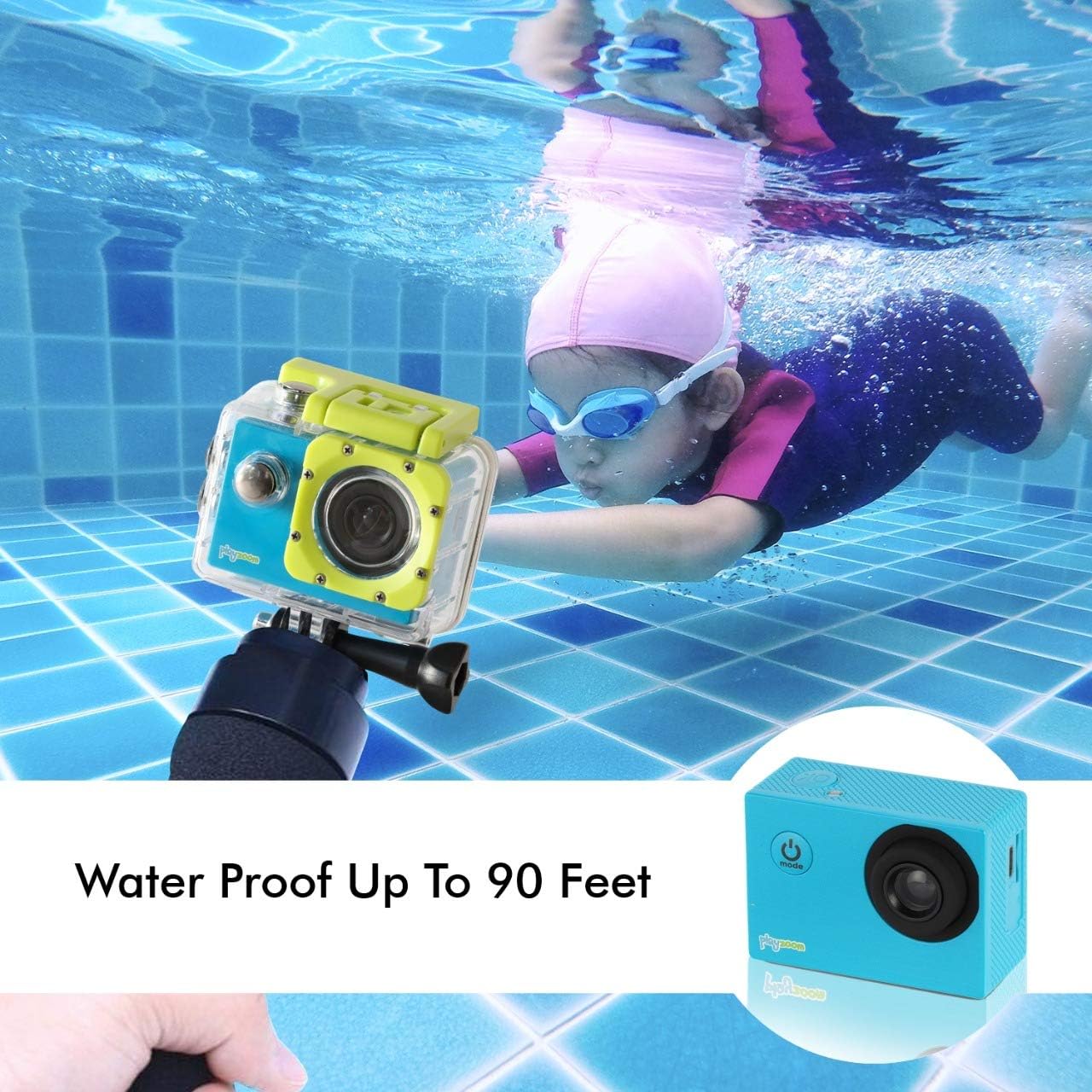
The GoCam is designed for underwater adventures, waterproof up to 90 feet.
וישאַלט
- רייניקונג: Use a soft, dry cloth to clean the camera body. For the lens, use a lens cleaning cloth. For the waterproof case, rinse with fresh water after each use, especially in saltwater, and wipe dry.
- סטאָרידזש: Store the camera in a cool, dry place away from direct sunlight and extreme temperatures. Remove the Micro SD card if storing for extended periods.
- באַטערי זאָרגן: To prolong battery life, avoid fully discharging the battery frequently. Charge the camera regularly, even if not in use, to maintain battery health.
- Waterproof Case Seal: Periodically inspect the rubber seal of the waterproof case for any dirt, debris, or damage. A clean and intact seal is crucial for maintaining its waterproof integrity.
טראָובלעשאָאָטינג
| פּראָבלעם | מעגלעך סיבה | לייזונג |
|---|---|---|
| די קאַמעראַ צינדט זיך נישט אָן. | די באַטעריע איז אויסגעשעפּט. | לאָדט אויף די קאַמעראַ גאָר מיטן USB קאַבל. |
| קען נישט רעקאָרדירן ווידעא אדער נעמען פאָטאָס. | קיין מיקראָ SD קאַרטל איז נישט אַרײַנגעשטעלט אָדער די קאַרטל איז פול/פאַרדאָרבן. | Insert a Micro SD card. If already inserted, check if it's full and delete files or format the card (this will erase all data). Try a different Micro SD card. |
| שלעכטע בילד/ווידעא קוואַליטעט. | די לינז איז שמוציק אדער די ליכט-באדינגונגען זענען שלעכט. | Clean the camera lens with a soft cloth. Ensure adequate lighting for best results. |
| די קאַמעראַ פרירט זיך אָדער ווערט נישט-רעאַגירנדיק. | ווייכווארג פראבלעם. | Press and hold the Power/Mode button for 10-15 seconds to force a shutdown. Restart the camera. |
ספּעסאַפאַקיישאַנז
| שטריך | דעטאַל |
|---|---|
| סאָרט | פּלייַזאָאָם |
| מאָדעל נאָמען | GoCam |
| ווידעא קאַפּטורע רעסאָלוטיאָן | 1080 פּ הד |
| עפעקטיוו נאָך האַכלאָטע | 12 מפּ |
| פאַרשטעלן גרייס | 2 אינטשעס (LCD) |
| וואַסער קעגנשטעל מדרגה | Waterproof (up to 90 feet / 30 meters with case) |
| פלאַש זכּרון טיפּ | Micro SD (supports up to 32GB) |
| געבויט-אין באַטערי | 400 מאַה קריקאָנלאָדלעך ליטהיום באַטערי |
| רעקאָרדינג צייט | בעערעך. 1.5 שעה |
| פּונקט וואָג | 4 אונסעס |
| פּראָדוקט דימענשאַנז | 3 X 1 X 3.5 אינטשעס |
וואָראַנטי און שטיצן
For warranty information and customer support, please refer to the contact details provided with your product packaging or visit the official PlayZoom webזייטל. האַלט אייער קויף קוויטל ווי אַ באַווייַז פון קויפן פֿאַר קיין וואָראַנטי קליימז.
For additional assistance or frequently asked questions, you may visit the PlayZoom Store on Amazon.


