הקדמה
Welcome to the user manual for your new Astro Men's Digital Watch, model A9916-PPHB. This guide provides comprehensive instructions on how to set up, operate, and maintain your watch to ensure optimal performance and longevity. Please read this manual carefully before using your watch.
פּראָדוקט איבערview און קנעפּל פונקציעס
Your Astro digital watch features a clear display and intuitive button controls for various functions.
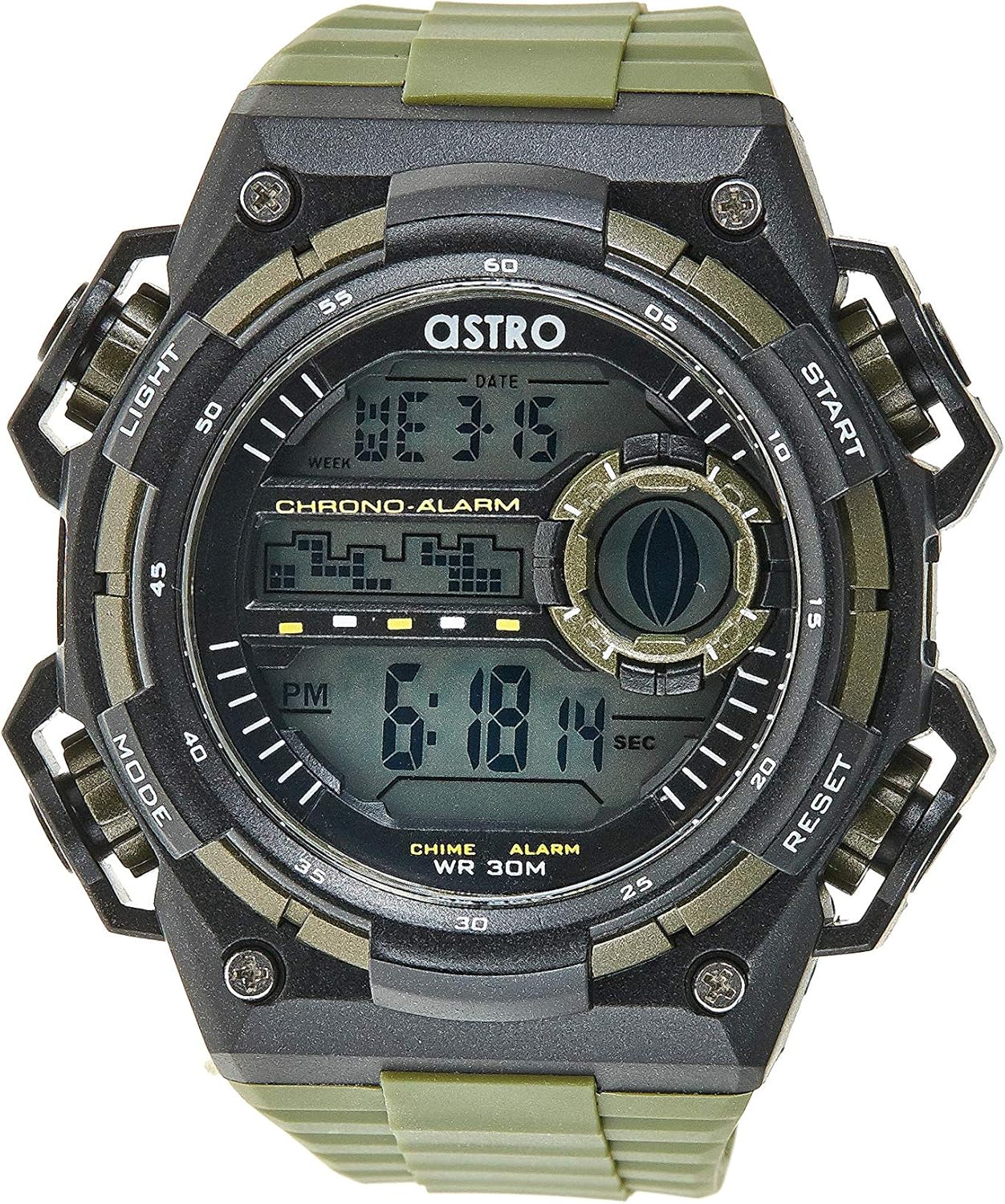
פיגורע 1: פראָנט View of the Watch. This image displays the watch face, highlighting the digital display and the four primary control buttons: LIGHT (top left), MODE (bottom left), START (top right), and RESET (bottom right). The display shows the time, day of the week, and date, along with indicators for chronograph and alarm functions.

פיגורע 2: זייַט View of the Watch. דאָס בילד גיט אַ פּראָפֿעסיאָנעלfile view of the watch, clearly showing the placement and design of the "LIGHT" and "MODE" buttons on the left side of the watch case. These buttons are essential for navigating through the watch's functions and activating the backlight.

פיגורע 3: צוריק View of the Watch. This image shows the reverse side of the watch, featuring the stainless steel case back secured by four screws. The durable olive green plastic strap, with its buckle closure, is also visible, indicating the watch's robust construction.
קנעפּל פאַנגקשאַנז:
- ליכט קנעפּל (אויבן לינקס): Activates the backlight for viewing the display in low-light conditions.
- MODE קנעפּל (אונטן לינקס): Cycles through different modes: Time Display, Alarm Setting, Chronograph (Stopwatch), and Date Setting.
- START קנעפּל (אויבן רעכטס): Used to start/stop the chronograph, adjust values during setting, or activate the alarm.
- RESET קנעפּל (אונטן רעכטס): Used to reset the chronograph, confirm settings, or switch between 12/24-hour format.
סעטאַפּ און ערשטע קאָנפיגוראַציע
1. ונבאָקסינג און דורכקוק
Upon receiving your watch, carefully unbox it and inspect for any visible damage. Ensure all components, including the watch and any accompanying documentation (like the guarantee card), are present.

Figure 4: Watch Packaging and Guarantee Card. This image shows the watch's protective tin packaging and the included guarantee card, which is important for warranty claims.
2. באַשטעטיקן די צייט און דאַטע
- פֿון נאָרמאַלן צײַט־אַרויסווייַז־מאָדוס, דריק די מאָדע קנעפל דריי מאל צו אריינגיין אין צייט איינשטעלונג מאָדע. די סעקונדעס ציפערן וועלן אָנהייבן צו בלינקען.
- דרוק די באַשטעטיק קנעפּל צו דורכגיין די סעטטינגס: סעקונדעס → שעה → מינוט → חודש → דאַטע → טאָג פון דער וואָך.
- While a digit is flashing, press the אָנהייב button to increase the value. Hold the אָנהייב button to rapidly advance the digits.
- אַמאָל אַלע סעטטינגס זענען אַדזשאַסטיד, דריקן די מאָדע קנעפּל צו פֿאַרלאָזן דעם סעטטינג מאָדע און צוריקקומען צו דער נאָרמאַלער צייט אַרויסווייַזונג.
3. 12/24-שעה פֿאָרמאַט אויסוואַל
In the normal time display mode, press the באַשטעטיק button to toggle between 12-hour (with 'AM'/'PM' indicator) and 24-hour formats.
אַפּערייטינג ינסטראַקשאַנז
1. שרעק פֿונקציע
- פֿון דער נאָרמאַלער צײַט־אַרויסווייַזונג, דריק די מאָדע button once to enter the Alarm mode. The alarm time will be displayed.
- דרוק די באַשטעטיק button to select the hour or minute to set. The selected digit will flash.
- דרוק די אָנהייב button to adjust the flashing digit.
- צו אַקטיווירן/דעאַקטיווירן דעם אַלאַרם, דריק די אָנהייב button while in Alarm mode (without any digits flashing). An alarm icon will appear/disappear on the display.
- דרוק די מאָדע קנעפּל צו צוריקקומען צו דער נאָרמאַלער צייט אַרויסווייַזונג.
2. האָurly טשימע
צו אַקטיווירן אָדער דעאַקטיווירן די האָurly chime (which beeps at the top of every hour):
- In Alarm mode, press the באַשטעטיק קנעפּל צו באַשטימען די האָurly chime on/off. A chime icon will appear/disappear on the display.
3. כראָנאָגראַף (סטאָפּוואַטש)
- פֿון דער נאָרמאַלער צײַט־אַרויסווייַזונג, דריק די מאָדע button twice to enter the Chronograph mode. The display will show "00:00:00".
- דרוק די אָנהייב קנעפּל צו אָנהייבן טיימינג.
- דרוק די אָנהייב קנעפּל ווידער צו פּויזירן די צייט.
- דרוק די באַשטעטיק button while paused to reset the chronograph to "00:00:00".
- דרוק די מאָדע קנעפּל צו צוריקקומען צו דער נאָרמאַלער צייט אַרויסווייַזונג.
4. באַקלייט פונקציע
דרוק די ליכט button (top left) at any time to illuminate the display for a few seconds, making it visible in dark environments.
וישאַלט און זאָרג
1. רייניקן דיין זייגער
To keep your watch looking its best, wipe it regularly with a soft, dry cloth. For stubborn dirt, a slightly damp מען קען ניצן אַ שטאָף, און עס זאָל גלייך טריקענען. מען זאָל נישט ניצן שאַרפע כעמיקאַלן אָדער אַברייסיוו מאַטעריאַלן.
2. Water Resistance (WR 30M)
Your Astro watch is water resistant up to 30 meters (3 ATM). This means it is suitable for daily use and can withstand splashes or brief immersion in water, such as during hand washing or light rain. It is NOT suitable for showering, swimming, diving, or any water sports. Do not operate buttons when the watch is wet.
3. באַטערי פאַרבייַט
When the display becomes dim or functions become erratic, it may be time to replace the battery. Battery replacement should ideally be performed by a qualified watch technician to ensure proper sealing and water resistance integrity.
טראָובלעשאָאָטינג
| פּראָבלעם | מעגלעך סיבה | לייזונג |
|---|---|---|
| דער עקראַן איז ליידיק אָדער טונקל. | נידעריק באַטאַרייע. | פאַרבייַטן די באַטאַרייע. |
| די צייט איז נישט ריכטיק. | די צייט נישט ריכטיק איינגעשטעלט אדער א אַקסאַדענטאַלע קנעפּל דריק. | Refer to "Setting the Time and Date" section to reset the time. |
| די קנעפּלעך זענען נישט ריספּאַנדינג. | Watch may be in a frozen state or battery is extremely low. | Try pressing all buttons simultaneously for a few seconds to reset. If problem persists, replace battery. |
| דער אַלאַרם קלינגט נישט. | Alarm is not activated. | Ensure the alarm icon is displayed on the screen. Refer to "Alarm Function" section. |
ספּעסאַפאַקיישאַנז
- מאָדעל נומער: A9916-PPHB
- ווייַז טיפּ: דיגיטאַל
- רימען מאַטעריאַל: פּלאַסטיק
- קאַסטן מאַטעריאַל: Plastic / Stainless Steel Back
- וואַסער קעגנשטעל: 30 מעטער (3 אַטם)
- פאַנגקשאַנז: Time (12/24-hour), Date, Day, Alarm, Hourly Chime, Chronograph, Backlight
- פאַבריקאַנט: אַסטראָ
וואָראַנטי און שטיצן
Your Astro A9916-PPHB watch comes with a manufacturer's guarantee. Please refer to the included guarantee card (Figure 4) for specific terms and conditions of your warranty. Keep your purchase receipt and guarantee card in a safe place as proof of purchase.
For technical support, warranty claims, or any inquiries not covered in this manual, please contact your retailer or the official Astro customer service channel as indicated on your guarantee card or product packaging.


