1. הקדמה
Thank you for choosing the MARVO Scorpion Gaming Mouse M399. This manual provides essential information for setting up, operating, maintaining, and troubleshooting your new gaming mouse. Please read it carefully to ensure optimal performance and longevity of your device.
2. פּראָדוקט פֿעיִקייטן
- Ultra-lightweight Honeycomb Design: Weighing approximately 76 grams, the mouse features a unique honeycomb shell for reduced weight and enhanced airflow.
- High-Performance Optical Sensor: Equipped with a gaming-grade optical sensor, offering up to 6400 DPI for precise tracking.
- 6 פּראָגראַממאַבלע קנעפּלעך: Customize your gaming experience with six buttons that can be assigned various functions.
- דינאַמישע RGB באַקלייטונג: Enjoy 16.8 million colors with 7 different backlight modes to personalize your setup.
- Ambidextrous Ergonomic Design: Comfortable design suitable for both left and right-handed users, ideal for extended gaming or office use.
3. פּעקל אינהאַלט
- MARVO Scorpion Gaming Mouse M399
- באַניצער מאַנואַל
4. סעטאַפּ
- פאַרבינדן די מויז: Plug the USB connector of the MARVO Scorpion Gaming Mouse M399 into an available USB port on your computer.
- אויטאָמאַטישע דרייווער אינסטאַלאַציע: Your operating system will typically detect the mouse and install the necessary drivers automatically. This may take a few moments.
- טעסט פאַנגקשאַנאַליטי: Once installed, move the mouse and click the buttons to ensure basic functionality.
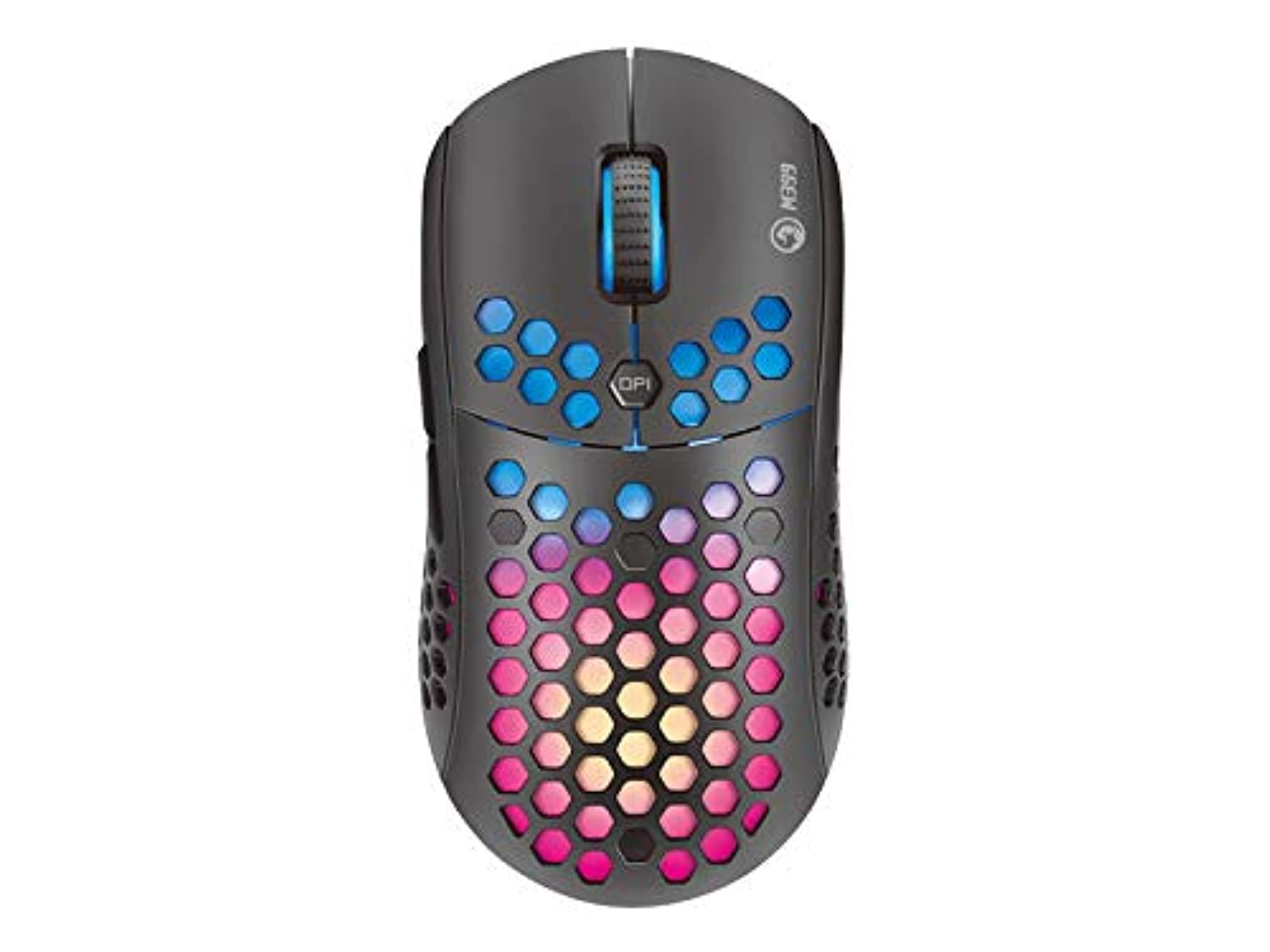
פיגור 1: פון אויבן אַראָפּ view of the MARVO Scorpion Gaming Mouse M399, highlighting its honeycomb shell and illuminated scroll wheel.
5. אַפּערייטינג ינסטרוקטיאָנס
5.1 יקערדיק פאַנגקשאַנז
- לינק קליקט: הויפּט אַקציע קנעפּל.
- רעכט גיט: צווייטיקער אַקציע קנעפּל, טיפּיש פֿאַר קאָנטעקסט מעניוז.
- סקראָל ראָד: Scroll up/down documents or web בלעטער. מען קען אויך קליקן דערויף פאר א מיטל-קליק פונקציאנאליטעט.
5.2 דפּי אַדזשאַסטמאַנט
The mouse features a dedicated DPI button (usually located behind the scroll wheel) to cycle through different sensitivity levels. Press this button to instantly change the DPI setting to match your preference or game requirements. The default DPI settings are typically pre-configured but can be customized via software.
5.3 פּראָגראַממאַבלע קנעפּלעך
The MARVO M399 includes 6 programmable buttons. These buttons can be assigned various functions, macros, or key combinations using the dedicated MARVO software. Refer to the customization section for more details.

פיגורע 2: זייַט view of the MARVO Scorpion Gaming Mouse M399, illustrating the ergonomic contour and accessible side buttons.
6. קוסטאָמיזאַטיאָן
To unlock the full potential of your MARVO Scorpion Gaming Mouse M399, including button remapping, macro creation, and advanced RGB lighting effects, you will need to download and install the official MARVO software. This software allows for detailed personalization of your mouse settings.
- קנעפּל אַסיינמאַנט: איבערצוטיילן פונקציעס צו איינע פון די 6 פּראָגראַמירבארע קנעפּלעך.
- DPI סעטטינגס: אַדזשאַסטירן DPI לעוועלס און שאַפֿן מנהג פּראָfiles.
- RGB לייטינג: Choose from 7 different backlight modes and millions of colors, adjust brightness, speed, and effects.
- מאַקראָו עדיטאָר: Create and assign complex macros to streamline in-game actions.
Note: The software can typically be found on the official MARVO website. Ensure you download the correct version for your M399 model.
7. וישאַלט
Proper maintenance ensures the longevity and performance of your gaming mouse.
- רייניקונג: ניצט אַ ווייכע, טרוקענע שטאָף צו ווישן די ייבערפלאַך פון דער מויז. פֿאַר שווערע שמוץ, אַ ביסל טרוקןamp cloth can be used, but ensure no liquid enters the mouse. Use compressed air to clean dust from the honeycomb holes and around buttons.
- סענסאָר זאָרגן: Keep the optical sensor on the underside of the mouse clean and free from debris. Avoid touching the sensor directly.
- קאַבלע פאַרוואַלטונג: פֿאַרמײַדט שאַרפֿע בייגן אָדער איבערגעטריבענעם ציען דעם USB קאַבל כּדי צו פֿאַרמײַדן שאָדן.
- סטאָרידזש: Store the mouse in a clean, dry environment away from extreme temperatures and direct sunlight when not in use.
8. טראָובלעשאָאָטינג
If you encounter issues with your MARVO Scorpion Gaming Mouse M399, refer to the following common solutions:
| פּראָבלעם | מעגלעך לייזונג |
|---|---|
| מויז ניט ריספּאַנדינג |
|
| קורסאָר באַוועגונג איז נישט סטאַביל אָדער שפּרינגיק |
|
| RGB לייטינג ארבעט נישט אדער איז פארשטאפט |
|
| פּראָגראַמירבאַרע קנעפּלעך אַרבעטן נישט |
|
9. ספּעסאַפאַקיישאַנז
| שטריך | דעטאַל |
|---|---|
| מאָדעל נומער | M399 |
| סענסאָר טיפּ | אָפּטיש |
| דפּי (דאַץ פּער אינטש) | אַרויף צו 6400 דפּי |
| קנעפּלעך | 6 פּראָגראַממאַבלע קנעפּלעך |
| לייטינג | RGB, 16.8 Million Colors, 7 Modes |
| פּלאַן | Ultra-lightweight Honeycomb, Ambidextrous |
| וואָג | בעערעך. 76 גראַמז |
| קאַנעקטיוויטי | וסב ווייערד |
| פּראָדוקט דימענשאַנז | 4.4 x 3.23 x 2.98 ס״מ (אומגעפער) |
10. וואָראַנטי און שטיצן
10.1 וואָראַנטי אינפֿאָרמאַציע
MARVO products are designed and manufactured to the highest quality standards. This product is covered by a limited warranty from the date of purchase. Please refer to the warranty card included with your product or visit the official MARVO webוועבזייטל פֿאַר דעטאַלירטע וואָראַנטי טערמינען און באַדינגונגען ספּעציפֿיש פֿאַר אייער געגנט.
10.2 טעכניש שטיצן
For technical assistance, driver downloads, or further inquiries, please visit the official MARVO support website or contact their customer service. You may need your product model number (M399) and proof of purchase when seeking support.
- באַאַמטער Webפּלאַץ: www.marvo-tech.com (ביטע טשעקט אויב עס זענען דא ראיאנישע וועריאציעס)
- שטיצן בליצפּאָסט: אָפּשיקן צו די webפּלאַץ פֿאַר קאָנטאַקט דעטאַילס.


