הקדמה
This manual provides comprehensive instructions for the Elekpia Universal Remote Control, model CT-RC1US-18. This remote is designed for seamless compatibility with a wide range of Toshiba LED LCD HDTV models, including but not limited to CT-90325, CT-90326, CT-90329, CT-8037, CT-90302, CT-90275, CT-90, CT-90366, and CT-RC1US-18. Please read this manual carefully to ensure proper setup and operation of your new remote control.
סעטאַפּ
ייַנמאָנטירונג פון באַטאַרייע
The Elekpia Universal Remote Control requires two (2) 1.5V AA batteries for operation. No programming is needed; simply install the batteries, and the remote will be ready to use with your compatible Toshiba TV.
- געפֿינען די דעקן פון די באַטאַרייע אָפּטייל אויף די צוריק פון די ווייַט קאָנטראָל.
- דריק אַראָפּ אויף דעם טאַב און שלעפּ דעם דעקל אַראָפּ צו עפֿענען דעם אָפּטייל.
- אַרײַנשטעלן צוויי (2) AA באַטעריעס, און זיכער מאַכן אַז די פּאָזיטיוו (+) און נעגאַטיוו (-) טערמינאַלן זענען ריכטיק אויסגעשטעלט מיט די מאַרקירונגען אינעווייניק אין דעם אָפּטייל.
- שטופּט צוריק דעם דעקל פון דעם באַטעריע־אָפּטייל ביז עס קליקט זיכער.

פיגור 1: פאָרנט און הינטן view of the Elekpia Universal Remote Control, highlighting the battery compartment on the rear.
Once batteries are installed, the remote is ready for immediate use with your Toshiba TV. No additional setup or code entry is required.
אַפּערייטינג ינסטראַקשאַנז
This universal remote control is designed to replicate the functions of your original Toshiba TV remote. Point the remote directly at your television's infrared receiver for optimal performance.
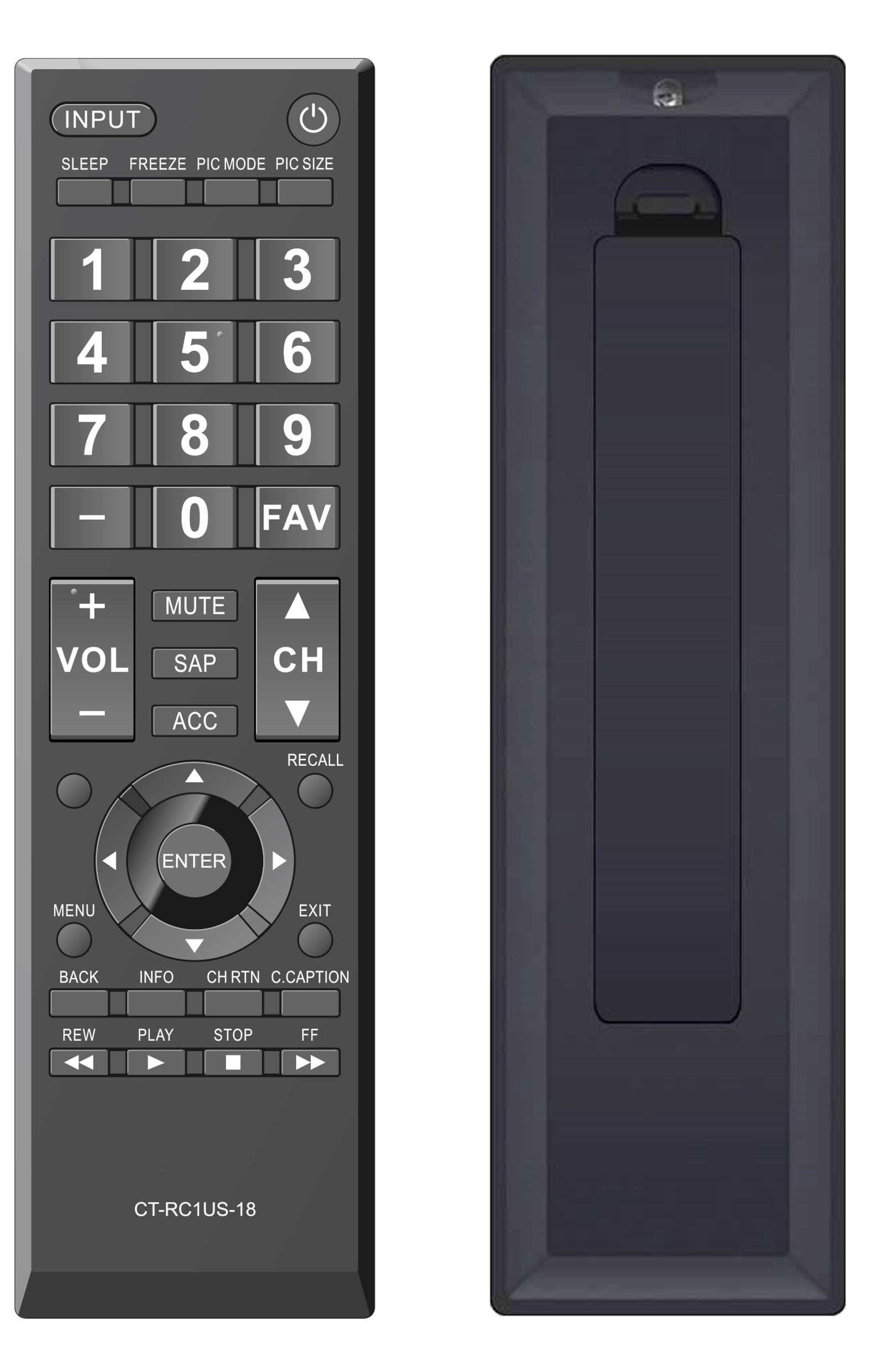
פיגורע 2: פראָנט view of the Elekpia Universal Remote Control, displaying the layout of all buttons.
קנעפּל פאַנגקשאַנז
- קראַפט (⏻): Turns the television on or off.
- אַרייַנשרייַב: Cycles through available input sources (HDMI 1, HDMI 2, AV, etc.).
- שלאָף: Activates or adjusts the TV's sleep timer function.
- פרירן: Pauses the current image on the screen (functionality may vary by TV model).
- PIC מאָדע: Adjusts picture modes (e.g., Standard, Movie, Dynamic).
- PIC SIZE: Changes the aspect ratio or picture size.
- נומער פּאַד (0-9): גלייך אריינגעבן קאַנאַל נומערן.
- - (Dash): Used for entering sub-channels (e.g., 7-1).
- FAV: Accesses favorite channels list.
- VOL (+/-): Increases or decreases the volume level.
- שטום: Silences the television audio.
- SAP: Selects Secondary Audio Program (SAP) or alternate audio tracks.
- ACC: Accesses accessibility features or audio settings.
- CH (אַרויף/אַראָפּ): Changes the television channel up or down.
- צוריקרופן: Switches between the current and previously viewעד קאַנאַל.
- נאַוויגאַציע פּאַד (אַרויף, אַראָפּ, לינקס, רעכטס, אַרייַן): Navigates through on-screen menus and confirms selections.
- MENU: Opens the main menu of the television.
- אַרויסגאַנג: Closes the current menu or returns to the previous screen.
- צוריק: גייט צוריק צום פריערדיקן מעניו אדער עקראַן.
- INFO: Displays information about the current program or input.
- CH RTN (Channel Return): Similar to RECALL, returns to the previous channel.
- C.CAPTION (Closed Caption): Toggles closed captions on or off.
- REW (Rewind), PLAY, STOP, FF (Fast Forward): Controls for media playback (e.g., when using a connected USB device or smart TV apps, if supported by the TV).
וישאַלט
רייניקונג פון די ווייַטקאָנטראָל
כדי צו אויפהאלטן דעם אויסזען און פונקציאנאליטעט פון דער ווײַטקאָנטראָל, רייניקט עס רעגולער:
- ניצט אַ ווייכן, טרוקענעם שטאָף צו ווישן די ייבערפלאַך פון דער ווייַטקאָנטראָל.
- פֿאַר שווערן שמוץ, אַ ביסל דampווישט דעם שטאָף מיט וואַסער אָדער אַ מילדן, נישט-שרייַבנדיקן רייניגער. פֿאַרמייַדט איבעריקע פֿײַכטקייט.
- ניצט נישט קיין שאַרפע כעמיקאַלן, סאָלווענטן, אדער אַברייסיוו רייניקונג פּאַדס, ווייל די קענען שעדיקן די ענדיקונג אדער אינעווייניקסטע קאָמפּאָנענטן פון דער ווייַטקאָנטראָל.
באַטערי פאַרבייַט
Replace batteries when the remote's response becomes sluggish or stops working. Always replace both AA batteries at the same time with new ones. Do not mix old and new batteries, or different types of batteries, as this can lead to leakage or damage.
סטאָרידזש
If the remote control will not be used for an extended period, remove the batteries to prevent potential leakage and damage to the device.
טראָובלעשאָאָטינג
If you encounter issues with your Elekpia Universal Remote Control, please refer to the following common solutions:
- ווייַט ניט ריספּאַנדינג:
- Ensure the batteries are correctly installed with the proper polarity (+/-).
- פאַרבייַטן די באַטעריז מיט פריש אַאַ באַטעריז.
- Check for any obstructions between the remote control and the TV's infrared sensor.
- Ensure you are pointing the remote directly at the TV.
- עטלעכע קנעפּלעך אַרבעטן נישט:
- This remote is pre-programmed for Toshiba TVs. Verify your TV model is compatible.
- Clean the remote's surface, especially around the unresponsive buttons, to remove any dirt or debris that might be interfering with button presses.
- טעלעוויזיע טוט זיך נישט אן/אויס:
- Confirm the TV is plugged into a working power outlet.
- Try using the power button directly on the TV to confirm it is operational.
If these steps do not resolve the issue, please refer to the customer support section.
ספּעסאַפאַקיישאַנז
| מאָדעל נומער | CT-RC1US-18 |
| סאָרט | אלקפיא |
| פּראָדוקט דימענשאַנז | 7 X 2 X 0.6 אינטשעס |
| פּונקט וואָג | 3 אונסעס |
| מאַכט מקור | 2 x 1.5V AA באַטעריעס (נישט אַרייַנגערעכנט) |
| קאַמפּאַטאַבאַל דעוויסעס | Toshiba LED LCD HDTVs |
| מאַקס נומער פון שטיצט דעוויסעס | 1 |
| קאָליר | שוואַרץ |
וואָראַנטי אינפֿאָרמאַציע
Specific warranty details for the Elekpia Universal Remote Control CT-RC1US-18 are not provided in this manual. Please refer to the product packaging, the retailer's return policy, or the manufacturer's official webזייטל פֿאַר אינפֿאָרמאַציע וועגן וואָראַנטי קאַווערידזש און טערמינען.
קונה שטיצן
For further assistance or inquiries regarding your Elekpia Universal Remote Control, please contact the retailer from whom you purchased the product. You may also visit the official Elekpia webזייטל פֿאַר מעגלעכע שטיצע רעסורסן אָדער קאָנטאַקט אינפֿאָרמאַציע.


