1. פּראָדוקט איבערview
די פּurline WS015 is a versatile weather station designed to provide detailed and current information regarding indoor and outdoor environmental conditions. This device monitors temperature, humidity, and offers a weather forecast. It also includes a digital clock with an alarm function and a calendar display.
Equipped for both indoor and outdoor use, the WS015 features a clear digital LCD display with animated symbols for weather forecasting. It stores maximum and minimum readings and tracks temperature trends over the past 12 hours. The main unit can also function as a USB charging hub for other devices.
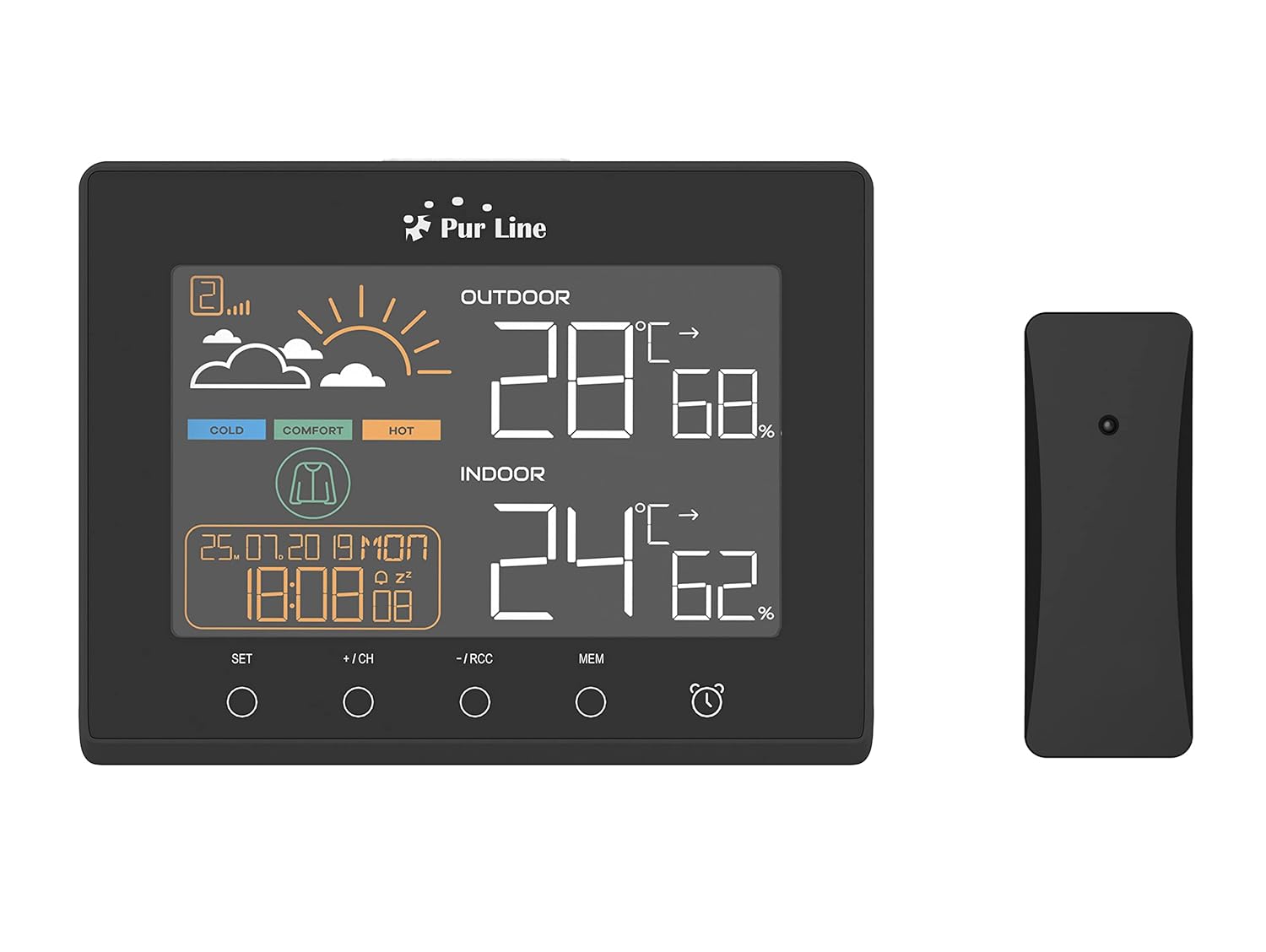
פראָנט view of the PUR LINE WS015 Weather Station display unit and its wireless outdoor sensor.
2. סעטאַפּ אינסטרוקציעס
2.1. אויספּאַקן און קאָמפּאָנענטן
Carefully remove all components from the packaging. Ensure you have the main display unit and the wireless outdoor sensor.
2.2. אנשטעלן דעם הויפט איינהייט
The main unit requires 3 AAA batteries (not included) or can be powered via a USB connection. To install batteries:
- עפֿנט דעם דעקל פֿון דער באַטעריע־אָפּטיילונג אויף דער הינטערשטער זײַט פֿון דער הויפּט־איינהייט.
- אַרײַנשטעלן 3 AAA באַטעריעס, אָבסערווירנדיק די ריכטיקע פּאָלאַריטעט (+/-).
- נאָענט די דעקן פון די באַטאַרייע אָפּטייל.
Alternatively, connect the main unit to a USB power source using a compatible USB cable (not included).
2.3. דרויסנדיקע סענסאָר פּלאַצירונג
The outdoor sensor is splash-proof (IP rated) but should be placed in a sheltered location to protect it from direct rain and prolonged sunlight, which can affect temperature readings. Ensure the sensor is within effective transmission range of the main unit (typically up to 30 meters in open air).
2.4. ערשטע סינקראָניזאַציע
Once both the main unit and the outdoor sensor are powered, they should automatically synchronize. If synchronization does not occur, press the 'CH' button on the main unit to initiate a search for the sensor. Ensure the sensor is close to the main unit during initial setup.

דערציען view of the PUR LINE WS015 Weather Station, showing the battery compartment and stand.
3. אַפּערייטינג ינסטרוקטיאָנס
3.1. ווייַז איבערview
די לקד אַרויסווייַזן ווייזט די פאלגענדע אינפֿאָרמאַציע:
- דרויסנדיקע טעמפּעראַטור און הומידיטי: Readings from the wireless sensor.
- אינעווייניק טעמפּעראַטור און הומידיטי: לייענונגען פון די הויפּט אַפּאַראַט'ס אינעווייניקסטע סענסאָרן.
- וועטער פאָרעקאַסט: Animated symbols indicating predicted weather conditions.
- צייט און דאַטע: Current time, day, and date.
- Comfort Level Indicator: Based on indoor temperature and humidity.
- Temperature Trend: Arrows indicating rising, falling, or stable temperature over the last 12 hours.

נאָענט-אַרויף view of the PUR LINE WS015 Weather Station display, showing outdoor and indoor temperature, humidity, time, date, and weather forecast symbols.
3.2. קנעפּל פאַנגקשאַנז
The main unit features several control buttons:
- שטעלן: Enters setting mode for time, date, and alarm. Confirms settings.
- +/CH: Increases values during setting. In normal mode, cycles through outdoor sensor channels or initiates sensor search.
- -/RCC: Decreases values during setting. In normal mode, manually initiates RCC (Radio Controlled Clock) signal reception.
- MEM: Displays maximum and minimum temperature/humidity records. Press again to clear records.
- שרעק ייקאַן: אַקטאַווייץ אָדער דיאַקטיווייץ די שרעק פונקציע.
3.3. באַשטעטיקן צייט און דאַטע
- דריקן און האַלטן די שטעלן קנעפּל ביז די צייט-אויסשטעלונג בלינקט.
- ניצן די + or - קנעפּלעך צו סטרויערן די שעה, און דאַן דריקן שטעלן צו באַשטעטיקן און אריבערגיין צו מינוטן.
- איבערחזרן פֿאַר מינוט, יאָר, חודש און טאָג.
- דרוק שטעלן צו פֿאַרלאָזן דעם סעטטינג מאָדע.
3.4. באַשטעטיקן די שרעק
- דרוק די שרעק יקאָן קנעפּל איין מאל צו ווייזן די אַלאַרם צייט.
- דריקן און האַלטן די שרעק יקאָן קנעפּל ביז די אַלאַרם צייט בלינקט.
- ניצן די + or - buttons to adjust the alarm hour, then press the שרעק יקאָן button to confirm and move to minutes.
- איבערחזרן פֿאַר מינוט.
- דרוק די שרעק יקאָן button to exit setting mode. Press it again in normal mode to toggle the alarm on/off.
3.5. USB טשאַרדזשינג אַוטפּוץ
The main unit is equipped with USB outputs that allow you to charge compatible electronic devices. Simply connect your device's USB charging cable to the USB port on the side of the weather station.

The PUR LINE WS015 Weather Station with two smartphones connected to its USB charging outputs.
4. וישאַלט
4.1. רייניקונג
To clean the weather station and sensor, use a soft, damp שטאָף. ניצט נישט קיין שרײַבנדיקע רייניגערס אדער סאָלווענטן, ווײַל די קענען שאַטן דעם עקראַן אָדער קאָמפּיוטער.asing. Ensure no liquid enters the device openings.
4.2. באַטערי פאַרבייַט
When the display becomes dim or readings are inconsistent, it may be time to replace the batteries in the main unit and/or the outdoor sensor. Follow the battery installation steps outlined in Section 2.2 for the main unit. For the outdoor sensor, open its battery compartment, replace the old batteries with new ones of the correct type, and close the compartment securely.
5. טראָובלעשאָאָטינג
פּראָסט ישוז און סאַלושאַנז
- No Display on Main Unit:
- Check if batteries are inserted correctly and are not depleted.
- Ensure the USB power cable (if used) is securely connected.
- Outdoor Readings Not Displaying or Incorrect:
- Check the batteries in the outdoor sensor.
- Ensure the outdoor sensor is within range of the main unit and free from major obstructions.
- דרוק די +/CH button on the main unit to re-initiate sensor search.
- Relocate the outdoor sensor to a more suitable position, away from direct sunlight or heat sources.
- Time Not Synchronizing (RCC):
- Ensure the unit is placed away from electronic interference.
- Manually initiate RCC signal reception by pressing the -/RCC קנעפּל.
- שרעק ניט קלאַנג:
- Verify that the alarm function is activated (alarm icon visible on display).
- קאָנטראָלירט אַז די אַלאַרם צייט איז ריכטיק איינגעשטעלט.
6. טעכניש ספּעסאַפאַקיישאַנז
- מאָדעל: WS015
- פאַבריקאַנט: Purlאין
- דימענסיעס (L x D x H): 17 x 3 x 13 ס״מ (אומגעפער)
- מאַכט מקור (הויפּט אַפּאַראַט): 3 x AAA batteries (not included) or USB
- מאַכט מקור (דרויסנדיק סענסאָר): Batteries (type not specified, typically AAA or AA)
- מאַטעריאַל: פּלאַסטיק
- קאַנעקטיוויטי: Wireless (sensor), USB (charging outputs)
- ספּעציעלע פֿעיִקייטן: Programmable alarm, Max/Min memory, Temperature trend, Weather forecast, USB charging outputs
- ווייַז טיפּ: דיגיטאַל לקד
7. וואָראַנטי און שטיצן
Information regarding product warranty and specific support contacts is not available in this document. For warranty claims or technical assistance, please refer to the documentation provided at the time of purchase or contact your retailer or the manufacturer directly.


