1. הקדמה
Thank you for choosing the Sinopé TH1310WF Smart Wi-Fi Thermostat. This device is designed to provide precise and efficient control over your in-floor heating system, enhancing comfort and energy savings. It integrates seamlessly with various smart home platforms, offering convenient control via mobile applications and voice commands.
This manual provides detailed instructions for the installation, operation, and maintenance of your TH1310WF thermostat. Please read it thoroughly before installation and keep it for future reference.

Figure 1: Sinopé TH1310WF Smart Wi-Fi Thermostat
The image displays the front of the Sinopé TH1310WF thermostat, a white rectangular device with a black digital display showing time, indoor temperature, and outdoor temperature. Below the screen, the Sinopé logo is visible, along with two circular buttons.
2. זיכערקייַט אינפֿאָרמאַציע
ווארענונג: Risk of electric shock. This product must be installed by a qualified electrician in accordance with local and national electrical codes. Disconnect power at the circuit breaker before installation or any maintenance.
- Ensure the power supply is OFF before handling any wiring.
- Do not install the thermostat with wet hands or while standing on wet surfaces.
- די טערמאָסטאַט איז דיזיינד בלויז פֿאַר נוצן אינעווייניק.
- באַשטעטיקן אַז די טעמפּעראַטור פון דעם טערמאָסטאַט איזtagE און וואַטtage ratings match your heating system's requirements (240V, 3600W max).
3. פּראָדוקט איבערview
3.1 שליסל פֿעיִקייטן
- ניט קיין הוב פארלאנגט: פֿאַרבינדט זיך גלייך צו אייער Wi-Fi נעץ.
- In-floor Heating Compatibility: Works with heating cables and heating cable mats. Includes a 15-foot floor sensor.
- אַגזיליערי רעזולטאַט: Features a second output for controlling an auxiliary heating system or connecting up to 10 expansion units (TR1310) for systems exceeding 15 A.
- סמאַרט היים ינטעגראַטיאָן: Compatible with Apple HomeKit, Amazon Alexa, Google Home, and Neviweb.
- נעוויweb אַפּ: Offers advanced features such as automations, scenes, geofencing, and real-time energy reports.

Figure 2: Smart Home Platform Compatibility
This image shows the Sinopé TH1310WF thermostat alongside logos of compatible smart home platforms: Neviweb, SmartThings, Apple HomeKit, Amazon Alexa, and Google Home, highlighting its versatile integration capabilities.
3.2 קאַמפּאָונאַנץ
- TH1310WF Thermostat Unit
- 15-foot Floor Sensor
- מאַונטינג סקרוז
4. סעטאַפּ
4.1 ינסטאַלירונג און וויירינג
Installation of the TH1310WF thermostat involves electrical wiring and should only be performed by a qualified electrician. Ensure the power is disconnected at the main circuit breaker before beginning any wiring.
The thermostat is designed for a 240V AC power source and can handle up to 3600 watts. Connect the heating cables or mats to the LOAD terminals and the power supply to the LINE terminals. The included floor sensor should be installed within the heating mat area to accurately measure floor temperature.

Figure 3: Thermostat Wiring Terminals
This image shows the back of the Sinopé TH1310WF thermostat, highlighting the LOAD (120/240V, 15A max) and LINE (L1, L2(N)) wiring terminals. A strip gauge is also visible for proper wire preparation.

Figure 4: Thermostat Back Panel and Sensor Ports
The image displays the back panel of the Sinopé TH1310WF thermostat, showing regulatory information (FCC, IC, cETLus certification) and the auxiliary (Aux 1, Aux 2) and sensor (Sonde) connection ports.
4.2 Initial Configuration and Wi-Fi Connection
After physical installation, power on the thermostat. Follow the on-screen prompts to set the date, time, and initial operating mode. To enable smart features, connect the thermostat to your Wi-Fi network.
- אָפּלאָדירן די Neviweb אַפּ פֿון דיין סמאַרטפֿאָן'ס אַפּ סטאָר (פֿאַראַן פֿאַר iOS און אַנדרויד).
- Create a Neviweb א חשבון אָדער קלאָץ אין אויב איר שוין האָבן איין.
- Follow the in-app instructions to add your new TH1310WF thermostat to your account. This typically involves putting the thermostat into pairing mode and connecting it to your home Wi-Fi network.
5. אָפּעראַציע
5.1 Basic On-Device Control
The thermostat features a clear LCD display and two physical buttons for basic control. You can adjust the setpoint temperature, switch between operating modes (e.g., Manual, Program), and view current temperature readings directly on the device.
5.2 Neviweb אַפּ קאָנטראָל
די נעוויweb app provides comprehensive control and advanced features for your thermostat:
- ווייַט קאָנטראָל: סטרויערן סעטטינגס פֿון ערגעץ.
- סקעדזשולינג: שאַפֿן מנהג באַהיצונג סקעדזשולז פֿאַר פאַרשידענע צייטן פון די טאָג און וואָך.
- אָטאַמיישאַנז: Set up triggers and actions based on schedules or other events.
- סצענעס: Activate personalized ambiances with a single tap.
- געאָפענסינג: Automatically adjust heating based on your proximity to home.
- ענערגיע רעפּאָרץ: Monitor your energy consumption and savings in real-time.
- Multi-Location Management: Control thermostats in multiple properties from one account.

Figure 5: Neviweb App Device List
This image shows a smartphone screen displaying the Neviweb app interface, which lists various connected smart devices and their current status, allowing users to manage their smart home ecosystem.

Figure 6: Neviweb App Multi-Location Management
The image displays a smartphone screen with the Neviweb app open to the 'Locations' section, showing icons for 'Home', 'Cabin', and other properties, illustrating the ability to manage multiple locations from a single account.
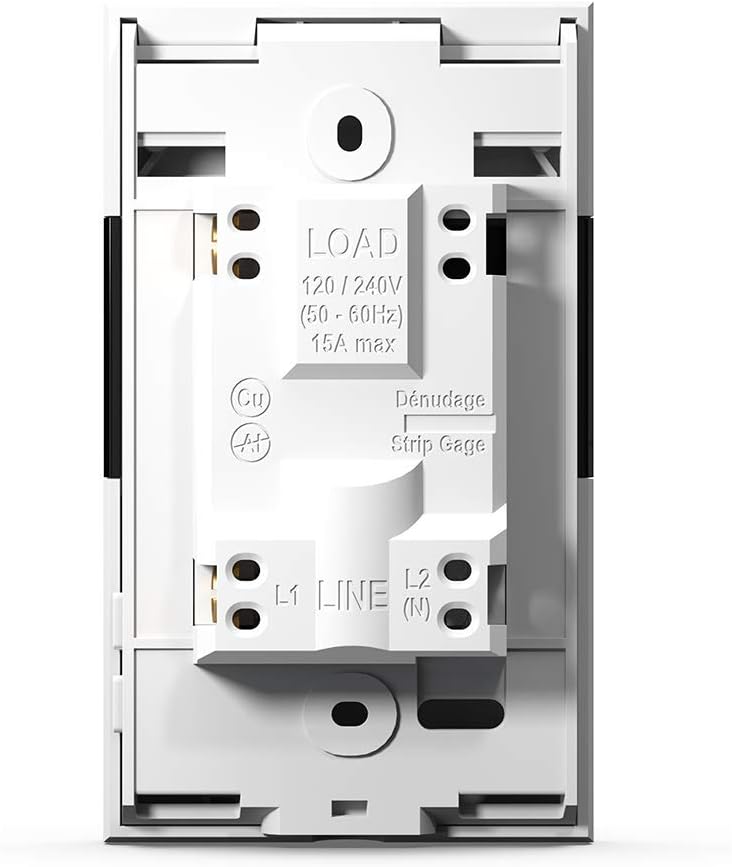
Figure 7: Neviweb App Energy Report
This image shows a smartphone displaying the Neviweb app's energy report feature, presenting a bar graph of energy consumption over time (24 hours, 30 days, 24 months) and estimated costs, allowing users to track their energy savings.
5.3 קול קאָנטראָל
The TH1310WF thermostat can be controlled using voice commands through compatible smart assistants:
- אַמאַזאָן אַלעקסאַ: "Alexa, set the living room thermostat to 72 degrees."
- Google היים: "Hey Google, what's the temperature in the kitchen?"
- Apple HomeKit: Use Siri to control your thermostat once added to HomeKit.

פיגור 8: שטימע אַסיסטאַנט אינטעגראַציע
The image features an Amazon Echo Dot smart speaker on a kitchen shelf, illustrating how users can interact with their thermostat using voice commands through compatible voice assistants.
6. וישאַלט
The Sinopé TH1310WF thermostat requires minimal maintenance. Keep the device clean by wiping it with a soft, dry cloth. Do not use abrasive cleaners or solvents. Ensure the vents are free from dust accumulation to maintain proper operation.
There are no user-serviceable parts inside the thermostat. Any repairs should be performed by qualified personnel.
7. טראָובלעשאָאָטינג
| פּראָבלעם | מעגלעך סיבה | לייזונג |
|---|---|---|
| טערמאַסטאַט אַרויסווייַזן איז ליידיק. | קיין מאַכט צושטעלן. | Check circuit breaker. Ensure proper wiring connections. |
| קענען ניט פאַרבינדן צו ווי-פי. | Incorrect Wi-Fi password; Thermostat too far from router; Router issues. | Verify Wi-Fi password. Move thermostat closer to router or use a Wi-Fi extender. Restart router. |
| הייצונג סיסטעם רעאַגירט נישט. | Thermostat in OFF mode; Wiring issue; Heating system malfunction. | Check thermostat mode. Verify wiring. Consult a qualified electrician or HVAC technician. |
| ומפּינקטלעך טעמפּעראַטור לייענען. | Floor sensor not properly installed or damaged. | Ensure floor sensor is correctly placed within the heating mat. Inspect sensor for damage. |
8. ספּעסאַפאַקיישאַנז
| שטריך | באַשרייַבונג |
|---|---|
| מאָדעל נומער | TH1310WF |
| Voltage | 240 וואלטס |
| וואָסtage | 3600 וואטס |
| קראַנט | מאַקסימום 15 אַ |
| קאַנעקטיוויטי | ווי-פי |
| קאָנטראָללער טיפּ | Amazon Alexa, Apple HomeKit, Google Assistant, Neviweb |
| טעמפּעראַטור ראַנגע | 41 ביז 97 גראַד פאַהרענהייט |
| אַרייַנגערעכנט קאַמפּאָונאַנץ | Floor sensor - 15 ft |
| דימענשאַנז | 4.8 X 2.83 X 1.02 אינטשעס |
| פּונקט וואָג | 13 אונסעס |
| מאַטעריאַל | פּלאַסטיק |
| ווייַז טיפּ | לקד |
| מאַונטינג טיפּ | וואנט בארג |
9. וואָראַנטי און שטיצן
9.1 וואָראַנטי אינפֿאָרמאַציע
The Sinopé TH1310WF Smart Wi-Fi Thermostat is covered by a 3-יאָר פאַבריקאַנט ס וואָראַנטי פֿון דעם קויפֿדאַטום. די וואָראַנטי דעקט חסרונות אין מאַטעריאַלן און אַרבעט אונטער נאָרמאַלן באַנוץ. עס דעקט נישט קיין שאָדן וואָס רעזולטירט פֿון אומריכטיקער אינסטאַלאַציע, אַקסידענט, אומרעכט באַנוץ, מיסברויך, אָדער נישט-אָטעריזירטע מאָדיפֿיקאַציעס.
ביטע האַלטן דיין דערווייַז פון קויפן פֿאַר וואָראַנטי קליימז.
9.2 קונה שטיצן
For technical assistance, troubleshooting, or warranty inquiries, please contact Sinopé Technologies customer support:
- Webפּלאַץ: www.sinopetech.com
- בליצפּאָסט: support@sinopetech.com
- טעלעפֿאָן: Refer to the contact section on the official Sinopé webוועבזייטל פֿאַר רעגיאָנאַלע טעלעפאָן נומערן.
When contacting support, please have your product model number (TH1310WF) and purchase date available.


