1. הקדמה
The Seagate One Touch 4TB External Hard Drive provides portable storage for your digital files. This device is designed for easy use with both PC and Mac computers, offering a simple solution for backing up and accessing your data.

Image 1.1: Seagate One Touch 4TB External Hard Drive. This image displays the silver-colored external hard drive with its minimalist design, suitable for various environments.
2. פּעקל אינהאַלט
באַשטעטיקן אַז אַלע זאכן זענען פאַראַן אין פּעקל:
- Seagate One Touch 4TB External Hard Drive
- וסב 3.0 קאַבלע
- שנעל אָנהייב גייד (דעם דאָקומענט)
3. סעטאַפּ און קאַנעקשאַן
The Seagate One Touch drive is designed for plug-and-play operation. Follow these steps to connect your device:
- Connect the small end of the included USB 3.0 cable to the USB port on the Seagate One Touch drive.
- Connect the larger end of the USB 3.0 cable to an available USB port on your computer (PC or Mac).
- דער דרייוו וועט זיך אויטאמאטיש אנצינדן און ווערן דעטעקטירט דורך אייער אפערירן סיסטעם.
באַמערקונג: For Mac users, reformatting may be required for full compatibility with Time Machine backup software. Refer to your Mac's documentation for reformatting instructions.

Image 3.1: Universal Compatibility. This image illustrates the connection of the USB 3.0 cable to the drive and highlights its compatibility with both Windows and Mac operating systems.
4. אַפּערייטינג די מיטל
4.1 דאַטן סטאָרידזש און טראַנספער
Once connected, the Seagate One Touch drive will appear as an external storage device on your computer. You can drag and drop fileס צו און פון דעם דרייוו, אדער ניצט אייער אפערירן סיסטעם'ס file management tools to organize your data.
4.2 Backup Features
The drive supports various backup methods:
- Single-Click Backup: Utilize the included software (if applicable) or your operating system's backup utility for immediate data backup.
- Scheduled Backups: Configure automatic daily, weekly, or monthly backups to ensure your data is regularly protected.
4.3 Included Software Features
The Seagate One Touch drive may include access to software subscriptions designed to enhance your digital experience:
- מייליאָ שאַפֿן: A one-year complimentary subscription to Mylio Create is included, allowing you to organize and protect your photos and videos across multiple devices.
- אַדאָובי קרעאַטיוו וואָלקן פאָטאָגראַפיע פּלאַן: A four-month membership to the Adobe Creative Cloud Photography plan is included, providing access to photo editing tools like Adobe Photoshop and Lightroom.
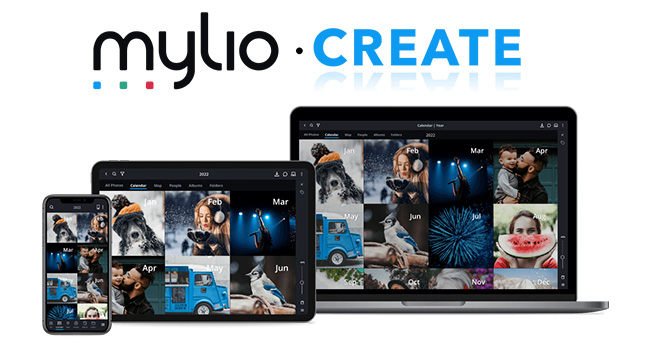
Image 4.1: Mylio Create Interface. This image shows the Mylio Create application running on various devices, demonstrating its capability to organize and display photos.
5. וישאַלט און קער
To ensure the longevity and optimal performance of your Seagate One Touch drive, follow these guidelines:
- גשמיות באַהאַנדלונג: Handle the drive with care. Avoid dropping it or subjecting it to strong impacts, as this can damage internal components.
- ינווייראַנמענאַל טנאָים: האַלט דעם דרייוו אַוועק פון עקסטרעמע טעמפּעראַטורן, דירעקט זונשייַן, און הויכע הומידיטי.
- רייניקונג: ניצט אַ ווייכע, טרוקענע שטאָף צו רייניקן די אויסערלעכע זייט פון דעם דרייוו. ניצט נישט קיין פליסיקע רייניגער אדער סאָלווענטן.
- זיכערע ארויסווארף: Always safely eject the drive from your computer's operating system before disconnecting the USB cable to prevent data corruption.
6. טראָובלעשאָאָטינג
If you encounter issues with your Seagate One Touch drive, refer to the following common solutions:
6.1 דרייוו נישט דעטעקטירט
- טשעק קאַבלע קאַנעקשאַן: Ensure the USB cable is securely connected to both the drive and your computer.
- פרובירט אן אנדערן USB פארט: פֿאַרבינדט דעם דרייוו צו אַן אַנדערן USB פּאָרט אויף אייער קאָמפּיוטער.
- פּרוּווט אַ אַנדערש קאַבלע: If available, use a different USB 3.0 cable to rule out a faulty cable.
- ריסטאַרט קאָמפּיוטער: Sometimes a simple computer restart can resolve detection issues.
- קוק דיסק מענעדזשמענט (ווינדאָוס) / דיסק יוטיליטי (מעק): Verify if the drive appears in your operating system's disk management tools. If it appears but is unformatted, you may need to format it (this will erase all data).
6.2 לאַנגזאַמע טראַנספער גיכקייטן
- ניצן USB 3.0 פּאָרט: Ensure the drive is connected to a USB 3.0 port on your computer for optimal speeds. USB 2.0 ports will result in slower transfers.
- פֿאַרמײַדן אַנדערע USB דעוויסעס: דיסקאָנעקט אַנדערע הויך-באַנדווידט USB דעוויסעס בעת גרויסע טראַנספערס.
- Check Drive Health: Run a disk check utility on your computer to identify any potential issues with the drive.
For further assistance, please visit the official Seagate support webפּלאַץ.
7. ספּעסאַפאַקיישאַנז
| שטריך | דעטאַל |
|---|---|
| מאָדעל נומער | STKC4000401 |
| סטאָרידזש קאַפּאַסיטי | 4TB (4000 GB) |
| האַרט דרייוו טיפּ | מעטשאַניקאַל שווער דיסק |
| צובינד | וסב 3.0 |
| קאַמפּאַטאַבילאַטי | פּיסי, מעק |
| דימענשאַנז (LxWxH) | 5.59 X 4.02 X 1.65 אינטשעס |
| פּונקט וואָג | 9.5 אונסעס |
| קאָליר | זילבער |
8. וואָראַנטי און שטיצן
8.1 לימיטעד וואָראַנטי
Your Seagate One Touch drive is covered by a limited warranty. Please refer to the warranty information provided with your product or visit the official Seagate webזייטל פֿאַר פרטים וועגן וואָראַנטי טערמינען און באדינגונגען.
8.2 דאַטן אָפּזוך באַדינונגען
Most Seagate drives include Rescue Data Recovery Services with their warranty. These services are designed to help protect against data loss due to power outages, natural disasters, user error, viruses, and other unforeseen events. With an industry-leading success rate, these services provide peace of mind for your stored files.

Image 8.1: Seagate Rescue Data Recovery Services. This image highlights the availability of data recovery services to protect against data loss.
8.3 טעכניש שטיצן
For technical assistance, product registration, or to access additional resources, please visit the official Seagate support webפּלאַץ: www.seagate.com/support


