1. הקדמה
This manual provides detailed instructions for the IPEGA PG-SW023 Bluetooth Wireless Game Controller. This versatile controller is designed to enhance your gaming experience across multiple platforms, including N-S consoles, PlayStation 3 (PS3), Android devices, and personal computers running Windows 7, 8, or 10.
Please read this manual carefully before using the product to ensure proper operation and to maximize its features.
2. פּראָדוקט פֿעיִקייטן
- מולטי-פּלאַטפאָרם קאַמפּאַטאַבילאַטי: Suitable for gaming on N-S consoles, PS3, Android devices, and PCs (Windows 7/8/10).
- ימפּרוווד גיימינג דערפאַרונג: Supports vibration feedback and a six-axis gyroscope function for immersive gameplay and precise control.
- Customizable Macro Function: Rear buttons can be configured as common keys or combination keys for simplified actions.
- Continuous TURBO Function: Features a dedicated TURBO button for rapid-fire actions, compatible with N-S Pro gamepads.
- ערגאָנאָמיק פּלאַן: Engineered for comfort during extended gaming sessions, fitting securely in the palm.

Image: The IPEGA PG-SW023 Wireless Game Controller highlighting its key features: two vibrating motors, six-axis design, high-sensitive buttons, and Turbo function.
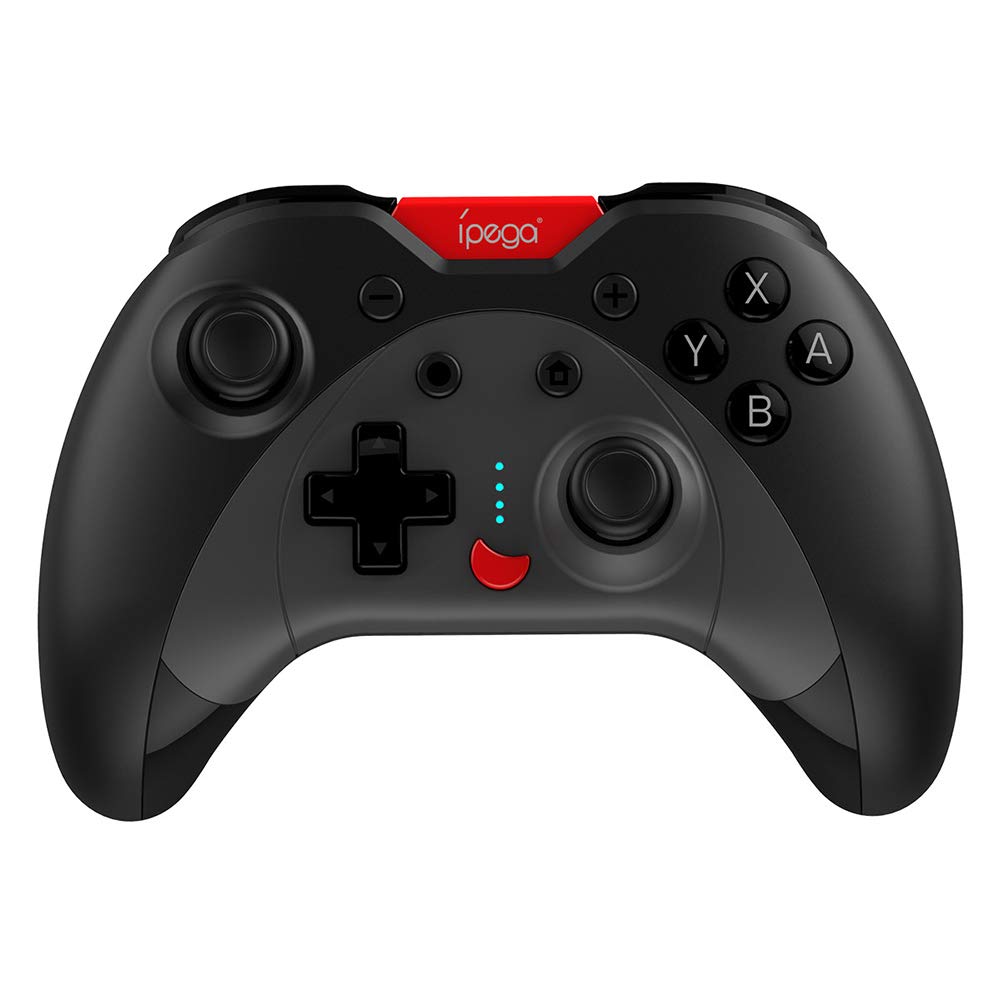
Image: A green IPEGA PG-SW023 controller illustrating its built-in six-axis gyroscope design for improved body feeling and accurate targeting.
3. פּעקל אינהאַלט
ביטע באַשטעטיקן אַז אַלע זאכן זענען פאַראַן אין דעם פּעקל:
- 1 x IPEGA PG-SW023 Wireless Game Controller
- 1 X Type-C טשאַרדזשינג קאַבלע
- 1 x באַניצער מאַנואַל
4. ספּעסאַפאַקיישאַנז
| שטריך | באַשרייַבונג |
|---|---|
| סאָרט | איפּעגאַ |
| מאָדעל | PG-SW023 |
| קאָליר אָפּציעס | Black, Green, Blue, Yellow |
| אַפּערייטינג וואָלtage | DC 3.7V |
| אַפּערייטינג קראַנט | <30mA |
| סטאַטיק קראַנט | <20uA |
| קעסיידערדיק פּלייַטימע | בעערעך. 15 שעה |
| אַרייַנשרייַב וואָלtagE/קראַנט | דק 5וו/500מאַ |
| טשאַרדזשינג צייט | בעערעך. 2 שעה |
| בלועטאָאָטה ווערסיע | 3.0 |
| טראַנסמיסיע דיסטאַנסע | ≤8 מעטער |
| באַטאַרייע קאַפּאַציטעט | 400 מאַה |
| פּראָדוקט דימענשאַנז | 15 X 10 X 5.5 סענטימעטער (5.91 X 3.94 X 2.17 אינטשעס) |
| פּראָדוקט וואָג | אומגעפער 215 גראַם (7.58 אונסעס) |
| קאַמפּאַטאַבאַל דעוויסעס | N-S Console, PS3, Android, PC (Win 7/8/10) |
| קאַנעקטיוויטי | ווירעלעסס (בלועטאָאָטה) |
| מאַכט מקור | באַטאַרייע פּאַוערד |
5. סעטאַפּ
5.1 טשאַרדזשינג די קאָנטראָללער
- Connect the provided Type-C charging cable to the controller's charging port.
- Connect the other end of the cable to a USB power source (e.g., PC, USB wall adapter).
- The indicator lights on the controller will show charging status. Once fully charged (approx. 2 hours), the lights will indicate completion or turn off.
5.2 פּאָרן מיט דעוויסעס
The pairing method varies slightly depending on the device. Ensure the controller is sufficiently charged before attempting to pair.

Image: A blue IPEGA PG-SW023 controller positioned in front of a Nintendo Switch, PlayStation 3, and a laptop, illustrating its multi-platform compatibility.
5.2.1 Pairing with N-S Console
- On your N-S console, go to the HOME Menu.
- אויסקלייבן 'קאנטראלערס' > 'טוישן גריפ/סדר'.
- Press and hold the pairing button on the IPEGA controller (refer to controller diagram for exact location) until the indicator lights begin to flash rapidly.
- The console will detect the controller. Once paired, the indicator light will become solid.
5.2.2 Pairing with PS3
- Connect the controller to the PS3 console using the Type-C cable.
- דרוק די HOME קנעפּל אויף די קאָנטראָללער.
- Once recognized, you can disconnect the cable and the controller should remain paired wirelessly.
5.2.3 פּאָרן מיט אַנדרויד דעוויסעס
- געבן בלועטאָאָטה אויף דיין אַנדרויד מיטל.
- On the controller, press and hold the Android pairing button combination (refer to controller diagram or quick start guide for specific button combination, usually 'A' + HOME or 'X' + HOME) until the indicator lights flash rapidly.
- On your Android device, search for new Bluetooth devices and select 'IPEGA PG-SW023' (or similar name) from the list.
- אַמאָל פּערד, וועט די אינדיקאַטאָר ליכט אויף די קאָנטראָללער ווערן האַרט.
5.2.4 Pairing with PC (Windows 7/8/10)
- זייט זיכער אז אייער קאמפיוטער האט בלועטוט ענייבאַלד.
- Go to 'Settings' > 'Devices' > 'Bluetooth & other devices' and click 'Add Bluetooth or other device'.
- Select 'Bluetooth'.
- On the controller, press and hold the PC pairing button combination (refer to controller diagram or quick start guide for specific button combination, usually 'L1' + HOME or 'Y' + HOME) until the indicator lights flash rapidly.
- Select 'IPEGA PG-SW023' (or similar name) from the list of available devices on your PC.
- אַמאָל פּערד, וועט די אינדיקאַטאָר ליכט אויף די קאָנטראָללער ווערן האַרט.
6. אַפּערייטינג ינסטרוקטיאָנס
6.1 גרונטלעכע קנעפּל פונקציעס
The controller features standard gaming buttons including directional pad, analog sticks, action buttons (A, B, X, Y), shoulder buttons (L1, R1), and triggers (L2, R2). Specific button mapping may vary by game and platform.

Image: Hands comfortably gripping a black IPEGA PG-SW023 controller, showcasing its ergonomic design for comfortable and convenient use.
6.2 טורבאָ פֿונקציע
The TURBO function allows for continuous rapid input of a selected button. This can be useful in games requiring fast, repeated button presses.
- To activate TURBO: Press and hold the desired action button (e.g., A, B, X, Y) and then press the TURBO button simultaneously. The button will now continuously input as long as it's held down.
- To deactivate TURBO: Repeat the same process (press the action button and TURBO button simultaneously).

Image: A yellow IPEGA PG-SW023 controller with its prominent TURBO button, shown with a Nintendo Switch console, illustrating the auto-fire feature.
6.3 מאַקראָ פֿונקציע
The macro function allows you to assign a sequence of button presses or a single common button to the programmable rear buttons. This can simplify complex in-game actions.
- Refer to the specific instructions provided in the quick start guide or on the manufacturer's website for detailed steps on programming macro buttons, as this process can vary.
6.4 Vibration and Gyroscope
The controller features dual motors for vibration feedback, providing tactile sensations that correspond to in-game events. The built-in six-axis gyroscope allows for motion control in supported games, offering a more immersive and precise aiming experience.

Image: A blue IPEGA PG-SW023 controller in use, with visual cues indicating its double motor vibrating design for immersive feedback during gameplay.
7. וישאַלט
Proper care will extend the life of your controller:
- רייניקונג: ניצט אַ ווייכע, טרוקענע שטאָף צו רייניקן דעם קאָנטראָללער. פֿאַר שווערע שמוץ, אַ ביסל ווייכער מאַכןampווישט דעם שטאָף מיט וואַסער אָדער אַ מילדער רייניקונג לייזונג. פֿאַרמייַדט שטרענגע כעמיקאַליעס.
- סטאָרידזש: האַלט דעם קאָנטראָללער אין אַ קיל, טרוקן אָרט אַוועק פון דירעקט זונשייַן און עקסטרעמע טעמפּעראַטורן.
- ויסמיידן פּראַל: לאָזט נישט אַראָפּ דעם קאָנטראָללער און שטעלט נישט אויס דעם קאָנטראָללער צו שטאַרקע קלאַפּן, ווײַל דאָס קען שעדיקן אינעווייניקסטע קאָמפּאָנענטן.
- פליסיק ויסשטעלן: Keep the controller away from liquids. If it comes into contact with liquid, power it off immediately and allow it to dry completely before attempting to use it again.
8. טראָובלעשאָאָטינג
If you encounter issues with your IPEGA PG-SW023 controller, try the following solutions:
- קאָנטראָללער פֿאַרבינדט זיך נישט:
- זיכער מאַכן אַז דער קאָנטראָללער איז גאָר אויפגעלאָדן.
- באַשטעטיקן אַז בלועטאָאָטה איז ענייבאַלד אויף דיין מיטל.
- Try re-pairing the controller by following the setup instructions for your specific device.
- Move the controller closer to the device to ensure it is within the 8-meter transmission range.
- Restart both the controller and your gaming device.
- קנעפּלעך ניט ריספּאַנדינג:
- Check if the controller is properly connected and paired.
- Test the controller with another game or application to rule out software-specific issues.
- זייט זיכער אז קיין שמוץ איז נישט איינגעהאלטן אונטער די קנעפלעך.
- ווייבריישאַן אַרבעט נישט:
- Verify that the game or system settings have vibration enabled.
- עטלעכע שפּילן קען נישט שטיצן ווייבריישאַן פֿידבעק.
- קורץ באַטאַרייע לעבן:
- Ensure the controller is fully charged before use.
- Battery life can vary based on usage intensity (e.g., continuous vibration).
- ויסמיידן טשאַרדזשינג אין גאָר הייס אָדער קאַלט ינווייראַנמאַנץ.
9. וואָראַנטי און שטיצן
For warranty information, technical support, or service inquiries regarding your IPEGA PG-SW023 Bluetooth Wireless Game Controller, please refer to the product packaging or contact the manufacturer directly through their official webזייטל אדער קונה סערוויס קאנאלן. האַלט אייער קויף קוויטל ווי אַ באַווייַז פון קויפן פֿאַר קיין וואָראַנטי קליימז.


