הקדמה
This manual provides comprehensive instructions for setting up, operating, and maintaining your Macally Bluetooth Keyboard. Designed for multi-device compatibility, this wireless keyboard features a built-in stand, a rechargeable battery, and 78 keys for efficient typing across various devices including tablets, smartphones, and computers.

Image: The Macally Bluetooth Keyboard in white, with a tablet securely docked in its integrated stand, showcasing its compact design and functionality.
וואָס איז אין די קעסטל
Upon unboxing your Macally Bluetooth Keyboard, please ensure all the following items are present:
- Macally Bluetooth Keyboard
- וסב טשאַרדזשינג קאַבלע
- באַניצער מאַנואַל (דעם דאָקומענט)
If any items are missing or damaged, please contact Macally customer support.
פּראָדוקט פֿעיִקייטן
The Macally Bluetooth Keyboard is designed for versatility and convenience, offering several key features:
- מולטי דיווייס קאַנעקטיוויטי: Seamlessly switch between up to 3 Bluetooth-enabled devices (e.g., tablet, smartphone, computer).
- ינאַגרייטיד מיטל שטיין: Features a built-in 10.5-inch slot to securely hold your smartphone or tablet.
- סאָליד און פּאָרטאַטיוו: Small enough to fit into most bags, making it ideal for on-the-go use.
- קריקאָנלאָדלעך באַטערי: אויסגעשטאַט מיט אַ 280mAh ריטשאַרדזשאַבאַל באַטאַרייע פֿאַר פּראַלאָנגד נוצן.
- Efficient Layout: Includes 78 quiet scissor-switch keys and 13 convenient shortcut/media keys for enhanced productivity.

Image: The keyboard demonstrating seamless Bluetooth connectivity with a 30ft wireless range, compatible with Apple, Windows, iOS, and Android operating systems.

Image: A visual representation of the keyboard's multi-device capability, showing it paired with a laptop, a desktop computer, and a smartphone simultaneously.

Image: The keyboard positioned on a desk, with both a tablet and a smartphone docked in its integrated 10.5-inch stand, highlighting its "setup anywhere" convenience.
סעטאַפּ
טשאַרדזשינג די קלאַוויאַטור
Before first use, fully charge your Macally Bluetooth Keyboard. Connect the provided USB charging cable to the keyboard's charging port and the other end to a USB power source (e.g., computer USB port, USB wall adapter). The charging indicator light will show the charging status.

Image: The keyboard with its charging cable connected, illustrating the rechargeable 280mAh battery and the included charging cable.
בלועטאָאָטה פּערינג
Follow these steps to pair your keyboard with a device:
- Ensure the keyboard is charged and powered on. The power switch is located on the top right of the keyboard.
- On your device (tablet, smartphone, computer), enable Bluetooth.
- דריקן און האַלטן די Fn קנעפּל און איינער פון די בלועטוט קאַנאַל קנעפּלעך (B1, B2, אָדער B3) simultaneously for a few seconds until the corresponding Bluetooth indicator light starts blinking rapidly. This indicates the keyboard is in pairing mode.
- On your device, search for "Macally Keyboard" or a similar name in the Bluetooth device list and select it to connect.
- Once connected, the indicator light will stop blinking and remain solid for a moment before turning off, indicating successful pairing.
To pair additional devices, repeat steps 3-5 using a different Bluetooth channel key (B1, B2, or B3).
אַפּערייטינג ינסטראַקשאַנז
באַשטימען צווישן דיווייסאַז
צו בייטן צווישן פארבונדענע דעווייסעס, דריק פשוט די Fn קנעפּל צוזאַמען מיטן קאָרעספּאָנדירנדיקן בלוטוט קאַנאַל קנעפּל (B1, B2, אָדער B3) for the desired device. The keyboard will quickly connect to the selected device.
Using Shortcut Keys
The keyboard features 13 dedicated shortcut/media keys for quick access to common functions. These keys are typically located on the top row (F1-F12 and an additional key). Functions may vary slightly depending on the operating system of your connected device.
Common shortcut functions include:
- Media playback controls (play/pause, next/previous track)
- Volume control (mute, volume up/down)
- אַדזשאַסטמאַנט פון די ברייטנאַס פון די פאַרשטעלן
- Home screen/desktop access
- זוכן פֿונקציע
Refer to your device's operating system documentation for specific compatibility and functionality of these keys.

בילד: א דעטאַלירטע view of the keyboard's layout, emphasizing its 78 quiet scissor-switch keys and the 13 dedicated shortcut/media keys for efficient use.
וישאַלט
To ensure the longevity and optimal performance of your Macally Bluetooth Keyboard, follow these maintenance guidelines:
- רייניקונג: ניצט אַ ווייכע, טרוקענע, לינט-פֿרייע שטאָף צו רייניקן די קלאַוויאַטור ייבערפלאַך. פֿאַר שווערע שמוץ, אַ ביסל ווישןampווישט דעם שטאָף מיט וואַסער אָדער אַ מילדן, נישט-שרייַבנדיקן רייניגער. פֿאַרמייַדט איבעריקע פֿײַכטקייט.
- סטאָרידזש: ווען נישט אין באַנוץ פֿאַר לענגערע פּעריאָדן, האַלט די קלאַוויאַטור אין אַ קיל, טרוקן אָרט אַוועק פון דירעקט זונשייַן און עקסטרעמע טעמפּעראַטורן.
- באַטערי זאָרגן: To preserve battery life, avoid fully discharging the keyboard frequently. Recharge it when the low battery indicator appears. If storing for a long time, charge it to about 50% every few months.
- ויסמיידן ספּילז: Keep liquids away from the keyboard to prevent internal damage.
טראָובלעשאָאָטינג
If you encounter issues with your Macally Bluetooth Keyboard, try the following solutions:
| פּראָבלעם | מעגלעך לייזונג |
|---|---|
| די קלאַוויאַטור טוט זיך נישט אָן. | Ensure the keyboard is charged. Connect it to a power source using the USB cable. |
| Unable to pair the keyboard. |
|
| די קלאַוויאַטור דיסקאָנעקט זיך אָפט. |
|
| שליסלען ריספּאַנד נישט. |
|
If these solutions do not resolve the issue, please contact Macally customer support for further assistance.
ספּעסאַפאַקיישאַנז
| שטריך | דעטאַל |
|---|---|
| מאָדעל נומער | BTTABKEYBAT |
| קאַנעקטיוויטי טעכנאָלאָגיע | בלועטאָאָטה |
| נומער פון קיז | 78 |
| באַטערי טיפּ | 1 ליטהיום יאָן באַטאַרייע (אַרייַנגערעכנט) |
| פּונקט וואָג | 1.92 פונט |
| פּעקל דימענשאַנז | 13.98 X 7.91 X 2.48 אינטשעס |
| פאַבריקאַנט | Mace Group Inc / Macally Peripherals |
| קאַמפּאַטאַבאַל דעוויסעס | PC, Tablet, Apple devices, Windows Desktop/Laptop, Surface, Chromebook, Smartphones, TVs (any device with Bluetooth) |
| רעקאָממענדעד ניצט | Office, School, Everyday Use, Personal, Education, Business |
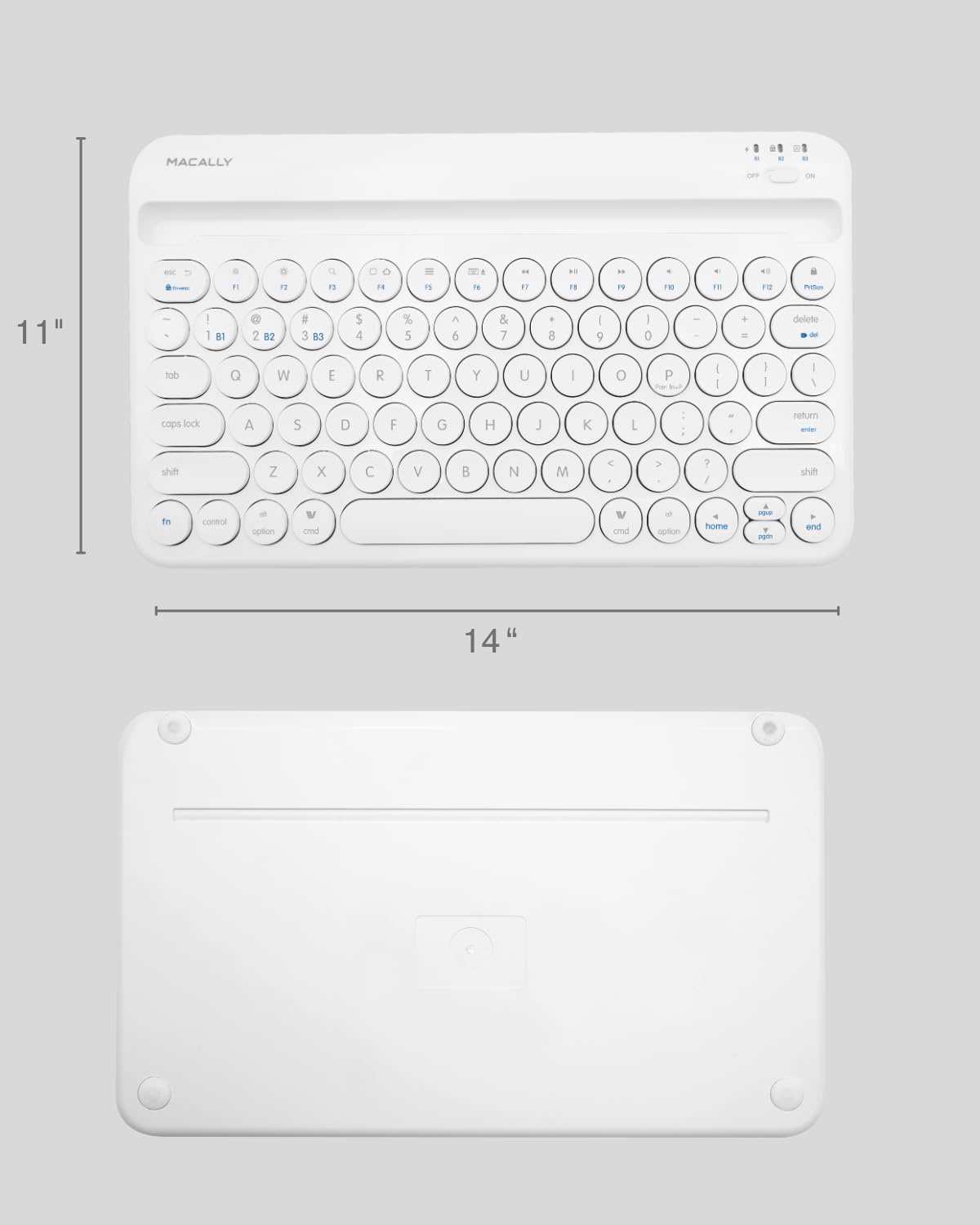
Image: The physical dimensions of the keyboard, measuring approximately 11 inches in width and 14 inches in length.

Image: The keyboard fitting easily into a backpack, demonstrating its compact size and suitability for travel and on-the-go use.
וואָראַנטי און שטיצן
Macally products are designed for quality and reliability. For information regarding product warranty, technical support, or service, please visit the official Macally webזייטל אדער קאנטאקט זייער קאסטומער סערוויס דעפארטמענט. האלט אייער קויף קוויטל אלס באווייז פון קויפן פאר גאראנטיע קליימס.
איר קענט געפֿינען מער אינפֿאָרמאַציע און שטיצע בײַ דער מאַקאַלי קראָם אויף אַמאַזאָן.


