הקדמה
א דאנק פארן קויפןasing the EARISE M15 Karaoke Machine. This portable PA loudspeaker system is designed to provide high-quality audio for various entertainment and public address needs. Featuring powerful sound output, versatile connectivity options, and vibrant LED lights, the M15 is perfect for parties, gatherings, and karaoke sessions. Please read this manual thoroughly before operating the device to ensure proper use and to maximize its lifespan.
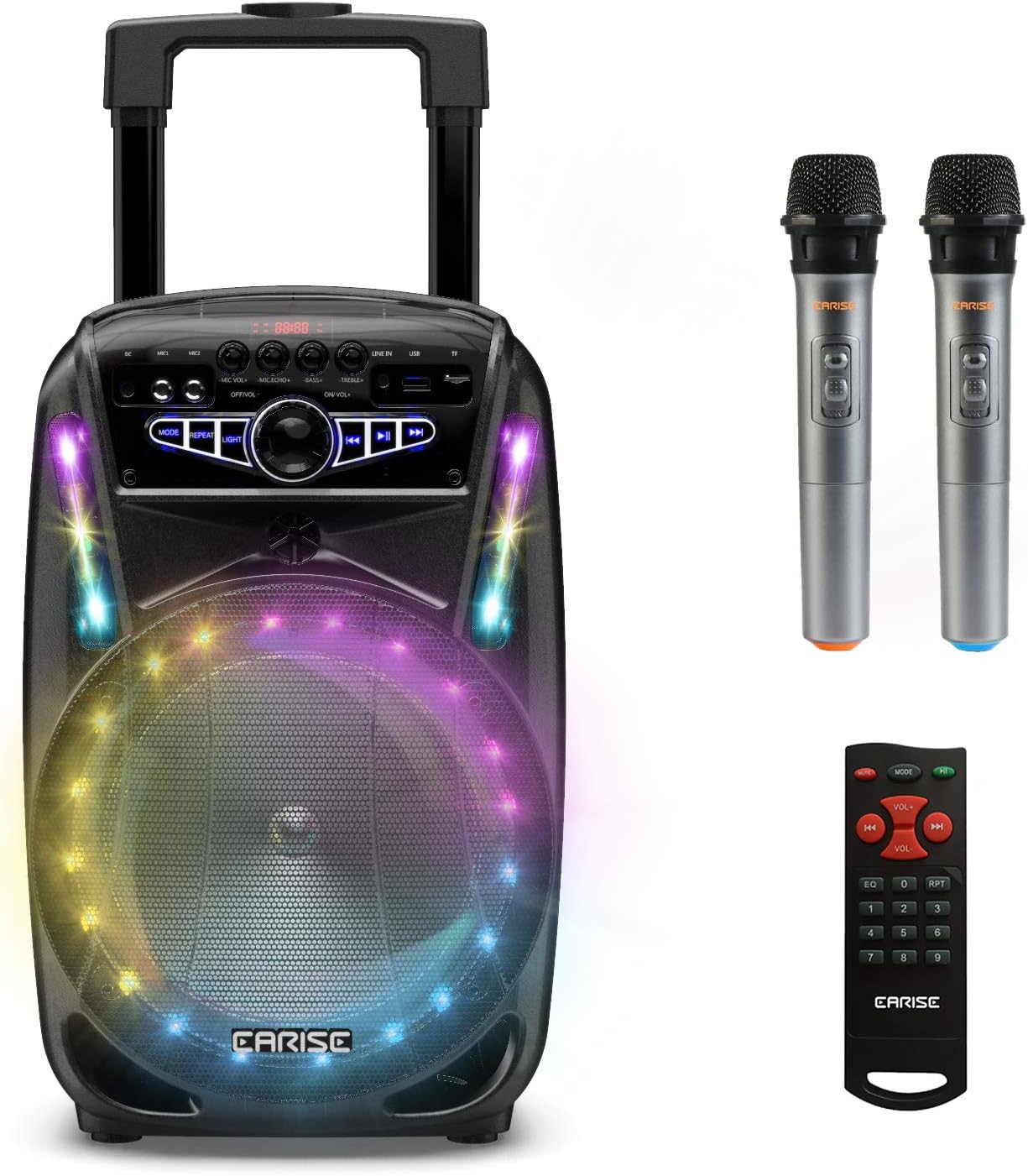
Image: The EARISE M15 Karaoke Machine, a black portable speaker with colorful LED lights on the front, shown with two wireless microphones and a remote control.
וואָס איז אין די קעסטל
ביטע טשעקט דעם אינהאַלט פון אייער פּעקל צו זיכער מאַכן אַז אַלע זאכן זענען דאָ און אין גוטן צושטאַנד.
- 1 רענטגענ מ 15 טראַלי פּאַ סיסטעם
- 2 קס ווירעלעסס מיקראָפאָנעס (באַטעריז נישט ינקלודעד)
- 1 x רימאָוט קאָנטראָל
- קסנומקס X מאַכט קאָרד
- 1 רענטגענ AUX קאַבלע
- 1 x באַניצער מאַנואַל (דאָס דאָקומענט)

Image: A visual representation of the package contents, showing the M15 speaker, two wireless microphones, a remote control, an AUX cable, and a charging cable.
סעטאַפּ גייד
1. טשאַרדזשינג די יוניט
Before first use, fully charge the M15 Karaoke Machine. The built-in 3600mAh 7.4V Lithium rechargeable battery provides portability. A full recharge takes approximately 3 hours.
- Connect the included power cord to the DC Charging Port (6) on the back of the unit.
- Plug the other end of the power cord into a standard AC 100-240V power outlet.
- The charging indicator light will illuminate. Once fully charged, the light may change color or turn off depending on the unit's design.
2. Installing Microphone Batteries
The wireless microphones require batteries (not included). Open the battery compartment of each microphone and insert the required batteries, ensuring correct polarity.
3. ערשטע איינשאַלטונג
Locate the Power On/Off switch (15) on the control panel. Turn the switch to the "ON" position to power on the unit.
אַפּערייטינג ינסטראַקשאַנז
קאָנטראָל פּאַנעל איבערview
מאַכט זיך באַקאַנט מיטן קאָנטראָל פּאַנעל פֿאַר אָפּטימאַלער אָפּעראַציע.

Image: Close-up of the M15's control panel, highlighting various buttons and ports with corresponding numbers for easy identification.
- ווייַז פאַרשטעלן: ווײַזט דעם איצטיקן מאָדע, טראַק נומער און אַנדערע אינפֿאָרמאַציע.
- מיקראָפאָן באַנד: אַדזשאַסטירט דעם באַנד פון פֿאַרבונדענע מיקראָפאָנען.
- מיקראָפאָן עקאָו: קאָנטראָלירט דעם עקאָ־עפֿעקט פֿאַר מיקראָפֿאָנען.
- באַס: אַדזשאַסטירט דעם באַס לעוועל פון די אַודיאָ אַוטפּוט.
- טרעבאַל: אַדזשאַסטירט די טרעבאַלע לעוועל פון די אַודיאָ אַוטפּוט.
- די סי טשאַרדזשינג פּאָרט: For connecting the power adapter to charge the unit.
- Mic 1 Port: אַרייַנשרייַב פֿאַר אַ ווייערד מיקראָפאָן.
- Mic 2 Port: Input for a second wired microphone.
- Line In Port (AUX): For connecting external audio devices via AUX cable.
- וסב פלאַש דרייוו שפּעלטל: פֿאַר שפּילן אַודיאָ fileס פון אַ וסב פאָר.
- TF/SD קאַרטל שפּעלטל: פֿאַר שפּילן אַודיאָ files from a TF or SD card.
- מאָדע: Switches between Bluetooth, USB, TF, AUX, and FM Radio modes.
- איבערחזרן: איבערחזרט דעם איצטיקן טרעק אדער פּלייַליסט.
- ליכט: Toggles or changes the LED light patterns.
- Power On/Off, Master Volume: Turns the unit on/off and adjusts the overall volume.
- פֿריִערדיקע שפּור: סקיפּס צו די פריערדיקע שפּור.
- שפּיל / פּויזע: שפּילט אָדער פּויזירט דעם איצטיקן טראַק.
- ווייַטער שפּור: שפּרינגען צו דער ווייַטער שפּור.
1. בלועטאָאָטה פּערינג
Connect your smartphone, tablet, or other Bluetooth-enabled device to the M15 for wireless audio streaming.
- Power on the M15 unit.
- דרוק די מאָדע button (12) until "Bluetooth" or "BT" appears on the Display Screen (1).
- Enable Bluetooth on your device and search for "EARISE M15" in the list of available devices.
- Select "EARISE M15" to pair. A confirmation sound will indicate successful pairing.
- You can now play audio from your device through the M15.

Image: A person sitting outdoors, connecting their smartphone to the EARISE M15 speaker via Bluetooth, indicated by the Bluetooth logo.
2. USB/TF קאַרטל פּלייבאַק
שפּיל אַודיאָ files directly from a USB flash drive or TF/SD card.
- Insert a USB flash drive into the USB Flash Drive Slot (10) or a TF/SD card into the TF/SD Card Slot (11).
- The unit should automatically switch to USB or TF mode and begin playing compatible audio fileס. אויב נישט, דריק די מאָדע button (12) to select the correct mode.
- ניצן די פֿריִערדיקע שפּירט (16), שפּיל / פּויזע (17), און ווייַטער שפּור (18) buttons to control playback.
3. AUX ינפּוט
Connect external audio devices that do not have Bluetooth capability using the AUX cable.
- Connect one end of the included AUX cable to the Line In Port (9) on the M15.
- פֿאַרבינדט דעם אַנדערן עק פֿונעם AUX קאַבל צום אַודיאָ אַרויסגאַנג דזשעק פֿון אייער עקסטערנעם מיטל (למשל, MP3 שפּילער, לאַפּטאָפּ).
- דרוק די מאָדע button (12) until "AUX" or "LINE" appears on the Display Screen (1).
- קאָנטראָל פּלייבאַק פון דיין פונדרויסנדיק מיטל.
4. מיקראָפאָן באַניץ
The M15 supports up to two wireless microphones and two wired microphones simultaneously for karaoke fun.
- ווירעלעסס מיקראָפאָן: Turn on the wireless microphones. They should automatically connect to the M15.
- דראָטיקע מיקראָפאָנען: Plug wired microphones into Mic 1 Port (7) or Mic 2 Port (8).
- Adjust the Microphone Volume (2) and Microphone Echo (3) knobs to achieve desired sound effects.

Image: A group of people enjoying karaoke, with the EARISE M15 speaker providing sound and multiple microphones in use, demonstrating its multi-user capability.
5. געפירט לייץ
Enhance your party atmosphere with the M15's colorful LED disco lights.
- דרוק די ליכט button (14) to toggle the LED lights on/off or to cycle through different light patterns.

Image: The EARISE M15 speaker with its front-facing LED lights glowing in multiple colors, creating a vibrant visual effect.
6. רימאָוט קאָנטראָל באַניץ
די אַרייַנגערעכנטע ווײַטקאָנטראָל גיט באַקוועמע אָפּעראַציע פֿון אַ ווײַטן.
- ענשור אַז די ווייַט קאָנטראָל האט ארבעטן באַטעריז.
- Point the remote control towards the front of the M15 unit.
- Use the buttons on the remote to control volume, mode, track selection, EQ, and other functions.
וישאַלט
Proper maintenance will ensure the longevity and optimal performance of your EARISE M15 Karaoke Machine.
- רייניקונג: ניצט אַ ווייכע, טרוקענע שטאָף צו ווישן די אויסערלעכע זייט פון דעם אַפּאַראַט. ניצט נישט קיין שרײַבנדיקע רייניגער, וואַקסן אָדער סאָלווענטן ווײַל זיי קענען שאַטן די ענדיקונג.
- באַטערי זאָרגן: To prolong battery life, avoid fully discharging the battery frequently. If storing the unit for an extended period, charge it to about 50% every few months.
- סטאָרידזש: האַלט דעם אַפּאַראַט אין אַ קיל, טרוקן אָרט אַוועק פון דירעקט זונשייַן, עקסטרעמע טעמפּעראַטורן און הויכער הומידיטי.
- האַנדלינג: While the unit is portable with wheels and a handle, avoid dropping or subjecting it to strong impacts.

Image: A person demonstrating the portability of the EARISE M15 by pulling it with its retractable handle and built-in wheels.
טראָובלעשאָאָטינג
If you encounter issues with your M15, please refer to the following common problems and solutions.
| פּראָבלעם | מעגלעך סיבה | לייזונג |
|---|---|---|
| קיין מאַכט / אַפּאַראַט צינדט זיך נישט אָן. | באַטערי איז דיפּליטיד. עלעקטרישע שנור נישט ריכטיג פארבונדן. | לאָדט דעם אַפּאַראַט גאָר אויף. Ensure power cord is securely connected to both the unit and the power outlet. |
| קיין קלאַנג פֿון רעדנער. | די באַנד איז צו נידעריק. אומרעכטע מאָדע אויסגעקליבן. External device volume is low. | Increase the Master Volume (15). דרוק די מאָדע button (12) to select the correct input source (Bluetooth, USB, AUX). Increase volume on the connected external device. |
| מיקראָפאָן טוט נישט אַרבעטן. | Microphone batteries are dead or incorrectly inserted. מיקראָפאָן וואָלומען איז צו נידעריק. Wireless microphone not paired. | Replace microphone batteries, ensuring correct polarity. Increase Microphone Volume (2). Ensure wireless microphones are turned on and within range. |
| בלועטאָאָטה פּערינג ניט אַנדערש. | M15 is not in Bluetooth mode. Device is too far from M15. בלועטוט אויף דעם דעווייס איז אויסגעלאשן. | דרוק מאָדע button (12) to select Bluetooth mode. ריקט אייער דעווייס נענטער צום M15. געבן בלועטאָאָטה אויף דיין מיטל. |
| די USB/TF קארטל שפילט נישט. | אומרעכט file פֿאָרמאַט. קאַרטל/דרייוו נישט ריכטיק אַרײַנגעשטעלט. Unit not in USB/TF mode. | פאַרזיכערן אַודיאָ files זײַנען אין אַ קאָמפּאַטיבלן פֿאָרמאַט (למשל, MP3). Re-insert the USB drive or TF card firmly. דרוק מאָדע button (12) to select USB or TF mode. |
ספּעסאַפאַקיישאַנז
Detailed technical specifications for the EARISE M15 Karaoke Machine.
| שטריך | באַשרייַבונג |
|---|---|
| מאָדעל | M15 |
| מאַכט רעזולטאַט | 400W מאַקס. |
| R.Frequency | 90Hz-20KHz |
| לי-יאָן באַטערי | 3.7V / 2600mAh (Built-in) |
| פאָר יוניט | 8" 4Ω*1 + 1" tweeter*1 |
| S/N פאַרהעלטעניש | ≥60דב |
| מאַכט צושטעלן | אַק 100-240וו |
| פּראָדוקט דימענשאַנז (L x W x H) | 27.94 X 25.4 X 40.64 סענטימעטער (11 X 10.4 X 16.3 אינטשעס) |
| פּונקט וואָג | 4.08 קג |
| קאַנעקטיוויטי טעכנאָלאָגיע | בלועטאָאָטה, וסב, AUX |
| קאַמפּאַטאַבאַל דעוויסעס | לאַפּטאַפּ, סמאַרטפאָנע |

Image: A diagram illustrating the physical dimensions of the EARISE M15 speaker, showing its height, width, and depth.
וואָראַנטי און שטיצן
For warranty information or technical support, please refer to the contact details provided with your purchase documentation or visit the official EARISE webזייטל. האַלט אייער קויף קוויטל ווי אַ באַווייַז פון קויפן פֿאַר קיין וואָראַנטי קליימז.


