הקדמה
Thank you for choosing the MEGATEK T8 Bluetooth Portable Speaker. This manual provides essential information for the proper setup, operation, and maintenance of your new speakers. The MEGATEK T8 speakers feature True Wireless Stereo (TWS) technology for an immersive audio experience, vibrant LED lighting, and a durable, waterproof design, making them ideal for various environments.
פּעקל אינהאַלט
ביטע טשעק די פּאַקעט פֿאַר די פאלגענדע זאכן:
- 2 x MEGATEK T8 Bluetooth Portable Speakers
- 1 x USB Charging Cable (designed to charge both speakers simultaneously)
- 1 x באַניצער מאַנואַל
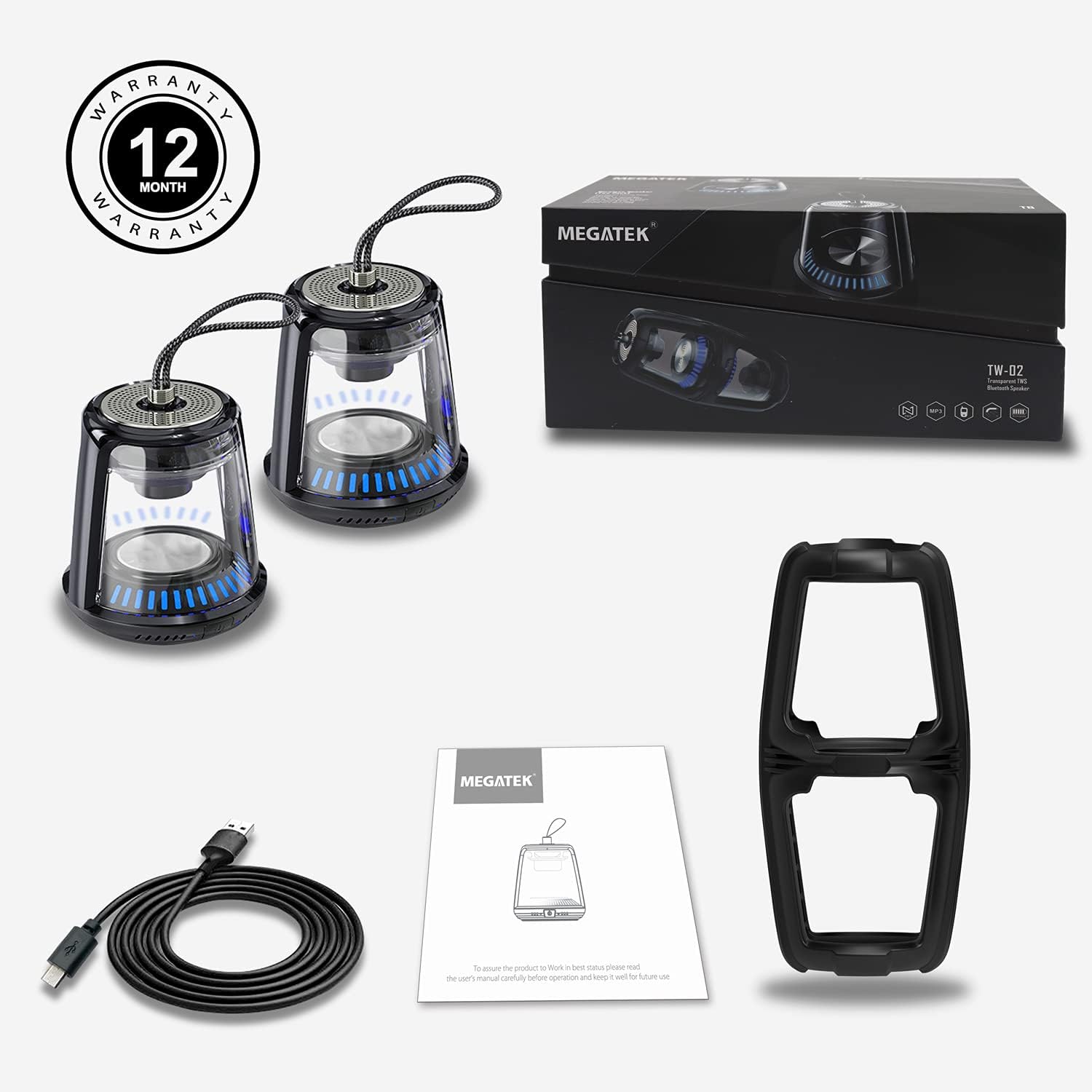
The package includes two MEGATEK T8 speakers, a USB charging cable for simultaneous charging, and this instruction manual.
פּראָדוקט פֿעיִקייטן
- בלועטאָאָטה קאַנעקטיוויטי: אָן קיין שטערונג אָן קיין דראָט פֿאַרבינדונג צו אייערע דעוויסעס.
- אמת ווירעלעסס סטערעאָ (TWS): Pair two speakers for a synchronized stereo sound experience.
- LED ליכט מאָדעס: Dynamic LED lighting to enhance ambiance.
- געבויט-אין מיקראָפאָן: שטיצט הענט-פריי רופן.
- IPX5 וואָטערפּרוף שאַץ: Protected against water splashes and light rain.
- מאַגנעטיק באַזע: Allows for convenient attachment to metal surfaces.
- סאָליד און פּאָרטאַטיוו פּלאַן: Easy to carry and place anywhere.
- קריקאָנלאָדלעך באַטערי: Provides portable power for on-the-go use.
סעטאַפּ
1. אויפלאָדן די רעדנערס
Before initial use, fully charge both speakers. Connect the provided USB charging cable to the charging port on each speaker and then to a USB power adapter (not included) or a computer's USB port. The LED indicator will show charging status and turn off when fully charged.
2. פּאָווערינג אויף / אויסגעלאשן
To power on the speaker, press and hold the power button for approximately 3 seconds until you hear an audible prompt and the LED lights illuminate. To power off, press and hold the power button again for 3 seconds until you hear a power-off prompt and the LED lights turn off.
3. בלועטוט פארבינדונג (איין רעדנער)
- זייט זיכער אז דער רעדנער איז אויפגעלאָדן און אנגעצונדן.
- אַקטאַווייט בלועטאָאָטה אויף דיין סמאַרטפאָנע, טאַבלעט אָדער אנדערע בלועטאָאָטה-ענייבאַלד מיטל.
- זוכן פֿאַר available devices and select "MEGATEK T8" from the list.
- אַמאָל קאָננעקטעד, איר וועט הערן אַ באַשטעטיקונג געזונט פון די רעדנער.

The speaker connects easily to your device via Bluetooth for wireless music streaming.
4. אמתע ווירעלעס סטערעאָ (TWS) פּאָרינג (צוויי רעדנערס)
To enjoy true stereo sound, you can pair two MEGATEK T8 speakers together:
- זיכער מאַכן אַז ביידע רעדנערס זענען גאָר אויפגעלאָדן און אויסגעלאָשן.
- Power on both speakers simultaneously.
- On איינער of the speakers (this will become the primary speaker), quickly double-press the power button. The speakers will begin searching for each other.
- Once successfully paired, you will hear a confirmation sound, and the LED indicators on both speakers will synchronize.
- Now, connect your Bluetooth device to the primary speaker (the one you double-pressed the button on) as described in the "Bluetooth Pairing (Single Speaker)" section.

This image illustrates the True Wireless Stereo (TWS) functionality, allowing two speakers to connect for an enhanced stereo sound experience.
אַפּערייטינג
1. פּלייַינג מוזיק
After successful Bluetooth pairing, you can play music from your connected device. Control playback (play/pause, next/previous track, volume) directly from your device.
2. האַנדס-פֿרייַ פאַך
When connected to a smartphone, the built-in microphone allows for hands-free calling. Press the power button once to answer an incoming call, and press it again to end the call. Press and hold the power button to reject an incoming call.
3. LED ליכט מאָדעס
The speakers feature integrated LED lights. To cycle through different light modes or turn them off, short press the LED light button (if available, otherwise refer to the power button for multi-functionality). The lights can create a dynamic visual experience.

The speaker features multiple LED light modes to enhance your listening experience with visual effects.
4. מאַגנעטישע מאָונטינג
The base of the speaker is magnetic, allowing it to be securely attached to compatible metal surfaces. This provides versatile placement options.

The magnetic base allows for convenient placement on metal surfaces, such as a refrigerator.
וישאַלט
1. רייניקונג
Wipe the speakers with a soft, dry cloth. Do not use abrasive cleaners, alcohol, or chemical solvents, as these may damage the surface or internal components.
2. וואַסער קעגנשטעל (IPX5)
The MEGATEK T8 speakers are IPX5 waterproof, meaning they are protected against low-pressure water jets from any direction. They are suitable for use in environments where they might encounter splashes, such as by a pool or in a bathroom. Do not submerge the speakers in water. Ensure the charging port cover is securely closed to maintain water resistance.

With an IPX5 waterproof rating, the speakers are protected against splashes, making them suitable for poolside or bathroom use.
3. סטאָרידזש
When not in use for extended periods, store the speakers in a cool, dry place away from direct sunlight and extreme temperatures. It is recommended to charge the speakers periodically to maintain battery health.
טראָובלעשאָאָטינג
- Speaker will not turn on: Ensure the battery is charged. Connect the speaker to the charging cable and allow it to charge for at least 30 minutes before attempting to power on again.
- קען נישט צוזאמענשטעלן דורך בלוטוט:
- מאַכן זיכער אַז בלועטאָאָטה איז ענייבאַלד אויף דיין מיטל.
- Make sure the speaker is in pairing mode (LED indicator blinking).
- Ensure your device is within the Bluetooth range (approximately 33 feet or 10 meters).
- פרובירט אפצופּאַרן און ווידער צופּאַרן דעם רעדנער פֿון די בלוטוט סעטטינגס פֿון אייער דעווייס.
- קיין קלאַנג אָדער נידעריקע באַנד:
- קאָנטראָלירט דעם וואָלומען לעוועל אויף ביידע דעם רעדנער און אייער פֿאַרבונדענעם מיטל.
- זיכער מאַכן אַז דער רעדנער איז ריכטיק פארבונדן דורך בלועטוט.
- TWS פּאָרינג פיילז:
- Ensure both speakers are powered off before initiating TWS pairing.
- Make sure both speakers are within close proximity to each other (within a few feet).
- איבערחזרן די TWS פּערינג טריט פֿאָרזיכטיק.
ספּעסאַפאַקיישאַנז
| מאָדעל נומער | T8 |
| יוניט גראף | 2 ספּיקערז |
| קאָליר | שוואַרץ |
| פּראָדוקט דימענשאַנז | 4"ד רענטגענ 4.7"וו רענטגענ 8.7"ה |
| פּונקט וואָג | 0.6 פונט (פּער רעדנער) |
| וואַסער קעגנשטעל מדרגה | IPX5 וואָטערפּרוף |
| קאַנעקטיוויטי טעכנאָלאָגיע | בלועטאָאָטה, וסב |
| אַודיאָ רעזולטאַט מאָדע | סטערעאָ, סוראַונד |
| מאַונטינג טיפּ | Freestanding, Magnetic |
| ספּעציעלע פֿעיִקייטן | Stereo Pairing (TWS), Auto EQ, Auto Speaker Setup, LED Light |
| פאַבריקאַנט | Megatek Electronics |
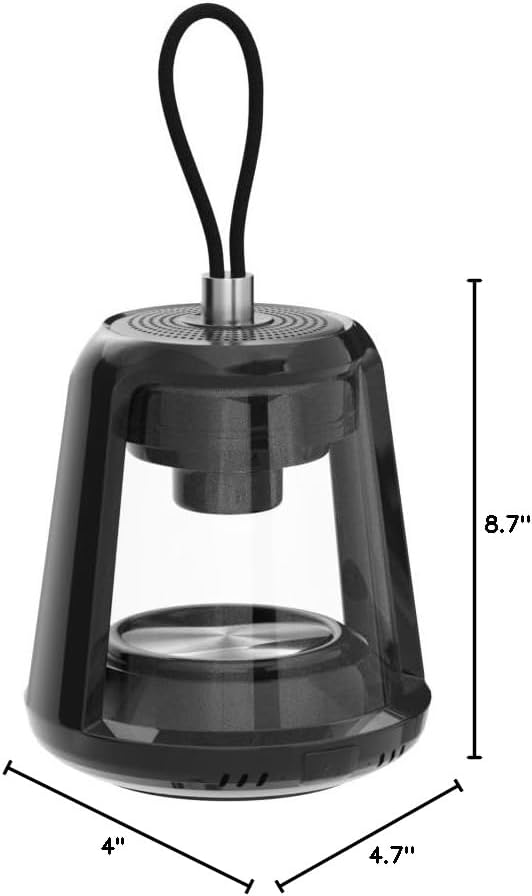
This image provides the physical dimensions of the MEGATEK T8 speaker: 4"D x 4.7"W x 8.7"H.
וואָראַנטי & שטיצן
1. וואָראַנטי אינפֿאָרמאַציע
The MEGATEK T8 Bluetooth Portable Speakers come with a 12-חודש וואָראַנטי פֿון דעם קויפֿדאַטום. די וואָראַנטי דעקט פֿאַבריקאַציע־דעפֿעקטן און גאַראַנטירט אַז דער פּראָדוקט איז פֿרײַ פֿון דעפֿעקטן אין מאַטעריאַל און אַרבעט אונטער נאָרמאַלן באַנוץ.
2. קונה שטיצן
For any questions, technical assistance, or warranty claims, please contact MEGATEK customer support through the retailer where you purchased the product or visit the official MEGATEK website for contact information. Please have your purchase receipt and product model number (T8) ready when contacting support.