1. הקדמה
Thank you for choosing the Ourlife Kids Camera OU-630. This digital camera is designed for children, offering 1080p Full HD video recording, 12MP photo resolution, and a unique 60x macro magnification function for exploring the micro-world. It features a 3.5-inch large screen, various creative filters, games, and music playback. Please read this manual carefully to ensure proper use and maintenance of your camera.
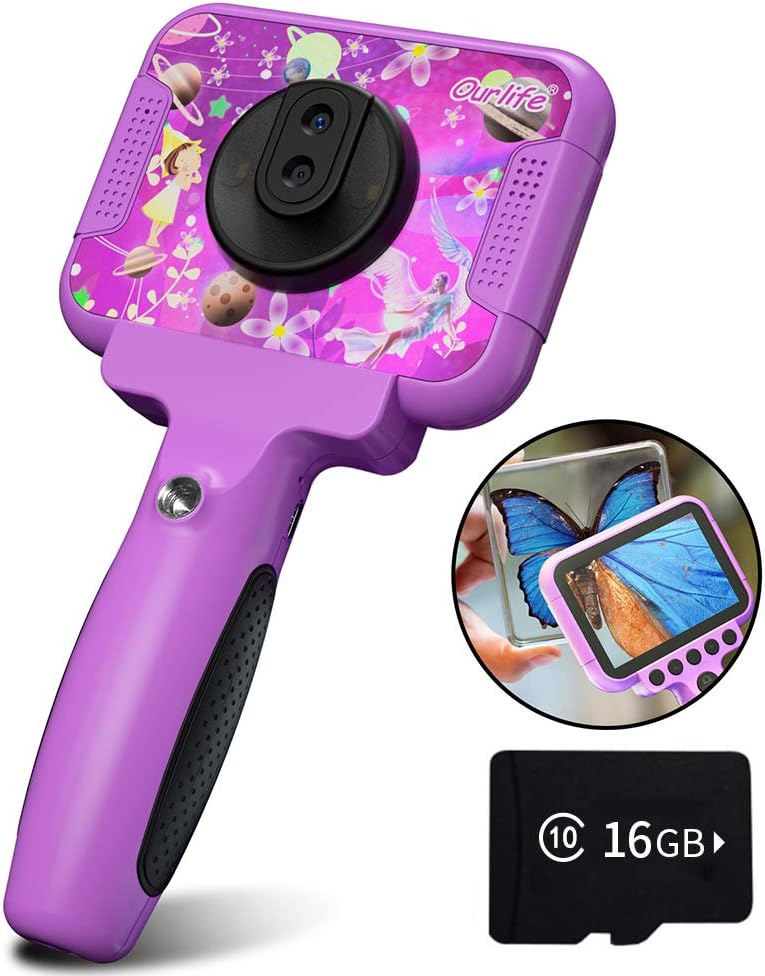
Image 1.1: The Ourlife Kids Camera OU-630, highlighting its design and macro capability.
2. פּעקל אינהאַלט
ביטע טשעקן דעם פּעקל צו זיכער מאַכן אַז אַלע זאכן זענען דאָרט:
- Kids Camera x 1
- 16 גיגאבייט TF קאַרטל x 1
- Base Bracket x 1
- וסב טשאַרדזשינג קאַבלע רענטגענ 1
- באַניצער מאַנואַל x 1
- Neck Lanyard x 1
- האַנט רימען X 1

Image 2.1: Contents of the Ourlife Kids Camera OU-630 package.
3. פּראָדוקט איבערview
מאַכט זיך באַקאַנט מיט די קאַמעראַ'ס קאָמפּאָנענטן און קאָנטראָלס:
- ווייַז פאַרשטעלן: 3.5-אינטש קאָליר פאַרשטעלן פֿאַר viewבילדער, ווידיאס, און נאַוויגירן מעניוז.
- הויפּט לינז: For standard photography and video.
- מאַקראָו לענס: Dedicated lens for 60x magnification.
- קאָנטראָל קנעפּלעך: M (Menu), Up, OK, Down, Power, Shutter/LED.
- שעפּן: Ergonomically designed for child-friendly grip.
- וסב פּאָרט: פֿאַר טשאַרדזשינג און דאַטן אַריבערפירן.
- טף קאַרד שפּעלטל: פֿאַר אַרײַנשטעלן אַ זכּרון קאַרטל.

Image 3.1: Key features and specifications of the Ourlife Kids Camera OU-630.
קנעפּל פֿונקציע טאַבלע
| קנעפּל | אַפּאַראַט מאָדע | רעקאָרדינג מאָדע | מוזיק מאָדע | שפּיל מאָדע | פּלייַבאַקק מאָדע |
|---|---|---|---|---|---|
| M | צוריק צו מעניו | ||||
| ▲ | Change filters/Frames Long press: Zoom in | Change filters/Frames | פֿריִער ליד | מאַך לינקס | Previous photo |
| OK | Long press: Open/Close LED light | OK | Choose music/story | OK | שפּיל / פּויזע |
| ▼ | Change filters/Frames Long press: Zoom out | Change filters/Frames | ווייַטער ליד | מאַך רעכט | ווייַטער פאָטאָ |
| ⏻ | Switch to Splicing mode | צוריק צו מעניו | NULL | NULL | ויסמעקן |
| ◎ | נעמען פאָטאָ | צוריק צו מעניו | NULL | NULL | NULL |
Image 3.2: Detailed functions of each button across different modes.
4. סעטאַפּ
4.1. טשאַרדזשינג די קאַמעראַ
Before first use, fully charge the camera. Connect the included USB charging cable to the camera's USB port and to a compatible USB power source (e.g., computer, wall adapter). The charging indicator light will show the charging status. A full charge provides approximately 3 hours of use.
4.2. ינסערטינג די טף קאַרד
The camera requires a TF (MicroSD) card to store photos and videos. A 16GB TF card is included. Locate the TF card slot on the side of the camera. Gently insert the TF card with the metal contacts facing down until it clicks into place. To remove, push the card in again until it springs out.
5. אַפּערייטינג ינסטרוקטיאָנס
5.1. מאַכט אויף / אויסגעלאשן
- צו אָנפאַנגען, דריקן און האַלטן די Power button (⏻) ביז די פאַרשטעלן לייץ אַרויף.
- צו האַלטן אַוועק, דריקן און האַלטן די Power button (⏻) ביז די פאַרשטעלן טורנס אַוועק.
5.2. מעניו נאַוויגאַציע
ניצן די אַרויף (▲) און אַראָפּ (▼) buttons to navigate through menu options. Press the OK קנעפּל to confirm a selection. Press the מ (מעניו) קנעפּל to return to the previous menu or the main menu.
5.3. גענומען פאָטאָס
- פון די הויפּט מעניו, אויסקלייַבן די אַפּאַראַט בילדל און דריקן OK.
- ראַמען דיין שאָס ניצנדיק דעם עקראַן.
- דרוק די Shutter button (◎) צו נעמען אַ פאָטאָ.
- ניצן די אַרויף (▲) און אַראָפּ (▼) buttons to change filters or frames. Long press אַרויף (▲) צו פארגרעסערן, דריקן לאַנג אַראָפּ (▼) צו פארגרעסערן.
5.4. רעקאָרדינג ווידיאס
- פון די הויפּט מעניו, אויסקלייַבן די ווידעא בילדל און דריקן OK.
- דרוק די Shutter button (◎) צו אָנהייבן רעקאָרדינג.
- דרוק די Shutter button (◎) ווידער צו האַלטן רעקאָרדינג.
- ניצן די אַרויף (▲) און אַראָפּ (▼) buttons to change filters or frames during recording.
5.5. Macro Function
The camera features a dedicated macro lens for 60x magnification, ideal for observing small objects. The optimal focal length for macro photography is 20-40mm.
- To switch between the main lens and macro lens, long press the Shutter button (◎).
- When in macro mode, position the camera close to the subject (20-40mm distance).
- Use the included base bracket for stability during macro shots to prevent hand shake.
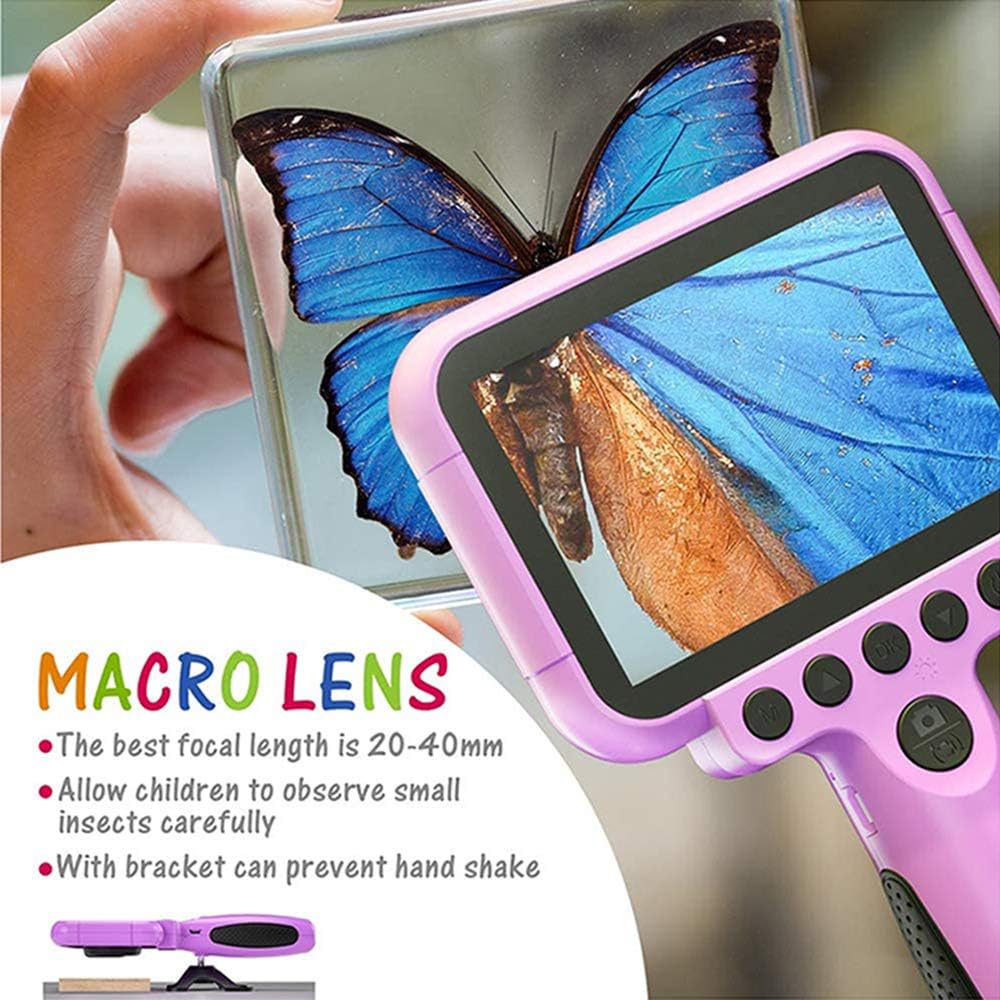
Image 5.1: Demonstrating the macro lens function for detailed observation.

Image 5.2: Switching between HD and Macro lenses.
5.6. Patchwork Mode (Splicing Mode)
This mode allows you to combine two separate photos into one. It includes various border patterns.
- In Camera Mode, press the Power button (⏻) to switch to Splicing (Patchwork) mode.
- Follow the on-screen prompts to take two photos that will be merged.
- Select from 9 available border patterns.

Image 5.3: Using the Patchwork Mode to combine images.
5.7. מוזיק מאָדע
The camera supports MP3 music playback. Store your favorite music files on the TF card. From the main menu, select the מוזיק בילדל און דריקן OK. ניצן די אַרויף (▲) און אַראָפּ (▼) buttons to select songs, and OK צו שפּילן / פּויזע.
5.8. גאַמעס
The camera includes pre-installed games for entertainment. From the main menu, select the Game icon און דריקן OKניצט די נאַוויגאַציע קנעפּלעך צו שפּילן.
5.9. פּלייבאַק מאָדע
צו view your captured photos and videos, select the Photos/Video Playback icon פון די הויפּט מעניו און דריקן OK. ניצן די אַרויף (▲) און אַראָפּ (▼) buttons to browse, and OK to play videos or view photos. To delete a file, דריקן די Power button (⏻) בשעת viewינג עס.
5.10. סעטטינגס
Access camera settings by selecting the סעטטינגס בילדל from the main menu. Here you can adjust various parameters such as date/time, language, resolution, and more.
6. וישאַלט
- האַלט די קאַמעראַ ריין דורך עס ווישן מיט אַ ווייכן, טרוקענעם שטאָף.
- Avoid exposing the camera to extreme temperatures, direct sunlight, or moisture.
- דו זאלסט נישט פּרווון צו דיסאַסעמבאַל אָדער פאַרריכטן די אַפּאַראַט זיך.
- Ensure the TF card is inserted correctly to prevent data loss.
- Charge the camera regularly to maintain battery health.
7. טראָובלעשאָאָטינג
- די אַפּאַראַט טוט נישט קער אויף: זיכער מאַכן אַז די באַטאַרייע איז אויפגעלאָדן. פֿאַרבינדט עס צו אַ מאַכט מקור און פּרוּווט ווידער.
- קען נישט נעמען בילדער/ווידעאס: Check if a TF card is inserted and if it has sufficient storage space.
- נעבעך בילד קוואַליטעט: Ensure the lens is clean. Check lighting conditions. For macro shots, ensure correct focal distance (20-40mm).
- קאַמעראַ פרירט זיך: דריק און האלט דעם פּאַוער קנעפּל צו צווינגען אַ ריסטאַרט.
- TF card error: Reinsert the TF card. If the issue persists, try formatting the card (this will erase all data) or use a different TF card.
8. ספּעסאַפאַקיישאַנז
| שטריך | דעטאַל |
|---|---|
| מאָדעל נומער | OU-630 |
| עפעקטיוו נאָך האַכלאָטע | 12 מפּ |
| ווידעא האַכלאָטע | 1080 פּ |
| פאַרשטעלן גרייס | 3.5 אינטשעס |
| בילד סטאַביליזאַטיאָן | דיגיטאַל |
| לענס טיפּ | Macro (60x zoom) |
| באַטערי טיפּ | 1 ליטהיום פּאָלימער (אַרייַנגערעכנט) |
| קאַנעקטיוויטי טעכנאָלאָגיע | וסב |
| שטיצט מעדיע טיפּ | סד קאָרט |
| שיסערייַ מאָדעס | Loop recording, Continuous shooting, Timed photo, Macro photography, Filter photos |
| נומער דימענשאַנז (ד רענטגענ וו רענטגענ ה) | 3.94"ד רענטגענ 7.28"וו רענטגענ 0.79"ה |
9. וואָראַנטי & שטיצן
This Ourlife Kids Camera OU-630 comes with a 12-חודש וואָראַנטי from the date of purchase. This warranty covers manufacturing defects and workmanship. It does not cover damage caused by misuse, accidents, unauthorized repairs, or normal wear and tear.
For technical support, warranty claims, or any questions regarding your product, please contact Ourlife customer service. Refer to the contact information provided on the product packaging or the official Ourlאויב webפּלאַץ.


