הקדמה
This manual provides essential information for the proper setup, operation, and maintenance of your NEC DTZ-12D-3 DT400 12-Button Display Phone. Please read these instructions carefully to ensure optimal performance and longevity of your device. This phone is designed for business communication environments, offering a range of features to enhance productivity.
פּראָדוקט איבערview
The NEC DTZ-12D-3 DT400 is a corded 12-button display phone, featuring a clear LCD screen for call information and menu navigation. It is designed for efficient communication in a professional setting.
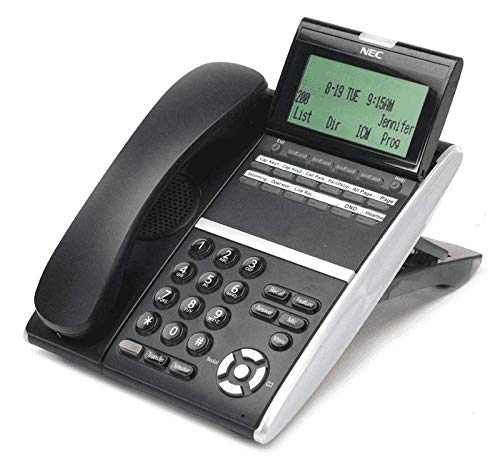
פיגורע 1: NEC DTZ-12D-3 DT400 12-Button Display Phone. This image shows the black corded desk phone with its adjustable display unit. The display shows time, date, and soft-key options. The phone features a standard dial pad, 12 programmable function keys, and dedicated buttons for speaker, transfer, redial, and navigation.
שליסל קאַמפּאָונאַנץ:
- כאַנדסעט: פֿאַר פּריוואַטע שמועסן.
- ווייַז פאַרשטעלן: Shows call status, time, date, and menu options.
- Programmable Feature Keys (12): Customizable buttons for speed dials, line access, or specific functions.
- טעלעפאן: Standard numeric keys (0-9, *, #) for dialing.
- נאַוויגאַציע שליסלען: פֿאַר סקראָלן דורך מעניוז און ליסטעס.
- רעדנער קנעפּל: Activates the speakerphone function.
- Transfer Button: Used to transfer an active call to another extension.
- רעדיאַל קנעפּל: רופט די לעצט אויפגערופענע נומער.
- DND (Do Not Disturb) Button: Activates/deactivates the Do Not Disturb feature.
סעטאַפּ
1. ונפּאַקקינג
- קערפאַלי באַזייַטיקן אַלע קאַמפּאָונאַנץ פון די פּאַקקאַגינג.
- Verify that all items are present: phone unit, handset, coiled handset cord, and telephone line cord.
2. פֿאַרבינדן דעם האַנדסעט
Connect one end of the coiled handset cord to the handset and the other end to the handset jack located on the side or back of the phone unit.
3. Connecting to the Telephone Line
Plug one end of the telephone line cord into the LINE jack on the phone unit and the other end into a standard telephone wall jack.
4. קאַנעקטינג מאַכט
This phone is designed for corded electric operation. Ensure it is connected to a compatible telephone system that provides power, or use the appropriate power adapter if supplied separately (check your system's requirements).
אַפּערייטינג ינסטראַקשאַנז
מאַכן אַ רוף
- הייבן די כאַנדסעט אָדער דריקן די רעדנער קנעפּל.
- Dial the desired telephone number using the dial pad.
- וואַרטן פֿאַר די רופן צו פאַרבינדן.
ענטפֿערן אַ רוף
- ווען דער טעלעפאָן קלינגט, הייבט אויף דעם האַנדסעט אָדער דריק די קנעפּל רעדנער קנעפּל.
Using Programmable Feature Keys
The 12 programmable keys can be configured for various functions such as speed dialing, line access, or system features. Consult your system administrator for specific programming details and assigned functions.
Caller Identification (Caller ID)
If subscribed to Caller ID service, the incoming caller's number and name (if available) will be displayed on the screen before you answer the call.
טראַנספערינג אַ רופן
- בעשאַס אַן אַקטיוו רופן, דריקן די אַריבערפירן קנעפּל.
- Dial the extension or number to which you want to transfer the call.
- Wait for the recipient to answer, then announce the call and hang up. Alternatively, you may hang up immediately for an unsupervised transfer.
רידיאַלינג די לעצטע נומער
הייבן די כאַנדסעט אָדער דריקן די רעדנער קנעפּל, און דריקן די רעדיאַל קנעפּל צו רופן די לעצט גערופענע נומער.
צי ניט שטערן (DND)
דרוק די דנד button to activate or deactivate the Do Not Disturb feature. When active, incoming calls may be redirected to voicemail or a busy signal, depending on system configuration.
וישאַלט
רייניקונג
- Wipe the phone's exterior with a soft, damp שטאָף.
- ניצט נישט שטרענגע כעמיקאלן, אברייסיוו רייניגער, אדער איבערגעטריבענע פייכטקייט.
- Ensure the phone is disconnected from the power source before cleaning.
סטאָרידזש
האַלט דעם טעלעפאָן אין אַ קיל, טרוקן אָרט אַוועק פון דירעקט זונשייַן און עקסטרעמע טעמפּעראַטורן ווען נישט אין באַנוץ פֿאַר לענגערע פּעריאָדן.
טראָובלעשאָאָטינג
קיין רעדל טאָן
- Check all cable connections, especially the telephone line cord.
- Ensure the phone system is operational.
- Test with another phone if available to rule out line issues.
אַרויסווייַזן נישט ארבעטן
- Verify the phone is properly connected to the system and receiving power.
- Adjust the display contrast if applicable (refer to system administrator).
קען נישט מאַכן אָדער באַקומען רופן
- Check if the DND feature is accidentally activated.
- Ensure the telephone line is active.
- Contact your system administrator for assistance with line configuration.
ספּעסאַפאַקיישאַנז
| שטריך | דעטאַל |
|---|---|
| מאָדעל | DTZ-12D-3 DT400 |
| סאָרט | NEC Co |
| טיפּ פון טעלעפאָן | קאָרדעד |
| קאָליר | שוואַרץ |
| מאַטעריאַל | פּלאַסטיק |
| פּונקט וואָג | 2.9 פונט |
| פּעקל דימענשאַנז | 12.28 X 9.21 X 4.61 אינטשעס |
| מאַכט מקור | קאָרדעד עלעקטריק |
| דיאַלער טיפּ | Single Keypad (tone dialing) |
| ענטפער סיסטעם טיפּ | דיגיטאַל |
| מולטיליין אפעראציע | איין-ליניע אָפּעראַציע |
| רופער אידענטיפיקאציע | יא |
| קאַמפּאַטאַבאַל דעוויסעס | Traditional telephone networks (PSTN, ISDN), potential integration with other communication devices. |
וואָראַנטי און שטיצן
For warranty information and technical support, please refer to the documentation provided by your system vendor or contact your NEC authorized dealer. As this product may be a renewed item, specific warranty terms may vary from new products. Please consult your purchase agreement for details.
For further assistance, it is recommended to contact your IT department or the telecommunications system administrator responsible for your NEC phone system.


