הקדמה
Thank you for choosing the Caliber CAM030 Wired Rear View Camera. This manual provides essential information for the proper installation, operation, and maintenance of your new camera. Please read this manual thoroughly before using the product to ensure safe and optimal performance.
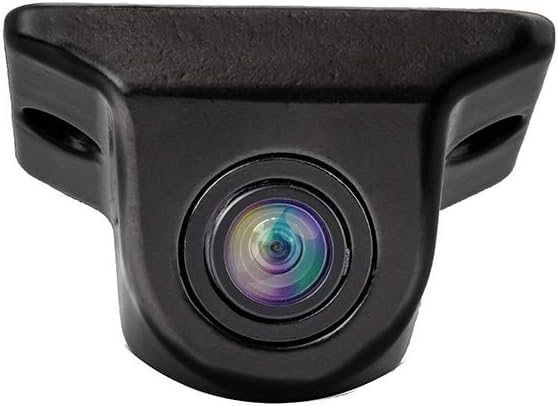
Figure 1: Caliber CAM030 Rear View אַפּאַראַט
זיכערקייַט אינפֿאָרמאַציע
שטענדיק אָבסערווירן די פאלגענדע זיכערהייט מיטלען צו פאַרמייַדן שאָדן אָדער שעדיקן צו די מיטל:
- Ensure the vehicle's power is off before beginning installation.
- באַראַטן זיך מיט אַ פאַכמאַן אויב איר זענט נישט זיכער וועגן קיין ינסטאַלירונג טריט.
- Do not expose the camera to extreme temperatures or direct water immersion.
- ניצט נאָר די צוגעשטעלטע קייבלען און אַקסעסאָריעס.
- האַלטן אויס פון דערגרייכן פון קינדער.
פּעקל אינהאַלט
ביטע קאָנטראָלירט אַז אַלע זאכן זענען פאַראַן אין דעם פּעקל:
- Caliber CAM030 Rear View אַפּאַראַט
- RCA ווידעא קאַבלע
- מאַכט קאַבלע
- Mounting Hardware (screws, bracket)
- באַניצער מאַנואַל (דעם דאָקומענט)
סעטאַפּ און ינסטאַלירונג
The Caliber CAM030 is designed for aftermarket installation and connects to a compatible monitor via an RCA connector. Follow these steps for proper installation:
- קלייַבן אַ מאַונטינג אָרט: Select a suitable location at the rear of your vehicle, typically near the license plate or bumper, that provides a clear view. The camera is designed for a wide-angle view פון 170 דיגריז.
- אָנקלאַפּן די אַפּאַראַט: Secure the camera using the provided mounting bracket and screws. Ensure it is firmly attached and angled correctly for optimal visibility.
- פאַרבינדן מאַכט: Connect the camera's power cable to the vehicle's reverse light circuit. This allows the camera to automatically power on when the vehicle is put into reverse gear. Ensure proper polarity.
- קאָננעקט ווידעא קאַבלע: Route the RCA video cable from the camera to your in-car monitor. Connect the RCA plug from the camera to the corresponding RCA input on your monitor.
- פּרובירן די ינסטאַלירונג: Once all connections are made, turn on your vehicle and shift into reverse gear to test the camera's functionality. Adjust the camera's angle if necessary.

Figure 2: Typical mounting location near the license plate.
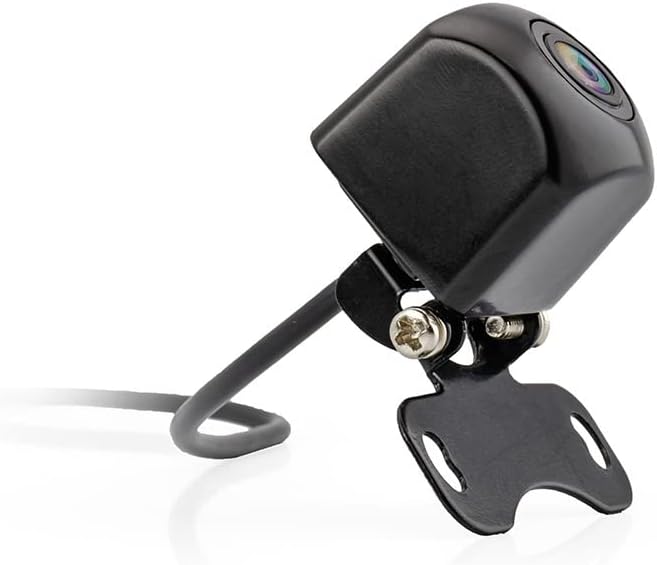
Figure 3: Camera with mounting bracket.

Figure 4: Compact size of the CAM030 camera.
אַפּערייטינג ינסטראַקשאַנז
The Caliber CAM030 is designed for simple, automatic operation:
- אָטאַמאַטיק אַקטאַוויישאַן: When properly installed and connected to the reverse light circuit, the camera will automatically activate and display the rear view on your connected monitor as soon as you shift your vehicle into reverse gear.
- ברייט ווינקל View: The camera features a 170-degree wide-angle lens, providing a broad field of vision to assist with parking and maneuvering.
- בילד קוואליטעט: The camera captures video in 1080p resolution using CMOS sensor technology for clear images.
וישאַלט
To ensure the longevity and optimal performance of your camera:
- רייניקונג: רייניקן די קאַמעראַ לינז פּעריִאָדיש מיט אַ ווייכן, דamp שטאָף צו באַזייַטיקן שמוץ, שטויב אָדער וואַסער פלעקן וואָס קענען פאַרשטאָפּן דעם viewניצט נישט קיין שאַרפע כעמיקאַלן.
- קאַבלע דורכקוק: Regularly check the cables for any signs of wear, fraying, or damage. Ensure all connections remain secure.
- ענוויראָנמענטאַל שוץ: While the camera is designed for outdoor use, avoid exposing it to extreme pressure washing or prolonged submersion in water.
טראָובלעשאָאָטינג
| פּראָבלעם | מעגלעך סיבה | לייזונג |
|---|---|---|
| קיין בילד אויף מאָניטאָר |
|
|
| פליקערנדיק אָדער פאַרדרייט בילד |
|
|
| בילד איז פארשוואומען אדער נישט קלאר |
|
|
ספּעסאַפאַקיישאַנז
| שטריך | דעטאַל |
|---|---|
| סאָרט | קאַליבער |
| מאָדעל נומער | CAM030 |
| קאַמפּאַטאַבאַל דעוויסעס | מאָניטאָר |
| קאַנעקטער טיפּ | RCA |
| ייַנמאָנטירונג טיפּ | אַפטערמאַרקיט |
| ווידעא רעקאָרדינג האַכלאָטע | 1080 פּ |
| אָפּטיש סענסאָר טעכנאָלאָגיע | קמאָס |
| לענס טיפּ | ברייט ווינקל |
| פאַקטיש ווינקל פון View | 170 דיגריז |
| פעלד פון View | 170 דיגריז |
| פּראָדוקט דימענשאַנז | 26L x 26W x 87H millimeters |
| קריקאָנלאָדלעך באַטערי | ניין |
| ספּער פּאַרץ אַוואַילאַביליטי | אינפֿאָרמאַציע ניט בנימצא |
| ווייכווארג דערהייַנטיקונגען געראַנטיד ביז | אינפֿאָרמאַציע ניט בנימצא |
| ערשטער בנימצא טאָג | 5 אפריל 2022 |
וואָראַנטי און שטיצן
For warranty information and technical support, please refer to the documentation provided at the time of purchase or visit the official Caliber webזייטל. האַלט דיין קויפן באַווייַז פֿאַר קיין וואָראַנטי קליימז.
באַמערקונג: אינפֿאָרמאַציע וועגן פֿאַרפֿיגבאַרקייט פֿון רעזערוו טיילן און ווייכווארג דערהייַנטיקונגען איז נישט פֿאַרפֿיגבאר אין דעם מאָמענט.


