הקדמה
This manual provides comprehensive instructions for the setup, operation, and maintenance of your Trust Ymo Wireless Keyboard and Mouse Set. This set is designed for comfortable and efficient use with its German QWERTZ layout, quiet keys, and splash-proof design.

Image: The Trust Ymo Wireless Keyboard and Mouse Set, featuring a full-size German QWERTZ keyboard and a compact wireless mouse.
פּעקל אינהאַלט
ביטע זיכער מאַכן אַז אַלע זאכן זענען פאַראַן אין פּעקל:
- Trust Ymo Wireless Keyboard (German QWERTZ Layout)
- Trust Ymo Wireless Mouse
- וסב מיקראָ ופנעמער
- AAA באַטעריעס (4 אַרייַנגערעכנט)
- באַניצער מאַנואַל (דעם דאָקומענט)

Image: The retail packaging for the Trust Ymo Wireless Keyboard and Mouse Set, indicating the contents.
סעטאַפּ אינסטרוקציעס
- ינסטאַלירן באַטעריז:
Open the battery compartments on both the keyboard and the mouse. Insert the included AAA batteries, ensuring correct polarity (+/-). Close the compartments securely.
- פאַרבינדן וסב ופנעמער:
Locate the USB micro receiver, typically stored within the mouse's battery compartment or a dedicated slot. Plug the USB receiver into an available USB port on your computer (PC, Laptop, Mac, or Chromebook).
- Automatic Connection (Plug & Play):
The keyboard and mouse are designed for plug-and-play functionality. Your operating system (Windows, MacOS, Chrome OS) should automatically detect and install the necessary drivers. No additional software installation is required.

Image: A user setting up the Trust Ymo Wireless Keyboard and Mouse, illustrating the "Plug & Play" feature and the shared micro USB receiver.
אַפּערייטינג ינסטראַקשאַנז
קלאַוויאַטור פֿעיִקייטן
- דײַטשע QWERTZ אויסלייג: The keyboard features a standard German QWERTZ layout with a full numeric keypad for efficient data entry.
- שטילע שליסלען: The keys are designed for a soft and quiet keystroke, minimizing disturbance in shared environments.
- מולטימעדיאַ און פונקציע קנעפּלעך: Access 13 dedicated office and multimedia buttons for quick control over volume, media playback, and common applications.
- אַדזשאַסטאַבאַל טילט: The keyboard includes foldable feet to adjust the typing angle for ergonomic comfort.

Image: Close-up of the Trust Ymo keyboard, highlighting its quiet keys, adjustable feet, and multimedia function keys.
מויז פֿעיִקייטן
- Quiet Buttons: The mouse buttons are designed for silent clicking, reducing noise during use.
- DPI קנעפּל: Adjust the mouse sensitivity (DPI) between 600 and 1400 DPI to suit your preference and task requirements.
- ווירעלעסס קייט: The mouse operates wirelessly with a range of up to 10 meters from the USB receiver.
- אַמבידעקסטראָוס פּלאַן: The mouse features a comfortable design suitable for both left-handed and right-handed users.
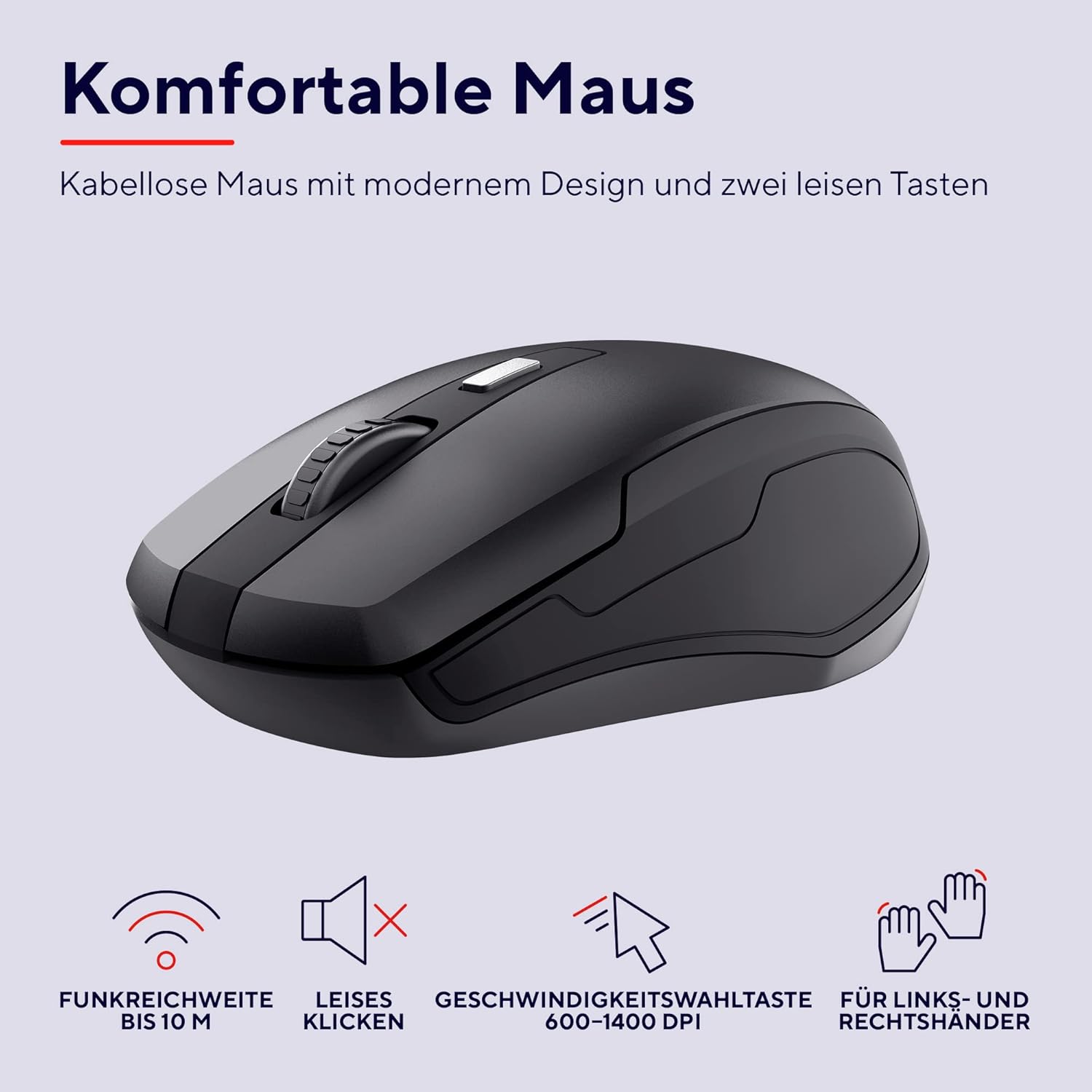
בילד: א דעטאַלירטע view of the Trust Ymo wireless mouse, showing its ergonomic shape, quiet click functionality, and DPI adjustment button.
וישאַלט
- רייניקונג: ניצט אַ ווייכע, טרוקענע שטאָף צו רייניקן די ייבערפלאַכן פון דער קלאַוויאַטור און מויז. פֿאַר שווערע שמוץ, ניצט אַ ביסל טרוקן שטאָף.amp מען קען ניצן אַ שטאָף, און זיכער מאַכן אַז קיין פליסיקייט גייט נישט אַרײַן אין דעם אַפּאַראַט.
- Splash-Proof Feature: The keyboard is designed to be splash-proof, offering protection against accidental spills. However, it is not waterproof. Avoid submerging the keyboard in liquid. If a spill occurs, gently wipe away the liquid and allow the keyboard to dry completely before continued use.
- באַטערי פאַרבייַט: Replace batteries when performance degrades or the low battery indicator illuminates.

Image: A close-up of the Trust Ymo keyboard demonstrating its splash-proof design, with water droplets on the keys.
טראָובלעשאָאָטינג
- קיין קשר:
- זיכער מאַכן אַז דער USB ופנעמער איז זיכער אַרייַנגעשטעקט אין אַ אַרבעטנדיקן USB פּאָרט.
- Check if the batteries in both the keyboard and mouse are correctly installed and have sufficient charge.
- פרובירט אריינצושטעקן דעם USB ריסיווער אין אן אנדער USB פארט אויף אייער קאמפיוטער.
- Move the keyboard and mouse closer to the USB receiver to rule out range issues.
- פארשפעטיקטע אדער אומגעריכטע פאָרשטעלונג:
- Replace the batteries in both devices.
- Ensure there are no large metallic objects or other wireless devices interfering with the signal between the receiver and the devices.
- מויז קורסאָר רירט זיך נישט:
- Check the mouse batteries.
- Ensure the mouse sensor on the bottom is clean and unobstructed.
- פּרוּווט ניצן די מויז אויף אַ אַנדערש ייבערפלאַך.
ספּעסאַפאַקיישאַנז
| סאָרט | צוטרוי |
| מאָדעל נומער | 24080 |
| קאַנעקטיוויטי טעכנאָלאָגיע | Radio Frequency (Wireless) |
| קלאַוויאַטור אויסלייג | דײַטשע QWERTZ |
| מויז דפּי | 600-1400 DPI (adjustable) |
| ווירעלעסס ראַנגע | אַרויף צו 10 מעטער |
| מאַכט מקור | Battery Powered (4x AAA included) |
| קאַמפּאַטאַבילאַטי | Windows, Mac OS, Chrome OS |
| ספּעציעלע פֿעיִקייטן | Splash-proof keyboard, Quiet keys and mouse buttons |
| פּראָדוקט דימענשאַנז | 2 x 44.2 x 14.2 cm (Keyboard); 560 g (Total weight) |
וואָראַנטי און שטיצן
פֿאַר וואָראַנטי אינפֿאָרמאַציע און טעכנישע שטיצע, ביטע זען די באַאַמטער טראַסט webזייטל אדער קאָנטאַקט אייער לאקאלן הענדלער. האַלט אייער קויפן-באַווייַז פֿאַר וואָראַנטי-קליימז.
ענוויראָנמענטאַל אינפֿאָרמאַציע
The packaging for the Trust Ymo Wireless Keyboard and Mouse Set is made from recycled materials, reflecting a commitment to environmental sustainability. Please dispose of the product and its batteries responsibly according to local regulations.

Image: Illustration of the sustainable packaging used for the Trust Ymo set, made from recycled cardboard.


