הקדמה
Thank you for choosing the Tecno Minipod M1 True Wireless Stereo (TWS) Earbuds. This manual provides detailed instructions on how to set up, operate, and maintain your Minipod M1 earbuds to ensure optimal performance and longevity. The Minipod M1 offers a seamless audio experience with its portable charging case, long playback time, IPX4 water resistance, and smart touch controls.
וואָס איז אין די קעסטל
- 1 x Tecno Minipod M1 TWS Earphone (Left and Right)
- 1 x פּאָרטאַטיוו טשאַרדזשינג קאַסע
- 1 x וסב טשאַרדזשינג קאַבלע
- 1 x באַניצער מאַנואַל
- 2 x פּאָר אויער-שפּיצן (פאַרשידענע גרייסן)
- 1 x Silicone Protective Cover
- 1 x Hook (Carabiner)

Image: Infographic highlighting key features of the Tecno Minipod M1, including 18 hours non-stop music, ENC Noise Reduction Technology, Bluetooth 5.0, cool touch controls, portable charging case, IPX4 water resistance, and 4.2gm ultra-light body.
פּראָדוקט איבערview
The Tecno Minipod M1 consists of two lightweight earbuds and a compact charging case. The case not only protects the earbuds but also provides additional battery life for extended listening.
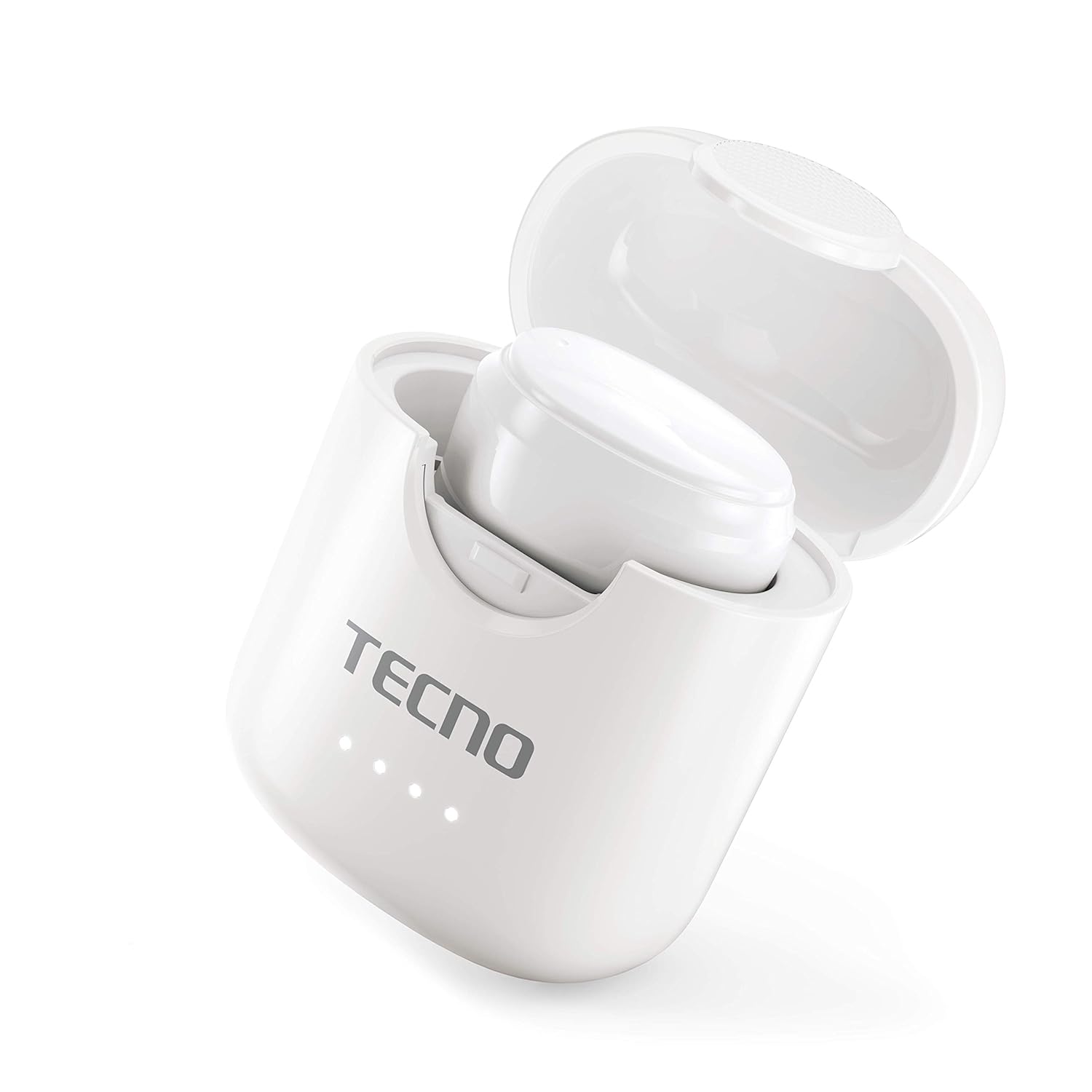
Image: The Tecno Minipod M1 earbud securely placed inside its open charging case, showing the compact design and charging indicators.

Image: A detailed close-up of a single Tecno Minipod M1 earbud, highlighting its ergonomic shape and touch-sensitive surface.
קאַמפּאָונאַנץ:
- עאַרבודז: Left and Right, each with touch controls and built-in microphone.
- טשאַרדזשינג קאַסע: Houses and charges the earbuds, with LED indicators for battery status.
- וסב טשאַרדזשינג פּאָרט: געפינען זיך אויפן טשאַרדזשינג קעסטל פֿאַר מאַכט אַרייַנגאַנג.
סעטאַפּ
1. ערשט טשאַרדזשינג:
Before first use, fully charge the Tecno Minipod M1 earbuds and their charging case.
- Place both earbuds into the charging case. Ensure they are correctly seated in their respective slots.
- Connect the provided USB charging cable to the charging port on the case and the other end to a USB power source (e.g., computer, wall adapter).
- The LED indicators on the charging case will illuminate to show charging status. Once fully charged, the indicators may change color or turn off.

Image: The Tecno Minipod M1 charging case in a closed position, showing the LED indicators on the front that display charging status.
2. פארבינדן מיט אייער אפאראט:
The Minipod M1 earbuds use Bluetooth 5.0 for a stable and quick connection.
- עפֿנט דעם טשאַרדזשינג קעסטל. די אויערקנעפּלעך וועלן אויטאָמאַטיש אַרײַן אין פּערינג מאָדע.
- אויף אייער סמאַרטפאָון אָדער בלועטוט-ענייבאַלד מיטל, גייט צו די בלועטוט סעטטינגס.
- זוכן פֿאַר available devices and select "Tecno Minipod M1" from the list.
- אַמאָל פארבונדן, וועט איר הערן אַ באַשטעטיקונג טאָן, און די אויערן-קנעפּלעך'ס אינדיקאַטאָר ליכט וועלן זיך טוישן.
- פֿאַר ווייטערדיקע נוצן, וועלן די אויערקנעפּלעך זיך אויטאָמאַטיש פֿאַרבינדן צום לעצטן פֿאַרבונדענעם מיטל ווען זיי ווערן אַרויסגענומען פֿון קעסטל.
אַפּערייטינג
סמאַרט ריר קאָנטראָלס:
The Tecno Minipod M1 features intuitive touch controls on each earbud.
| קאַמף | קאָנטראָל |
|---|---|
| שפּיל / פּויזע מוזיק | איין צאַפּן אויף יעדער עאַרבוד |
| ווייַטער שפּור | טאָפּל-טאַפּ אויף די רעכטע אויערקנעפּל |
| פֿריִערדיקע שפּירט | טאָפּל-טאַפּ אויף די לינקע אויערקנעפּל |
| ענטפֿערן / סוף רופן | איין צאַפּן אויף יעדער עאַרבוד |
| אָפּוואַרפן רופן | דריקן און האַלטן יעדער עאַרבוד פֿאַר 2 סעקונדעס |
| אַקטאַווייט די קול אַססיסטאַנט | דריי מאָל צאַפּן אויף יעדן אויערקנעפּל |
טראָגן די עאַרבודז:
Choose the correct size of eartips for a comfortable and secure fit. Insert the earbuds gently into your ear canal and twist slightly to ensure a snug fit. A proper fit enhances sound quality and noise cancellation.
וישאַלט
רייניקונג:
- רייניקט רעגולער די אויערקנעפּלעך און די טשאַרדזשינג קעסטל מיט אַ ווייכן, טרוקענעם, לינט-פֿרייע שטאָף.
- ניצט נישט קיין שרײַבנדיקע רייניגער, אַלקאָהאָל, אדער כעמישע סאָלווענטן.
- אַראָפּנעמען פֿאָרזיכטיק יעדן אויערוואַקס אָדער שמוץ פֿון די אויערשפּיצן און רעדנער מעש מיט אַ קליינעם, ווייכן באַרשט אָדער וואַטע שטעכל.
סטאָרידזש:
- ווען נישט אין באַנוץ, שטענדיק האַלטן די אויערן-קנעפּלעך אין זייער טשאַרדזשינג קעסטל צו באַשיצן זיי און האַלטן זיי טשאַרדזשד.
- האַלט דעם אַפּאַראַט אין אַ קיל, טרוקן אָרט, אַוועק פון עקסטרעמע טעמפּעראַטורן און דירעקט זונשייַן.
וואַסער קעגנשטעל (IPX4):
The Tecno Minipod M1 earbuds are IPX4 water resistant, meaning they are protected against splashing water from any direction. This makes them suitable for workouts and light rain. However, they are not designed for swimming or submersion in water. Do not charge the earbuds or case if they are wet.

Image: The Tecno Minipod M1 charging case shown with various colorful silicone protective covers, emphasizing the included accessory for better protection and portability.
טראָובלעשאָאָטינג
| פּראָבלעם | מעגלעך לייזונג |
|---|---|
| עאַרבודס נישט טשאַרדזשינג | זיכער מאַכן אַז דער טשאַרדזשינג קאַבל איז זיכער פארבונדן. קאָנטראָלירט צי דער טשאַרדזשינג קעסטל האט שטראָם. רייניקט די טשאַרדזשינג קאָנטאַקטן אויף ביידע אויערן און דעם קעסטל. |
| קען נישט צוזאמענשטעלן מיטן אפאראט | Make sure Bluetooth is enabled on your device. Ensure earbuds are in pairing mode (open case). Forget "Tecno Minipod M1" from your device's Bluetooth list and try pairing again. Move closer to your device. |
| נאָר איין אויערקנעפּל שפּילט געזונט | לייגט צוריק ביידע אויערקנעפּלעך אין די טשאַרדזשינג קעסטל, מאַכט צו דעם דעקל, וואַרט אַ פּאָר סעקונדעס, דערנאָך עפֿנט דעם דעקל און פּרוּווט ווידער. מאַכט זיכער אַז ביידע אויערקנעפּלעך זענען אָנגעלאָדן. |
| נידעריקע באַנד אָדער שלעכטע געזונט קוואַליטעט | Adjust the volume on your device. Ensure earbuds are properly seated in your ears. Clean any debris from the speaker mesh and eartips. |
| Microphone not working during calls | Ensure the earbuds are connected as a "headset" profile in your device's Bluetooth settings. Check for any obstructions on the microphone opening. |
ספּעסאַפאַקיישאַנז
| שטריך | דעטאַל |
|---|---|
| מאָדעל נאָמען | Tecno Minipod M1 |
| בלועטאָאָטה ווערסיע | 5.0 |
| גאַנץ שפּיל צייט | Up to 18 hours (6 hours on earbuds + 12 hours with charging case) |
| וואַסער קעגנשטעל | IPX4 (שווייס און שפּריץ קעגנשטעליק) |
| ראַש קאַנסאַליישאַן | ענוויראָנמענטאַל ראַש קאַנסאַליישאַן (ENC) |
| קאָנטראָלס | סמאַרט ריר קאָנטראָלס |
| עאַרבוד ווייט | אומגעפער 4.2 גראַם פּער אויערקנעפּל |
| דימענשאַנז (פּראָדוקט) | 2.4 X 1.7 X 2.7 סענטימעטער |
| מאַטעריאַל | פּאָליקאַרבאָנאַט (PC), אַקרילאָניטריל בוטאַדין סטירען (ABS) |
| אַפּערייטינג סיסטעם קאַמפּאַטאַבילאַטי | יאָס, אַנדרויד |
וואָראַנטי און שטיצן
The Tecno Minipod M1 comes with a 6-חודש וואָראַנטי פֿון דעם קויפֿדאַטום. די וואָראַנטי דעקט פֿאַבריקאַציע־דעפֿעקטן. ביטע באַהאַלטן אייער קויפֿבאַווײַז פֿאַר וואָראַנטי־קליימז.
For technical support, warranty claims, or any other inquiries, please contact Tecno customer service through their official website or the contact information provided with your purchase documentation. You can also visit the Tecno Store on Amazon פֿאַר מער אינפֿאָרמאַציע.


