1. הקדמה
The ELECDER D19 True Wireless Earbuds are designed to provide a superior audio experience with advanced features such as Bluetooth 5.0 connectivity, noise cancellation, and IPX7 waterproofing. This manual provides comprehensive instructions for setting up, operating, and maintaining your earbuds to ensure optimal performance and longevity.
שליסל פֿעיִקייטן:
- בלועטאָאָטה 5.0: Fast and stable wireless transmission with CVC8.0 noise cancellation for clear calls.
- Premium Hi-Fi Stereo Audio: APTX audio for lossless transmission, delivering immersive sound with crystal clarity and deep bass.
- IPX7 וואָטערפּרוף: Resistant to sweat, water, and rain, ideal for workouts and outdoor activities.
- ערגאָנאָמיק פּלאַן: Lightweight (5g per earbud) with flexible silicone ear-fins and S/M/L ear caps for a secure and comfortable fit.
- Quick Pairing Technology: Automatic power-on and pairing upon removal from the charging case.
- USB Quick Charge & Wireless Charging: Up to 4.5 hours of music on a single charge, with an additional 18 hours from the charging case, supporting both USB and wireless charging.
2. פּראָדוקט איבערview

Figure 2.1: ELECDER D19 True Wireless Earbuds in their charging case. The earbuds are black, sleek, and designed for in-ear use, while the compact charging case is also black with a smooth finish.
וואָס איז אין די קעסטל:
- ELECDER D19 True Wireless Earbuds (Left and Right)
- טשאַרדזשינג קאַסע
- וסב טשאַרדזשינג קאַבלע
- אויער טיפּס (S/M/L גרייסן)
- באַניצער מאַנואַל (דעם דאָקומענט)
3. סעטאַפּ גייד
3.1 אויפלאָדן די אויערקנעפּלעך און קעסטל
Before first use, fully charge the earbuds and the charging case. The charging case supports both USB cable charging and wireless charging.
- USB טשאַרדזשינג: Connect the provided USB cable to the charging port on the case and plug the other end into a USB power source (e.g., computer, wall adapter). The indicator light on the case will show charging status.
- ווירעלעסס טשאַרדזשינג: Place the charging case on a compatible wireless charging pad. The indicator light will flash to confirm charging.

Figure 3.1: The ELECDER D19 charging case being charged wirelessly on a charging pad, also showing the Micro USB port for wired charging. This image highlights the dual charging capabilities of the case.
A full charge for the earbuds provides approximately 4.5 hours of music playback, and the charging case provides an additional 18 hours of battery life.
3.2 פּאָרן מיט דיין מיטל
The ELECDER D19 earbuds feature quick pairing technology for seamless connection.
- שריט 1: Open the charging case and take out both earbuds. They will automatically power on and pair with each other.
- שריט 2: אויף אייער סמאַרטפאָון אָדער בלועטוט-ענייבאַלד מיטל, גייט צו די בלועטוט סעטטינגס.
- שריט 3: זוכן פֿאַר available devices and select "Elecder D19" from the list to connect.
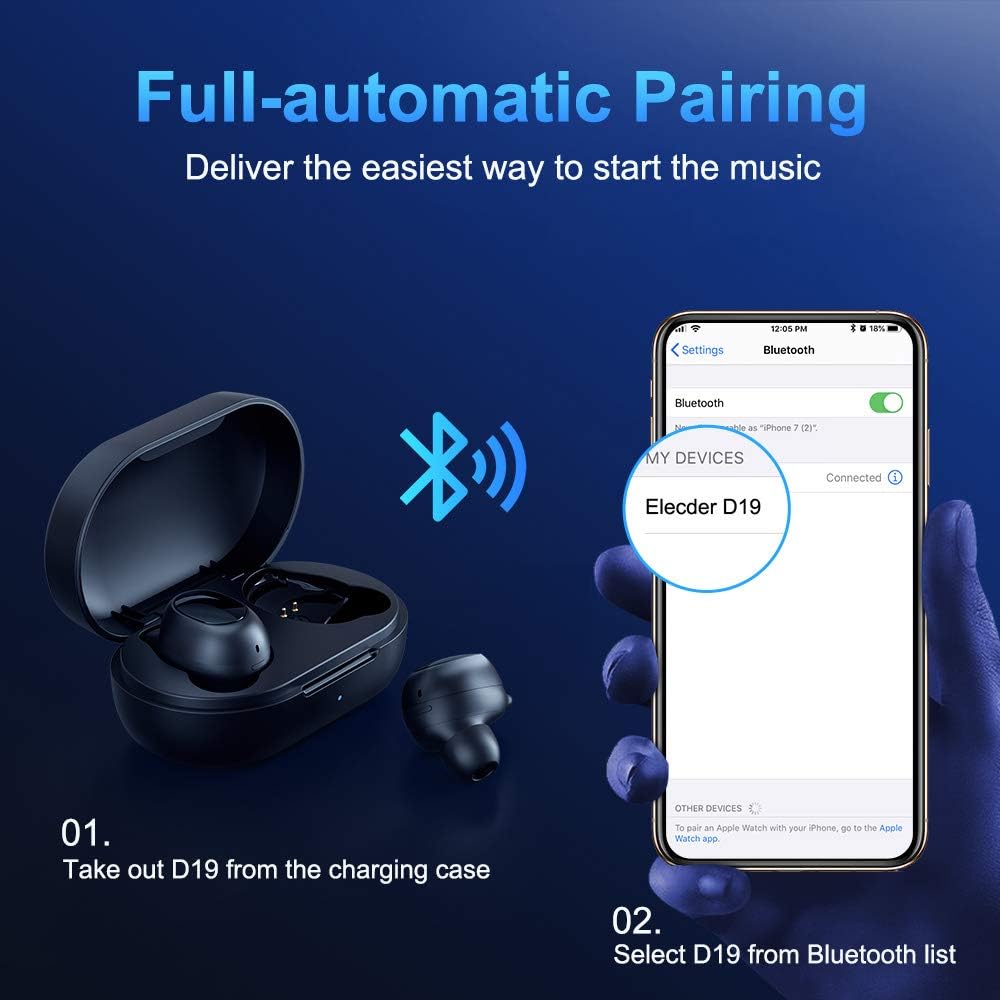
Figure 3.2: A visual guide demonstrating the automatic pairing process. The image shows the earbuds being taken out of the case and then the "Elecder D19" option appearing in a smartphone's Bluetooth settings for connection.
After the initial pairing, the earbuds will automatically connect to the last paired device when taken out of the charging case.

Figure 3.3: An illustration showing the stable Bluetooth connection between the ELECDER D19 earbuds and various smart devices, including smartphones and tablets.
4. אַפּערייטינג ינסטרוקטיאָנס
4.1 טראָגן די אויערקנעפּלעך
For optimal sound quality and comfort, choose the ear tips that best fit your ears. The earbuds come with S, M, and L sizes. Insert the earbuds into your ears and gently rotate them to find a secure and comfortable fit. The ergonomic ear-fin design helps ensure stability during movement.
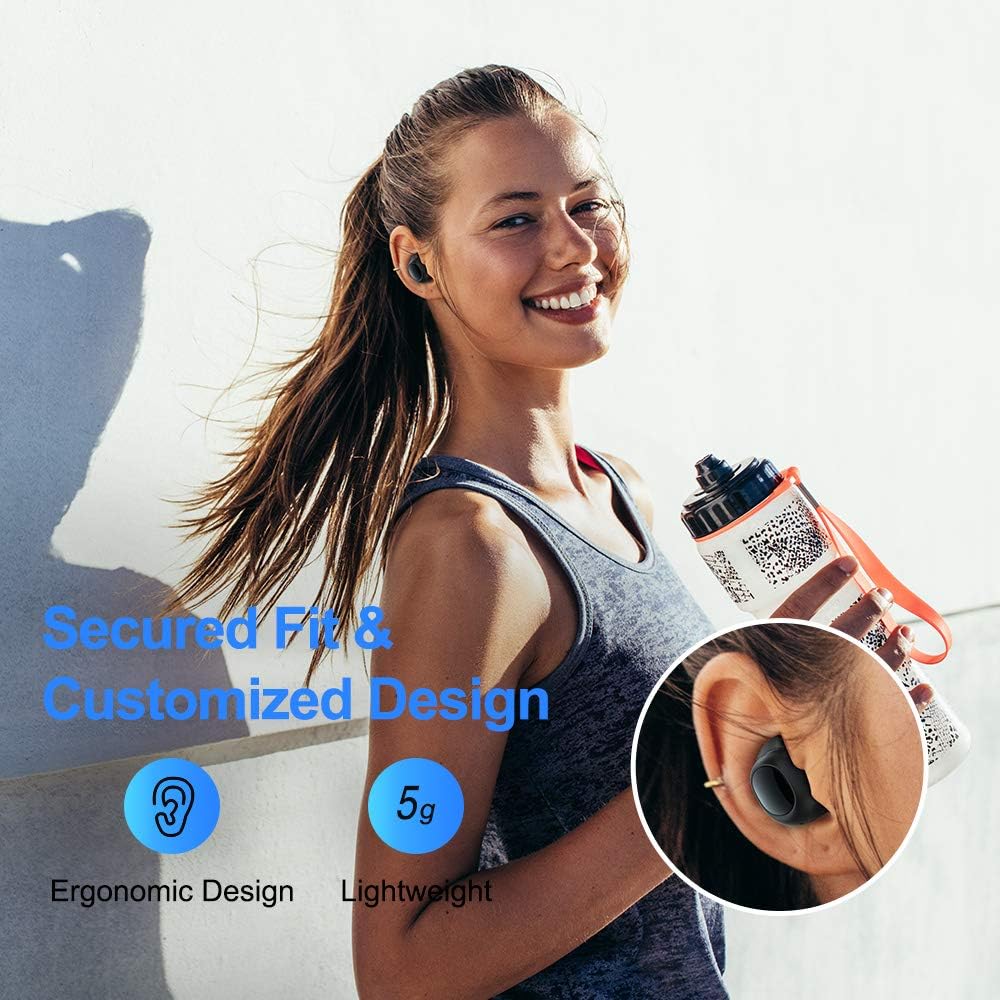
Figure 4.1: A person wearing the ELECDER D19 earbuds during a workout, demonstrating the secure and comfortable fit provided by the ergonomic design and customizable ear tips.
4.2 Media Control
The ELECDER D19 earbuds feature physical buttons for media control. Specific button functions may vary slightly based on the device and operating system, but common controls include:
- שפּיל / פּויזע: איין דריק אויף יעדן אויערקנעפל.
- ווייַטער שפּור: דריקט צוויי מאָל אויף די רעכטע אויערקנעפּל.
- פֿריִערדיקע שפּור: דריקט צוויי מאָל אויף די לינקע אויערקנעפל.
- באַנד אַרויף: דריק דריי מאל אויף די רעכטע אויערקנעפל.
- באַנד אַראָפּ: דריק דריי מאל אויף די לינקע אויערקנעפל.
4.3 רוף פאַרוואַלטונג
Manage your calls directly from the earbuds:
- ענטפֿערן / סוף רופן: איין דריק אויף יעדן אויערקנעפל.
- אָפּוואַרפן רופן: דריקן און האַלטן יעדער עאַרבוד פֿאַר 2 סעקונדעס.
- אַקטאַווייט קול אַססיסטאַנט: דריק און האלט איינע פון די אויערקנעפל פאר 3 סעקונדעס (למשל, סירי, גוגל אסיסטאנט).
5. וישאַלט און קער
Proper maintenance ensures the longevity and optimal performance of your ELECDER D19 earbuds.
5.1 רייניקונג
- רייניקט רעגולער די אויערקנעפּלעך און די טשאַרדזשינג קעסטל מיט אַ ווייכן, טרוקענעם, לינט-פֿרייע שטאָף.
- אַראָפּנעמען די אויער־שפּיצן און רייניקן זיי מיט מילד זייף און וואַסער, און דערנאָך טרוקן גוט אויס איידער איר זיי צוריקבאַפעסטיקט.
- Use a cotton swab or small brush to gently clean the charging contacts on both the earbuds and the case.
- ויסמיידן ניצן אַברייסיוו מאַטעריאַלס, אַלקאָהאָל, אָדער כעמישע רייניקונג מיטלען.
5.2 וואַסער קעגנשטעל (IPX7)
The ELECDER D19 earbuds are IPX7 waterproof, meaning they can withstand submersion in up to 1 meter of water for 30 minutes. This makes them suitable for protection against sweat, rain, and accidental splashes.

Figure 5.1: The ELECDER D19 earbuds shown with water droplets, illustrating their IPX7 waterproof rating, which protects them from sweat, rain, and splashes.
באַמערקונג: The charging case is not waterproof. Ensure earbuds are dry before placing them back into the charging case.
5.3 סטאָרידזש
When not in use, store the earbuds in their charging case to protect them and keep them charged. Store the case in a cool, dry place away from extreme temperatures and direct sunlight.
6. טראָובלעשאָאָטינג
If you encounter issues with your ELECDER D19 earbuds, refer to the following common solutions:
| פּראָבלעם | מעגלעך סיבה | לייזונג |
|---|---|---|
| די אויערקנעפּלעך פאַרבינדן זיך נישט מיטן אַפּאַראַט. | בלועטוט איז אויסגעלאשן אויף דעם דעווייס; אויערקנעפּלעך נישט אין פּערינג מאָדע; פריער פּערד דעווייס שטערט. | Ensure Bluetooth is enabled. Place earbuds back in case, then take them out to re-enter pairing mode. Forget "Elecder D19" from your device's Bluetooth list and re-pair. |
| נאָר איין אויערקנעפּל אַרבעט. | אויערקנעפּלעך נישט צוזאַמענגעפּאַסט איינע מיט די אַנדערע; נידעריקע באַטאַרייע אויף איין אויערקנעפּל. | Place both earbuds back into the charging case, close the lid, wait a few seconds, then open and take them out again. Ensure both earbuds are charged. |
| קיין קלאַנג אָדער נידעריקע וואָלומען. | Device volume too low; ear tips not properly sealed; debris in earbud nozzle. | Increase volume on your device. Adjust earbud position or try different sized ear tips for a better seal. Clean earbud nozzles. |
| די טשאַרדזשינג קעיס טשאַרדזשט זיך נישט. | Faulty cable/charger; improper placement on wireless charger. | Try a different USB cable and power adapter. Ensure the case is correctly aligned on the wireless charging pad. |
| בלועטוט פֿאַרבינדונג נישט סטאַביל. | Interference; distance from device; low earbud battery. | Reduce distance between earbuds and device. Avoid environments with strong Wi-Fi or other Bluetooth signals. Ensure earbuds are fully charged. |
7. ספּעסאַפאַקיישאַנז
Detailed technical specifications for the ELECDER D19 True Wireless Earbuds:
| שטריך | דעטאַל |
|---|---|
| מאָדעל נאָמען | ELECDER D19 |
| קאַנעקטיוויטי טעכנאָלאָגיע | ווירעלעס (בלוטוט 5.0) |
| בלועטאָאָטה קייט | 33 פֿיס |
| אויער פּלייסמאַנט | אין אויער |
| פאָרם פאַקטאָר | אין אויער |
| ראַש קאָנטראָל | Active Noise Cancellation (CVC8.0) |
| מיקראָפאָן | אַרייַנגערעכנט |
| וואַסער קעגנשטעל מדרגה | IPX7 וואָטערפּרוף |
| באַטעריע לעבן (אויערקנעפּלעך) | Up to 4.5 hours (music) / 4 hours (calling) |
| Charging Case Additional Playtime | 18 שעה |
| טשאַרדזשינג צייט | בעערעך 2 שעה |
| טשאַרדזשינג צובינד | Micro USB, Wireless Charging |
| פּונקט וואָג | 1.92 ounces (total) / 5g (each earbud) |
| פּראָדוקט דימענשאַנז | 3.89 X 3.89 X 1.65 אינטשעס |
| קאַמפּאַטאַבאַל דעוויסעס | iOS and Android Smartphones |
| מאַטעריאַל | סיליקאָן (אויער שפּיץ) |
| קאָליר | שוואַרץ |

Figure 7.1: An infographic detailing the battery life of the ELECDER D19 earbuds and charging case, showing 4 hours for calls, 4.5 hours for music, and a total of 18 hours with the 500mAh charging case.
8. וואָראַנטי און שטיצן
ELECDER products are manufactured to high quality standards. For information regarding warranty coverage, technical support, or service inquiries, please refer to the contact information provided with your product packaging or visit the official ELECDER webפּלאַץ.
פֿאַר ווייטערדיקע הילף, קענט איר אויך קאָנטאַקטירן דעם הענדלער וואו איר האָט געקויפט דעם פּראָדוקט.