1. הקדמה
This instruction manual provides detailed guidance for the proper use and maintenance of your KONNWEI KW600 and KW210 Battery Testers. These devices are designed to accurately diagnose the health and performance of 12V automotive batteries, including regular flooded, AGM flat plate, AGM spiral, and gel batteries. Please read this manual thoroughly before operation to ensure safe and effective use.
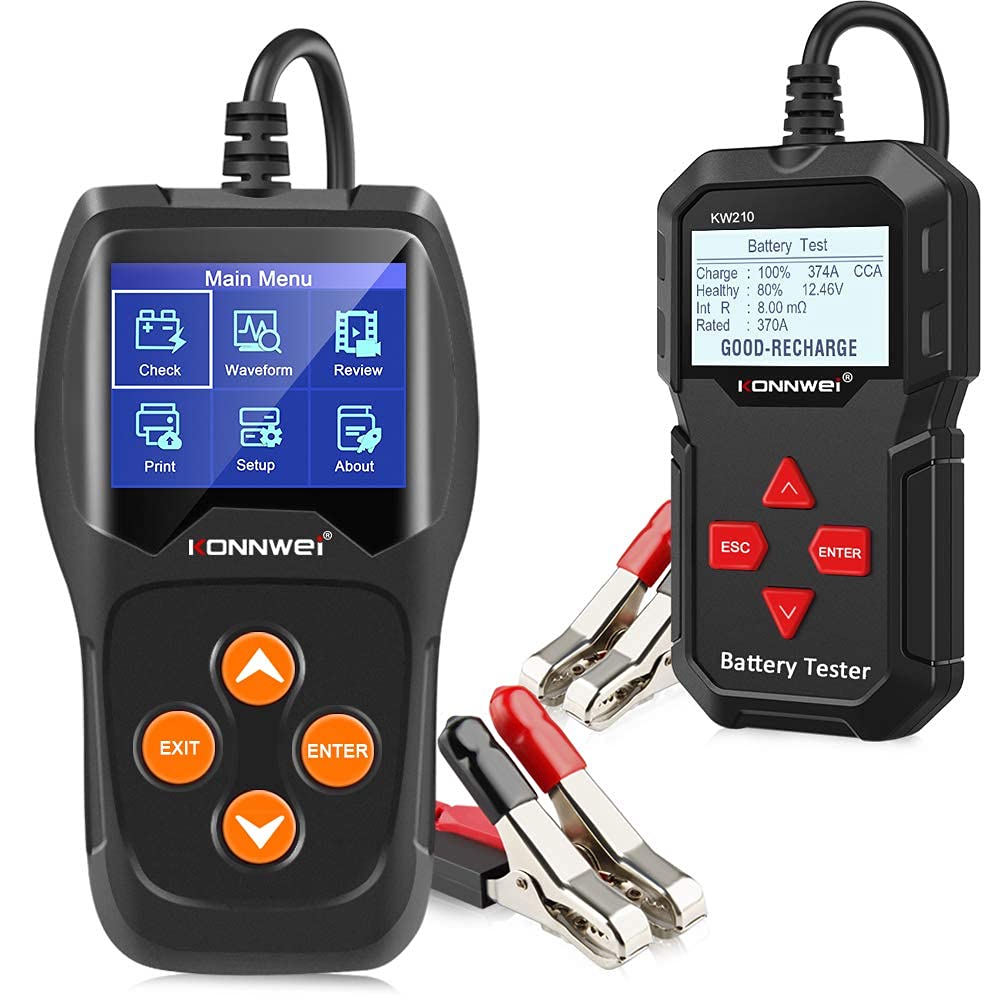
Image 1.1: The KONNWEI KW600 and KW210 Battery Testers, showing their main units and battery clamps.
2. KONNWEI KW600 Product Overview
The KONNWEI KW600 is an advanced automotive battery tester featuring a color screen for clear display of diagnostic results. It provides highly accurate data, calculating the cold cranking capability and the extent of battery aging. This tool assists in proactive battery maintenance and repair, helping to prevent unexpected battery failures. The KW600 is designed to test all 12V batteries, including those in cars, boats, motorcycles, and light trucks, with a testing range of 100-2000 CCA.
2.1 Key Features of KW600
- Color LCD screen for enhanced readability.
- High accuracy (up to 99%) for reliable battery diagnostics.
- Measures cold cranking amps (CCA) and assesses battery aging.
- Supports various 12V battery types: regular flooded, AGM flat plate, AGM spiral, and gel.
- Provides comprehensive battery health and charge status.
- Includes functions for Cranking Test, Battery Charging Test, Battery Health Test, and Voltage Graphing Monitor.
- Wide application for cars, boats, motorcycles, and light trucks.

Image 2.1: The KW600's main menu interface, displaying options for various tests and settings.

Image 2.2: The KW600 showing detailed battery status, including State of Health (SOH) and voltage.

Image 2.3: The KW600's versatility, demonstrating its ability to test batteries in various vehicle types and offering 'In-Vehicle' or 'Out-of-Vehicle' testing options.

Image 2.4: The KW600's waveform graphing function, illustrating voltage changes over time for diagnostic purposes.
3. KONNWEI KW210 Product Overview
The KONNWEI KW210 is a 12V battery tester designed for a wide range of automotive applications. Equipped with an STM-32 chip, it delivers fast and precise testing reports. The KW210 supports a broad testing range of 100-2000 CCA and is compatible with various battery rating standards. It also features an update function for continuous improvement.
3.1 Key Features of KW210
- Wider testing range: 100-2000 CCA for 12V batteries.
- Fast and accurate results due to STM-32 chip technology.
- Supports multiple battery types: regular flooded, AGM flat plate, AGM spiral, and gel.
- Compatible with various rating standards: CCA, BCI, CA, MCA, JIS, DIN, IEC, EN, SAE, GB.
- Displays basic battery parameters: voltagE, ינערלעך קעגנשטעל, קאַלט קראַנקינג amp, AH capacity, battery health, and charge status.
- Features an update function for software enhancements.

בילד 3.1: פראָנט view of the KW210 Battery Tester, showing its display and control buttons.

Image 3.2: The KW210's display showing options like Voltage Test, Charging Test, Cranking Test, and Health Status.

Image 3.3: The KW210 in use, demonstrating its compatibility for both in-vehicle and out-of-vehicle battery testing.
4. אויפשטעלן און ערשטע פארבינדונג
Before operating your KONNWEI battery tester, ensure the vehicle's ignition is off and all accessories are disconnected. Follow these steps for proper connection:
- רייניקן באַטעריע טערמינאַלן: Ensure the battery terminals are clean and free of corrosion for a reliable connection.
- קאָננעקט רויט קלamp: באַפעסטיקט דעם רויטן פּאָזיטיוון (+) קל.amp פונעם טעסטער צום פאזיטיוון (+) טערמינאל פון דער באטעריע.
- קאָננעקט שווארצע קלamp: באַפעסטיקט דעם שוואַרצן נעגאַטיוון (-) קל.amp פונעם טעסטער צום נעגאַטיוון (-) טערמינאַל פון דער באַטעריע.
- מאַכט אויף: The tester will power on automatically once correctly connected to the battery.
- Select Language (if prompted): If this is the first use, you may be prompted to select your preferred language. Navigate using the arrow buttons and confirm with the ENTER button.
Important: Ensure clamps are securely attached to prevent inaccurate readings or damage. Do not touch the clampס צוזאַמען.
5. אַפּערייטינג ינסטרוקטיאָנס
Both KW600 and KW210 testers operate similarly with menu-driven interfaces. Use the UP/DOWN arrow buttons to navigate through menu options and the ENTER button to confirm selections. The EXIT/ESC button is used to return to the previous menu or exit a function.
5.1 Common Test Functions
- באַטערי טעסט: This function assesses the overall health of the battery, including its voltage, internal resistance, CCA value, and State of Health (SOH).
- קריקינג טעסט: Measures the battery's ability to provide current during engine startup. It analyzes the cranking voltagE און צייט.
- טשאַרדזשינג טעסט: Evaluates the vehicle's charging system (alternator) by checking the output voltage under various load conditions.
- VoltagE טעסט: Provides a real-time voltage reading of the battery.
- Waveform (KW600 only): Displays a graphical representation of voltage changes, useful for diagnosing intermittent issues.
5.2 Performing a Battery Test (Example for KW600/KW210)
- פאַרבינדן די טעסטער: Follow the setup instructions in Section 4.
- אַקסעס הויפּט מעניו: The tester will display the main menu upon power-up.
- Select "Battery Test": Use the arrow buttons to highlight "Battery Test" (or "Check" on KW600) and press ENTER.
- אויסקלייַבן באַטאַרייע טיפּ: Choose the appropriate battery type (e.g., Flooded, AGM, Gel) and press ENTER.
- Input CCA Value: אַרייַן די קאַלט קראַנקינג Amps (CCA) rating of your battery, usually found on the battery label. Use arrow buttons to adjust values and ENTER to confirm.
- View רעזולטאַטן: The tester will perform the test and display results such as voltage, internal resistance, CCA, SOH, and a recommendation (e.g., "Good Battery," "Replace Battery," "Charge Battery").
- Review/Print (if available): Some models allow reviewing past tests or printing results via a connected PC.
Refer to the on-screen prompts and specific menu options for each test function on your KW600 or KW210 model.
6. וישאַלט און קער
Proper maintenance ensures the longevity and accuracy of your KONNWEI battery testers.
- רייניקונג: ווישט אויס דעם טעסטער'ס קasinג מיט אַ ווייך, דamp cloth. Do not use abrasive cleaners or solvents. Ensure the clampס זענען ריין און פריי פון דעבריס.
- סטאָרידזש: Store the tester in a dry, cool environment, away from direct sunlight and extreme temperatures. Keep it in its original packaging or a protective case when not in use.
- קאַבלע דורכקוק: רעגולער קאָנטראָלירן די קייבלס און קלampקוקט אויף צייכנס פון שאדן, אויסריסונג, אדער קאראזיע. פארטרעט אויב נויטיג.
- Software Updates (KW210): For the KW210, periodically check the KONNWEI official website for available software updates to ensure optimal performance and compatibility with new battery technologies.
Caution: Do not attempt to open the tester's casing, as this will void the warranty and may cause damage.
7. טראָובלעשאָאָטינג
If you encounter issues with your KONNWEI battery tester, refer to the following common problems and solutions:
| פּראָבלעם | מעגלעך סיבה | לייזונג |
|---|---|---|
| דער טעסטער גייט נישט אן. | שלעכטע פֿאַרבינדונג צו באַטעריע טערמינאַלן; באַטעריע פֿולקייטtagE צו נידעריק. | פאַרזיכערן קלamps are securely attached to clean battery terminals. Check battery voltage with a multimeter; if below 8V, the tester may not power on. |
| נישט פּינקטלעכע אָדער נישט קאָנסיסטענטע לייענונגען. | Corroded battery terminals; Incorrect battery type/CCA input; Loose connections. | Clean battery terminals thoroughly. Verify correct battery type and CCA value entered. Re-secure clamps. |
| דער עקראַן איז ליידיק אָדער פֿאַרפֿרוירן. | ווייכווארג פראבלעם; שטראָם אונטערברעכונג. | Disconnect the tester from the battery, wait 30 seconds, then reconnect. If issue persists, check for software updates (KW210). |
| "Battery Error" message. | Severely discharged or damaged battery. | Attempt to charge the battery and retest. If the error persists, the battery may need replacement. |
If the problem persists after attempting these solutions, please contact KONNWEI customer support for further assistance.
8. טעכניש ספּעסאַפאַקיישאַנז
The following specifications apply to the KONNWEI KW600 and KW210 Battery Testers:
- סאָרט: KONNWEI
- מאָדעלס: KW600, KW210
- מאַכט מקור: Battery Powered (via vehicle battery)
- טעסט וואָלtage: 12V
- KW600 Testing Range: 100-2000 קקאַ
- KW210 Testing Range: 100-2000 קקאַ
- סופּפּאָרטעד באַטערי טייפּס: Regular Flooded, AGM Flat Plate, AGM Spiral, Gel
- שטיצט סטאַנדאַרדס: CCA, BCI, CA, MCA, JIS, DIN, IEC, EN, SAE, GB
- ווייַז:
- KW600: Color LCD
- KW210: Backlit LCD
- אַפּערייטינג טעמפּעראַטור: 0°C צו 50°C (32°F צו 122°F)
- סטאָרידזש טעמפּעראַטור: -20°C צו 70°C (-4°F צו 158°F)
- Dimensions (KW210 approximate): 0.26ft (width) x 0.42ft (height) x 0.06ft (depth) - Note: These dimensions appear to be for the KW210 unit only, excluding cables.
- Cable Length (KW210 approximate): 7.8ft total, with 6.5ft main cable and 1.3ft clamp פירט.
- באַשרייַבונג מיט: IEC, SAE

Image 8.1: Dimensional diagram for the KONNWEI KW210 Battery Tester, including cable length.
9. גאַראַנטיע און קונה שטיצע
KONNWEI products are manufactured to high-quality standards. For specific warranty information, please refer to the documentation included with your product packaging or visit the official KONNWEI webפּלאַץ.
If you require technical assistance, have questions about product operation, or need to report a defect, please contact KONNWEI customer support through their official channels. Contact information can typically be found on the KONNWEI webזייטל אדער אין אייער פּראָדוקט'ס פּאַקאַדזשינג.
אָנליין רעסורסן: For the latest software updates (especially for KW210) and additional support resources, please visit the official KONNWEI webפּלאַץ.