1. הקדמה
This manual provides instructions for the Powerextra D-Tap Charger, designed for V Mount, V Lock, and Gold Mount batteries. It ensures efficient and safe charging for compatible camera batteries and other devices that utilize a D-Tap port for charging.

Image 1.1: Powerextra D-Tap Charger with its integrated D-Tap cable.
2. פּעקל אינהאַלט
באַשטעטיקן אַז אַלע זאכן זענען פאַראַן אין דיין פּעקל:
- 1 x Powerextra D-Tap Charger
- 1 x 100cm AC Charging Cable
- 1 x מיקראָפיבער רייניקונג שטאָף

Image 2.1: The D-Tap charger, AC power cable, and microfiber cloth included in the package.
3. ספּעסאַפאַקיישאַנז
| שטריך | באַשרייַבונג |
|---|---|
| אַק אַרייַנשרייַב | 100-240 וו / 0.8 אַ |
| דק רעזולטאַט | 16.8וו-2.0אַ |
| רעזולטאַט חלקtage | 16.8 וואלטס |
| פּונקט וואָג | 8.1 אונסעס (בעערעך 230 ג) |
| פּעקל דימענשאַנז | 6.14 X 3.58 X 1.46 אינטשעס |
| סערטיפיקאַטיאָנס | CE |
4. סעטאַפּ
Follow these steps to set up your D-Tap Charger:
- פֿאַרבינדט דעם AC מאַכט קאַבל: Insert the included 100cm AC charging cable into the power input port on the charger unit.
- צאַפּן אין די מאַכט אָוטלעט: Plug the other end of the AC charging cable into a standard wall power outlet (100-240V).
- פאַרבינדן צו באַטאַרייע: Insert the D-Tap connector from the charger into the D-Tap port on your compatible V Mount, V Lock, or Gold Mount battery. Ensure a secure connection.

Image 4.1: The D-Tap connector for battery connection.


בילד 4.2: עקס.amples of compatible V-Mount, Gold Mount, and other D-Tap port batteries.
5. אַפּערייטינג ינסטרוקטיאָנס
Once the charger is connected to a power source and a compatible battery, it will begin charging automatically.
- טשאַרדזשינג ינדיקאַטאָר: The charger features an LED indicator light to show the charging status.
- רויט ליכט: ווײַזט אָן אַז די באַטאַרייע לאָדט זיך איצט אויף.
- גרין ליכט: ינדיקייץ אַז די באַטאַרייע איז גאָר באפוילן.
The charger utilizes automatic constant current control to optimize charging speed and prevent overcharging.
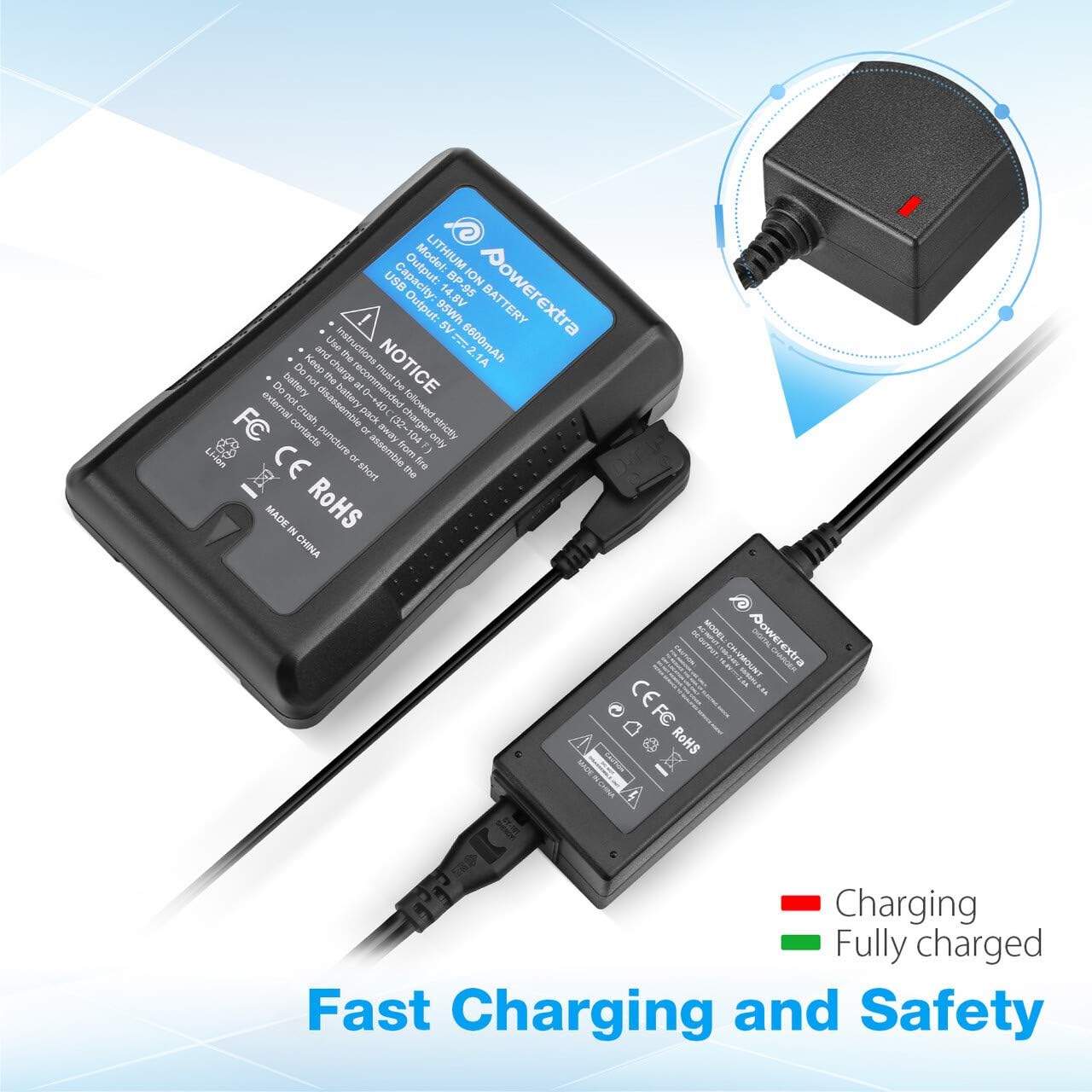
Image 5.1: Charger connected to a battery, with the red LED indicating active charging.
6. זיכערקייַט אינפֿאָרמאַציע
To ensure safe operation and prolong the life of your charger and batteries, please observe the following safety precautions:
- אָווערטשאַרדזש שוץ: The charger is designed to prevent batteries from overcharging.
- קורץ קרייַז שוץ: Built-in mechanisms protect against short circuits.
- איבער קראַנט פּראַטעקשאַן: זיכערהייטן קעגן איבערגעטריבענעם קראַנט שטראָם.
- איבערהייצונג שוץ: Prevents the charger from overheating during operation.
- איבער אָפּזאָגן שוץ: (Note: This protection is typically a feature of the battery itself, but the charger is designed to work safely with such batteries.)
- Use the charger only with compatible V Mount, V Lock, or Gold Mount batteries.
- שטעלט נישט אויס דעם טשאַרדזשער צו פייכטקייט, רעגן, אדער עקסטרעמע טעמפּעראַטורן.
- נעמט נישט אויס אדער מאדיפיצירט נישט דעם טשאַרדזשער. לאָזט איבער אַלע סערוויסעס צו קוואַליפֿיצירטע פּערסאָנאַל.
- האַלטן אויס פון דערגרייכן פון קינדער.

Image 6.1: Visual representation of the multi-protection features including short circuit, over discharge, over current, over charge, and over heating protection.
7. וישאַלט
Proper maintenance ensures optimal performance and longevity of your charger:
- רייניקונג: Use the provided microfiber cleaning cloth to gently wipe the charger and cables. Do not use liquid cleaners or solvents.
- סטאָרידזש: האַלט דעם טשאַרדזשער אין אַ קיל, טרוקן אָרט אַוועק פון דירעקט זונשייַן און עקסטרעמע טעמפּעראַטורן ווען נישט אין באַנוץ.
- קאַבלע זאָרגן: Avoid bending or crimping the cables excessively. Always grasp the plug, not the cable, when disconnecting.
8. טראָובלעשאָאָטינג
If you encounter issues with your Powerextra D-Tap Charger, refer to the following common problems and solutions:
- טשאַרדזשער גייט נישט אן:
- Ensure the AC power cable is securely connected to both the charger and the wall outlet.
- באַשטעטיקט אַז די וואַנט אַוטלעט אַרבעט דורך עס צו פּרובירן מיט אַן אַנדער אַפּאַראַט.
- באַטאַרייע ניט טשאַרדזשינג:
- Check that the D-Tap connector is fully and correctly inserted into the battery's D-Tap port.
- Confirm that the battery is compatible with the charger and is not fully charged already (green LED).
- Inspect the D-Tap cable and connector for any visible damage.
- אינדיקאַטאָר ליכט אַרבעט נישט:
- If the charger is connected and the battery is not fully charged, but the light is off, contact customer support.
If the problem persists after attempting these solutions, please contact Powerextra customer support for further assistance.
9. וואָראַנטי און שטיצן
Powerextra provides the following for this D-Tap Charger:
- וואָראַנטי: 12-month hassle-free warranty from the date of purchase.
- שטיצן: לעבן טעכניש שטיצן.
For warranty claims, technical assistance, or any product-related inquiries, please contact Powerextra customer service through their official webפּלאַץ אָדער די זיצער ווו די פּראָדוקט איז פּערטשאַסט.


