1. פּראָדוקט איבערview
The Philips SRP5016/10 is a modern and elegant 6-in-1 universal remote control designed to simplify your home entertainment experience. It allows you to control up to six different devices, such as televisions, DTVs, DVRs, home theater systems, soundbars, and streaming devices. This remote features a learning function, enabling it to receive and store infrared codes from your original remote controls, providing comprehensive control over various brands and models.
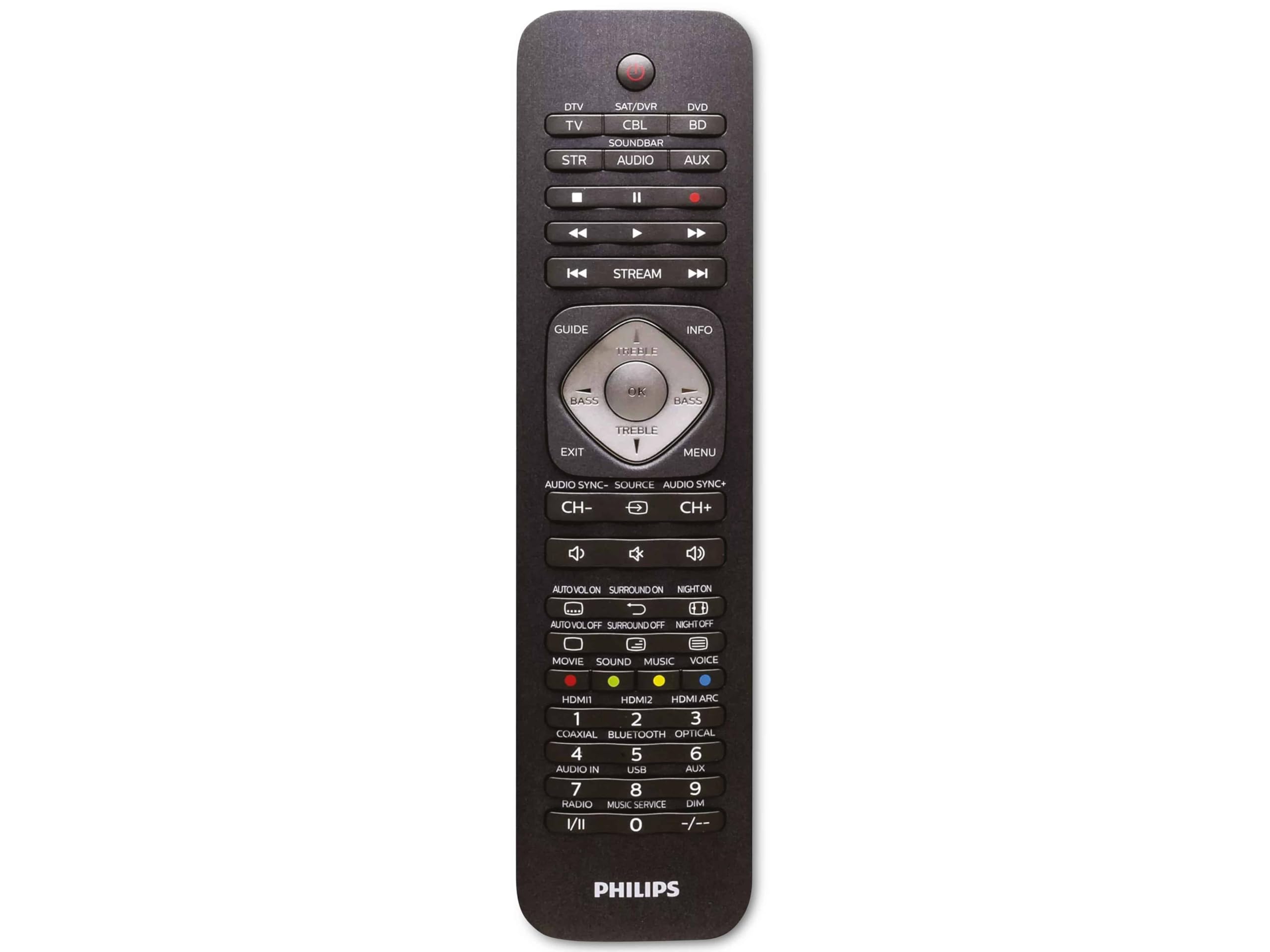
Image 1.1: Philips SRP5016/10 6-in-1 Universal Remote Control. This image displays the front view of the black universal remote control, highlighting its ergonomic design and button layout.
2. סעטאַפּ
2.1. באַטאַרייע ייַנמאָנטירונג
- עפֿנט דעם דעקל פֿון דער באַטעריע־אָפּטיילונג, וואָס געפֿינט זיך אויף דער הינטערשטער זײַט פֿון דער ווײַטקאָנטראָל.
- אַרײַנשטעלן צוויי AAA באַטעריעס, און זיכער מאַכן אַז די ריכטיקע פּאָלאַריטעט (+ און -) איז אָנגעוויזן אין דעם אָפּטייל.
- פאַרמאַכן די באַטאַרייע אָפּטייל דעקן סיקיורלי.
באַמערקונג: באַטעריז זענען נישט אַרייַנגערעכנט און מוזן זיין פּערטשאַסט סעפּעראַטלי.
2.2. Programming Devices
The Philips SRP5016/10 can be programmed using either direct code entry or the learning function.
2.2.1. Direct Code Entry (Recommended for common brands)
- צינדט אָן דעם דעווייס וואָס איר ווילט קאָנטראָלירן (למשל, טעלעוויזיע, DVD שפּילער).
- Press and hold the desired device button on the universal remote (e.g., TV, ווי) for approximately 3 seconds until the device button lights up.
- Enter the 4-digit code for your device's brand (refer to the code list provided with your remote, if available, or search online for Philips universal remote codes).
- If the device turns off or responds, the code is correct. Press the device button again to save the code. If not, try the next code for your brand.
2.2.2. Learning Function (For devices not in the code list or advanced functions)
- Place the universal remote and your original remote control head-to-head, approximately 1-3 cm apart.
- Press and hold the desired device button on the universal remote (e.g., TV) for approximately 3 seconds until the device button lights up.
- דריקן און האַלטן די לערן button on the universal remote until the device button starts blinking.
- On your original remote, press the button you wish to teach (e.g., מאַכט). The device button on the universal remote will blink rapidly and then stay solid, indicating successful learning.
- Repeat step 4 for all other buttons you wish to learn.
- דרוק די לערן button again to exit learning mode.
3. אַפּערייטינג ינסטרוקטיאָנס
3.1. Selecting a Device
To control a specific device, press the corresponding device button (e.g., TV, ווי, SAT, AUX, סאָונדבאַר, STREAM) once. The selected device button will light up briefly to confirm your selection. You can then use the remote's buttons to control that device.
3.2. יקערדיק פאַנגקשאַנז
- מאַכט: טוט אן אדער אויסלעשן דעם אויסגעקליבענעם אפאראט.
- VOLUME +/-: אַדזשאַסטירט דעם באַנד פֿון דעם אויסגעקליבענעם אַודיאָ מיטל.
- CHANNEL +/-: Changes channels on the selected TV or DTV device.
- שטיל: מוטשעט די אַודיאָ.
- נומער קנעפּלעך (0-9): פֿאַר דירעקט קאַנאַל אַרייַנטרעטן אָדער אַנדערע נומערישע אַרייַנגאַנגען.
- NAVIGATION (Arrow buttons, OK): פֿאַר מעניו נאַוויגאַציע און סעלעקציע.
4. וישאַלט
4.1. באַטערי פאַרבייַט
When the remote control's range decreases or buttons become unresponsive, it is time to replace the batteries. Follow the battery installation steps in Section 2.1. Always replace both AAA batteries simultaneously with new ones.
4.2. רייניקונג
צו רייניקן די ווײַטקאָנטראָל, ניצט אַ ווייכע, טרוקענע שטאָף. פֿאַר שווערע שמוץ, אַ ביסל ווייכער מאַכןampen the cloth with water or a mild cleaning solution. Avoid using abrasive cleaners, solvents, or alcohol, as these can damage the remote's surface or internal components.
5. טראָובלעשאָאָטינג
- ווייַט ניט ארבעטן:
- Check if the batteries are inserted correctly and are not depleted. Replace if necessary.
- פאַרזיכערן אַז עס זענען קיין אַבסטראַקשאַנז צווישן די ווייַט און די מיטל.
- Verify that the correct device button (e.g., TV, DVD) is selected.
- דיווייס רעאַגירט נישט אויף באַפֿעלן:
- The device code may be incorrect. Try reprogramming the device using a different code from the code list or use the learning function.
- Ensure the remote's infrared emitter is pointed directly at the device's infrared receiver.
- לערן פונקציע ארבעט נישט:
- Ensure the original remote's batteries are fresh and it is functioning correctly.
- Make sure the remotes are positioned correctly (head-to-head, 1-3 cm apart) during the learning process.
- Try learning the button again. Some original remotes have weaker IR signals that require multiple attempts.
6. ספּעסאַפאַקיישאַנז
| שטריך | באַשרייַבונג |
|---|---|
| סאָרט | פיליפּס |
| מאָדעל נאָמען | 6-אין-1 |
| מאָדעל נומער | SRP5016/10 |
| קאַמפּאַטאַבאַל דעוויסעס | Home Theater, DVD/Blu-ray Player, SoundBar, Television, Streaming Device |
| ספּעציעלע שטריך | Universal, Learning Function |
| קאַנעקטיוויטי טעכנאָלאָגיע | ינפרערעד |
| Maximum Number of Supported Devices | 6 |
| קאָנטראָללער טיפּ | קנעפּל קאָנטראָל |
| נומער פון קנעפּלעך | Not specified (typical universal remote layout) |
| מאַקסימום קייט | 10 מעטער |
| מאַכט מקור | 2 X AAA באַטעריז (ניט אַרייַנגערעכנט) |
| מאַטעריאַל טיפּ | פּלאַסטיק |
| פּראָדוקט דימענשאַנז | 21.4 X 5.3 X 2.2 סענטימעטער |
| פּראָדוקט וואָג | 130 ג |
7. וואָראַנטי און שטיצן
For warranty information, please refer to the documentation provided at the time of purchase or contact your retailer. Philips offers customer support for their products. If you encounter issues that cannot be resolved using this manual, please visit the official Philips support webפּלאַץ אָדער קאָנטאַקט זייער קונה דינסט פֿאַר הילף.
ביטע האַלטן דיין דערווייַז פון קויפן פֿאַר וואָראַנטי קליימז.