1. פּראָדוקט איבערview
This manual provides comprehensive instructions for the Retro-Bit Official Sega Saturn 2.4 GHz Wireless Controller. This controller is designed for use with Sega Saturn, Sega Genesis Mini, Nintendo Switch, PlayStation 3, PC, and Mac systems, offering a wireless gaming experience with classic control.

Image description: The Retro-Bit Official Sega Saturn 2.4 GHz Wireless Controller in white, shown with its packaging, a Sega Saturn port receiver, and a USB receiver.
2. פּעקל אינהאַלט
- 1x Retro-Bit Official Sega Saturn 2.4 GHz Wireless Controller (White)
- 1x Sega Saturn Port Receiver
- 1x USB Port Receiver
- 1x סטאָרידזש קאַסע
- 1x 3.3ft Charging Cable

Image description: The Retro-Bit wireless controller neatly stored within its protective case, alongside both the Sega Saturn and USB receivers.
3. סעטאַפּ אינסטרוקציעס
3.1. אויפלאָדן דעם קאָנטראָללער
Connect the included 3.3ft charging cable to the controller's charging port and a USB power source. The LED indicator on the controller will show charging status. A full charge provides approximately 550 mAh of battery life.
3.2. זיך פֿאַרבינדן צו אַ מיטל
- Select the appropriate receiver: Use the Sega Saturn Port Receiver for Sega Saturn consoles or the USB Port Receiver for Sega Genesis Mini, Nintendo Switch, PlayStation 3, PC, and Mac.
- Insert the receiver: Plug the chosen receiver into the corresponding port on your gaming system or computer.
- Power on the controller: Press the HOME button on the controller to power it on. The controller will automatically attempt to pair with the receiver.
- פּאָרינג (אויב נייטיק): If the controller does not connect automatically, press the pairing button on the receiver and then the HOME button on the controller simultaneously until the connection is established. The LED indicator on both the controller and receiver will become solid when successfully paired.

בילד באַשרייַבונג: א נאָענטע בילד view of the Sega Saturn port receiver, which connects the wireless controller to a Sega Saturn console.
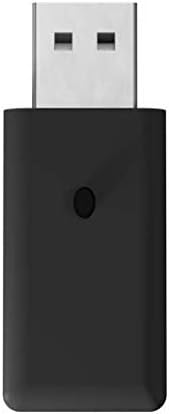
בילד באַשרייַבונג: א נאָענטע בילד view of the USB port receiver, used to connect the wireless controller to various modern systems like PC, Mac, Switch, and PS3.
4. אפערירן דעם קאנטראלער
4.1. קנעפּל אויסשטעל און פונקציעס
The controller features a classic 6-button layout with a responsive D-Pad, HOME, SELECT, and START buttons, along with shoulder buttons (L, R, Z, Y, X, A, B, C).
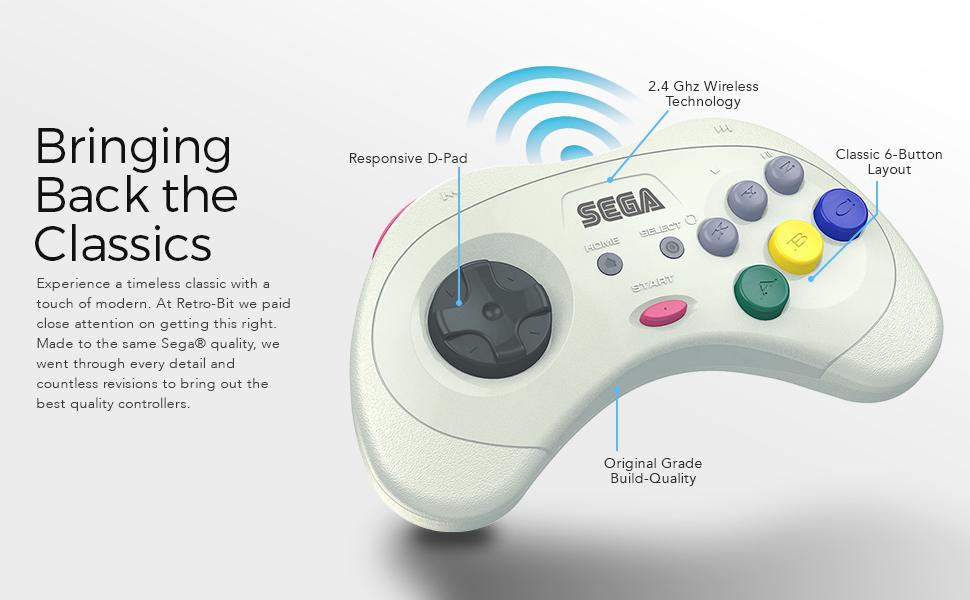
Image description: An annotated image of the Retro-Bit wireless controller highlighting its key features: Responsive D-Pad, 2.4 GHz Wireless Technology, Classic 6-Button Layout, and Original Grade Build-Quality.
4.2. Compatibility Modes
The controller automatically adapts to the connected system via the receiver.
- Sega Saturn: Full functionality for Sega Saturn games.
- Sega Genesis Mini: Compatible with the Sega Genesis Mini console.
- נינטענדאָו סוויטש: Functions as a Pro Controller.
- פּלייסטיישאַן 3: Functions as a standard PS3 controller.
- פּיסי / מעק: Recognized as a standard gamepad, compatible with most games supporting XInput or DirectInput.
4.3. שלאָפן מאָדע
To conserve battery, the controller will enter sleep mode after 5 minutes of inactivity. Press any button to wake it up.
5. וישאַלט
- רייניקונג: ניצט אַ ווייכע, טרוקענע שטאָף צו רייניקן דעם קאָנטראָללער. פֿאַרמייַדט אַברייסיוו רייניגער אָדער סאָלווענטן.
- סטאָרידזש: Store the controller in its included storage case when not in use to protect it from dust and damage.
- באַטערי זאָרגן: For optimal battery life, avoid fully discharging the controller frequently. Charge it regularly.
6. טראָובלעשאָאָטינג
6.1. Controller Not Responding
- מאַכן זיכער אַז די קאָנטראָללער איז טשאַרדזשינג.
- Verify the receiver is securely plugged into the device.
- Re-attempt the pairing process as described in the "Connecting to a Device" section.
- Check for interference from other 2.4 GHz wireless devices.
6.2. קשר ישוז
- Ensure you are within the 30ft gaming range.
- Try a different USB port on your PC/Mac/PS3 if using the USB receiver.
- Ensure the correct receiver is used for your system.
6.3. Buttons Not Functioning Correctly
- Test the controller on a different game or system to isolate the issue.
- זייט זיכער אז קיין שמוץ איז נישט איינגעהאלטן אונטער די קנעפלעך.
7. טעכניש ספּעסאַפאַקיישאַנז
| שטריך | דעטאַל |
|---|---|
| מאָדעל נומער | רב-סגאַ-048 |
| קאַנעקטיוויטי | ווירעלעסס 2.4 גהז |
| קאַמפּאַטאַבילאַטי | Sega Saturn, Sega Genesis Mini, Switch, PS3, PC, Mac |
| באַטערי | 550 mAh ריטשאַרדזשאַבאַל |
| טשאַרדזשינג קאַבלע | 3.3ft USB |
| ווירעלעסס ראַנגע | אַרויף צו 30ft |
| שלאָף מאָדע | נאָך 5 מינוט פון ינאַקטיוויטי |
| פּעקל דימענשאַנז | 7.36 X 5.83 X 2.05 אינטשעס |
| פּונקט וואָג | 15.5 אונסעס |
8. וואָראַנטי און שטיצן
For warranty information and technical support, please refer to the official Retro-Bit webזייטל אדער קאנטאקט זייער קאסטומער סערוויס. האלט אייער באווייז פון קויפן פאר גאראנטיע טענות.


