1. הקדמה
The LifeSmart LS101GS Smart Door Lock (Classic) is designed to enhance your home security and user experience. It incorporates an independent encryption security zone and an advanced fingerprint acquisition device, ensuring both robust protection and convenient access to your private space.
This manual provides detailed instructions for the installation, operation, and maintenance of your smart door lock. Please read it carefully before use to ensure proper functionality and safety.
2. שליסל פֿעיִקייטן
- קייפל צוטריט מעטאָדן: Unlock your door using a password, fingerprint, NFC, or a traditional physical key.
- גליטשיק פּלאַן: Features a frameless screen and a durable tempered panel.
- Advanced Security Alarms: Equipped with a duress alarm and an intrusion alarm for enhanced safety.
- Secure Password Entry: Includes a secure mode for password input to prevent unauthorized access.
- Lock Mode Functionality: Provides a dedicated lock mode for added security.
- סמאַרט היים ינטעגראַטיאָן: Recommended for use with a Smart Station for expanded smart home capabilities.
3. פּראָדוקט איבערview
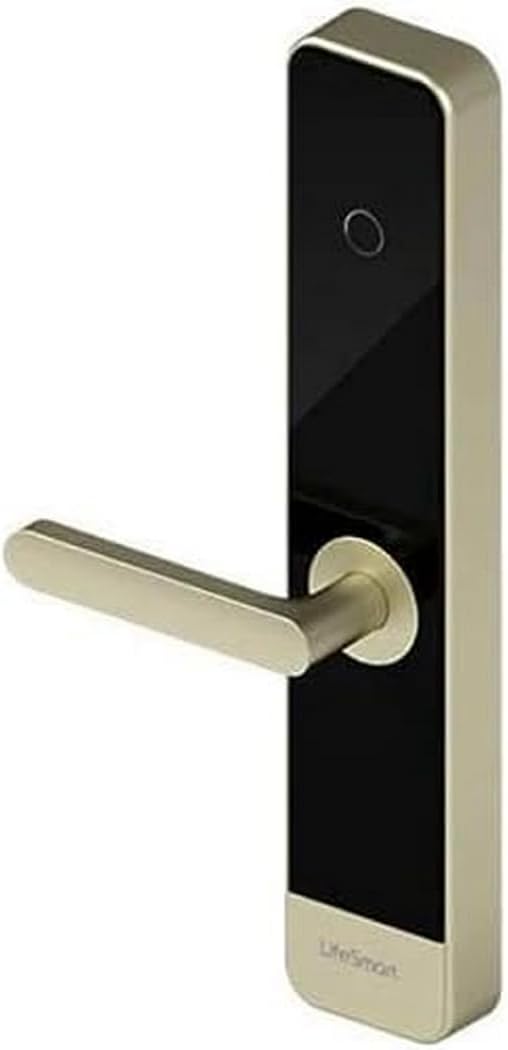
This image displays the LifeSmart LS101GS Smart Door Lock. It features a sleek, modern design with a gold-colored handle extending horizontally from a vertical black panel. The panel has a circular fingerprint sensor near the top and the 'LifeSmart' logo at the bottom. The overall structure is rectangular with rounded edges, indicating a contemporary aesthetic suitable for various door types.
4. סעטאַפּ און ייַנמאָנטירונג
Proper installation is crucial for the optimal performance and security of your LifeSmart LS101GS Smart Door Lock. It is recommended to seek professional assistance if you are unsure about any steps.
4.1. אַנפּאַקקינג און צוגרייטונג
- פּאַקט פֿאָרזיכטיק אויס אַלע קאָמפּאָנענטן און קאָנטראָלירט קעגן דער פּאַקינג־ליסטע.
- Ensure you have the necessary tools: screwdriver, measuring tape, drill (if required).
- Check your door's compatibility with the lock's dimensions (385 x 75 x 33 mm).
4.2. באַטאַרייע ייַנמאָנטירונג
The lock requires 8 AA batteries for power. Locate the battery compartment, typically on the interior unit of the lock. Insert the batteries, ensuring correct polarity.
4.3. גשמיות ייַנמאָנטירונג
Follow the detailed instructions provided in the separate installation guide for mounting the lock on your door. This typically involves:
- Preparing the door (drilling holes if necessary).
- Installing the mortise lock.
- Mounting the exterior and interior lock units.
- Connecting internal cables.
- Securing all screws.
4.4. ערשט קאָנפיגוראַטיאָן
After physical installation, power on the lock. Follow the on-screen prompts or refer to the quick start guide to set up an administrator password and register initial fingerprints or NFC cards.
5. אַפּערייטינג ינסטרוקטיאָנס
5.1. אויפשליסן די טיר
- פינגערפּרינט: לייגט אייער רעגיסטרירטן פינגער אויפן פינגער-אפדרוק סענסאר. דער שלאָס וועט זיך עפענען נאך דערפאלגרייכער דערקענונג.
- שפּריכוואָרט: Enter your registered password on the keypad. For secure mode, you may enter random digits before and after your actual password to obscure it. Press the '#' key to confirm.
- NFC: Present your registered NFC device (e.g., smartphone, NFC card) to the NFC reader area on the lock.
- שליסל: Insert the physical key into the emergency keyhole and turn to unlock.
5.2. פארשליסן די טיר
The lock typically auto-locks after a set period once the door is closed. You can also manually lock it by lifting the handle or pressing a dedicated lock button on the interior unit, depending on the specific model configuration.
5.3. שרעק פאַנגקשאַנז
- Duress Alarm: If you are forced to unlock the door under duress, entering a pre-set duress code will unlock the door silently while simultaneously sending an alert to your connected Smart Station or emergency contacts.
- Intrusion Alarm: The lock will trigger an alarm if forced entry is detected or if multiple incorrect access attempts are made.
5.4. באַניצער מאַנאַגעמענט
Access the lock's menu (usually by entering the administrator password) to add, modify, or delete user fingerprints, passwords, or NFC devices. Refer to the on-screen menu for specific navigation.
6. וישאַלט
Regular maintenance ensures the longevity and reliable operation of your smart door lock.
- באַטערי פאַרבייַט: Replace all 8 AA batteries when the low battery indicator appears. Do not mix old and new batteries.
- רייניקונג: Wipe the lock's surface and fingerprint sensor with a soft, dry cloth. Avoid using abrasive cleaners, solvents, or excessive moisture, as these can damage the electronic components or finish.
- מעכאנישע קאָנטראָל: Periodically check that all screws are secure and that the handle operates smoothly.
- ווייכווארג דערהייַנטיקונגען: If connected to a Smart Station, ensure the lock's firmware is updated regularly for optimal performance and security features.
7. טראָובלעשאָאָטינג
If you encounter issues with your LifeSmart LS101GS Smart Door Lock, refer to the following common problems and solutions:
| פּראָבלעם | מעגלעך סיבה | לייזונג |
|---|---|---|
| לאַק טוט נישט ריספּאַנד. | טויט באַטעריז. | פאַרבייַטן אַלע 8 אַאַ באַטעריז. |
| פינגער־אפדרוק נישט דערקענט. | דער פינגער איז שמוציק/נאַס, דער סענסאָר איז שמוציק, אדער דער פינגער-אפדרוק נישט ריכטיק רעגיסטרירט. | Clean finger and sensor. Re-register fingerprint if issue persists. |
| פּאַראָל נישט אנגענומען. | Incorrect password entered, or secure mode entry error. | Ensure correct password. Re-enter carefully, paying attention to secure mode sequence if applicable. |
| דער אַלאַרם ווערט אומגעריכט אַקטיוויזירט. | Sensitivity settings too high, or actual intrusion attempt. | Check sensitivity settings in the lock's menu. Investigate for signs of tampערינג. |
| Lock is unresponsive after power loss. | צייטווייליגע עלעקטראָנישע פּראָבלעם. | Remove batteries for 1 minute, then reinsert. If possible, use the physical key. |
אויב די פראבלעם בלייבט נאך פרובירן די לייזונגען, ביטע קאנטאקטירט קאסטומער סופארט.
8. טעכניש ספּעסאַפאַקיישאַנז
| באַשרייַבונג | ווערט |
|---|---|
| פאַבריקאַנט | ליפעסמאַרט |
| מאָדעל נומער | LS101SL |
| דימענסיעס (L X W X H) | 38.5 X 7.5 X 3.3 סענטימעטער (15.16 X 2.95 X 1.3 אינטשעס) |
| וואָג | 1 קילאָגראַם (2.2 פונט) |
| מאַטעריאַל | מעטאַל |
| טראַנסמיסיע דיסטאַנסע | Up to 100 meters in open field |
| אָפטקייַט | GFSK 433 MHz |
| ווירעלעסס פּראָטאָקאָל | CoSS |
| ופשליסן מעטהאָדס | Fingerprint, Password, NFC, Keys |
| מאַכט צושטעלן | 8 אַאַ באַטעריז (ניט אַרייַנגערעכנט) |
| אַפּערייטינג טעמפּעראַטור | -30°C ~ +60°C (-22°F ~ +140°F) |
| אַפּערייטינג הומידיטי | 20 ~ 90% (ניט-קאַנדאַנסינג) |
9. וואָראַנטי און שטיצן
Your LifeSmart LS101GS Smart Door Lock comes with a warranty provided by the seller, Eternal Security.
צוריקקער פּאָליטיק: If the product is found to be defective, customers have up to 30 days from the date of purchase to return it for a 100% refund.
For any technical questions, incidents, or warranty claims, please contact Eternal Security directly. They are committed to providing quality products and excellent service, with customer satisfaction as their top priority.


