1. הקדמה
The Vimar 14597 Plana Gateway is an Internet of Things (IoT) device designed to integrate, configure, and supervise VIEW Wireless smart home systems. It utilizes both Bluetooth and Wi-Fi connectivity to enable seamless communication between your smart devices and the Vimar Cloud, accessible via dedicated smartphone and tablet applications. This gateway allows for advanced home automation control, including supervision through the View app and compatibility with popular voice assistants such as Amazon Alexa, Google Assistant, and Apple Siri.
The device is designed for modular installation, fitting into standard 2-module Plana sockets, and operates on a 100-240 V 50/60 Hz power supply.

פיגורע 1.1: פראָנט view of the Vimar 14597 Plana Gateway, showing its compact design and integrated Bluetooth and Wi-Fi indicators.
2. סעטאַפּ
2.1. גשמיות ייַנמאָנטירונג
Proper physical installation is crucial for the safe and effective operation of your Vimar 14597 Plana Gateway. If you are not comfortable with electrical installations, it is recommended to consult a qualified electrician.
- מאַכט דיסקאַנעקשאַן: Before beginning any electrical work, ensure the main power supply to the installation area is completely disconnected to prevent electric shock.
- מאַונטינג אָרט: The Vimar 14597 Gateway is designed for modular, flush-mounted or wall-mounted installations. It occupies two standard module slots within a Vimar Plana socket.
- וויירינג: Connect the gateway to the electrical system. A neutral wire (N) connection is required for proper operation, in addition to the live wire (L). Refer to the markings on the back of the device for correct terminal identification. The device operates on 100-240 V ~ 50/60 Hz.
- זיכער ינסטאַלירונג: Once wired, securely fasten the gateway into its designated module slots.
- מאַכט ווידער קאַנעקשאַן: After ensuring all connections are secure and correct, restore power to the installation area.
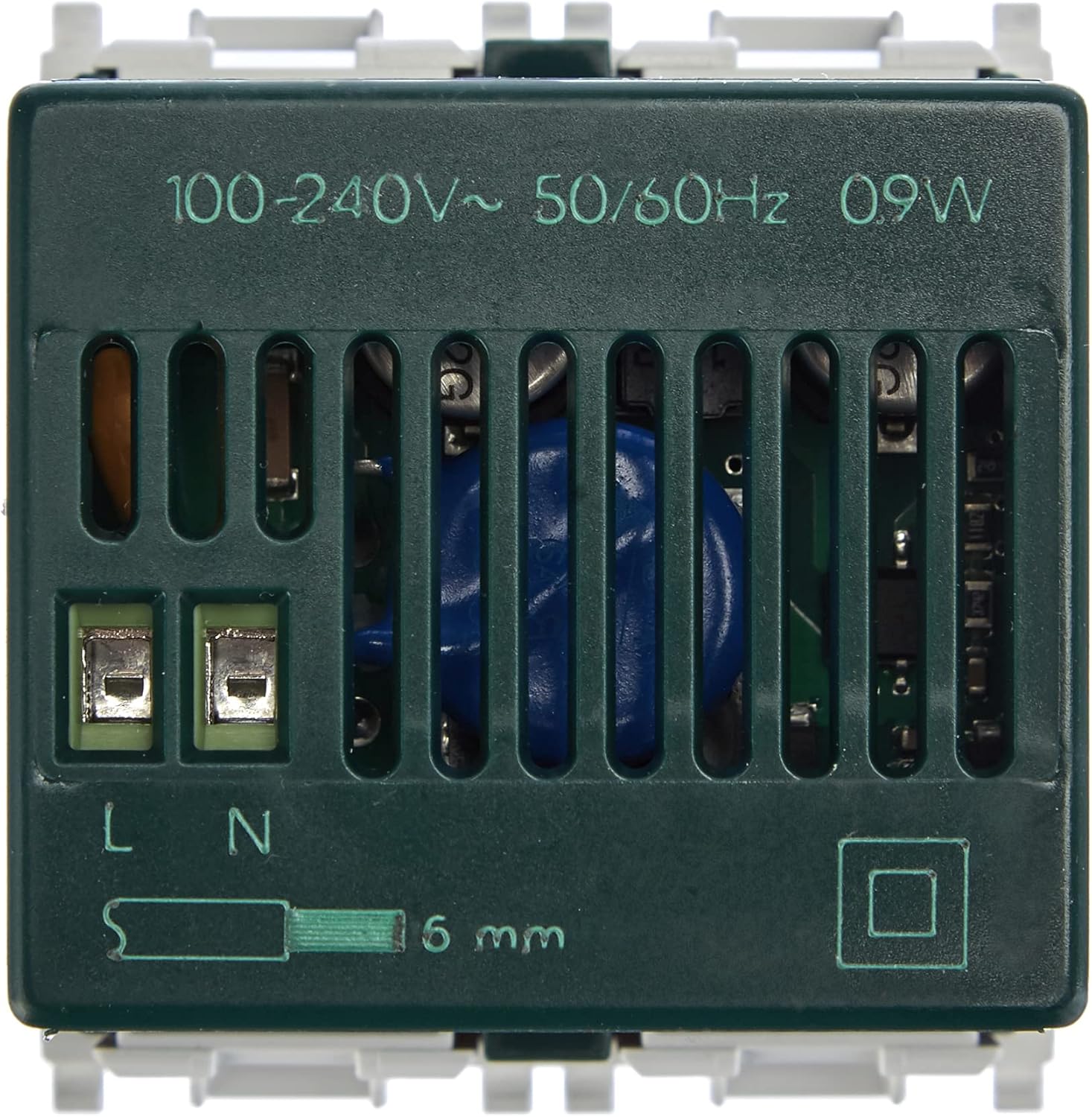
פיגורע 2.1: דערציען view of the Vimar 14597 Gateway, illustrating the power input terminals (L and N) and voltage specifications (100-240V~ 50/60Hz).

פיגורע 2.2: דנאָ view of the Vimar 14597 Gateway, showing ventilation slots and mounting points.
2.2. ווייכווארג קאָנפיגוראַטיאָן
The Vimar system utilizes two distinct applications for configuration and daily operation:
- ווימאר VIEW Wireless App: Used specifically for the initial configuration of the gateway and other VIEW ווירעלעסס דעוויסעס.
- ווימאר VIEW אַפּ: Used for the daily control and supervision of all connected devices and scenarios.
- שאַפֿן אַ חשבון: Create a Vimar account if you do not already have one. This is essential for accessing the Vimar Cloud services.
- דאַונלאָוד אַפּפּס: Download both the "Vimar VIEW Wireless" app and the "Vimar VIEW" app from your smartphone's or tablet's app store.
- Gateway Configuration (VIEW Wireless App):
- Open the Vimar VIEW Wireless app.
- Follow the on-screen instructions to add and configure your Vimar 14597 Plana Gateway. This typically involves connecting the app to the gateway via Bluetooth or Wi-Fi.
- During this process, you may be prompted to update the gateway's firmware. It is recommended to proceed with firmware updates to ensure optimal performance and access to the latest features.
- Administrator Role: Ensure that an administrator role is assigned within the app for full system control. This is a necessary step for managing the system effectively.
- Device Pairing (VIEW App): Once the gateway is configured, use the Vimar VIEW app to pair and manage your other Vimar IoT devices (e.g., thermostats, switches, roller shutter controls).

פיגורע 2.3: Example of the Vimar VIEW app interface on a smartphone, used for managing connected devices and scenarios.

פיגורע 2.4: די ווימאר VIEW app icon, used for daily control and supervision of your smart home system.
3. אפערירן דעם גייטוויי
Once configured, the Vimar 14597 Plana Gateway acts as the central hub for your VIEW Wireless smart home system, enabling various control methods.
3.1. Control via Vimar VIEW אַפּ
- דיווייס קאָנטראָל: Use the Vimar VIEW app to control individual smart devices connected to the gateway, such as lights, shutters, and thermostats.
- סצענאַר פאַרוואַלטונג: Create and activate custom scenarios (e.g., "Good Morning," "Away," "Movie Night") that trigger multiple actions simultaneously across different devices.
- ווייַט אַקסעס: The gateway enables remote control of your smart home devices from anywhere, provided you have an internet connection on your smartphone/tablet.
- ענערגיע מאָניטאָרינג: The app may offer features for monitoring energy consumption of connected devices, if supported.

פיגורע 3.1: The Vimar Gateway seamlessly integrated into a wall plate, illustrating its connectivity with the Vimar App and voice assistants like Alexa, Google, and Siri.
3.2. שטימע אַסיסטאַנט אינטעגראַציע
The Vimar 14597 Gateway supports integration with popular voice assistants, allowing for hands-free control of your smart home:
- אַמאַזאָן אַלעקסאַ: Link your Vimar account to your Alexa app to control devices using voice commands (e.g., "Alexa, turn on the living room lights").
- גוגל אַססיסטאַנט: Connect your Vimar system to Google Assistant for voice control (e.g., "Hey Google, set the thermostat to 22 degrees").
- עפל סירי: Utilize Siri shortcuts or HomeKit integration (if supported by specific Vimar devices) for voice commands (e.g., "Hey Siri, close the blinds").

פיגורע 3.2: A user interacting with a smart home system, demonstrating the convenience of voice control through the Vimar Gateway.
4. וישאַלט
The Vimar 14597 Plana Gateway is designed for reliable, long-term operation with minimal maintenance. No routine user maintenance is required for the device itself. Ensure the device is kept free from dust and moisture. For optimal performance, regularly check for and apply firmware updates through the Vimar VIEW Wireless app.
5. טראָובלעשאָאָטינג
This section addresses common issues you might encounter during the installation and operation of your Vimar 14597 Plana Gateway.
5.1. Configuration Difficulties
- Complex Setup Process: Users have reported that the initial software configuration can be complex due to the need for two separate apps (VIEW Wireless for setup, VIEW for daily use) and specific administrator role assignments. Carefully follow the step-by-step instructions provided in the Vimar VIEW Wireless app.
- פירמוואַרע אַפּדייט ישוז: If the gateway experiences issues after a firmware update, try repeating the configuration process. Ensure a stable internet connection during updates.
- Account and App Management: Verify that your Vimar account is correctly set up and that you are using the appropriate app for the task (VIEW Wireless for initial gateway setup, VIEW for device control). Ensure the administrator role is correctly assigned.
5.2. קאָנעקטיוויטי פּראָבלעמען
- קיין קשר: Ensure the gateway is powered correctly and that your Wi-Fi router is operational and within range. Check the LED indicators on the gateway for status.
- בלועטאָאָטה פּערינג ישוז: If experiencing problems with Bluetooth pairing during initial setup, ensure your smartphone's Bluetooth is enabled and that it is close to the gateway.
5.3. רעסעטטינג די מיטל
The Vimar 14597 Gateway does not feature a physical reset button. If a factory reset is required, this procedure must be initiated through the Vimar VIEW Wireless app. Refer to the app's help section or the official Vimar support documentation for detailed instructions on performing a software-based reset.
6. ספּעסאַפאַקיישאַנז
| שטריך | דעטאַל |
|---|---|
| סאָרט | VIMAR |
| מאָדעל נומער | 14597 |
| פּראָדוקט דימענשאַנז | 4.9 X 4.48 X 4.78 סענטימעטער |
| וואָג | 50 גראַמז |
| מאַכט צושטעלן | 100-240 וו ~ 50/60 הז |
| קאָליר | ווייַס |
| קאַנעקטיוויטי | אינטערנעט פון זאכן, בלועטוט, וויי-פיי |
| מאָדולע גרייס | 2 modules (Plana series) |
| לאַנד פון אָריגין | איטאליע |

פיגורע 6.1: The Vimar 14597 Gateway shown in hand, providing a visual reference for its compact size (approximately 5 cm in height).

פיגורע 6.2: Schematic diagram illustrating the Vimar 14597 Plana Gateway's form factor and key indicators.
7. וואָראַנטי און שטיצן
7.1. וואָראַנטי אינפֿאָרמאַציע
Specific warranty terms and conditions for the Vimar 14597 Plana Gateway are provided by Vimar. Please refer to the official Vimar website or the documentation included with your product for detailed warranty information.
7.2. קונה שטיצן
For further assistance, technical support, or to access additional manuals and instructions, please visit the official Vimar website. Vimar is known for responsive and knowledgeable customer support.
Official Vimar Webפּלאַץ: www.vimar.com
8. אפיציעלע פּראָדוקט ווידעאָס
קיין אפיציעלע פּראָדוקט ווידעאָס פֿונעם פֿאַרקויפֿער זענען נישט צוגעשטעלט געוואָרן אין די פּראָדוקט דאַטן פֿאַר עמבעדדינג אין דעם מאַנואַל.


