1. הקדמה
This manual provides detailed instructions for the proper use and maintenance of your Tronsmart T6 Plus Upgraded Bluetooth Speaker. Please read this manual thoroughly before using the product to ensure safe operation and optimal performance. Keep this manual for future reference.
2. פּעקל אינהאַלט
- Tronsmart T6 Plus Upgraded Bluetooth Speaker
- טשאַרדזשינג קאַבלע
- 3.5mm AUX Cable (if included with your specific package)
- באַניצער מאַנואַל (דעם דאָקומענט)
3. פּראָדוקט פֿעיִקייטן
- 40W Output with SoundPulse™ Technology: Delivers powerful audio with enhanced bass and clear vocals.
- 360° HD Surround Sound: Provides immersive audio experience from all directions.
- IPX6 וואַסער קעגנשטעליק: Designed to resist heavy splashes, rain, and sweat, making it suitable for outdoor use.
- 15 שעה שפּיל צייט: Extended battery life for prolonged listening on a single charge (at 50% volume).
- Tri-Bass Effects: Three distinct equalizer audio effects (Balanced, 3D, Deep Bass) to suit various music genres.
- NFC קאַנעקטיוויטי: Quick and easy pairing with NFC-enabled devices.
- יו-עס-בי טשאַרדזש אויס: Functions as a power bank to charge your smart devices in emergencies.
- אמת וויירליס סטערעאָ (טווס) פּערינג: Connect two T6 Plus speakers for a true stereo sound experience.
- Intuitive Control Wheel: Easy-to-use rotary control for volume adjustment and multi-function button for playback and calls.
4. קאָנטראָלס און ינדיקאַטאָרס

בילד באַשרייַבונג: A black Tronsmart T6 Plus speaker shown vertically, highlighting its cylindrical shape and the control panel on its side. The top features a rotary control wheel with a blue LED ring. Below it are buttons for NFC, previous track, play/pause, next track, EQ, Mode, and Power. At the bottom, there are ports for TF Card, USB, and AUX input.

בילד באַשרייַבונג: A series of three images demonstrating the intuitive control wheel. The first shows rotating the wheel for volume control. The second shows tapping the center for play/pause and hands-free calls. The third shows pressing and holding the center to activate the voice assistant.
קאָנטראָל פּאַנעל אויסלייג:
- Rotary Control Wheel: Rotate clockwise to increase volume, counter-clockwise to decrease volume.
- Multi-function Button (Center of wheel): Tap to play/pause music or answer/end calls. Press and hold to activate voice assistant.
- NFC Icon: Tap NFC-enabled device here for quick pairing.
- Previous Track Button (◀◀): דרוק צו גיין צו די פריערדיקע שפּור.
- Next Track Button (▶▶): דרוק צו גיין צו די ווייַטער שפּור.
- עק קנעפּל: Press to cycle through Tri-Bass Effects (Balanced, 3D, Deep Bass).
- מאָדע קנעפּל (M): Press to switch between Bluetooth, TF Card, and AUX modes.
- מאַכט קנעפּל (⑂): דריקן און האַלטן צו מאַכט אויף / אַוועק.
LED ינדיקאַטאָרס:
- בלועטאָאָטה ינדיקאַטאָר: Blue light flashes when pairing, solid blue when connected.
- טשאַרדזשינג ינדיקאַטאָר: רויט ליכט ינדיקייץ טשאַרדזשינג, טורנס אַוועק ווען גאָר באפוילן.
- באַטערי נידעריק ינדיקאַטאָר: Red light flashes when battery is low.
5. סעטאַפּ
5.1 אויפלאָדן דעם רעדנער
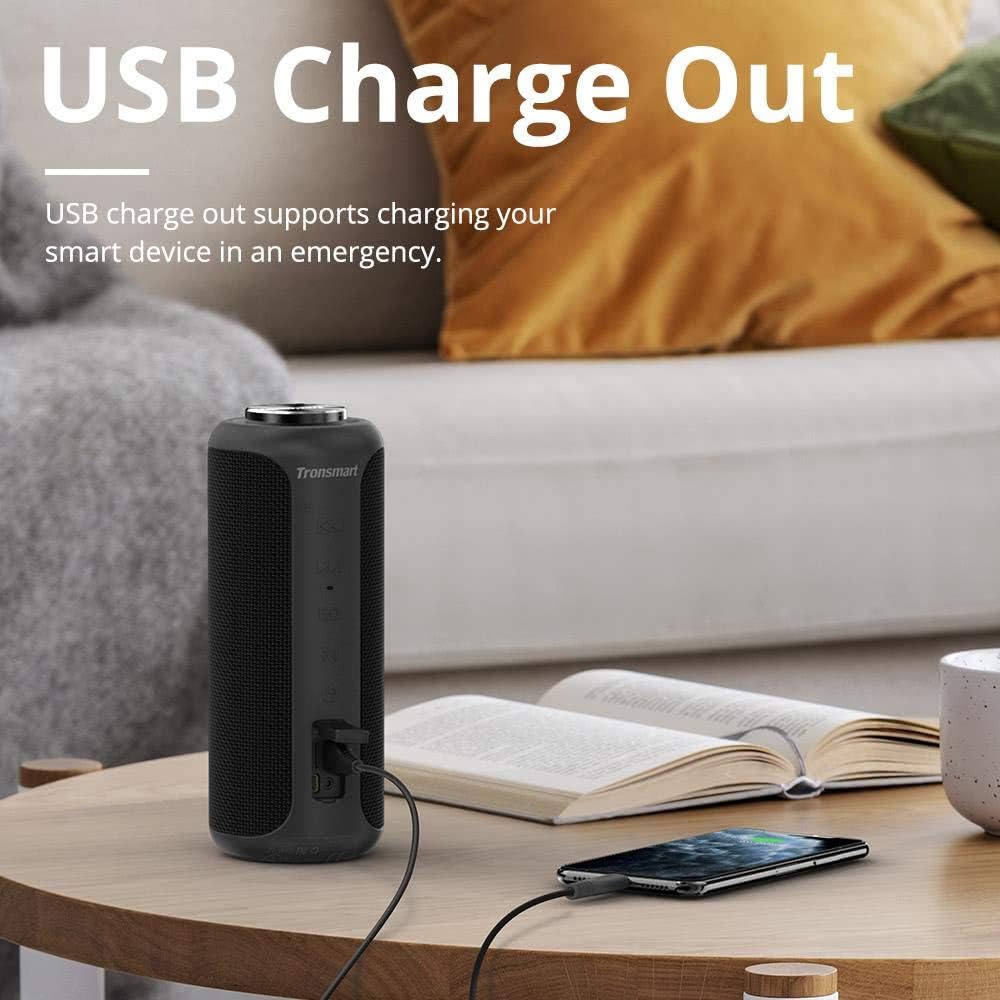
בילד באַשרייַבונג: The Tronsmart T6 Plus speaker standing on a wooden table, connected via a USB cable to a smartphone that is being charged. This illustrates the USB charge out feature.
- Connect the provided charging cable to the speaker's charging port and a USB power adapter (not included) or a computer's USB port.
- די טשאַרדזשינג אינדיקאַטאָר ליכט וועט אָנצינדן רויט בעת טשאַרדזשינג.
- The light will turn off once the speaker is fully charged.
- א פולע אָפּצאָל גיט ביז 15 שעה שפּיל צייט ביי 50% וואָלומען.
5.2 מאַכט אויף / אַוועק
- מאַכט אויף: Press and hold the Power button (⑂) for 2-3 seconds until the indicator light illuminates.
- מאַכט אַוועק: Press and hold the Power button (⑂) for 2-3 seconds until the indicator light turns off.
5.3 בלועטאָאָטה פּערינג
- Ensure the speaker is powered on and the Bluetooth indicator is flashing blue, indicating it's in pairing mode.
- אויף אייער דעווייס (סמאַרטפאָן, טאַבלעט, לאַפּטאָפּ), אַקטיווירט בלועטוט און זוכט פֿאַר פֿאַראַן דעווייסעס.
- Select "Tronsmart T6 Plus" from the list of devices.
- אַמאָל פארבונדן, וועט דער בלועטוט אינדיקאַטאָר ווערן בלוי.
NFC פּאָרינג (אפציאָנעל):
- Ensure NFC is enabled on your device and the speaker is powered on.
- Tap your NFC-enabled device gently against the NFC icon on the speaker.
- באַשטעטיקן די פּאָרינג בעטן אויף דיין מיטל.
5.4 אמתע ווירעלעס סטערעאָ (TWS) פּאָרינג

בילד באַשרייַבונג: Two Tronsmart T6 Plus speakers, one black and one red, are shown on steps with blue circular waves emanating from them, symbolizing their wireless stereo connection. This illustrates the True Wireless Stereo (TWS) pairing feature.
To pair two T6 Plus speakers for a stereo sound experience:
- זיכער מאַכן אַז ביידע רעדנערס זענען אנגעצונדן און נישט פארבונדן צו קיין בלוטוט דעווייס.
- On one speaker (this will be the primary speaker), press and hold the Mode button (M) for 3 seconds until you hear a prompt sound.
- The two speakers will automatically connect to each other. Once connected, the primary speaker's Bluetooth indicator will flash blue, and the secondary speaker's indicator will be solid blue.
- איצט, פֿאַרבינדט אייער דעווייס צום הויפּט רעדנער דורך בלועטוט ווי באַשריבן אין סעקציע 5.3.
6. אַפּערייטינג ינסטרוקטיאָנס
6.1 מוזיק פּלייבאַק
- שפּיל / פּויזע: Tap the Multi-function button (center of the control wheel).
- ווייַטער שפּור: Press the Next Track button (▶▶).
- פֿריִערדיקע שפּור: Press the Previous Track button (◀◀).
- באַנד אַרויף: Rotate the control wheel clockwise.
- באַנד אַראָפּ: Rotate the control wheel counter-clockwise.
6.2 רוף פאַרוואַלטונג
- ענטפֿערן / סוף רופן: צאַפּן אויף די מולטי-פונקציע קנעפּל.
- אָפּוואַרפן רופן: דריקן און האַלטן די מולטי-פונקציע קנעפּל פֿאַר 2 סעקונדעס.
6.3 ווויס אַססיסטאַנט
- אַקטאַווייט קול אַססיסטאַנט: דריקן און האַלטן די מולטי-פונקציע קנעפּל פֿאַר 2 סעקונדעס.
6.4 Tri-Bass Effects

בילד באַשרייַבונג: A graphic illustrating the three Tri-Bass Effects available on the speaker: Balanced (Default), 3D, and Deep Bass. Each effect is represented by a hexagonal icon with a play button, suggesting different audio profiles for various music genres.
- דרוק די EQ button to cycle through the three available sound modes: Balanced (Default), 3D, and Deep Bass.
6.5 TF קאַרטל פּלייבאַק
- אַרײַנשטעלן אַ TF (microSD) קאַרטל מיט מוזיק files into the TF Card slot. The speaker will automatically switch to TF Card mode and begin playback.
- Use the playback controls (Play/Pause, Next/Previous Track) as described above.
6.6 AUX אַרייַנשרייַב
- Connect an audio device to the speaker's AUX port using a 3.5mm audio cable.
- דער רעדנער וועט זיך אויטאָמאַטיש איבערקערן צו AUX מאָדע.
- קאָנטראָליר ווידערשפּיל פֿון דיין פֿאַרבונדענע אַודיאָ מיטל.
7. וישאַלט און קער
- רייניקט דעם רעדנער מיט אַ ווייכן, דamp שטאָף. דו זאלסט נישט נוצן האַרב קעמיקאַלז אָדער אַברייסיוו מאַטעריאַלס.
- The speaker is IPX6 water resistant, meaning it can withstand heavy splashes and rain. Do not submerge the speaker in water. Ensure the port cover is securely closed when exposed to water.
- האַלט דעם רעדנער אין אַ קיל, טרוקן אָרט אַוועק פון עקסטרעמע טעמפּעראַטורן און דירעקט זונשייַן.
- ויסמיידן דראַפּינג אָדער ונטערטעניק די רעדנער צו שטאַרק ימפּאַקץ.
- אויב דער רעדנער וועט נישט ווערן גענוצט פאר א לענגערע צייט, לאדט אים אויף כאטש איין מאל יעדע דריי חדשים כדי צו פארשפארן די באַטעריע לעבן.
8. טראָובלעשאָאָטינג
| פּראָבלעם | מעגלעך סיבה | לייזונג |
|---|---|---|
| דער רעדנער גייט נישט אן. | באַטערי איז דיפּליטיד. | לאָדט דעם רעדנער גאָר אויף. |
| קיין געזונט. | די קול איז צו נידעריג; די דעווייס איז נישט פארבונדן; די אומרעכטע מאָדע. | Increase volume on speaker and device; ensure Bluetooth is connected or correct mode (TF/AUX) is selected. |
| בלועטוט פֿאַרבינדונג איז נישט סטאַביל אָדער פֿאַרפֿעלט. | רעדנער צו ווייט פון דעווייס; אריינמישונג; דעווייס בלועטוט פראבלעם. | Move speaker closer to device; avoid obstacles; restart speaker and device's Bluetooth. |
| TWS פּאָרינג פיילז. | רעדנערס שוין פארבונדן צו אנדערע דעווייסעס; אומרעכטע פארבינדונג פראצעדור. | Ensure both speakers are disconnected from other devices; follow TWS pairing steps carefully. |
| פאַרקרימט געזונט. | Volume too high; low battery; poor audio source. | Reduce volume; charge speaker; try a different audio source. |
9. ספּעסאַפאַקיישאַנז
| שטריך | דעטאַל |
|---|---|
| מאָדעל נאָמען | ט 6 פּלוס |
| רעדנער טיפּ | דרויסנדיק |
| ספּעציעלע שטריך | וואָטערפּרוף |
| רעדנער מאַקסימום רעזולטאַט מאַכט | 40 וואטס |
| אַודיאָ רעזולטאַט מאָדע | אַרומרינגלען |
| קאַנעקטיוויטי טעכנאָלאָגיע | בלועטוט, ען-עף-סי, יו-עס-בי |
| ווירעלעסס קאָמוניקאַציע טעכנאָלאָגיע | בלועטאָאָטה |
| בלועטאָאָטה ווערסיע | 5.0 (Inferred from Surround Sound Channel Configuration) |
| קאָנטראָל מעטאָד | ריר |
| באַטערי לעבן | 15 שעה |
| מאַכט מקור | באַטאַרייע פּאַוערד (1 ליטהיום פּאָלימער באַטאַרייע אַרייַנגערעכנט) |
| פּראָדוקט דימענשאַנז | 3.31"ד רענטגענ 3.31"וו רענטגענ 8.27"ה |
| פּונקט וואָג | 1.6 פונט |
| קאָליר | שוואַרץ |
| פאַבריקאַנט | טראָנסמאַרט |
10. וואָראַנטי און שטיצן
The Tronsmart T6 Plus Upgraded Bluetooth Speaker comes with a limited warranty. For detailed warranty information, technical support, or service inquiries, please visit the official Tronsmart webזייטל אדער קאנטאקט זייער קאסטומער סערוויס גלייך. האלט אייער קויף קוויטל אלס באווייז פון קויפן פאר גאראנטיע קליימס.
Tronsmart Official Webפּלאַץ: www.tronsmart.com


