הקדמה
Thank you for choosing the MageGee Pink Gaming Keyboard. This mechanical keyboard is designed to enhance your gaming and typing experience with its responsive blue switches, dynamic backlighting, and durable construction. This manual provides detailed instructions for setup, operation, maintenance, and troubleshooting to ensure optimal performance.

סעטאַפּ
The MageGee Pink Gaming Keyboard is designed for simple plug-and-play functionality, requiring no additional drivers for most operating systems.
קאַנעקטינג די קלאַוויאַטור
- זוכט אַ פאַראַן USB פּאָרט אויף אייער קאָמפּיוטער (פּיסי אָדער מעק).
- Insert the USB connector of the keyboard into the USB port. The keyboard features a gold-plated USB port for stable data transmission.
- Wait for your operating system to recognize the device. This usually happens automatically within a few seconds.
- The keyboard's backlight will illuminate upon successful connection, indicating it is ready for use.

אַפּערייטינג ינסטראַקשאַנז
This section details the various functions and features of your MageGee Gaming Keyboard.
שליסל פֿעיִקייטן
- Professional Blue Switches: Equipped with linear, top-to-bottom switches that offer a smooth and responsive typing experience with a distinct tactile and audible click.
- N-שליסל ראָולאָוווער: Features 100% anti-ghosting across all 104 keys, ensuring that every simultaneous key press is registered accurately, crucial for fast-paced gaming.
- דינאַמיש באַקלייט: Offers 18 distinct backlight models to customize your typing environment.
- עקסטרעמע האַלטבארקייט: Built with a solid base and double injection ABS keycaps, designed for long-term use and resistance to wear.
- ברייט קאַמפּאַטאַבילאַטי: Supports Windows 10, Windows 8, Windows 7, Mac OS X, Windows XP, Windows VISTA, and other common operating systems.
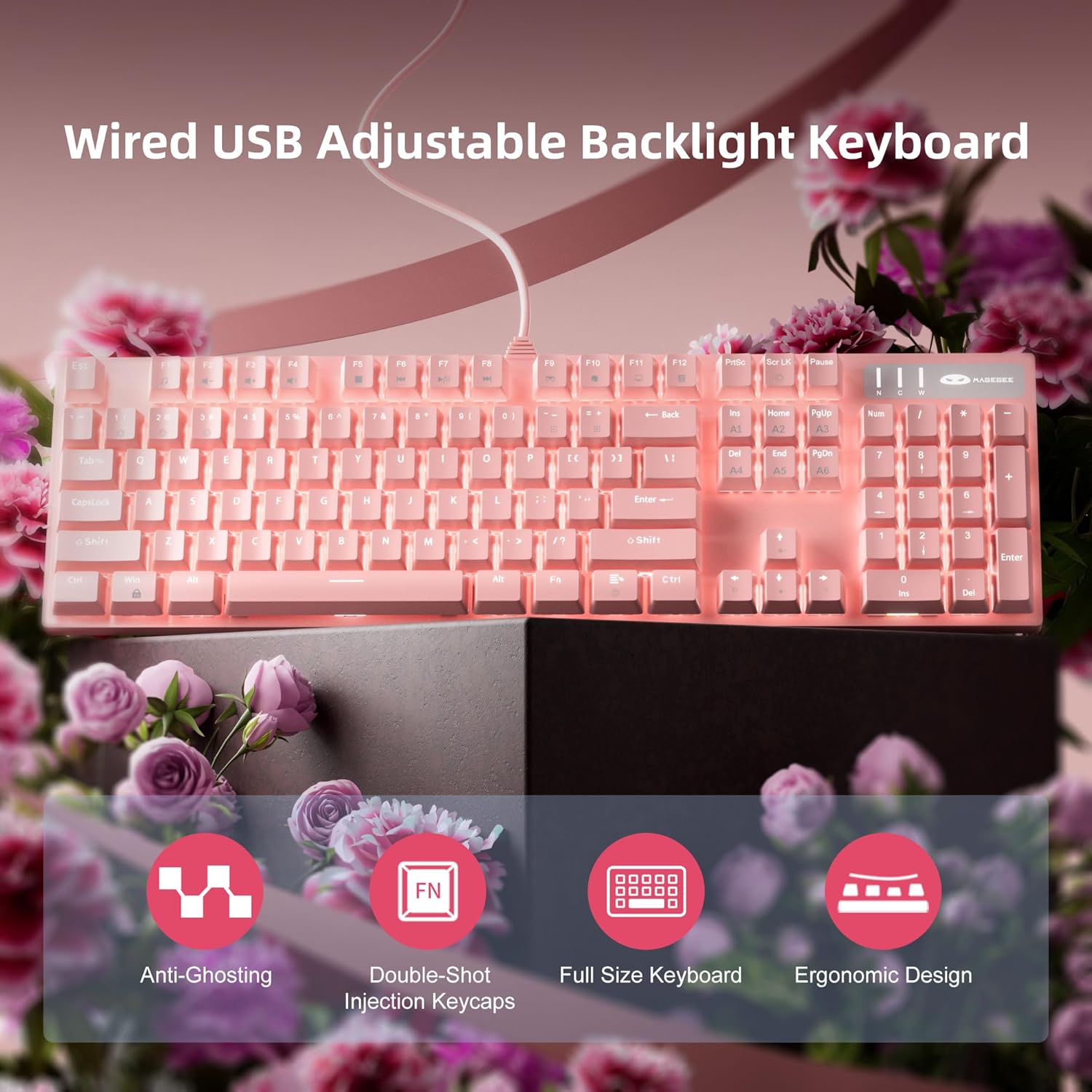
באַקלייט קאָנטראָל
The keyboard offers various backlight settings for customization:
- סטרויערן ברייטנאַס: דרוק FN + Up Arrow Key to increase backlight brightness. Press FN + Down Arrow Key to decrease backlight brightness.
- טוישן באַקלייט מאָדע: The keyboard has 18 different backlight modes. Refer to the keyboard's function key combinations (e.g., FN + F1-F12, or specific keys) to cycle through these modes. Detailed mode switching instructions may vary; experimentation is encouraged.

וישאַלט
Proper care will extend the life and maintain the performance of your keyboard.
- רייניקונג: Use a soft, dry cloth to wipe down the keyboard surface. For deeper cleaning, use compressed air to remove dust and debris from between the keycaps.
- קלאַוויאַטור אַראָפּנעמען: The double injection ABS keycaps are designed for durability. If you need to remove keycaps for cleaning or replacement, use a keycap puller to avoid damaging the switches. Gently pull straight up on the keycap.
- פליסיק ספּילז: While the keyboard is designed to be splash-proof, avoid direct exposure to large amounts of liquid. In case of a spill, immediately disconnect the keyboard from your computer and allow it to dry completely before reconnecting.

טראָובלעשאָאָטינג
אויב איר טרעפט פּראָבלעמען מיט אייער קלאַוויאַטור, פּרוּווט די פאלגענדע לייזונגען:
| פּראָבלעם | מעגלעך לייזונג |
|---|---|
| קלאַוויאַטור ניט ריספּאַנדינג |
|
| באַקלייט אַרבעט נישט אָדער איז טונקל |
|
| שליסלען רעגיסטרירן זיך נישט אדער טייפן נישט צוויי מאל |
|
ספּעסאַפאַקיישאַנז
| שטריך | דעטאַל |
|---|---|
| פּראָדוקט דימענשאַנז | 17 X 5 X 1.5 אינטשעס |
| פּונקט וואָג | 2.74 פונט |
| פאַבריקאַנט | MageGee |
| מאָדעל נומער | Storm Pink |
| קאַנעקטיוויטי טעכנאָלאָגיע | וסב |
| קלאַוויאַטור באַשרייַבונג | מעטשאַניקאַל |
| רעקאָממענדעד ניצט | גיימינג |
| ספּעציעלע שטריך | Lighting, Multimedia Keyboard |
| קאָליר | ראָזעווע |
| נומער פון קיז | 104 (Full Size) |
| שטיצע פֿאַר באַקלייטונג קאָליר | RGB (אַדזשאַסטאַבאַל) |
| סטייל | מאָדערן |
| ערשטער בנימצא טאָג | 17 אפריל 2020 |
וואָראַנטי און שטיצן
MageGee products are built with quality and durability in mind. For specific warranty information, please refer to the warranty card included with your product or visit the official MageGee website. If you require technical assistance or have questions not covered in this manual, please contact MageGee customer support through their official channels.
פֿאַר מער אינפֿאָרמאַציע און פּראָדוקט דערהייַנטיקונגען, באַזוכט די MageGee Store on Amazon.


