הקדמה
This manual provides detailed instructions for the MageGee K1 RGB Gaming Keyboard and Mouse combo. Please read this manual carefully before using the product to ensure proper setup and operation. This product is designed for use with personal computers and laptops, offering a full-size keyboard with RGB backlighting and a high-resolution gaming mouse.

Image: The MageGee K1 RGB Gaming Keyboard and Mouse set, featuring a pink keyboard with RGB backlighting and a matching pink mouse.
פּעקל אינהאַלט
זיכער מאַכן אַז אַלע זאכן זענען פאַראַן אין פּעקל:
- MageGee K1 RGB Gaming Keyboard
- MageGee K1 Gaming Mouse
- באַניצער מאַנואַל (דעם דאָקומענט)
סעטאַפּ
קאַנעקטינג די מיטל
- Locate an available USB 2.0 port on your computer or laptop.
- Plug the USB connector of the MageGee K1 Keyboard into the USB port.
- Plug the USB connector of the MageGee K1 Mouse into another available USB port.
- The keyboard and mouse are plug-and-play devices. Your operating system should automatically detect and install the necessary drivers. No additional software or drivers are typically required.
קאַמפּאַטאַבילאַטי
The MageGee K1 RGB Gaming Keyboard and Mouse are compatible with the following operating systems:
- Windows XP
- Windows Vista
- Windows 7
- Windows 8
- Windows 10
- מעק אַס
- לינוקס
Operating the Keyboard and Mouse
קלאַוויאַטור פֿעיִקייטן
The K1 keyboard features a full-size 104-key layout with ergonomic design for comfortable use. It includes a numeric keypad and function keys.

Image: Illustration of the ergonomic design of the MageGee K1 keyboard, showing the keycap profile פֿאַר באַקוועמען טייפּן.
RGB באַקלייט קאָנטראָל
The keyboard features RGB backlighting with multiple customization options:
- ליכט קאָלאָרס: 8 distinct colors.
- לייטינג מאָדעס: 5 different lighting effects.
- ברייטנאַס לעוועלס: Adjustable to suit your preference.
- גיכקייַט קאָנטראָל: Adjust the speed of dynamic lighting effects.
צו קאָנטראָלירן די באַקלייט:
- Refer to the keyboard's dedicated backlight control keys or FN key combinations for specific adjustments.
- The backlight can be turned on or off as needed.

Image: Diagram illustrating the RGB backlight features of the MageGee K1 keyboard, including 5 light modes, 8 light colors, adjustable speed/brightness, and light on/off functionality.
מולטימעדיאַ פאַנגקשאַנז
The keyboard includes multimedia shortcut keys accessible via the FN שליסל:
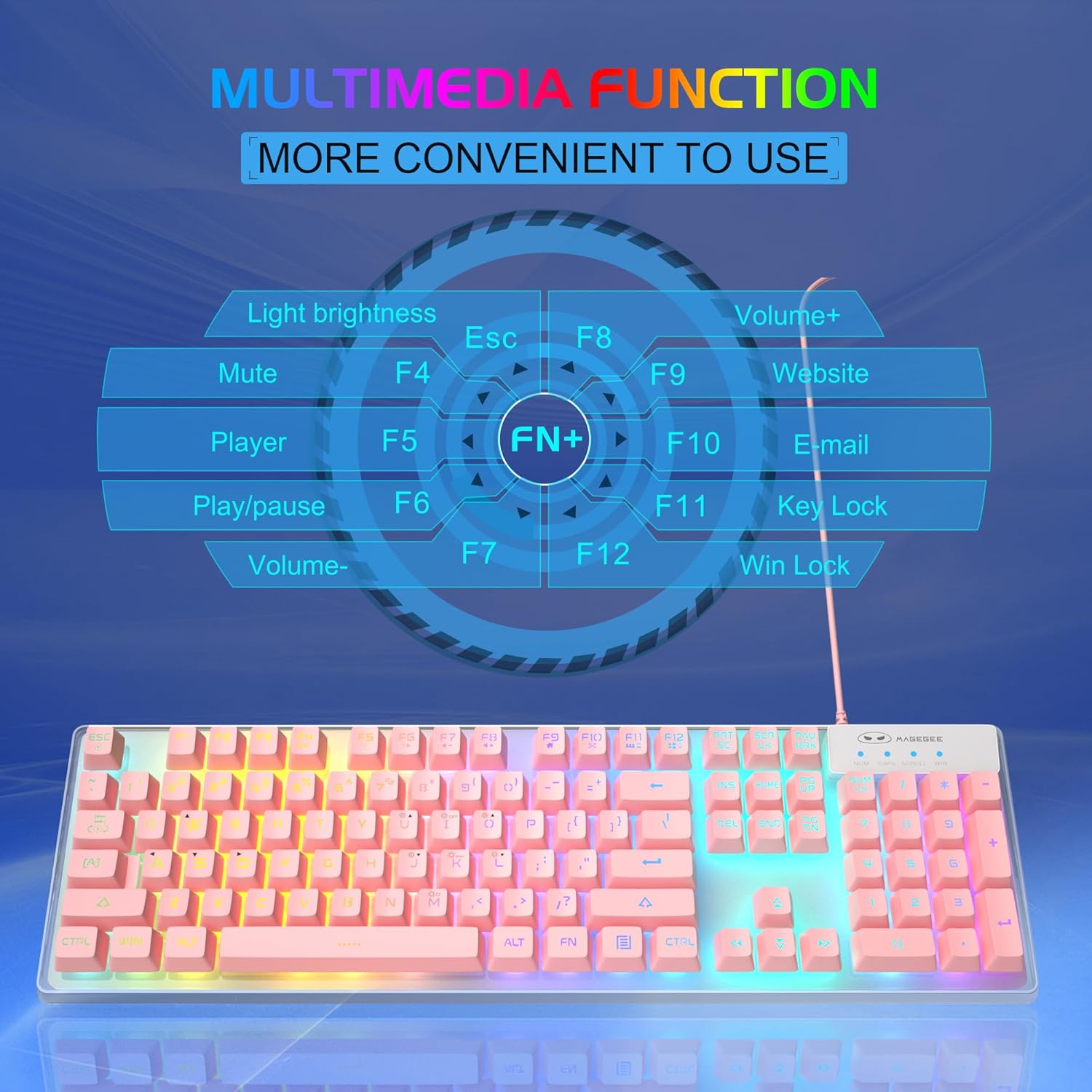
Image: A visual guide to the multimedia functions of the MageGee K1 keyboard, showing FN key combinations for mute, volume control, media playback, website, email, and key lock.
- FN+F1: שטום
- FN+F2: באַנד אַראָפּ
- FN+F3: באַנד אַרויף
- FN+F4: שפּילער
- FN+F5: שפּיל / פּויזע
- FN+F6: פֿריִערדיקע שפּירט
- FN+F7: ווייַטער שפּור
- FN+F8: האַלטן
- FN+F9: בליצפּאָסט
- FN+F10: Web בלעטערער
- FN+F11: שליסל לאַק
- FN+F12: Win Lock (disables Windows key)
מויז פֿעיִקייטן
The K1 mouse offers high resolution and responsive tracking for gaming and general computing.
דפּי אַדזשאַסטמאַנט
The mouse features 6 adjustable DPI (Dots Per Inch) levels to match your precision and speed requirements:
- דפּי לעוועלס: 600 / 800 / 1200 / 1600 / 2400 / 3200
To change DPI, press the dedicated DPI button on the mouse. Each press cycles through the available DPI settings.

Image: Diagram showing the MageGee K1 mouse with its 6 DPI levels (600-3200) and instructions for changing and locking the 7-color LED backlight.
LED Backlight Control (Mouse)
The mouse features a 7-color LED backlight with a breathing effect. To lock the mouse LED backlight to a specific color:
- While the mouse cycles through colors, press the זייַט קנעפּל (forward button) and the מיטן קנעפּל (scroll wheel click) simultaneously. This will lock the current color.

Image: Display of the MageGee K1 mouse showing its 7-color cycled breathing LED lights in green, yellow, purple, cyan, red, and white.
וישאַלט
רייניקונג
To maintain the performance and appearance of your MageGee K1 keyboard and mouse:
- אָפּשטעקן די דעוויסעס פֿון אייער קאָמפּיוטער איידער איר רייניגט זיי.
- ניצן אַ ווייך, לינט-פֿרייַ שטאָף אַ ביסל דampמיט וואַסער אָדער אַ מילד רייניקונג לייזונג.
- Avoid using harsh chemicals, abrasive cleaners, or solvents, as these can damage the surface and keycap legends.
- פֿאַר דער קלאַוויאַטור, קענט איר נוצן קאָמפּרעסירטע לופט צו באַזייַטיקן שטויב און שמוץ פון צווישן די קנעפּלעך.
- For the mouse, gently wipe the surface and the optical sensor area.
אַלגעמיינע קער
- פֿאַרמײַדן אויסצושטעלן די דעווײַסעס צו עקסטרעמע טעמפּעראַטורן, דירעקטע זונשײַן, אָדער הויכע פֿײַכטקייט.
- לאָזט נישט אַראָפּפֿאַלן און שטעלט נישט די דעווייסעס אויס צו שטאַרקע קלאַפּן.
- Keep liquids away from the keyboard and mouse. While the keyboard has some water-resistant features, it is not fully waterproof.
טראָובלעשאָאָטינג
If you encounter issues with your MageGee K1 keyboard and mouse, refer to the following common solutions:
| פּראָבלעם | מעגלעך לייזונג |
|---|---|
| קלאַוויאַטור/מויז רעאַגירט נישט |
|
| Backlight not working (Keyboard) |
|
| פּראָבלעמען מיט מאַוס טראַקינג |
|
| מולטימעדיאַ שליסלען נישט ארבעטן |
|
ספּעסאַפאַקיישאַנז
Below are the technical specifications for the MageGee K1 RGB Gaming Keyboard and Mouse:

Image: Detailed dimensions of the MageGee K1 keyboard (438mm x 137mm x 35mm) and mouse (123mm x 63mm x 39mm).
| שטריך | דעטאַל |
|---|---|
| סאָרט | MageGee |
| מאָדעל נומער | K1 |
| קאָליר | K1 Pink |
| קאַנעקטיוויטי טעכנאָלאָגיע | Wired USB 2.0 (Gold-plated interface, Anti-interference magnetic ring) |
| קלאַוויאַטור אויסלייג | Full-size 104 keys |
| קלאַוויאַטור באַקלייט | RGB (8 colors, 5 modes, adjustable brightness/speed) |
| טיפּ פון שליסל | Double-shot injection molded, Membrane style |
| Special Keyboard Features | Ergonomic, Backlit, Shortcut and Multimedia keys, Anti-ghosting (19 keys) |
| Mouse Sensor Technology | אָפּטיש |
| מויז DPI לעוועלס | 600/800/1200/1600/2400/3200 |
| מויז באַקלייט | 7-color cycled breathing LED |
| קאַמפּאַטאַבאַל אַפּערייטינג סיסטעמס | Windows XP/Vista/7/8/10, Mac, Linux |
| מאַטעריאַל | אַבס אינזשעניריע פּלאַסטיק |
| מאַכט מקור | USB געטריבן (קיין באַטעריעס נישט נויטיק) |
וואָראַנטי און שטיצן
Information regarding specific warranty terms and customer support contact details for the MageGee K1 RGB Gaming Keyboard and Mouse is not available in this document. Please refer to the product packaging or the official MageGee webזייטל פֿאַר וואָראַנטי אינפֿאָרמאַציע און קונה סערוויס קאָנטאַקטן.


