1. הקדמה
This user manual provides comprehensive instructions for the setup, operation, and maintenance of your INSIGNIA NS-24DF311SE21 24-inch Smart HD TV - Fire TV Edition. Please read this manual thoroughly before using your television to ensure proper functionality and safety.
2. וואָס איז אין דער קעסטל
באַשטעטיקן אַז אַלע זאכן זענען פאַראַן אין דער פּאַקאַדזשינג:
- INSIGNIA NS-24DF311SE21 24-inch Smart HD TV
- Voice Remote with Alexa (includes 2 AAA batteries)
- טעלעוויזיע שטאַנד (2 שטיק)
- מאַכט שנור
- שנעל סעטאַפּ גייד (דעם דאָקומענט)
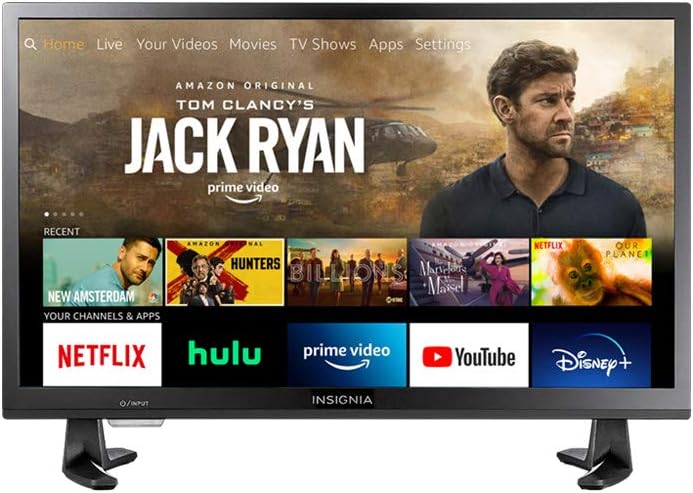
Figure 2.1: INSIGNIA NS-24DF311SE21 Smart HD TV with Fire TV interface.
3. סעטאַפּ
3.1 אנשטעלן דעם טעלעוויזיע שטאנד
- לייגט פֿאָרזיכטיק דעם טעלעוויזאָר מיטן פּנים אַראָפּ אויף אַ ווייכער, ריינער ייבערפֿלאַך כּדי צו פֿאַרמייַדן שאָדן צום עקראַן.
- Align the stand pieces with the screw holes on the bottom of the TV.
- Secure the stand pieces using the provided screws. Ensure they are tightened firmly.

Figure 3.1: TV with stand attached.
3.2 קאַנעקטינג מאַכט
Plug the power cord into the TV's power input, then plug the other end into a wall outlet.
3.3 ערשט סעטאַפּ
- צינדט אָן דעם טעלעוויזיע מיטן מאַכט קנעפּל אויף דער ווײַטקאָנטראָל.
- פֿאָלגט די אינסטרוקציעס אויף דעם עקראַן צו אויסקלײַבן אײַער שפּראַך, פֿאַרבינדט זיך צו אַ Wi-Fi נעץ, און לאָגט זיך אײַן אין אײַער Amazon חשבון.
- The TV will guide you through pairing the Voice Remote with Alexa.
4. אַפּערייטינג ינסטרוקטיאָנס
4.1 Using the Voice Remote with Alexa
The included Voice Remote with Alexa allows for intuitive control of your TV. Press and hold the microphone button to issue voice commands for searching content, launching apps, controlling smart home devices, and more.
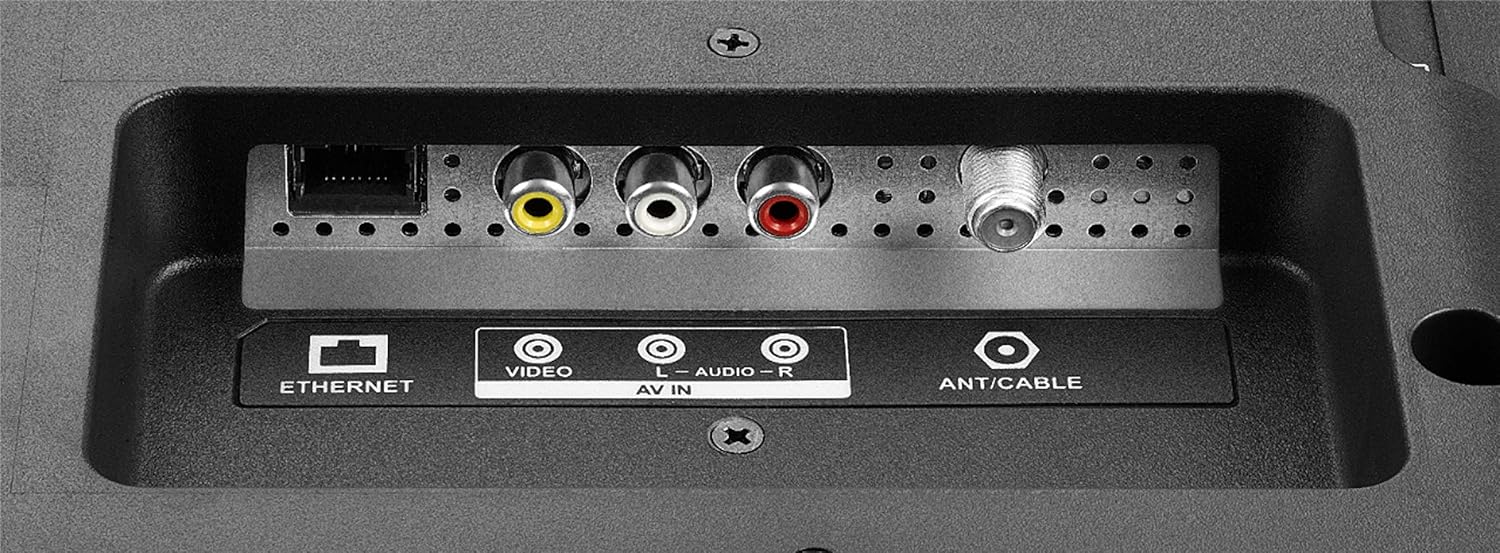
Figure 4.1: Voice Remote with Alexa.
4.2 נאַוויגירן דעם פייער טיווי צובינד
The Fire TV interface provides a unified home screen for live TV and streaming channels. Use the navigation buttons on your remote to browse content, access apps, and adjust settings.
- היים: Returns to the main Fire TV home screen.
- אַפּפּס: Access your installed applications.
- סעטטינגס: Configure TV and Fire TV settings.
- דעדאַקייטאַד קנעפּלעך: Quick access to popular streaming services like Netflix and Amazon Prime Video.

Figure 4.2: Fire TV interface and remote in use.
5. שליסל פֿעיִקייטן
- שטימע ווײַטקאָנטראָל מיט אַלעקסאַ: Control your TV, launch apps, search for titles, play music, switch inputs, and manage smart home devices using voice commands.
- אינטעגרירטע פייער טעלעוויזיע דערפאַרונג: Access over 500,000 streaming movies and TV episodes from tens of thousands of channels and apps.
- Unified Home Screen: Seamlessly integrates live over-the-air TV and streaming channels.
- סמאַרט טעלעוויזיע פאַנגקשאַנאַליטי: Built-in Wi-Fi and integrated apps for streaming content.
- HD האַכלאָטע: Provides clear picture quality for an enhanced viewינג דערפאַרונג.
- Multiple HDMI Connections: Facilitates easy connection of external devices.
6. קאַנעקשאַנז
Your INSIGNIA TV offers various ports for connecting external devices.
6.1 זייט פּאַנעל קאַנעקשאַנז
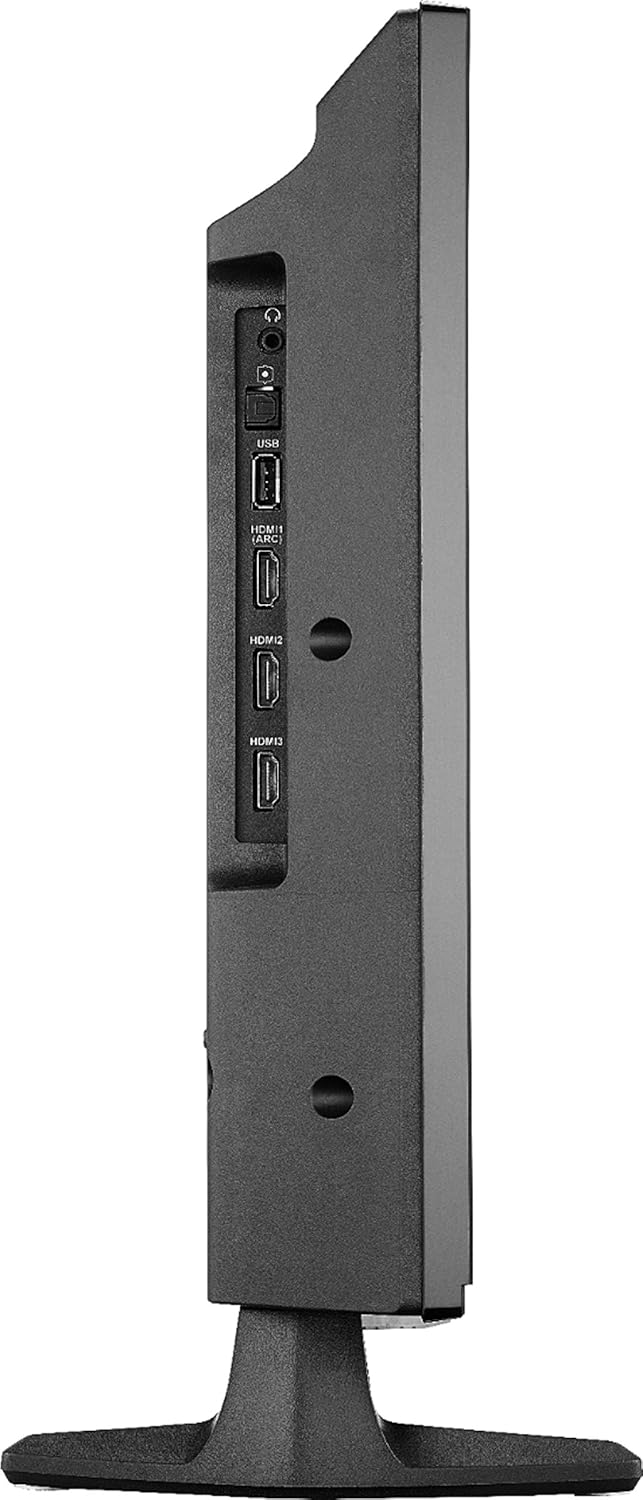
Figure 6.1: Side panel connections.
- וסב: פֿאַרבינדט USB סטאָרידזש דעוויסעס פֿאַר מעדיע ווידערשפּיל.
- הדמי (קרייַזבויגן): Connect HDMI devices. Audio Return Channel (ARC) allows audio to be sent back to a compatible audio system.
- HDMI 2, HDMI 3: Connect additional HDMI devices such as gaming consoles, Blu-ray players, or cable boxes.
- DIGITAL OPTICAL OUTPUT: פֿאַר פֿאַרבינדן צו אַ דיגיטאַל אַודיאָ ריסיווער אָדער סאַונדבאַר.
- 3.5 מם כעדפאָון דזשאַק: פֿאַר קאַנעקטינג כעדפאָונז.
6.2 דערציען פּאַנעל קאַנעקשאַנז
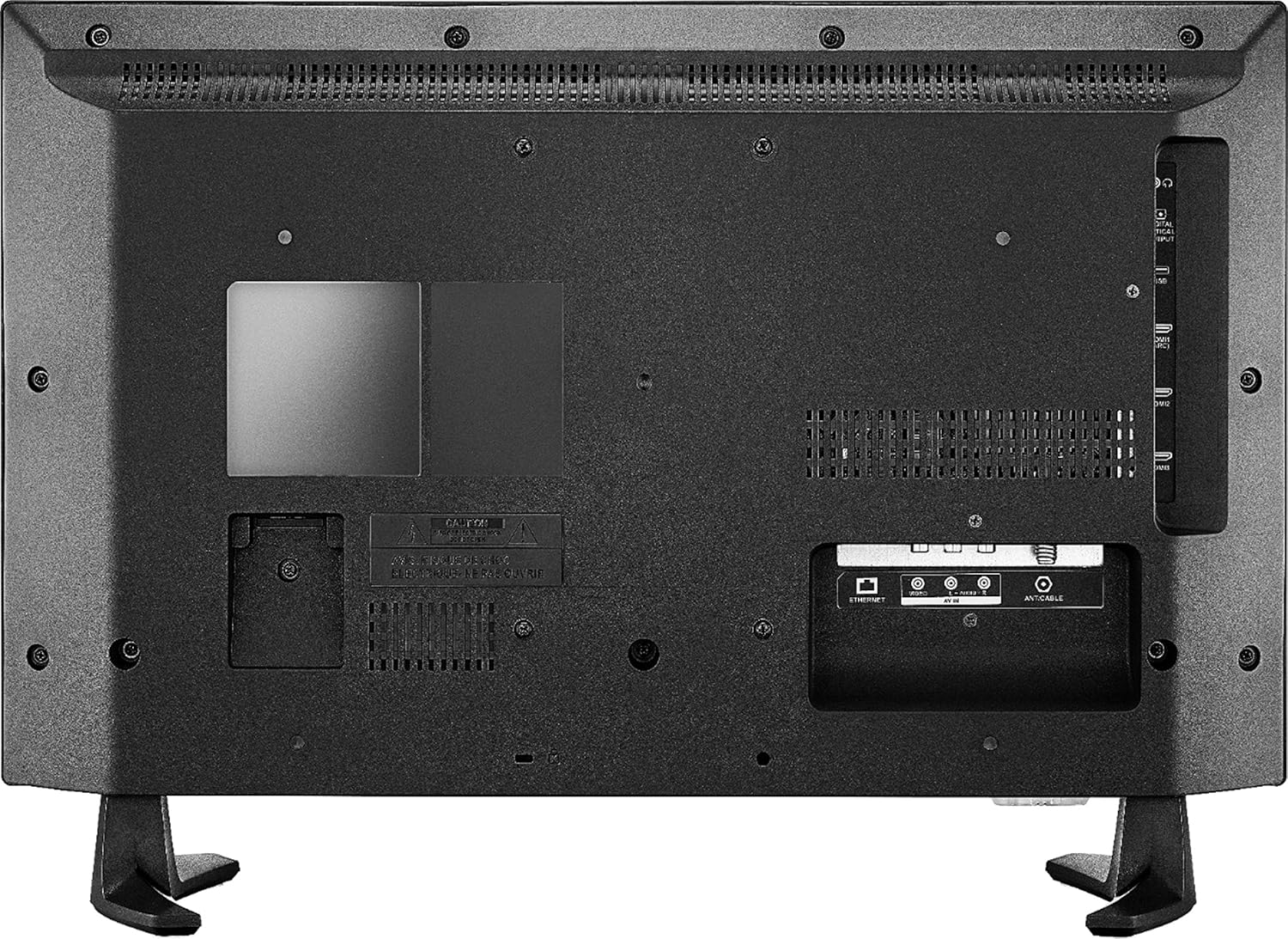
פיגור 6.2: הינטערשטע פּאַנעל קאַנעקשאַנז.
- עטערנעט: פֿאַר אַ דראָטיקער אינטערנעט פֿאַרבינדונג.
- AV IN (Video, L-Audio, R-Audio): פֿאַרבינדט עלטערע דעווייסעס ניצנדיק קאָמפּאָזיט ווידעאָ און סטערעאָ אַודיאָ קייבלס.
- אַנט / קאַבלע: פֿאַרבינדט אַן אַנטענע פֿאַר איבער-די-לופֿט בראָדקאַסץ אָדער אַ קאַבל טעלעוויזיע פֿאַרבינדונג.
7. ספּעסאַפאַקיישאַנז
| שטריך | דעטאַל |
|---|---|
| סאָרט | ינסיגניאַ |
| מאָדעל נומער | נס -24 דפ 311 סע 21 |
| פאַרשטעלן גרייס | 23.6 אינטשעס (24-אינטש קלאַס) |
| ווייַז טעכנאָלאָגיע | געפירט |
| האַכלאָטע | הד (720 פּ) |
| דערפרישן קורס | 60 הז |
| אַספּעקט פאַרהעלטעניש | 16:9 |
| קאַנעקטיוויטי טעכנאָלאָגיע | HDMI, Wi-Fi, עטערנעט |
| פּראָדוקט דימענשאַנז (ד רענטגענ וו רענטגענ ה) | 7.1"ד רענטגענ 21.7"וו רענטגענ 14.4"ה |
| פּונקט וואָג | 6.4 פונט |
| רעדנער טיפּ | געבויט-אין |
| ספּעציעלע שטריך | Flat Screen, Fire TV Edition |
| באַטעריז | 2 AAA באַטעריעס (אַרייַנגערעכנט פֿאַר ווייַטקאָנטראָל) |
| קאָליר | שוואַרץ |
| VESA בארג קאַמפּאַטאַבילאַטי | 100 x 100mm (Note: May use 2 mounting points, refer to mounting instructions for details) |
8. טראָובלעשאָאָטינג
אויב איר טרעפט פּראָבלעמען מיט אייער טעלעוויזיע, באַזירט זיך אויף די פאלגענדע געוויינטלעכע לייזונגען:
- קיין מאַכט: זיכער מאַכן אַז די עלעקטרישע קאַבל איז זיכער פארבונדן צו ביידע די טעלעוויזיע און אַ אַרבעטנדיק עלעקטריש אַוטלעט. פּרוּווט אַן אַנדער אַוטלעט.
- קיין בילד/קלאַנג:
- Verify the correct input source is selected (e.g., HDMI 1, Antenna).
- Check all cable connections (HDMI, AV, etc.) are secure.
- זייט זיכער אז די קול איז נישט שטיל אדער געשטעלט אויף מינימום.
- ווייַט ניט ריספּאַנדינג:
- פאַרבייַטן די באַטעריז אין די ווייַט קאָנטראָל.
- זיכער מאַכן אַז עס זענען נישטאָ קיין שטערונגען צווישן דעם ווײַטקאָנטראָל און דעם טעלעוויזיע.
- Re-pair the remote if necessary (follow on-screen instructions during initial setup or in TV settings).
- נעץ פֿאַרבינדונג פּראָבלעמען:
- ריסטאַרט דיין Wi-Fi ראַוטער און מאָדעם.
- Check TV network settings to ensure it's connected to the correct network.
- אויב איר ניצט אַ דראָטיקע פֿאַרבינדונג, זאָרגט אַז דער עטהערנעט קאַבל איז ריכטיק פֿאַרבונדן.
- בילד קוואַליטעט פּראָבלעמען:
- אַדזשאַסטירן בילד סעטטינגס (ברייטקייט, קאָנטראַסט, קאָליר) אין די טעלעוויזיע מעניו.
- Ensure the input source is providing a high-quality signal.
פֿאַר ווייטערדיקע הילף, באַראַט זיך מיט די אָנליין שטיצע רעסורסן אָדער קאָנטאַקט קונה סערוויס.
9. וישאַלט
- רייניקונג די פאַרשטעלן: ווישט אָפּ דעם עקראַן מיט אַ ווייכן, לינט-פֿרײַעם שטאָף. פֿאַר שווערע פֿלעקן, ווישט לײַכט.ampווישט דעם שטאָף מיט וואַסער אָדער אַ ספּעציעל געמאַכטע לייזונג פֿאַר עלעקטראָניק. שפּריצט נישט קיין פליסיקייט גלייך אויפן עקראַן.
- רייניקונג די קאַבינעט: ניצט אַ ווייכע, טרוקענע שטאָף צו ווישן דעם טעלעוויזיע קאַבינעט. פֿאַרמייַדט ניצן אַברייסיוו רייניגער אָדער סאָלווענטן.
- ווענטילאַטיאָן: זיכערט זיך אז די ווענטילאציע עפענונגען אויפן טעלעוויזאר זענען נישט פארשטאפט צו פארמיידן איבערהיצונג.
- מאַכט שנור: Regularly check the power cord for any damage. If damaged, discontinue use and replace it with an authorized replacement.
10. זיכערקייַט אינפֿאָרמאַציע
Please read and follow all safety instructions to prevent injury or damage to your TV.
- דו זאלסט נישט ויסשטעלן די טעלעוויזיע צו רעגן אָדער נעץ.
- Do not open the TV cabinet; there are no user-serviceable parts inside. Refer all servicing to qualified personnel.
- ענשור געהעריק ווענטאַליישאַן אַרום די טעלעוויזיע.
- פֿאַרמײַדט צו שטעלן דעם טעלעוויזאָר אין דירעקטער זון אָדער לעבן היץ־קוואַלן.
- שטעלט נישט קיין שווערע זאכן אויף דער טעלעוויזיע.
- Keep the TV away from sources of strong magnetic fields.
- This item arrives in packaging that reveals what’s inside and can’t be hidden.
11. לעגאַל אָפּלייקענונג
Web-based services and content require high-speed Internet service. Some services may require a subscription.
12. וואָראַנטי און שטיצן
For warranty information and technical support, please refer to the documentation included with your purchase or visit the official INSIGNIA website. You can also find support resources on the Amazon product page for this model.
אָנליין רעסורסן: