1. הקדמה
Thank you for choosing the havit KB488L USB Wired Keyboard. This manual provides essential information for setting up, operating, and maintaining your keyboard. Please read it carefully to ensure optimal performance and longevity of your device.
The havit KB488L is designed for both office and gaming use, featuring a quiet typing experience, ergonomic wrist rest, and vibrant rainbow LED backlighting. It offers a 105-key UK layout for comfortable and efficient input.

Image 1.1: The havit KB488L keyboard, highlighting its quiet operation and integrated wrist rest.
2. פּראָדוקט פֿעיִקייטן
- שטיל אָפּעראַציע: Designed for smooth and silent typing, suitable for office and home environments.
- ערגאָנאָמיק פּלאַן: Features a 15° tilt capability and an integrated wrist rest to reduce fatigue during extended use.
- רעגנבויגן געפירט באַקלייט: Enhances visibility in low-light conditions and provides an aesthetic appeal. The backlight can be toggled on/off.
- 12 מולטימעדיאַ קורץ-וועג שליסלען: Provides quick access to common functions for entertainment and productivity.
- דוראַבאַל קאַנסטראַקשאַן: Keys tested for 5 million clicks, ensuring long-term reliability.
- ווייערד קאַנעקטיוויטי: Reliable USB connection for consistent performance.
- ברייט קאַמפּאַטאַבילאַטי: Supports Windows 2000/XP/Vista/7/8/10, Mac, and Linux operating systems. (Note: Multimedia keys function only on Windows).

Image 2.1: The integrated wrist rest of the havit KB488L keyboard, designed for ergonomic comfort.
3. פּעקל אינהאַלט
- havit KB488L USB Wired Keyboard with integrated wrist rest
- באַניצער מאַנואַל (דעם דאָקומענט)
4. סעטאַפּ אינסטרוקציעס
- ופשליסן די קלאַוויאַטור: נעמט פֿאָרזיכטיק אַרויס די קלאַוויאַטור פֿון איר פּאַקעט.
- פאַרבינדן צו קאָמפּיוטער: Plug the USB connector of the keyboard into an available USB port on your computer (desktop PC or laptop).
- דרייווער ינסטאַלירונג: The keyboard is plug-and-play. Your operating system will automatically detect and install the necessary drivers. No additional software installation is required.
- אַדזשאַסטירן טילט (אפציאנאל): Flip out the adjustable feet on the underside of the keyboard to set your preferred typing angle.

Image 4.1: The havit KB488L keyboard set up and connected to a computer.
5. אַפּערייטינג ינסטרוקטיאָנס
5.1 גרונטלעכע קלאַוויאַטור פונקציעס
The havit KB488L functions as a standard 105-key UK layout keyboard. All standard alphanumeric keys, function keys (F1-F12), navigation keys, and numeric keypad operate as expected.
5.2 מולטימעדיאַ קורץ-קנעפּלעך
The keyboard features 12 multimedia shortcut keys accessible by pressing the Fn שליסל אין קאָמבינאַציע מיט די קאָרעספּאָנדירנדיקע פקסנומקס-פקסנומקס keys. These shortcuts are designed to enhance productivity and entertainment. Note: Multimedia keys are ONLY functional on Windows operating systems.
| שליסל קאָמבינאַציע | פֿונקציע |
|---|---|
| Fn + F1 | מוזיק שפּילער |
| Fn + F2 | באַנד אַראָפּ |
| Fn + F3 | באַנד אַרויף |
| Fn + F4 | שטום |
| Fn + F5 | פרייַערדיק ליד |
| Fn + F6 | ווייַטער ליד |
| Fn + F7 | שפּיל / פּויזע |
| Fn + F8 | האַלטן |
| Fn + F9 | Web/היים |
| Fn + F10 | בליצפּאָסט |
| Fn + F11 | מיין קאָמפּיוטער |
| Fn + F12 | פאַוואָריטעס |
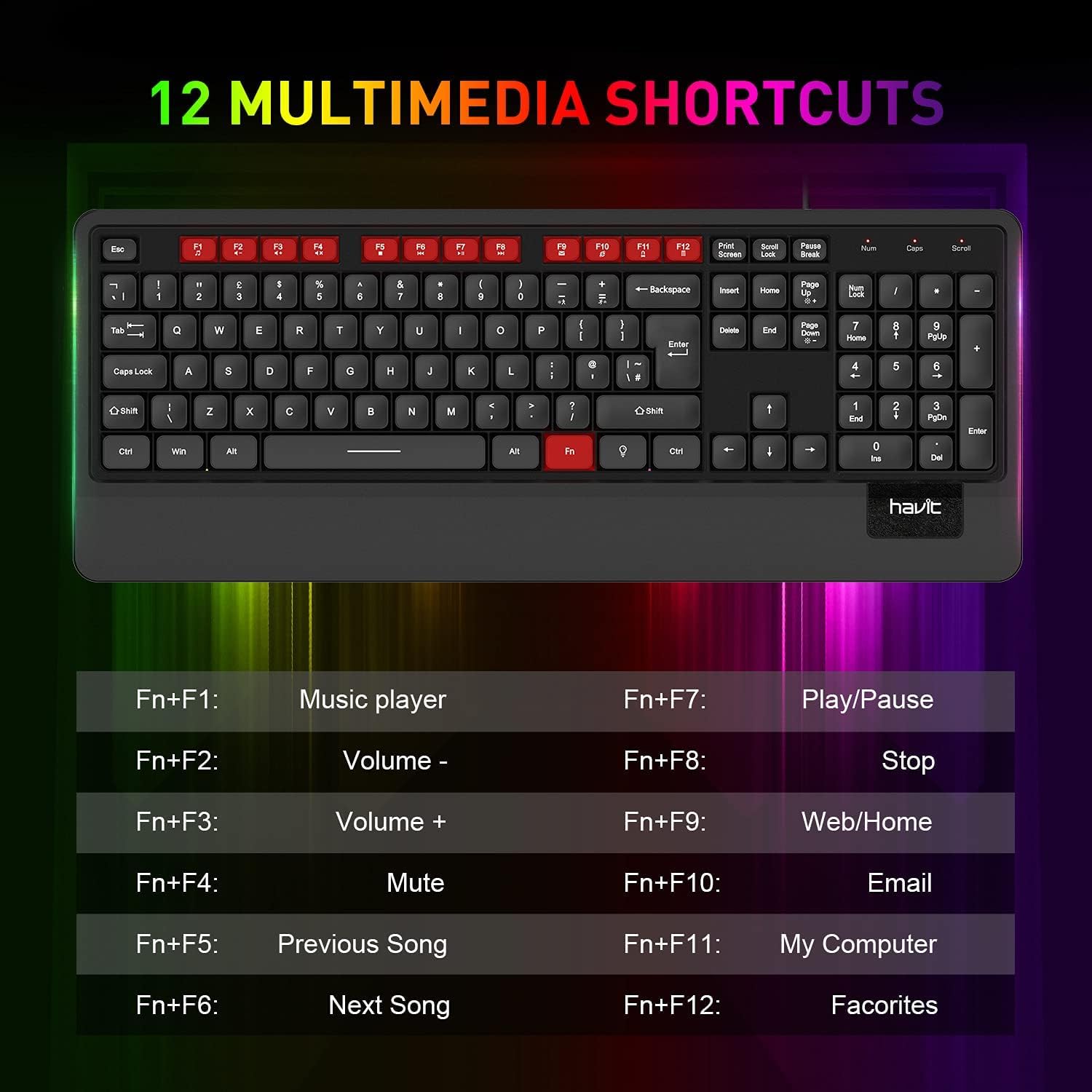
בילד 5.1: איבערview of the 12 multimedia shortcut keys and their functions.
5.3 באַקלייט קאָנטראָל
The keyboard features a rainbow LED backlight. To control the backlight:
- קער אויף / אַוועק: דרוק די מעגילע לאַק key to toggle the backlight on or off.

Image 5.2: The havit KB488L keyboard with its rainbow LED backlight active, illustrating key visibility in low light.
6. וישאַלט
To ensure the longevity and proper functioning of your havit KB488L keyboard, follow these maintenance guidelines:
- רייניקונג: ניצט אַ ווייכע, טרוקענע שטאָף צו ווישן די ייבערפלאַך פון דער קלאַוויאַטור. פֿאַר שווערע שמוץ, אַ ביסל טרוקןamp cloth can be used, ensuring no liquid enters the keycaps or internal components. Avoid harsh chemicals or abrasive cleaners.
- באַזייַטיקונג פון שטויב: ניצט קאמפרעסט לופט צו באזייטיגן שטויב און שמוץ פון צווישן די קנעפלעך.
- ויסמיידן ספּילז: Keep liquids away from the keyboard to prevent damage. In case of a spill, immediately disconnect the keyboard from your computer and allow it to dry completely before reconnecting.
- סטאָרידזש: ווען נישט אין באַנוץ פֿאַר לענגערע פּעריאָדן, זאָל מען האַלטן די קלאַוויאַטור אין אַ ריינער, טרוקענער סביבה, אַוועק פֿון דירעקטער זון און עקסטרעמע טעמפּעראַטורן.
7. טראָובלעשאָאָטינג
If you encounter issues with your havit KB488L keyboard, please refer to the following common solutions:
- קלאַוויאַטור ניט ריספּאַנדינג:
- זייט זיכער אַז דער USB קאַבל איז זיכער אַרייַנגעשטעקט אין אַ אַרבעטנדיקן USB פּאָרט אויף אייער קאָמפּיוטער.
- פרובירט אריינצושטעקן די קלאַוויאַטור אין אַן אַנדער USB פּאָרט.
- ריסטאַרט דיין קאָמפּיוטער.
- פּרובירט די קלאַוויאַטור אויף אַן אַנדער קאָמפּיוטער צו באַשטימען צי די פּראָבלעם איז מיטן קלאַוויאַטור אָדער מיטן קאָמפּיוטער.
- באַקלייט ניט ארבעטן:
- דרוק די מעגילע לאַק key to ensure the backlight is toggled on.
- זייט זיכער אז די קלאַוויאַטור איז ריכטיק פארבונדן און באַקומט מאַכט.
- מולטימעדיאַ קנעפּלעך אַרבעטן נישט:
- Remember that multimedia keys only work on Windows operating systems.
- זייט זיכער אז איר דריקט די Fn key simultaneously with the desired function key (F1-F12).
- Keys Sticking or Not Registering:
- Clean the affected keys using compressed air to remove any debris.
- פֿאַרמײַדט איבערגעטריבענע קראַפט בײַם טײַפּן.
If these steps do not resolve your issue, please contact havit customer support for further assistance.
8. ספּעסאַפאַקיישאַנז
| שטריך | דעטאַל |
|---|---|
| מאָדעל נומער | KB488L |
| קאַנעקטיוויטי | ווייערד וסב |
| שליסל אויסלייג | 105 Keys, UK Layout |
| באַקלייט | רעגנבויגן געפירט |
| ספּעציעלע פֿעיִקייטן | Backlit, Ergonomic, Integrated Wrist Rest |
| קאַמפּאַטאַבאַל דעוויסעס | לאַפּטאַפּ, פּיסי |
| אַפּערייטינג סיסטעם קאַמפּאַטאַבילאַטי | Windows 2000/XP/Vista/7/8/10, Mac, Linux |
| פּראָדוקט דימענשאַנז | 1.08 X 17.52 X 6.89 אינטשעס (27.5 X 445 X 175 מם) |
| פּונקט וואָג | 1.63 פונט (0.74 קג) |
| פאַבריקאַנט | האַוויט |

Image 8.1: Detailed dimensions of the havit KB488L keyboard.
9. וואָראַנטי און שטיצן
havit products come with a standard manufacturer's warranty. For specific warranty details, terms, and conditions, please refer to the warranty card included with your purchase or visit the official havit webפּלאַץ.
For technical support, troubleshooting assistance, or any inquiries regarding your havit KB488L keyboard, please contact havit customer service through their official webזייטל אדער די קאָנטאַקט אינפֿאָרמאַציע וואָס איז צוגעשטעלט אין אייער פּראָדוקט פּאַקאַדזשינג.