1. הקדמה
Thank you for choosing the HBN Digital Programmable Timer Socket. This device is designed to automate the switching of electrical appliances, helping you save energy and enhance convenience. It features an LCD display, 8 configurable ON/OFF programs, and a random function for security. Please read this manual carefully before use to ensure proper operation and safety.
2. זיכערקייַט אינסטרוקציעס
- This timer socket is designed for indoor use only. Do not expose it to moisture, water, or extreme temperatures.
- Ensure the connected appliance's power consumption does not exceed the timer's maximum load capacity (16A / 3680W). Overloading can cause damage or fire.
- Do not disassemble or attempt to repair the device. Refer all servicing to qualified personnel.
- האַלטן אויס פון דערגרייכן פון קינדער.
- Always insert the plug fully into the socket.
- Unplug the timer from the wall socket before cleaning. Clean only with a dry, soft cloth.
3. פּראָדוקט איבערview
Familiarize yourself with the components of your HBN Digital Programmable Timer Socket.

פיגורע 3.1: פראָנט view of the timer socket, showing the LCD display, control buttons, and power outlet.

פיגורע 3.2: צוריק view of the timer socket, displaying the model number BND-50/SG3-VC and electrical ratings.
קאָנטראָל קנעפּלעך:

פיגורע 3.3: דעטאַילעד view of the control buttons and LCD display.
- זייגער: Used to set the current time and exit programming mode.
- פּראָג: Enters and cycles through the 8 ON/OFF programming settings.
- R (Random): Activates or deactivates the random switching function.
- באַשטעטיק: רייסט אויס אַלע סעטטינגס און שטעלט צוריק דעם טייַמער צו די פאַבריק דיפאָלץ.
- וואָך: Selects the day(s) of the week for time and program settings.
- שעה: Adjusts the hour for time and program settings.
- MIN: Adjusts the minute for time and program settings.
- ON/AUTO/OFF: Manually switches the timer to ON, AUTO (programmed mode), or OFF.
LCD ווייַז:
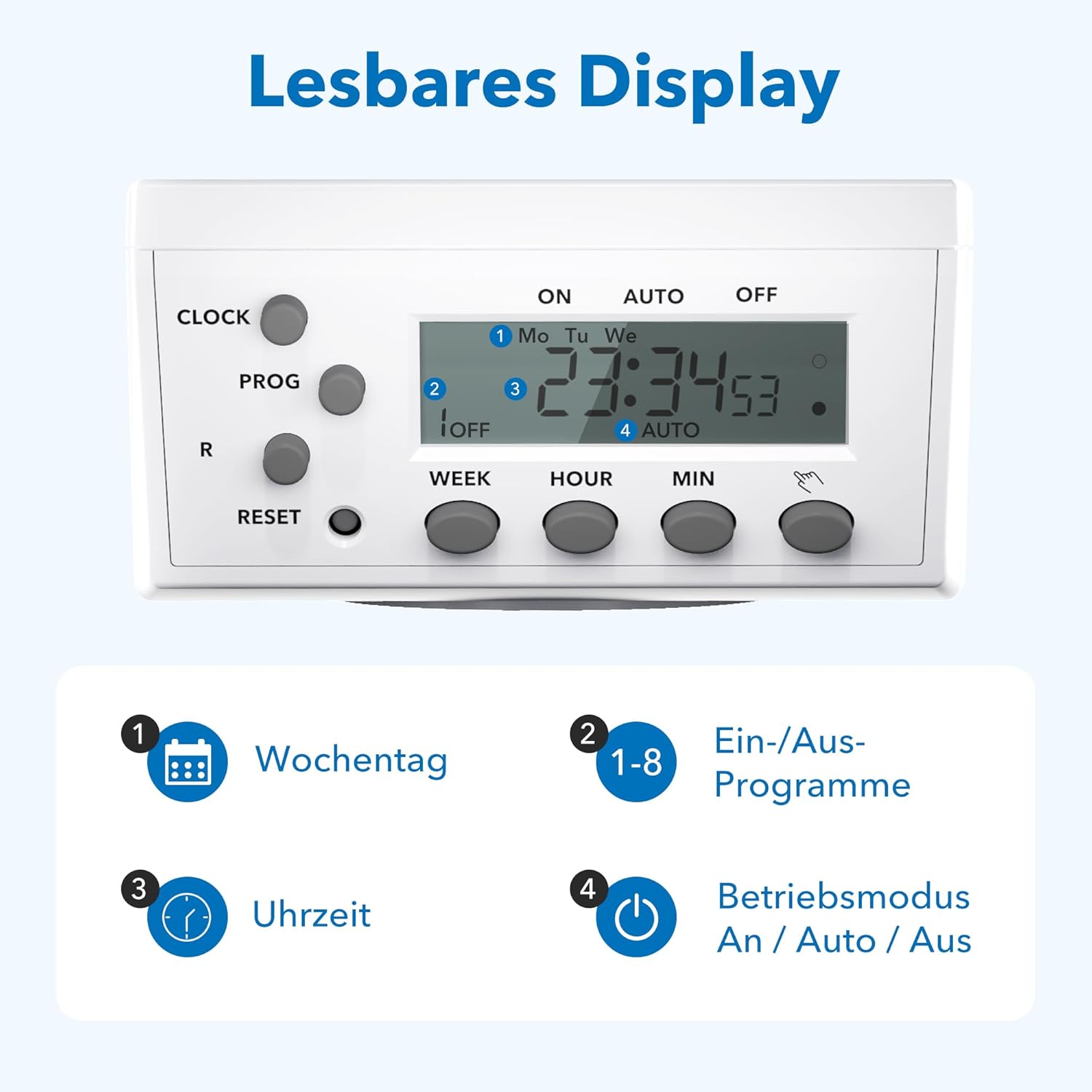
Figure 3.4: The LCD display shows current time, day, program status, and operating mode.
The LCD display provides clear information on the current time, day of the week, active program number, and the current operating mode (ON, AUTO, OFF).
4. סעטאַפּ
4.1 Initial Charging and Reset
- Plug the timer socket into a live wall outlet for at least 15-30 minutes to charge its internal battery. This battery retains settings during power outages.
- After charging, use a pointed object (like a pen tip) to press the באַשטעטיק button. This clears all previous settings and ensures a fresh start. The display will show '0:00'.
4.2 שטעלן די איצטיקע צייט
- דריקן און האַלטן די זייגער קנעפּל.
- בשעת האלטן זייגער, דריקן די וואָך button repeatedly to select the current day of the week (Mo, Tu, We, Th, Fr, Sa, Su).
- בשעת האלטן זייגער, דריקן די שעה קנעפּל עטלעכע מאָל צו שטעלן די איצטיקע שעה.
- בשעת האלטן זייגער, דריקן די MIN קנעפּל איבער און איבער צו שטעלן די איצטיקע מינוט.
- מעלדונג די זייגער button. The current time is now set.
5. אַפּערייטינג ינסטרוקטיאָנס
5.1 פּראָגראַמירן אויף/אויס צייטן
The timer allows for up to 8 distinct ON/OFF programs. Each program consists of an ON time and an OFF time.
- דרוק די PROG button once. The display will show '1 ON'.
- דרוק וואָך to select the desired day(s) for this program. Options include individual days, weekdays, weekends, or all days.
- דרוק שעה to set the desired ON hour.
- דרוק MIN to set the desired ON minute.
- דרוק PROG נאכאמאל. די דיספלעי וועט ווייזן '1 אויס'.
- Repeat steps 2-4 to set the desired OFF time for program 1.
- דרוק PROG again to move to '2 ON' and repeat the process for subsequent programs (up to 8).
- נאכדעם וואס איר האט איינגעשטעלט אלע געוואונטשענע פראגראמען, דריקט דעם זייגער קנעפּל צו פֿאַרלאָזן פּראָגראַמירן מאָדע און צוריקקומען צו דער איצטיקער צייט אַרויסווייַזונג.
5.2 מאַנועלע איבערשרייבונג (אויף/אויטאָמאַטיש/אויס)
דרוק די ON/AUTO/OFF קנעפּל צו דורכגיין די אפערירן מאָדעס:
- אויף: The connected appliance is continuously ON, overriding all programs.
- אָטאַמאַטיק: The timer operates according to the programmed ON/OFF times. This is the standard operating mode for automated control.
- OFF: The connected appliance is continuously OFF, overriding all programs.
5.3 צופֿעליקע פֿונקציע
The random function provides a security feature by switching the connected appliance ON and OFF at irregular intervals (2 to 30 minutes delay) around the programmed times. This can simulate presence when you are away.
- צו אַקטאַווייט, דריקן די R button. An 'R' indicator will appear on the display.
- To deactivate, press the R button again. The 'R' indicator will disappear.

פיגורע 5.1: עקסamples of versatile applications for the timer socket.
6. וישאַלט
- Ensure the timer is unplugged from the power outlet before cleaning.
- ווישט אָפּ די אויסערלעכע זייט מיט אַ ווייכן, טרוקענעם שטאָף. ניצט נישט קיין פליסיקע רייניקונגס־מיטלען אדער שרײַבנדיקע מאַטעריאַלן.
- סטאָר די טייַמער אין אַ קיל, טרוקן אָרט ווען ניט אין נוצן.
7. טראָובלעשאָאָטינג
- די אַרויסווייַזן איז ליידיק: Ensure the timer is plugged into a live outlet. If it has been unplugged for an extended period, the internal battery may be depleted. Plug it in for 15-30 minutes to recharge.
- Appliance does not switch ON/OFF as programmed:
- Check if the timer is in AUTO mode. If it's in ON or OFF mode, programs are overridden.
- באַשטעטיקן אַז די פּראָגראַמירטע אָן/אויס צייטן און טעג זענען ריכטיק.
- Ensure the current time is set accurately.
- Confirm the appliance itself is working and properly connected to the timer.
- Programs are lost after a power outage: The internal battery may not be fully charged or is at the end of its life. Ensure the timer is regularly plugged in to maintain battery charge.
- Timer is unresponsive: דרוק די באַשטעטיק button with a pointed object to clear all settings and restart the device. Then, reprogram the time and desired schedules.
8. ספּעסאַפאַקיישאַנז

Figure 8.1: Technical data and dimensions of the timer socket.
| באַשרייַבונג | ווערט |
|---|---|
| מאָדעל נומער | BND-50/SG3-VC |
| רייטאַד וואָלtage | 230 V |
| רייטאַד קראַנט | 16 א |
| מאַקסימום מאַסע | 3680 וו |
| מינימום סוויטשינג צייט | 1 מינוט |
| נומער פון מגילה | 8 ON/OFF מגילה |
| פּראָדוקט דימענשאַנז | 7.5 X 7.5 X 8 סענטימעטער |
| פּונקט וואָג | 150 גראַמז |
| מאַטעריאַל | קונסטשטאָף (פּלאַסטיק) |
| קאָליר | ווייַס |
| פאַבריקאַנט | Ergo I&E CO.,LTD |
9. וואָראַנטי און שטיצן
HBN products are manufactured to high-quality standards. For warranty information or technical support, please refer to the documentation provided with your purchase or contact your retailer. Keep your proof of purchase for warranty claims.


