1. פּראָדוקט איבערview
The Alecto WS-1560 is a wireless weather station designed to provide accurate indoor and outdoor environmental data. Featuring a clear color display and a remote outdoor sensor, it offers comprehensive weather information and additional useful functions for your home.
שליסל פֿעיִקייטן:
- Measures indoor and outdoor temperature and humidity.
- Long-range wireless outdoor sensor (up to 100 meters).
- 5.7-inch well-lit color display with animated weather forecast icons.
- Temperature and ice alarm functions.
- שרעק זייגער מיט סנוז פונקציע.
- Memory function for latest and highest readings.
- Moon phase indicator, date, day, and time display.
- Battery-operated main unit and outdoor sensor with backup batteries.

Figure 1.1: Alecto WS-1560 Main Unit and Wireless Outdoor Sensor.
2. פּעקל אינהאַלט
Ensure all components are present and in good condition upon unpacking:
- Alecto WS-1560 Main Unit (Indoor Display)
- ווירעלעסס דרויסנדיק סענסאָר
- באַניצער מאַנואַל
- (Power adapter and batteries may be included depending on package)
Video 2.1: Illustrative video showing typical weather station components and basic setup. (Note: This video is for a related product and may not show the exact Alecto WS-1560 model.)
3. סעטאַפּ און ייַנמאָנטירונג
3.1. באַטאַרייע ייַנמאָנטירונג
Both the main unit and the outdoor sensor require batteries for operation. Ensure you use the correct type and polarity.
- דרויסנדיק סענסאָר:
- עפֿנט דעם באַטעריע אָפּטייל אויף דער הינטערשטער זײַט פֿון דעם וויירלעסן דרויסנדיקן סענסאָר.
- Insert 2x AA batteries (not included) according to the polarity markings (+/-).
- פאַרמאַכן די באַטאַרייע אָפּטייל סיקיורלי.
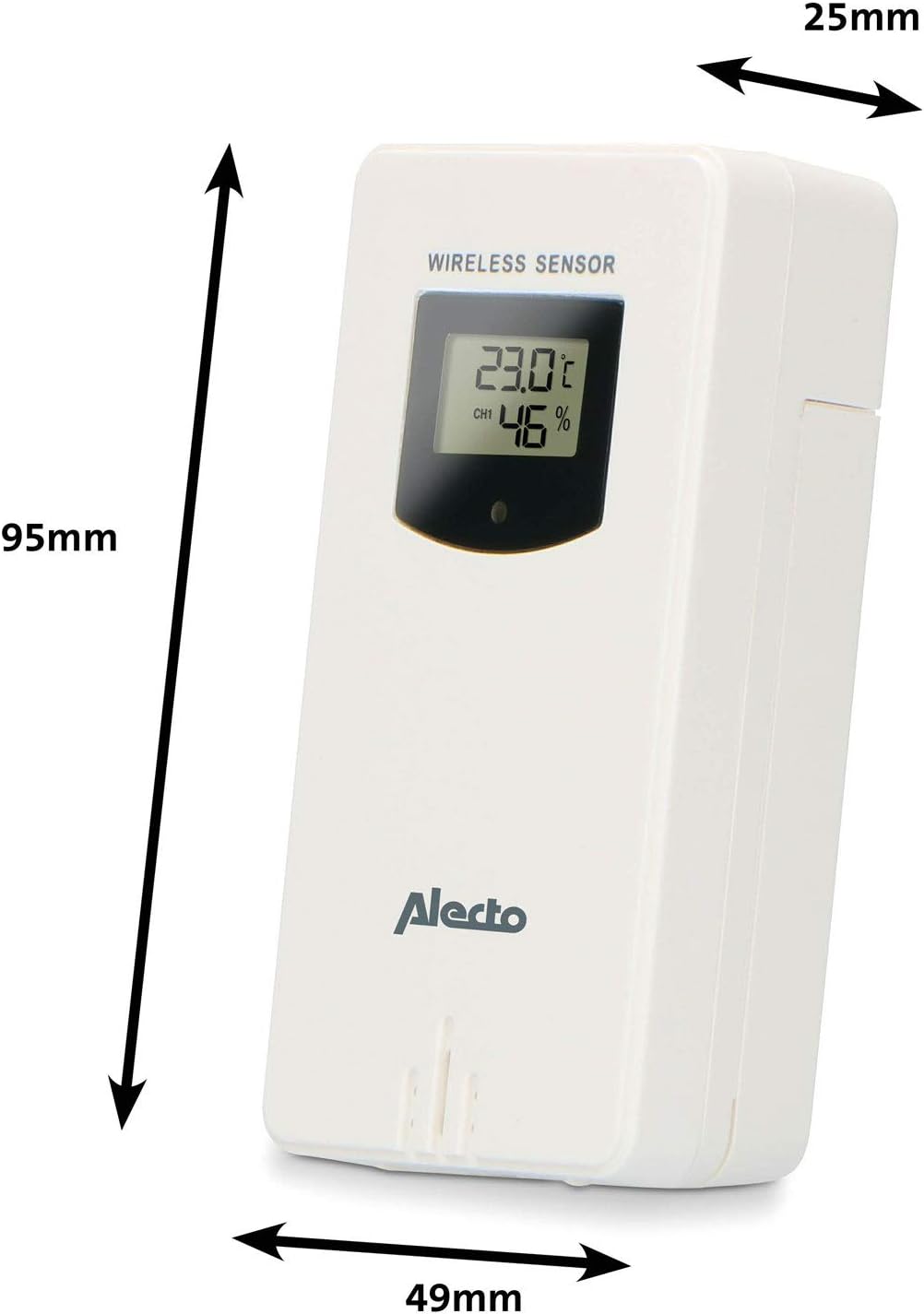
Figure 3.1: Wireless Outdoor Sensor dimensions and battery compartment location.
- הויפּט אַפּאַראַט:
- עפֿנט דעם באַטעריע־אָפּטייל אויף דער הינטערשטער זײַט פֿון דער הויפּט־איינהייט.
- Insert 2x AA batteries (not included) according to the polarity markings (+/-). These serve as backup batteries.
- פאַרמאַכן די באַטאַרייע אָפּטייל סיקיורלי.
- Connect the main unit to a power outlet using the provided power adapter (if included).

Figure 3.2: Main Unit dimensions and power input.
3.2. סענסאָר פּלייסמאַנט
For accurate outdoor readings, proper placement of the wireless sensor is crucial:
- Place the sensor in a shaded area, away from direct sunlight, to prevent inaccurate temperature readings.
- זיכער מאַכן גוטע לופט צירקולאַציע אַרום דעם סענסאָר.
- מאָנטירט דעם סענסאָר ווערטיקאַל, בערך 1.5 ביז 2.5 מעטער (5 ביז 8 פֿיס) העכער דער ערד.
- Avoid placing the sensor near heat sources (e.g., vents, windows) or moisture sources.
- The maximum transmission range is 100 meters (328 feet) in open air. Walls and other obstacles will reduce this range.

פיגורע 3.3: עקסample of outdoor sensor placement on a wall.
3.3. Pairing the Sensor with the Main Unit
The main unit and sensor should automatically pair once both are powered on. If pairing does not occur:
- Ensure both units have fresh batteries and are within range.
- Press the "TX" button inside the outdoor sensor's battery compartment to manually send a signal.
- On the main unit, you may need to initiate a search for the outdoor sensor (refer to the "Operation" section for specific button functions).
4. אָפּעראַציע
4.1. ווייַז אויסלייג
The 5.7-inch color display provides a clear overview of all measured data. Key areas include:
- דרויסנדיקע טעמפּעראַטור און הומידיטי: Displays current outdoor conditions.
- אינעווייניק טעמפּעראַטור און הומידיטי: Displays current indoor conditions.
- Animated Weather Forecast: Icons predict upcoming weather (sunny, partly cloudy, cloudy, rainy, snowy).
- צייט & דאַטע: Current time, day, and date.
- באַראָמעטריק דרוק: איצטיקער אטמאספערישער דרוק.
- לבנה פאַסע: גראַפֿישע רעפּרעזענטאַציע פֿון דער איצטיקער לבנה־פֿאַזע.
- Temperature/Ice Alarm Indicators: Alerts for specific temperature thresholds or potential ice conditions.

פיגורע 4.1: דעטאַילעד view of the main unit's color display.
4.2. קנעפּל פאַנגקשאַנז
The main unit features several buttons for setting and adjusting functions. Common buttons include:
- שטעלן: Enters setup mode for time, date, and other settings.
- DIRECTIONS: Switches between display modes or confirms settings.
- UP/DOWN (or +/-): Adjusts values during setup or cycles through channels.
- אַלאַרם: שטעלט איין אדער אקטיווירט די אלארם פונקציע.
- MEM: Displays maximum/minimum temperature and humidity records. Long press to clear records.
- SNOOZE / LIGHT: Activates snooze during an alarm or adjusts backlight brightness.
Video 4.2: Illustrative video demonstrating various features and settings of a weather station. (Note: This video is for a related product and may not show the exact Alecto WS-1560 model.)
4.3. באַשטעטיקן צייט און דאַטע
- Press and hold the "SET" button until the time display starts flashing.
- Use the "UP" or "DOWN" buttons to adjust the hour, then press "SET" to confirm and move to minutes.
- איבערחזרן פֿאַר מינוט, יאָר, חודש און טאָג.
- Press "SET" again to exit the setting mode.
4.4. שרעק סעטטינגס
- Press the "ALARM" button once to view די שרעק צייט.
- דריק און האלט דעם "ALARM" קנעפל ביז די אַלאַרם צייט הייבט אן צו בלינקען.
- Use the "UP" or "DOWN" buttons to set the desired alarm hour and minute.
- Press "ALARM" to confirm.
- כדי צו אַקטיווירן/דעאַקטיווירן דעם אַלאַרם, דריק דעם "ALARM" קנעפּל קורץ ווען די אַלאַרם צייט ווערט געוויזן. אַן אַלאַרם בילדל וועט דערשייַנען/פאַרשווינדן.
4.5. מאַקס/מינ רעקאָרדס
The weather station automatically records the maximum and minimum temperature and humidity values over a 24-hour period.
- Press the "MEM" button briefly to view the maximum recorded values.
- Press "MEM" again to view the minimum recorded values.
- Press "MEM" a third time to return to current readings.
- To clear the records, press and hold the "MEM" button for a few seconds.
5. וישאַלט
- רייניקונג: ווישט אָפּ די עקראַן און אַפּאַראַט־פֿלעכן מיט אַ ווייכן, דamp שטאָף. דו זאלסט נישט נוצן אַברייסיוו קלינערז אָדער סאָלוואַנץ.
- באַטערי פאַרבייַט: Replace batteries in both the main unit and the outdoor sensor when the low battery indicator appears on the display. Always replace all batteries at the same time with new ones of the same type.
- סענסאָר זאָרגן: Periodically check the outdoor sensor for debris or obstructions that might affect its readings. Ensure it remains in a shaded, well-ventilated area.
6. טראָובלעשאָאָטינג
| פּראָבלעם | מעגלעך סיבה | לייזונג |
|---|---|---|
| No outdoor temperature/humidity reading (or "---" displayed) |
|
|
| נישט פּינקטלעכע טעמפּעראַטור/פֿײַכטקייט מעסטונגען |
|
|
| ווייַז איז טונקל אָדער ליידיק |
|
|
7. ספּעסאַפאַקיישאַנז
| מאָדעל נומער | ווס-קסנומקס |
| סאָרט | Alecto |
| מאַכט מקור (הויפּט אַפּאַראַט) | Power Adapter (if included) + 2x AA batteries (backup) |
| מאַכט מקור (דרויסנדיק סענסאָר) | 2x אַאַ באַטעריז |
| פּראָדוקט דימענסיעס (הויפּט אַפּאַראַט) | 5.1 X 16.5 X 12.3 סענטימעטער |
| פּראָדוקט וואָג | 440 ג |
| Wireless Sensor Range | ביז 100 מעטער (אפֿענע לופֿט) |
| ווייַז גרייס | 5.7 אינטשעס / 14.5 סענטימעטער |
| אָריגין | כינע |
8. וואָראַנטי און שטיצן
For warranty information, technical support, or service inquiries, please refer to the warranty card included with your product or visit the official Alecto webזייטל. האַלט אייער קויף קוויטל ווי אַ באַווייַז פון קויפן.
Alecto Webפּלאַץ: www.alecto.nl (General Alecto website, specific support page may vary)