1. הקדמה
Thank you for choosing the TecTake Racing Office Chair, Model 800774. This manual provides essential information for the safe assembly, operation, and maintenance of your new chair. Please read these instructions carefully before use and retain them for future reference.
2. זיכערקייַט אינפֿאָרמאַציע
ווארענונג:
- Always follow the assembly instructions carefully to ensure the chair is correctly assembled and stable.
- Exercise caution when adjusting the chair's height using the safety gas spring to prevent injuries.
- Do not exceed the maximum weight capacity of 120 kg (264 lbs) to maintain the chair's stability and safety.
- Ensure all screws are tightened securely after assembly and periodically check for any loosening.
3. פּראָדוקט פֿעיִקייטן
The TecTake Racing Office Chair is designed for comfort and functionality, featuring:
- מאָדערן און ערגאַנאַמיק פּלאַן.
- Robust and resistant structure.
- Thick padding for comfortable seating.
- Upholstered in soft synthetic leather with breathable mesh inserts.
- Continuously adjustable height with safety gas lift.
- Adjustable tilt mechanism.
- 360-גראַד ראָוטיישאַן.
- Stable base with 5 floor-friendly double castors.
- Curved and resistant armrests.

Figure 1: Key features of the TecTake Racing Office Chair.

פיגורע 2: דעטאַילעד view of upholstery, armrests, mesh, and control lever.
4. אַסעמבלי אינסטרוקציעס
The TecTake Racing Office Chair is designed for quick and straightforward assembly. Please ensure all components are present before beginning.
4.1 אַנפּאַקינג
- קערפאַלי באַזייַטיקן אַלע קאַמפּאָונאַנץ פון די פּאַקקאַגינג.
- Verify that all parts listed in the included assembly guide are present and undamaged.
4.2 שריט-ביי-שריט צוזאַמענשטעלונג
Refer to the detailed assembly instructions provided in the box. General steps typically include:
- Attach the castors to the chair base.
- Insert the gas lift cylinder into the base.
- Secure the seat mechanism to the underside of the seat cushion.
- Attach the armrests to the seat. Note that armrests may be side-specific; ensure correct orientation.
- Connect the backrest to the seat and armrests. This step may require some force to align holes due to the curved design.
- לייגט דעם צוזאמענגעשטעלטן זיץ און רוקן־שטיצע אויף דעם גאז־ליפט־צילינדער.
טיפּ: For attaching the backrest to the seat, it may be easier with two people or by positioning the seat on a stable surface with the backrest hanging to apply necessary pressure for screw alignment.
5. אַפּערייטינג ינסטרוקטיאָנס
Your TecTake Racing Office Chair offers several adjustable features to customize your seating experience.
5.1 הייך אַדזשאַסטמאַנט
צו סטרויערן די הייך פון שטול:
- To raise the chair: Lift the lever located under the right side of the seat while taking your weight off the seat. The chair will rise automatically.
- To lower the chair: Lift the lever located under the right side of the seat while seated. The chair will lower under your weight.
- Release the lever to lock the chair at the desired height.
5.2 טילט מעכאניזם
The chair features an adjustable tilt mechanism for reclining:
- To enable tilt: Pull the same lever used for height adjustment outwards.
- To lock the chair in an upright position: Push the lever inwards.
The tension of the tilt mechanism can often be adjusted by a knob located under the front of the seat. Turn clockwise to increase tension (making it harder to tilt) and counter-clockwise to decrease tension (making it easier to tilt).

Figure 3: Chair recline range and adjustment points.
5.3 360-Degree Rotation
The chair is designed to rotate 360 degrees freely on its base, allowing for easy movement and access within your workspace.
6. וישאַלט
Proper care and maintenance will extend the life of your TecTake Racing Office Chair.
6.1 רייניקונג
- For general cleaning, wipe the chair with a damp שטאָף.
- Avoid using harsh chemicals, abrasive cleaners, or solvents, as these can damage the synthetic leather and mesh fabric.
- פֿאַר פֿאַרגיסונגען, ווישט גלייך מיט אַ ריינעם, טרוקענעם שטאָף.
6.2 פּעריאָדיש טשעקס
- קאָנטראָלירט פּעריִאָדיש אַלע שרויפן און באָלטן צו זיכער מאַכן אַז זיי זענען פעסט. פֿעסטשטעלט ווידער אויב נייטיק צו האַלטן די פעסטקייט און זיכערקייט.
- Inspect the castors for any debris (hair, lint) that might hinder smooth movement. Clean as needed.
- Ensure the gas lift operates smoothly. If it becomes stiff or inconsistent, contact customer support.
7. טראָובלעשאָאָטינג
אויב איר טרעפט פראבלעמען מיט אייער בענקל, זעט די פאלגנדע געוויינלעכע פראבלעמען און לייזונגען.
7.1 Chair Sinks or Does Not Hold Height
- סיבה: גאז ליפט צילינדער נישט גוט געארבעט אדער הייבער נישט אינגאנצן איינגעארבעט.
- לייזונג: Ensure the height adjustment lever is fully released after setting the height. If the issue persists, the gas lift cylinder may need replacement. Contact customer support.
7.2 שטול וואָקלען
- סיבה: לויזע שרויפן אדער אומגלייכע פֿאַרזאַמלונג.
- לייזונג: Check and tighten all assembly screws, especially those connecting the seat to the mechanism and the backrest to the seat/armrests. Ensure the chair is on a flat, even surface.
7.3 Castors Not Rolling Smoothly
- סיבה: Debris caught in castors or damaged castors.
- לייזונג: Turn the chair over and carefully remove any hair, lint, or other debris from the castor wheels. If a castor is damaged, it may need replacement.
8. ספּעסאַפאַקיישאַנז
| שטריך | דעטאַל |
|---|---|
| מאָדעל נומער | 800774 |
| קוילעלדיק דימענשאַנז (ב x ד x ה) | Approx. 65 x 66 x 111.5 – 121.5 cm |
| אַוועקזעצן הייך | Approx. 47 – 57 cm |
| Seat Surface (W x D) | בעערעך 51 רענטגענ 50 סענטימעטער |
| וואַטן גרעב | אַרויף צו 11 סענטימעטער |
| באַקרעסט הייך | בעערעך. 68 סענטימעטער |
| Armrest Height from Floor | Approx. 67 – 77 cm |
| Internal Distance Between Armrests | בעערעך. 49 סענטימעטער |
| באַזע דיאַמעטער | בעערעך. 67 סענטימעטער |
| Castor Diameter/Width | Approx. 5 / 5.6 cm |
| מאַקסימום מאַסע קאַפּאַציטעט | 120 קג (264 לבס) |
| פּראָדוקט וואָג | בעערעך. 14.7 קג |
| מאַטעריאַלס | Polyurethane (PU), Polyvinyl Chloride (PVC), Polypropylene (PP), Nylon |
| קאָליר | שוואַרץ / בלוי |
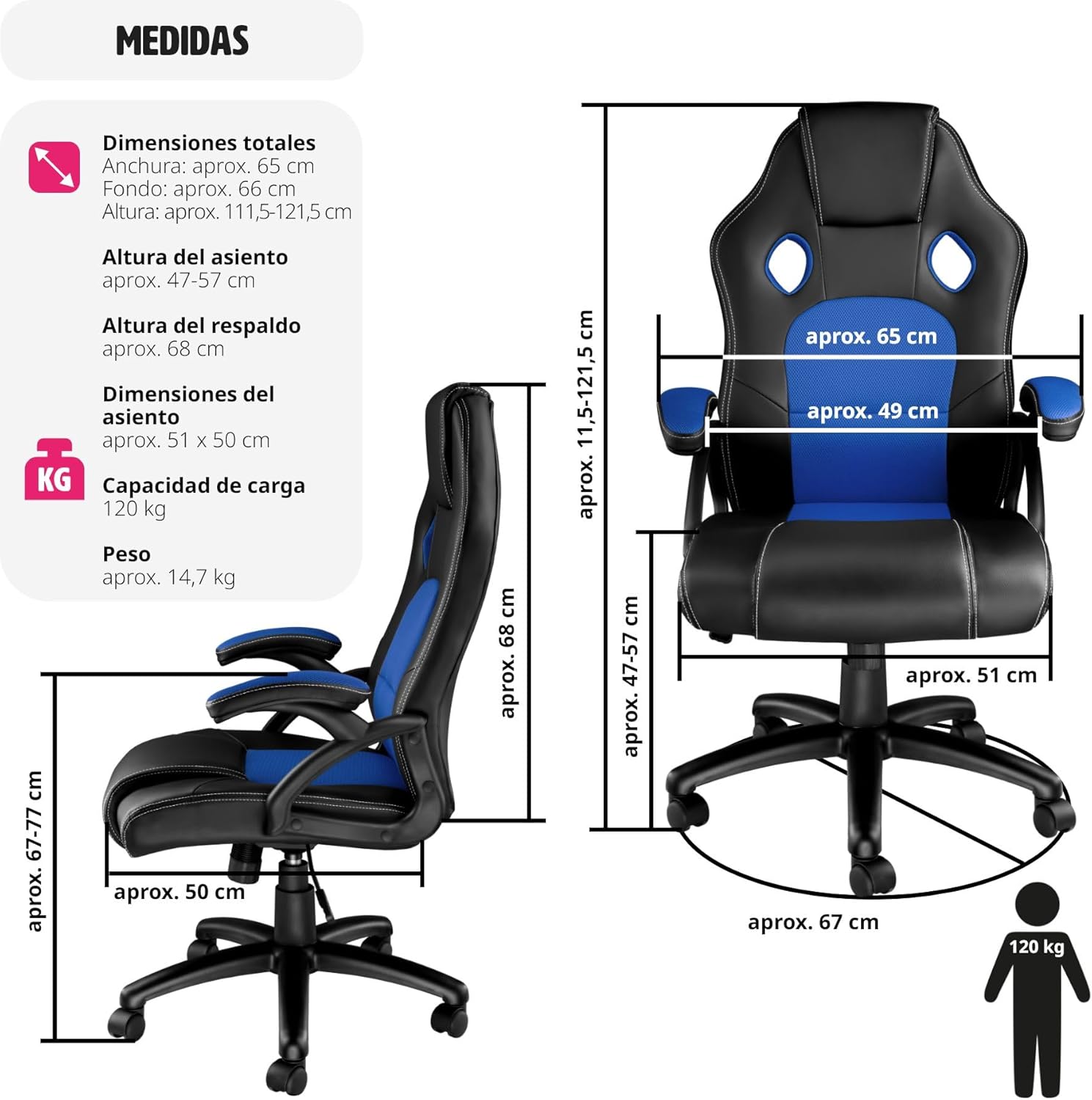
פיגור 4: דעטאַלירטע פּראָדוקט דימענסיעס און וואָג קאַפּאַציטעט.
9. וואָראַנטי און שטיצן
For warranty information or technical support, please refer to the documentation included with your purchase or visit the official TecTake webזייטל. האַלט דיין קויפן באַווייַז פֿאַר קיין וואָראַנטי קליימז.


