1. הקדמה
The LAUNCH CRP239 is an intelligent and networkable automotive diagnostic tool designed for passenger cars. It offers comprehensive OBD II full functionality and rapid testing capabilities for four major vehicle systems: Engine, Automatic Transmission (A/T), Anti-lock Braking System (ABS), and Supplemental Restraint System (SRS). Additionally, the CRP239 includes advanced reset functions such as Oil Reset, Steering Angle Reset, Brake-Pad Reset, Battery Matching, Throttle Adaptation, and Diesel Particulate Filter (DPF) Regeneration, catering to the needs of professional technicians and DIY enthusiasts.
2. זיכערקייַט אינפֿאָרמאַציע
Always observe the following safety precautions when operating the LAUNCH CRP239:
- Ensure the vehicle's ignition is off before connecting or disconnecting the diagnostic tool.
- ניצט נישט דאָס געצייג אין נאַסע באַדינגונגען אָדער לעבן ברענענדיקע פליסיקייטן אָדער גאַזן.
- Wear appropriate personal protective equipment, such as safety glasses, when working on vehicles.
- זעט דעם סערוויס מאַנואַל פֿונעם פֿאָרמיטל פֿאַר ספּעציפֿישע דיאַגנאָסטישע פּראָצעדורן און זיכערהייט וואָרענונגען.
- Keep the tool away from strong magnetic fields.
- Only use the provided cables and accessories.
3. פּעקל אינהאַלט
באַשטעטיקן אַז אַלע זאכן זענען פאַראַן אין פּעקל:
- LAUNCH CRP239 Main Unit
- OBD II דיאַגנאָסטיק קאַבלע
- וסב קאַבלע
- באַניצער מאַנואַל
- קעריינג קאַסע

Figure 3.1: Contents of the LAUNCH CRP239 package, showing the diagnostic tool, cables, and storage case.
4. פּראָדוקט איבערview
The LAUNCH CRP239 features a robust design with a 5.0-inch 720p touch screen for intuitive navigation. It includes physical buttons for common operations and a durable rubber exterior for protection.

פיגורע 4.1: פראָנט view of the LAUNCH CRP239, highlighting the touch screen display and navigation buttons.
4.1. קאַמפּאָונאַנץ
- 5.0-אינטש ריר-עקראַן: High-resolution display for clear data presentation and touch input.
- נאַוויגאַציע קנעפּלעך: Directional pad, OK button, and Return button for menu navigation.
- OBD II קאַנעקטאָר: סטאַנדאַרט 16-פּין קאַנעקטער פֿאַר פאָרמיטל קאָמוניקאַציע.
- וסב פּאָרט: For connecting to a computer for updates or data transfer.
- מאַכט ינדיקאַטאָר: LED ליכט וואָס ווײַזט אָן מאַכט סטאַטוס.
5. סעטאַפּ
Follow these steps for initial setup of your LAUNCH CRP239:
- טשאַרדזשינג די מיטל: Connect the CRP239 to a power source using the provided USB cable to ensure the internal 4000mAh lithium-polymer battery is fully charged before first use.
- מאַכט אויף: דריקן און האַלטן די מאַכט קנעפּל צו קער אויף די מיטל.
- שפּראַך סעלעקציע: On the initial setup screen, select your preferred language. The device supports multilingual operation.
- Wi-Fi קאַנעקשאַן: Navigate to the 'Settings' menu and select 'Wi-Fi'. Connect to an available wireless network to enable online updates and diagnostic report sharing.
- ווייכווארג דערהייַנטיקן: It is recommended to perform a software update immediately after connecting to Wi-Fi to ensure you have the latest features and vehicle coverage. Navigate to the 'Update' section and follow the on-screen prompts.

Figure 5.1: The LAUNCH CRP239 with its diagnostic cable connected, ready for vehicle communication.
6. אַפּערייטינג ינסטרוקטיאָנס
The LAUNCH CRP239 provides a comprehensive suite of diagnostic functions. Below are instructions for common operations.
6.1. פֿאַרבינדן זיך צום פֿאָרמיטל
- Locate the vehicle's 16-pin OBD II diagnostic port (usually under the dashboard).
- זיכער מאַכן אַז די איגנישאַן פונעם אויטאָ איז אויסגעלאָשן.
- Connect the OBD II diagnostic cable to the vehicle's OBD II port and to the CRP239.
- Turn the vehicle's ignition to the ON position (engine off). The CRP239 will power on automatically.
6.2. הויפּט מעניו נאַוויגאַציע
From the main menu, you can access various functions:
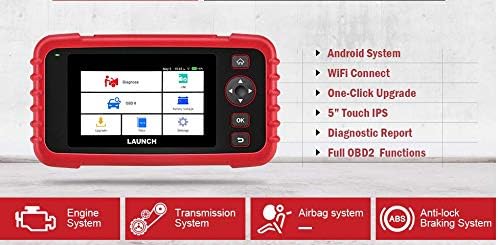
Figure 6.1: The main menu interface of the LAUNCH CRP239, providing access to all primary functions.
- דיאַגנאָזירן: For full system diagnostics (Engine, A/T, ABS, SRS).
- איך/מ: Readiness status for emissions.
- OBD II: Standard OBD II functions (read/clear DTCs, live data, freeze frame, O2 sensor test, etc.).
- באַשטעטיק: Access various maintenance reset functions.
- באַטערי וואָלtage: Displays real-time vehicle battery voltage.
- דערהייַנטיקן: For software and firmware updates via Wi-Fi.
- דאַטן: Review saved diagnostic data and reports.
- סעטטינגס: Configure device settings such as language, Wi-Fi, and display.
6.3. Performing a Diagnostic Scan
- פון די הויפּט מעניו, אויסקלייַבן "Diagnose".
- The tool will attempt to automatically identify the vehicle via VIN scan. If unsuccessful, you may need to manually select the vehicle make, model, and year.
- Choose the system you wish to diagnose (e.g., Engine, Transmission, ABS, SRS).
- אויסקלייַבן "Read Fault Codes" צו view Diagnostic Trouble Codes (DTCs).
- אויסקלייַבן "Clear Fault Codes" to erase DTCs after repairs have been made. Caution: Clearing codes without addressing the underlying issue will result in the codes reappearing.
- אויסקלייַבן "Read Data Stream" צו view live sensor data.
6.4. Using Reset Functions
The CRP239 supports several common maintenance reset functions:
- אָיל באַשטעטיק: שטעלט צוריק די אויל לעבן דערמאָנונג נאָך אַן אויל וועקסל.
- שטייער ווינקל צוריקשטעלן: Resets the steering angle sensor after alignment or component replacement.
- Brake-Pad Reset (EPB): ריסעט די עלעקטראָנישע פּאַרקינג ברעיק סיסטעם נאָך ברעיק פּעד פאַרבייַט.
- Battery Matching (BMS): Registers a new battery with the vehicle's Battery Management System.
- טראָטל אַדאַפּטיישאַן: לערנט זיך ווידער די פּאָזיציע פֿון דעם גאַז־קערפּער נאָך רייניקונג אָדער אויסטויש.
- די.פי.עף. רעגענעראַציע: Initiates the Diesel Particulate Filter regeneration process.
To use a reset function, select "Reset" from the main menu, then choose the desired function and follow the on-screen instructions.
6.5. ווייכווארג דערהייַנטיקונגען
The CRP239 supports one-click Wi-Fi updates for software and vehicle coverage, ensuring you always have the latest diagnostic capabilities.
- זיכער מאַכן אַז די מיטל איז פארבונדן צו אַ סטאַביל Wi-Fi נעץ.
- פון די הויפּט מעניו, אויסקלייַבן "Update".
- The device will check for available updates. Select the updates you wish to install and confirm.
- Allow the update process to complete without interruption. The device may restart during this process.

Figure 6.2: The update screen on the LAUNCH CRP239, showing available software updates for various vehicle brands.
6.6. Diagnostic Report Generation
The CRP239 can automatically generate diagnostic reports, which can be shared via email.
- After completing a diagnostic session, the tool will prompt you to generate a report.
- Confirm to generate the report.
- נאַוויגירן צו די "Data" מעניו צו view saved reports.
- Select a report and choose the option to share via email. Ensure your Wi-Fi is connected and email settings are configured in the 'Settings' menu.
7. וישאַלט
Proper maintenance ensures the longevity and optimal performance of your LAUNCH CRP239:
- רייניקונג: ניצט אַ ווייכע, טרוקענע שטאָף צו רייניקן דעם אַפּאַראַט. ניצט נישט קיין שרײַבנדיקע רייניגערס אדער סאָלווענטן.
- סטאָרידזש: האַלט דאָס אַפּאַראַט אין זײַן טראָג־קעסטל אין אַ קילן, טרוקענעם אָרט ווען עס איז נישט אין באַנוץ. פֿאַרמײַדט עקסטרעמע טעמפּעראַטורן.
- באַטערי זאָרגן: Charge the battery regularly, even if the device is not in frequent use, to maintain battery health. Avoid fully discharging the battery for extended periods.
- קאַבלע דורכקוק: Periodically inspect the diagnostic and USB cables for any signs of damage. Replace damaged cables immediately.
8. טראָובלעשאָאָטינג
This section addresses common issues you might encounter with the LAUNCH CRP239.
| פּראָבלעם | מעגלעך סיבה | לייזונג |
|---|---|---|
| די מיטל טוט נישט מאַכט אויף. | Low battery; faulty connection to vehicle. | Charge the device fully. Ensure the OBD II cable is securely connected to both the CRP239 and the vehicle. Check vehicle's ignition is ON. |
| קען נישט קאָמוניקירן מיטן אויטאָ. | Incorrect vehicle protocol; faulty OBD II port; damaged cable. | Verify vehicle compatibility. Check the vehicle's OBD II port for power. Try a different vehicle or cable if available. Ensure vehicle ignition is ON. |
| ווייכווארג דערהייַנטיקונג פיילז. | נישט-סטאַבילע Wi-Fi פֿאַרבינדונג; נישט גענוג סטאָרידזש. | Ensure a strong and stable Wi-Fi connection. Check available storage space on the device. Restart the update process. |
| די פאַרשטעלן איז ניט ריספּאַנדאַבאַל. | ווייכווארג פראבלעם; פיזישער שאדן. | Perform a soft reset by holding the power button until the device restarts. If the issue persists, contact customer support. |
9. ספּעסאַפאַקיישאַנז
| שטריך | דעטאַל |
|---|---|
| מאָדעל | CRP239 (CREADER PROFESSIONAL 239) |
| ווייַז | 5.0-אינטש 720p טאָוטש סקרין |
| באַטערי | 4000mAh ריטשאַרדזשאַבאַל ליטהיום פּאָלימער (אַרייַנגערעכנט) |
| קאַנעקטיוויטי | OBD II, Wi-Fi, USB |
| פאָרמיטל קאַווערידזש | Domestic, Asian, European vehicles (1996 and newer OBD2) |
| שטיצט סיסטעמען | Engine, Automatic Transmission (A/T), ABS, SRS |
| ספּעציעלע פאַנגקשאַנז | Oil Reset, Steering Angle Reset, Brake-Pad Reset (EPB), Battery Matching (BMS), Throttle Adaptation, DPF Regeneration |
| דימענשאַנז | 32.4 x 25.4 x 8 ס״מ (פּאַקעט) |
| פּונקט וואָג | 560 ג |
| עקסטעריאָר מאַטעריאַל | גומע |
10. וואָראַנטי אינפֿאָרמאַציע
The LAUNCH CRP239 comes with a standard manufacturer's warranty. For specific warranty terms and conditions, please refer to the warranty card included in your product package or visit the official Launch webזייטל. האַלט אייער קויף קוויטל ווי אַ באַווייַז פון קויפן פֿאַר וואָראַנטי קליימז.
פארלענגערטע וואָראַנטי אָפּציעס קען זיין בנימצא פון דריט-פּאַרטיי פּראַוויידערז. למשלample, 1-Year and 2-Year Extended Warranties by Salama Care are offered for this product.
11. שטיצן
For technical assistance, product inquiries, or support, please contact Launch customer service through their official website or the contact information provided in your product documentation. Ensure you have your product model number (CRP239) and serial number ready when contacting support.
פֿאַר נאָך רעסורסן, באַזוכט די Launch Official Webפּלאַץ.


